How do I save a copy of PQservice to a external HDD?

greenwizard

New member
Power User
Local time
5:14 AM
Messages
56
I have a acer laptop.I don't have any blank dvds & am not buying any.I want to know how I save a copy of the PQservice to a external HDD that is just used for backing up files.
Then if I ever decide to use the PQservice or sell the laptop & put it back in the laptop's HDD.How would I do that?

I want to find out how to do this as soon as possible.Because I am going to DBAN the HDD clean.Then reinstall windows 7 on it.Same os version laptop runs(home premium 64b).It's just the OS that has nothing extra,none of that silly crap(games etc.) that the manufacturers throw in.I want to do this to save some GBs on the HDD.
The external is in NTFS.I think the PQservice is fat32 or 64(OS in the laptop is 64bit).
Can I just create a new partition on the external,put how many bytes needed & format it to fat32?And still keep the other/original partition in NTFS?
I know DBAN may seem overkill but,laptop was bought off someone & they left it how they had it.Bunch of junk in it.
 

My Computer My Computer

At a glance

window 7 64b SP1AMD P320 2.1ghzATI radeon HD 4250
Computer Manufacturer/Model Number
Acer aspire 5551-2036
OS
window 7 64b SP1
CPU
AMD P320 2.1ghz
Graphics Card(s)
ATI radeon HD 4250
Screen Resolution
1024x768 native
Hard Drives
320gb hitachi
It seems like the easiest way to do this would be to image the drive (or at least that one partition). Then the drive image can be stored on anything like a regular file. You would have to image it back to use it if you needed to use it. I believe that those things are usually required to be bootable so merely trying to copy the partition contents may not work by itself.

However, If you just want to copy the partition files then I don't think it matters that the original partition is fat32. Somtimes the recovery software can be run from windows without needing to be booted directly. In that case the file system formatting does not matter. But to be safe, I'd do a full partition copy so you get the formatting and the bootability saved as well as the files themselves.
 

My Computer My Computer

At a glance

Windows 7 x64 Ultimatei7 96012 Gig Corsair DominatorNvidia 480
Computer Manufacturer/Model Number
Scratch built
OS
Windows 7 x64 Ultimate
CPU
i7 960
Motherboard
Asus P6X58D
Memory
12 Gig Corsair Dominator
Graphics Card(s)
Nvidia 480
Sound Card
Maudio Delta 44 + breakout box
Monitor(s) Displays
Dell UltraSharp U2410 24in and Samsung 21 dual monitors
Screen Resolution
1920x1200 and 1280x1024
Hard Drives
Primary: Intel X-25M G2 160G SSD
Secondary: Segate baracuda 1.0 TB
HDs in AHCI mode.
PSU
Corasair TX850
Case
Cooler Master HAF
Cooling
Corsair H50
Keyboard
Logitech G15 + N52 game pad
Mouse
Logitech MX518
Internet Speed
15kbs down 4.5kbps up
Other Info
WEI 7.6
CPU & RAM 7.6
Graphics 7.9
Hard disk 7.7
It may lose it's hotkey function, but you can possibly restore it using commands similar to this if necessary with SIW2's help: Recovery Partition - restoring F8 link

It seems making the Recovery Disks is what you want, although having a secondary backup method is always a good idea.

You can also always clean reinstall using the Product Key on COA sticker for a much superior install without the factory bloatware: Reinstalling Windows 7
 
Why do you think PQService is FAT32? I think you will find it is NTFS.

This ACER recovery is easy to image and restore the image using free Macrium Reflect. I have restored it to a new HDD and performed the factory restore without problems.

I would suggest you buy some DVDs and burn the factory restore also.
 

My Computer My Computer

At a glance

Windows 7x64 Home Premium SP1Intel i7 2600kG.Skill Ripjaws (DDR3-1600) 2x4GBNvidia GeForce GTS 450; Intel HD Graphics 300...
Computer type
PC/Desktop
Computer Manufacturer/Model Number
Own build
OS
Windows 7x64 Home Premium SP1
CPU
Intel i7 2600k
Motherboard
ASUS P8Z68 Deluxe
Memory
G.Skill Ripjaws (DDR3-1600) 2x4GB
Graphics Card(s)
Nvidia GeForce GTS 450; Intel HD Graphics 3000(GT2+)
Monitor(s) Displays
Dell Ultrasharp IPS panel U2311H, Samsung SyncMaster P2350
Screen Resolution
1920x1080
Hard Drives
Samsung 850 Pro SSD 256GB, Samsung SSD 840 120GB, Seagates 1TB Barracuda ST31000528AS x2
PSU
Seasonic M12II 520W
Case
Lian Li Lancool PC-K60
Cooling
Case: 1x120mm, 3x140mm CPU: Hyper 212+
Keyboard
Logitech MK520 (wireless)
Mouse
Logitech MK520
Internet Speed
6-7 Mbps
Antivirus
Norton Security Premium, Malwarebytes on 2 (MSE on 3rd PC)
Browser
FireFox
Other Info
Audio: Logitech Z523 2.1
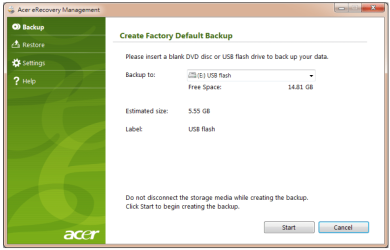
You may/may not have the option to make a USB Recovery Disk.

Capture USB.PNG
 

My Computer My Computer

At a glance

ME/XP/Vista/Win7
OS
ME/XP/Vista/Win7
Back
Top