How do I see my external drive?

Regent

New member
Local time
4:25 PM
Messages
6
Location
Victoria BC Canada
Where can I find the ASMedia USB 3 Host Controller Drivers? Is there a website I can download it from? Or can I find it on my computer?
I have Windows 7 64 bit. My motherboard is an Asus (P8P67 LE).
When I try to restore my image backup from my W7 boot CD it just don't recognize my USB 3 external drive!

The problem is that I need to load the USB 3 external drive drivers while am in boot mode from the W7 backup boot CD. Then I will be able to see the drive in question! As of now my bios can't see the image on my external drive so I can't restore my image!

Does anyone else had that problem? If so, please let me know how you solve that issue?

Thanks
 

My Computer My Computer

Computer type
PC/Desktop
Computer Manufacturer/Model Number
Asus
OS
w7 64 bit
CPU
i7 2600K 3.4GHz 4 Core 8 Thread
Motherboard
P8P67 LE
Memory
4GB 1600 MHz DDR3
Graphics Card(s)
Nvidia GeForce Gt 240
Sound Card
Motherboard
Monitor(s) Displays
Vizio 32 Inch
Screen Resolution
1920 X 1080
Hard Drives
solid-state drive (SSD)
PSU
500 Watts
Case
Antec 900
Cooling
Generic Fan
Keyboard
Generic Keyboard
Mouse
Generic Mouse
Internet Speed
50 Mbps
Antivirus
Microsoft Security Essentials
Browser
Waterfox

My Computer My Computer

Computer type
Laptop
Computer Manufacturer/Model Number
Lenovo Y580
OS
Windows 7 Ultimate 64bit SP1 with Media Center
CPU
i7 3610QM 2.3MHz (Turbo 3.3MHZ)
Motherboard
HM76
Memory
8GB DDR3 PC3-12800
Graphics Card(s)
NVIDIA GeForce GTX660M 2GB
Sound Card
RealteK/JBL branded speakers
Monitor(s) Displays
15.4in LCD Laptop & (2x 27in AOC LED Monitors)
Screen Resolution
1366x768 & (1920x1080)
Hard Drives
Internal:
120GB Samsung 850 Pro System SSD,
256GB Plaxtor M5M msata Internal SSD,
1TB Samsung swappable HDD,
External:
2x 8TB USB3 WD Drive,
1x 6TB USB3 WD Drive.
1x 4TB USB3 WD Drive.
Keyboard
Logitech K360 Wireless Keyboard
Mouse
Logitech M525 Wireless mouse
Internet Speed
Virgin media 220Mbps download, 12Mbps upload
Browser
Pale Moon x64 & Opera
Other Info
Swappable Blu-ray Burner, Bluetooth, WiFi bgn, Internal Digital TV Tuner.
Some imaging programs (e.g. the older versions of Macrium) do not support USB3 for the recovery. Attach the disk to a USB2 port - you may have more luck.
 

My Computer My Computer

Computer Manufacturer/Model Number
HP, Dell, Gateway, Toshiba - 4 laptops and 2 desktops
OS
Vista, Windows7, Mint Mate, Zorin, Windows 8
CPU
from 1.6GHz Duo to i7
Monitor(s) Displays
2x HP w2207
Hard Drives
5x HDD, 7x SSD, 12x Externals
Keyboard
with trackball - no mices
Mouse
Trackball mice
Internet Speed
DSL 6000
You dont say what size your usb3 external drive is, if it is larger than 2TB, than a firmware upgrade & driver maybe required 1st (see link above) for it to properly see the external drive, going by its age.
 

My Computer My Computer

Computer type
Laptop
Computer Manufacturer/Model Number
Lenovo Y580
OS
Windows 7 Ultimate 64bit SP1 with Media Center
CPU
i7 3610QM 2.3MHz (Turbo 3.3MHZ)
Motherboard
HM76
Memory
8GB DDR3 PC3-12800
Graphics Card(s)
NVIDIA GeForce GTX660M 2GB
Sound Card
RealteK/JBL branded speakers
Monitor(s) Displays
15.4in LCD Laptop & (2x 27in AOC LED Monitors)
Screen Resolution
1366x768 & (1920x1080)
Hard Drives
Internal:
120GB Samsung 850 Pro System SSD,
256GB Plaxtor M5M msata Internal SSD,
1TB Samsung swappable HDD,
External:
2x 8TB USB3 WD Drive,
1x 6TB USB3 WD Drive.
1x 4TB USB3 WD Drive.
Keyboard
Logitech K360 Wireless Keyboard
Mouse
Logitech M525 Wireless mouse
Internet Speed
Virgin media 220Mbps download, 12Mbps upload
Browser
Pale Moon x64 & Opera
Other Info
Swappable Blu-ray Burner, Bluetooth, WiFi bgn, Internal Digital TV Tuner.
Some imaging programs (e.g. the older versions of Macrium) do not support USB3 for the recovery. Attach the disk to a USB2 port - you may have more luck.

I'd try this first before hunting for any drivers.

Please let us know how it went.
 

My Computer My Computer

Computer type
PC/Desktop
Computer Manufacturer/Model Number
Custom built by me.
OS
Windows 10 Pro
CPU
Intel Core i7-4770K (3.5Ghz)
Motherboard
Gigabyte G1 Sniper 5 (F10 Bios)
Memory
32 gig Corsair Dominator Platinum (4x8Gig)
Graphics Card(s)
Sapphire Tri-X R9 Fury
Sound Card
Soundblaster ZXR
Monitor(s) Displays
NEC PA242W 24" LCD Monitor
Screen Resolution
1920 x 1200
Hard Drives
Primary - Samsung 850 Pro (512gig), Samsung 840 Pro (256gig), 2TB WD Caviar Black.
PSU
EVGA Supernova 1000 G2
Case
Cooler Master HAF X
Cooling
Corsair H100i with Corsair Air Series SP120 Quiet Fans
Keyboard
Logitech Wireless Wave
Mouse
Logitech Performance MX
Internet Speed
High Speed Cable
Antivirus
Norton Security
Browser
IE11
Other Info
Memory Timings - 1866MHz @ 9-9-9-27-1T @ 1.5 volts
My usb3 external drive is 1.5TB. Thanks guys for the links but all theses drivers are install from windows! I need the driver that can be loaded while am in boot mode.
When I try to restore my image from my w7 boot cd (the boot cd was created from w7 after it made the backup) it can't see the USB 3 external drive so I need the drivers that will allowed me to see my image that is on my USB 3 external drive?
 
Last edited:

My Computer My Computer

Computer type
PC/Desktop
Computer Manufacturer/Model Number
Asus
OS
w7 64 bit
CPU
i7 2600K 3.4GHz 4 Core 8 Thread
Motherboard
P8P67 LE
Memory
4GB 1600 MHz DDR3
Graphics Card(s)
Nvidia GeForce Gt 240
Sound Card
Motherboard
Monitor(s) Displays
Vizio 32 Inch
Screen Resolution
1920 X 1080
Hard Drives
solid-state drive (SSD)
PSU
500 Watts
Case
Antec 900
Cooling
Generic Fan
Keyboard
Generic Keyboard
Mouse
Generic Mouse
Internet Speed
50 Mbps
Antivirus
Microsoft Security Essentials
Browser
Waterfox
My usb3 external drive is 1.5TB. Thanks guys for the links but all theses drivers are install from windows! I need the driver that can be loaded while am in boot mode.
When I try to restore my image from my w7 boot cd (the boot cd was created from w7 after it made the backup) it can't see the USB 3 external drive so I need the drivers that will allowed me to see my image that is on my USB 3 external drive?

You don't need drivers for that, the BIOS should just pick it up. What you need to do is go into the BIOS and make sure you choose boot from USB as the first boot device. Than, as whs tells you, use a USB 2.0 slot as USB 3.0 is backwards compatible, so just use the 2.0 slot.

Let us know.
 

My Computer My Computer

Computer type
PC/Desktop
Computer Manufacturer/Model Number
Custom built by me.
OS
Windows 10 Pro
CPU
Intel Core i7-4770K (3.5Ghz)
Motherboard
Gigabyte G1 Sniper 5 (F10 Bios)
Memory
32 gig Corsair Dominator Platinum (4x8Gig)
Graphics Card(s)
Sapphire Tri-X R9 Fury
Sound Card
Soundblaster ZXR
Monitor(s) Displays
NEC PA242W 24" LCD Monitor
Screen Resolution
1920 x 1200
Hard Drives
Primary - Samsung 850 Pro (512gig), Samsung 840 Pro (256gig), 2TB WD Caviar Black.
PSU
EVGA Supernova 1000 G2
Case
Cooler Master HAF X
Cooling
Corsair H100i with Corsair Air Series SP120 Quiet Fans
Keyboard
Logitech Wireless Wave
Mouse
Logitech Performance MX
Internet Speed
High Speed Cable
Antivirus
Norton Security
Browser
IE11
Other Info
Memory Timings - 1866MHz @ 9-9-9-27-1T @ 1.5 volts
Thanks sygnus21 for your help. You are right if I plug it into my USB 2 port it will work but I will lose the speed!

But at this point it the only option I have left.
 

My Computer My Computer

Computer type
PC/Desktop
Computer Manufacturer/Model Number
Asus
OS
w7 64 bit
CPU
i7 2600K 3.4GHz 4 Core 8 Thread
Motherboard
P8P67 LE
Memory
4GB 1600 MHz DDR3
Graphics Card(s)
Nvidia GeForce Gt 240
Sound Card
Motherboard
Monitor(s) Displays
Vizio 32 Inch
Screen Resolution
1920 X 1080
Hard Drives
solid-state drive (SSD)
PSU
500 Watts
Case
Antec 900
Cooling
Generic Fan
Keyboard
Generic Keyboard
Mouse
Generic Mouse
Internet Speed
50 Mbps
Antivirus
Microsoft Security Essentials
Browser
Waterfox
Thanks sygnus21 for your help. You are right if I plug it into my USB 2 port it will work but I will lose the speed!

But at this point it the only option I have left.

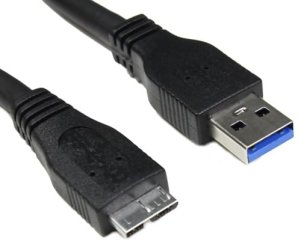
In this instance the point is the get the OS installed. After that, you can still use the 3.0 ports. They're just not recognized in the BIOS for what you want to do. Should work fine in normal use. Also, make sure you're using a USB 3.0 cable to get those speeds. You'll know you have a 3.0 cable if the inside of the ends are blue.

USB3-Micro-3FT.jpg
Notice the blue plastic inside

Note however this (probably) had nothing to do with your issue since 3.0 is backwards compatible. Meaning if the cable was USB 2 instead of 3 you'd just get 2.0 speeds instead of 3.0 speeds.

Good luck :)
 

My Computer My Computer

Computer type
PC/Desktop
Computer Manufacturer/Model Number
Custom built by me.
OS
Windows 10 Pro
CPU
Intel Core i7-4770K (3.5Ghz)
Motherboard
Gigabyte G1 Sniper 5 (F10 Bios)
Memory
32 gig Corsair Dominator Platinum (4x8Gig)
Graphics Card(s)
Sapphire Tri-X R9 Fury
Sound Card
Soundblaster ZXR
Monitor(s) Displays
NEC PA242W 24" LCD Monitor
Screen Resolution
1920 x 1200
Hard Drives
Primary - Samsung 850 Pro (512gig), Samsung 840 Pro (256gig), 2TB WD Caviar Black.
PSU
EVGA Supernova 1000 G2
Case
Cooler Master HAF X
Cooling
Corsair H100i with Corsair Air Series SP120 Quiet Fans
Keyboard
Logitech Wireless Wave
Mouse
Logitech Performance MX
Internet Speed
High Speed Cable
Antivirus
Norton Security
Browser
IE11
Other Info
Memory Timings - 1866MHz @ 9-9-9-27-1T @ 1.5 volts
Some imaging programs (e.g. the older versions of Macrium) do not support USB3 for the recovery. Attach the disk to a USB2 port - you may have more luck.

Is this what solved your problem?
 

My Computer My Computer

Computer type
PC/Desktop
Computer Manufacturer/Model Number
Home made Desktop
OS
Windows 10 Pro. 64/ version 1709 Windows 7 Pro/64
CPU
Intel i7-6800K @ 4.3
Motherboard
ASUS X-99 Deluxe II
Memory
Corsair Platinum 16 gig @2400
Graphics Card(s)
EVGA GTX 1070 OC
Monitor(s) Displays
Asus 27" LED LCD/VE278Q
Screen Resolution
1920-1080 or 1280-720 HDMI
Hard Drives
INTEL SSD 730-240 Gb Sata 3.0/
PSU
EVGA Platium 1200W
Case
Phanteks Luxe Tempered Glass 8 fans/ one radiator
Cooling
XSPC/ Water Cooled CPU
Keyboard
Das 4 Professional
Mouse
Logitech M705/MX Anywhere 2-S
Internet Speed
100 mbits
Antivirus
Microsoft Security Essentials/ Malwarebytes Premium 3.0/ SAS
Browser
I.E. 11 default/Firefox/ ISP Time Warner Cable/Spectrum
Other Info
LG BluRay Burner/
Sound system-KLipsch-THX/
Icy Dock ssd Hot Swap bays.
Some imaging programs (e.g. the older versions of Macrium) do not support USB3 for the recovery. Attach the disk to a USB2 port - you may have more luck.

Is this what solved your problem?

I think the problem was the BIOS wasn't allowing him to boot from the USB 3.0 ports. Additionally the fact that the BIOS wasn't set up to boot from a USB device could have also been a problem.

Could use a bit of clarification from the OP though.
 

My Computer My Computer

Computer type
PC/Desktop
Computer Manufacturer/Model Number
Custom built by me.
OS
Windows 10 Pro
CPU
Intel Core i7-4770K (3.5Ghz)
Motherboard
Gigabyte G1 Sniper 5 (F10 Bios)
Memory
32 gig Corsair Dominator Platinum (4x8Gig)
Graphics Card(s)
Sapphire Tri-X R9 Fury
Sound Card
Soundblaster ZXR
Monitor(s) Displays
NEC PA242W 24" LCD Monitor
Screen Resolution
1920 x 1200
Hard Drives
Primary - Samsung 850 Pro (512gig), Samsung 840 Pro (256gig), 2TB WD Caviar Black.
PSU
EVGA Supernova 1000 G2
Case
Cooler Master HAF X
Cooling
Corsair H100i with Corsair Air Series SP120 Quiet Fans
Keyboard
Logitech Wireless Wave
Mouse
Logitech Performance MX
Internet Speed
High Speed Cable
Antivirus
Norton Security
Browser
IE11
Other Info
Memory Timings - 1866MHz @ 9-9-9-27-1T @ 1.5 volts
I still don't know why I can't see my USB 3 external drive while its plugs into the USB 3 port but if I plug the blue USB 3 cable into the USB 2 port it will work & I can see my image on my external drive!

As I said before I may lose some speed but it works!

Thanks for all your help.

Regent from Canada
 

My Computer My Computer

Computer type
PC/Desktop
Computer Manufacturer/Model Number
Asus
OS
w7 64 bit
CPU
i7 2600K 3.4GHz 4 Core 8 Thread
Motherboard
P8P67 LE
Memory
4GB 1600 MHz DDR3
Graphics Card(s)
Nvidia GeForce Gt 240
Sound Card
Motherboard
Monitor(s) Displays
Vizio 32 Inch
Screen Resolution
1920 X 1080
Hard Drives
solid-state drive (SSD)
PSU
500 Watts
Case
Antec 900
Cooling
Generic Fan
Keyboard
Generic Keyboard
Mouse
Generic Mouse
Internet Speed
50 Mbps
Antivirus
Microsoft Security Essentials
Browser
Waterfox
I still don't know why I can't see my USB 3 external drive while its plugs into the USB 3 port but if I plug the blue USB 3 cable into the USB 2 port it will work & I can see my image on my external drive!

You've actually confirmed what we thought problem was.

My usb3 external drive is 1.5TB. Thanks guys for the links but all theses drivers are install from windows! I need the driver that can be loaded while am in boot mode.
When I try to restore my image from my w7 boot cd (the boot cd was created from w7 after it made the backup) it can't see the USB 3 external drive so I need the drivers that will allowed me to see my image that is on my USB 3 external drive?

You don't need drivers for that, the BIOS should just pick it up. What you need to do is go into the BIOS and make sure you choose boot from USB as the first boot device. Than, as whs tells you, use a USB 2.0 slot as USB 3.0 is backwards compatible, so just use the 2.0 slot.

Thanks.
 

My Computer My Computer

Computer type
PC/Desktop
Computer Manufacturer/Model Number
Custom built by me.
OS
Windows 10 Pro
CPU
Intel Core i7-4770K (3.5Ghz)
Motherboard
Gigabyte G1 Sniper 5 (F10 Bios)
Memory
32 gig Corsair Dominator Platinum (4x8Gig)
Graphics Card(s)
Sapphire Tri-X R9 Fury
Sound Card
Soundblaster ZXR
Monitor(s) Displays
NEC PA242W 24" LCD Monitor
Screen Resolution
1920 x 1200
Hard Drives
Primary - Samsung 850 Pro (512gig), Samsung 840 Pro (256gig), 2TB WD Caviar Black.
PSU
EVGA Supernova 1000 G2
Case
Cooler Master HAF X
Cooling
Corsair H100i with Corsair Air Series SP120 Quiet Fans
Keyboard
Logitech Wireless Wave
Mouse
Logitech Performance MX
Internet Speed
High Speed Cable
Antivirus
Norton Security
Browser
IE11
Other Info
Memory Timings - 1866MHz @ 9-9-9-27-1T @ 1.5 volts
I have a SD CR-35m card reader. I have lost the original driver. The computer will not recognise it. On searching the net, I was urged to download Bearshare which seems to be a prog for music etc.
Any ideas how I can get the computer to acknowledge. On first plugging in was told software installed. However, does not appear on list of drives in 'computer'. I also have a HAMA stick with no problem.
johnep
 

My Computer My Computer

Computer type
Laptop
Computer Manufacturer/Model Number
dell
OS
7 64
CPU
intel I5
Motherboard
dell
Memory
3gb
Graphics Card(s)
dell
Hard Drives
2 x 320gb
Antivirus
avg
Browser
chrome
Hi Welcome to Seven Forums .. If you know the Model Number of your Dell .You can get the Driver from their website .. As for Bearshare i would Uninstall it . As it will only cause you problems
 

My Computer My Computer

Computer Manufacturer/Model Number
W530-3630QM1
OS
windows 7 home 64bit
CPU
INTEL-CORE I7
Memory
16GB
Hard Drives
750GB
Browser
Chrome
Hi johnep, Welcome to seven forums.

You need to create your own post on your issue as this one is different from yours, and it has been solved. This also helps to keep posts organized here. You can create yours in the Drivers forum.

That said, when you do, please tell us the name and manufacture of the card reader. Example IOGEAR GUH 287

Thanks.
 

My Computer My Computer

Computer type
PC/Desktop
Computer Manufacturer/Model Number
Custom built by me.
OS
Windows 10 Pro
CPU
Intel Core i7-4770K (3.5Ghz)
Motherboard
Gigabyte G1 Sniper 5 (F10 Bios)
Memory
32 gig Corsair Dominator Platinum (4x8Gig)
Graphics Card(s)
Sapphire Tri-X R9 Fury
Sound Card
Soundblaster ZXR
Monitor(s) Displays
NEC PA242W 24" LCD Monitor
Screen Resolution
1920 x 1200
Hard Drives
Primary - Samsung 850 Pro (512gig), Samsung 840 Pro (256gig), 2TB WD Caviar Black.
PSU
EVGA Supernova 1000 G2
Case
Cooler Master HAF X
Cooling
Corsair H100i with Corsair Air Series SP120 Quiet Fans
Keyboard
Logitech Wireless Wave
Mouse
Logitech Performance MX
Internet Speed
High Speed Cable
Antivirus
Norton Security
Browser
IE11
Other Info
Memory Timings - 1866MHz @ 9-9-9-27-1T @ 1.5 volts
Thanks for the Welcome, I have all the drivers for Dell. It was just an old card reader I found in my drawer and I wanted to use it. I have avoided Bear Share.
My Dell is an XPS 17 which I bought in 2010.

johnep
 

My Computer My Computer

Computer type
Laptop
Computer Manufacturer/Model Number
dell
OS
7 64
CPU
intel I5
Motherboard
dell
Memory
3gb
Graphics Card(s)
dell
Hard Drives
2 x 320gb
Antivirus
avg
Browser
chrome
I talk to Asus about my problem & we where able to solve it. When I boot to my w7 backup restore CD I needed to load two drivers file from my flash drive!I needed to load the Generic USB Hub & one of the ASMedia XHCI Controller drivers! then click load & the image on the USB 3 drive showed up!
Now I have the USB 3 speed when the image is restore!
 

My Computer My Computer

Computer type
PC/Desktop
Computer Manufacturer/Model Number
Asus
OS
w7 64 bit
CPU
i7 2600K 3.4GHz 4 Core 8 Thread
Motherboard
P8P67 LE
Memory
4GB 1600 MHz DDR3
Graphics Card(s)
Nvidia GeForce Gt 240
Sound Card
Motherboard
Monitor(s) Displays
Vizio 32 Inch
Screen Resolution
1920 X 1080
Hard Drives
solid-state drive (SSD)
PSU
500 Watts
Case
Antec 900
Cooling
Generic Fan
Keyboard
Generic Keyboard
Mouse
Generic Mouse
Internet Speed
50 Mbps
Antivirus
Microsoft Security Essentials
Browser
Waterfox
Thanks for the update.
 

My Computer My Computer

Computer type
PC/Desktop
Computer Manufacturer/Model Number
Custom built by me.
OS
Windows 10 Pro
CPU
Intel Core i7-4770K (3.5Ghz)
Motherboard
Gigabyte G1 Sniper 5 (F10 Bios)
Memory
32 gig Corsair Dominator Platinum (4x8Gig)
Graphics Card(s)
Sapphire Tri-X R9 Fury
Sound Card
Soundblaster ZXR
Monitor(s) Displays
NEC PA242W 24" LCD Monitor
Screen Resolution
1920 x 1200
Hard Drives
Primary - Samsung 850 Pro (512gig), Samsung 840 Pro (256gig), 2TB WD Caviar Black.
PSU
EVGA Supernova 1000 G2
Case
Cooler Master HAF X
Cooling
Corsair H100i with Corsair Air Series SP120 Quiet Fans
Keyboard
Logitech Wireless Wave
Mouse
Logitech Performance MX
Internet Speed
High Speed Cable
Antivirus
Norton Security
Browser
IE11
Other Info
Memory Timings - 1866MHz @ 9-9-9-27-1T @ 1.5 volts
Back
Top