jaffamuffin
New member
- Local time
- 3:48 AM
- Messages
- 16
Hi all
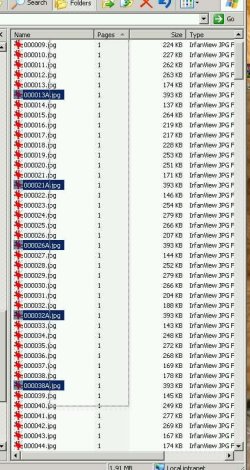
Often I have a situation where I need to select a certain subset of files (usually too many to individually select), and these files will be named longer than the majority.. by this I mean suffixed with a number, or a letter etc. (Please see screenshot, note the mouse pointer is not visible but it is located at the bottom left corner of each selection box)
In XP/Win2k I would draw a selection box that touched only the long files, and it would select them. I could easily count them, move them, drag and drop them, delete them, INVERT SELECTION, etc etc
I see no way to do this in Windows 7. I disabled full row select but it does not do what I expected. I can't select only files with a certain name length.
I have attached a picture example. And before anyone says sort by time (as the A.jpg have a earlier time stamp, this is almost never the case)
Often I have a situation where I need to select a certain subset of files (usually too many to individually select), and these files will be named longer than the majority.. by this I mean suffixed with a number, or a letter etc. (Please see screenshot, note the mouse pointer is not visible but it is located at the bottom left corner of each selection box)
In XP/Win2k I would draw a selection box that touched only the long files, and it would select them. I could easily count them, move them, drag and drop them, delete them, INVERT SELECTION, etc etc
I see no way to do this in Windows 7. I disabled full row select but it does not do what I expected. I can't select only files with a certain name length.
I have attached a picture example. And before anyone says sort by time (as the A.jpg have a earlier time stamp, this is almost never the case)
Attachments

My Computer
- Computer type
- PC/Desktop
- Computer Manufacturer/Model Number
- hp xeon workstation
- OS
- win 7 64
- Memory
- 20gb