How do I set a moving animated .gif image as my desktop b.g./wallpaper

WheelzWindows7

New member
Local time
2:13 PM
Messages
1
Hi guys. I'm not all that computer literate but I have Windows 7 Professional 64-bit on my laptop and its hooked up to my 42" Full HD TV, used as my computer's monitor.
I have downloaded and am trying to use this moving .gif image:

http://upload.wikimedia.org/wikipedia/commons/2/22/Animated_fire_by_nevit.gif

as my desktop background/wallpaper.
I've Googled and Youtubed the subject, as many seem to say that Microsoft doesn't allow you to use animated .gif desktop backgrounds in Windows 7 but they say there are ways around it. They pretty much all say to use a program called DreamScene but that didn't work for me at all! I tried several times! I eventually found a trial version of a program called BioniX Desktop Wallpaper Animator that ran as an add-on program in the "Tools" menu inside another program called Bionix Wallpaper Changer. This worked perfectly! I stretched the gif to fill my screen. You could even set the speed of the .gif frames to make it seem exactly like the speed of real flames rising (the default speed was slightly too fast).
BUT..
I just turned my computer back on this morning and tried to run BioniX Desktop Wallpaper Animator, as I do every startup, to start the .gif running as my desktop background and it wouldn't let me.. A small window popped up whenever I tried to select the fire .gif to use, saying "Please Update"... I opened the main BioniX Wallpaper Changer program (which still works I might add...you can still use a playlist of normal jpg's as a slideshow fade-transition type background) and clicked the "Check for Updates" button but it said I already have the latest version. The Bionix Desktop Animator tool/program within it does not have a "Check for Updates" button. So I can only assume that because both are only free trials, that "Please Update" actually means "Please pay for the full version"...I can't do that. I don't have a credit card. But anyway... I also tried un-installing the program and re-installing it. This didn't work either!
I was wondering if anyone knows of any other alternatives to BioniX that will allow me to permanently use this moving gif as my desktop background/wallpaper and select/change the play speed/frame-rate of the gif?? The search for an alternate program is doing my head in!!! Thanks again.
 

My Computer My Computer

At a glance

Windows 7 Professional 64-bit
Computer type
Laptop
OS
Windows 7 Professional 64-bit
Hi and welcome to SevenForums,
Please use the link above my signature to Fill in your system spec's page,
Using a gif will not be possible but you can convert the gif to a wmv file to use it instead,
http://www.sevenforums.com/customization/330884-how-play-gif-images-wall-paper-windows-7-a.html
But this is resource hog,
Cheers.

Here's a 1600-900 version of the gif which might be more appropriately sized for a desktop background,
The file is 11.3mg so this is where the resources get eaten up ;)
 
Last edited:

My Computer My Computer

At a glance

Win-7-Pro64bit 7-H-Prem-64biti7-5930K 2nd i9-9940x both water blocked VRM'...Trident-z 3200C14 2nd Trident-z 3600C16EVGA 1080ti ftw3 2nd Titan Xp both water blocked
Computer type
PC/Desktop
Computer Manufacturer/Model Number
Custom assembled by me :}
OS
Win-7-Pro64bit 7-H-Prem-64bit
CPU
i7-5930K 2nd i9-9940x both water blocked VRM's too
Motherboard
ASUS SABERTOOTH X99 2nd ASUS x299 Apex
Memory
Trident-z 3200C14 2nd Trident-z 3600C16
Graphics Card(s)
EVGA 1080ti ftw3 2nd Titan Xp both water blocked
Sound Card
Built-in Realtek
Monitor(s) Displays
1-AOC G2460PG 24"G-Sync 144Hz/ 2nd 1-ASUS VG248QE 24" 144Hz
Screen Resolution
1920 x 1080 144Hz
Hard Drives
2-Samsung M.2 Evo & Evo Plus
2-Samsung 850 EVO 500GB SSD's/ 3-2.5 W.D. Black 1tb-&3-1tb/3-3.5 WD Black 1tb hdd's
PSU
EVGA SuperNOVA 1000-P2 2nd 1200-P2
Case
2-Corsair Obsidian Series 450D Black ATX Mid Tower
Cooling
Custom water loops
Keyboard
Logitech G710+/ 2nd Logitech G910
Mouse
2-RedDragon M901 Perdition 16400 dpi Gaming mouse = wired
Internet Speed
Comcast Ping 19ms 89.31mbps download speed 6.12mbps upload
Antivirus
Malwarebytes Pro/ Superantispyware Pro
Browser
FireFox & Pale moon
Other Info
2nd ASUS X299 Apex/Intel i9-9940x with Custom water loop/7H-Prem-x64/Corsair 450D case/Ram Trident-z 3600C16 4x8gb / Samsung970Evo plus 500gb SSD/Dual ssd EZ swap evo/PSU EVGA SuperNova 1200w-P2 80+Platinum/GPU Titan Xp /8-ML-140 on push-pull on 2-280GTX rads
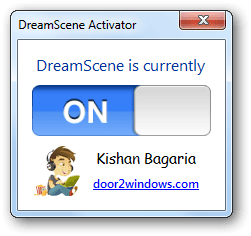
Welcome to Seven Forums WheelzWindows7. This should work with DreamScene Activator. It works with animated gifs. Download here;

DreamScene Activator: Activate DreamScene In All Editions Of Windows 7 & Vista | door2windows

Extract the zip file to the directory of your choice> Navigate to the folder you chose> Right click on the Windows 7 Dream Scene Activator application and choose Run as administrator> When the application opens, set it to On

step-2.png

Right click on your animated gif, and choose Set as Desktop Background

That should do it. A Guy
 

My Computer My Computer

At a glance

Windows 10 Home x64INTEL Core i5-750 Quad-Core 3.37GHzHyperX Fury Black Series 8GB (2 x 4GB) 1866MhzEVGA GeForce GTX 750 Superclocked 1GB 128-Bit...
Computer type
PC/Desktop
OS
Windows 10 Home x64
CPU
INTEL Core i5-750 Quad-Core 3.37GHz
Motherboard
ASUS P7P55D
Memory
HyperX Fury Black Series 8GB (2 x 4GB) 1866Mhz
Graphics Card(s)
EVGA GeForce GTX 750 Superclocked 1GB 128-Bit GDDR5
Monitor(s) Displays
LG 32MA68HY 32" IPS
Screen Resolution
1920 x 1080
Hard Drives
Samsung 840 Evo 120GB, SEAGATE 500GB Barracuda® 7200.12, SATA 3 Gb/s, 7200 RPM, 16MB cache
PSU
ANTEC TruePower New TP-550, 80 PLUS, 550W
Case
ANTEC Three Hundred Illusion
Cooling
COOLER MASTER Hyper 212 Plus, 4 x 120mm 1 x 140mm Noctua's
Internet Speed
85 + Mbps
Antivirus
Avast
Browser
Vivaldi
thats stupid

in windows xp all you needed to do is just "browse" and then upload the picture as a background picture
and it will still acknowledge the animated feature of the .gif file

in windows 7 it doesn't work for some reason, very sloppy programming i reckon
 

My Computer My Computer

At a glance

windows 7 32bit
Computer type
Laptop
Computer Manufacturer/Model Number
dell
OS
windows 7 32bit
Browser
firefox
No, it's most likely to have one less route for malware to run when Windows loads.
 

My Computer My Computer

At a glance

Win10 Pro 64-bitAMD Ryzen 7 3800X32 GB Kingston DDR4-2666MSI nVidia GT 710 (2GB)
Computer type
PC/Desktop
Computer Manufacturer/Model Number
Self-Built
OS
Win10 Pro 64-bit
CPU
AMD Ryzen 7 3800X
Motherboard
Gigabyte X570 UD
Memory
32 GB Kingston DDR4-2666
Graphics Card(s)
MSI nVidia GT 710 (2GB)
Sound Card
Creative Audigy FX 5.1
Monitor(s) Displays
ViewSonic VG2439Smh 24"
Screen Resolution
1920x1080
Hard Drives
3xWD1TB; 1xSeagate 1TB... all spinning rust
PSU
EVGA 100-W1-0500-KR (500w)
Case
SilverStone PS10 (modified)
Cooling
CPU:AMD Wraith Prism. Case:3x Noctua 120mm
Keyboard
Compaq Professional PS/2
Mouse
Microsoft Basic Optical Mouse 2.0
Internet Speed
Fiber 1Gbit/sec down/up
Antivirus
Avast Free
Browser
FF, Chrome
Other Info
2x LG GH24NSC0 DVD burners, Mackie CR3 monitor speakers
One method I've found that can work is if you create a html page with the gif as the whole page you can then set that html page as the desktop background. I know it works on XP but it might not work on 7 (can't check right now as I an on my wp8)
The html would look like:
<html>
<body>
<img src='path to file'>
<body>
<html>
 
Last edited:

My Computer My Computer

At a glance

windows 7 64 bit
Computer type
Laptop
Computer Manufacturer/Model Number
Lenovo
OS
windows 7 64 bit
Browser
Firefox
Hi, Aguy,
Your link exe does not work and got neutralized by the panda antivirus free as a Potentially Unwanted programme. If i double click the exe, it says parameter incorrect? Any idea
 

My Computer My Computer

At a glance

Microsoft Windows 7 Ultimate 64-bit 7601 Mult...Intel(R) Core(TM)2 Duo CPU E7200 @ 2.53GHz4.00 GBNVIDIA GeForce 210
Computer type
PC/Desktop
Computer Manufacturer/Model Number
custom build
OS
Microsoft Windows 7 Ultimate 64-bit 7601 Multiprocessor Free Service Pack 1
CPU
Intel(R) Core(TM)2 Duo CPU E7200 @ 2.53GHz
Motherboard
To be filled by O.E.M. To be filled by O.E.M.
Memory
4.00 GB
Graphics Card(s)
NVIDIA GeForce 210
Sound Card
(1) NVIDIA High Definition Audio (2) Realtek High Definiti
Screen Resolution
1920 x 1080 x 32 bits (4294967296 colors) @ 60 Hz
Hard Drives
ST3500312CS ATA Device

My Computer My Computer

At a glance

Windows 10 Home x64INTEL Core i5-750 Quad-Core 3.37GHzHyperX Fury Black Series 8GB (2 x 4GB) 1866MhzEVGA GeForce GTX 750 Superclocked 1GB 128-Bit...
Computer type
PC/Desktop
OS
Windows 10 Home x64
CPU
INTEL Core i5-750 Quad-Core 3.37GHz
Motherboard
ASUS P7P55D
Memory
HyperX Fury Black Series 8GB (2 x 4GB) 1866Mhz
Graphics Card(s)
EVGA GeForce GTX 750 Superclocked 1GB 128-Bit GDDR5
Monitor(s) Displays
LG 32MA68HY 32" IPS
Screen Resolution
1920 x 1080
Hard Drives
Samsung 840 Evo 120GB, SEAGATE 500GB Barracuda® 7200.12, SATA 3 Gb/s, 7200 RPM, 16MB cache
PSU
ANTEC TruePower New TP-550, 80 PLUS, 550W
Case
ANTEC Three Hundred Illusion
Cooling
COOLER MASTER Hyper 212 Plus, 4 x 120mm 1 x 140mm Noctua's
Internet Speed
85 + Mbps
Antivirus
Avast
Browser
Vivaldi
Hi, A guy,
Thanks for the reply. But what about solution to the problem. Is there no way to work with gif in Windows 7. Somebody suggested bionix. Would you recommend that? Will it work. Bionix screen saver
 

My Computer My Computer

At a glance

Microsoft Windows 7 Ultimate 64-bit 7601 Mult...Intel(R) Core(TM)2 Duo CPU E7200 @ 2.53GHz4.00 GBNVIDIA GeForce 210
Computer type
PC/Desktop
Computer Manufacturer/Model Number
custom build
OS
Microsoft Windows 7 Ultimate 64-bit 7601 Multiprocessor Free Service Pack 1
CPU
Intel(R) Core(TM)2 Duo CPU E7200 @ 2.53GHz
Motherboard
To be filled by O.E.M. To be filled by O.E.M.
Memory
4.00 GB
Graphics Card(s)
NVIDIA GeForce 210
Sound Card
(1) NVIDIA High Definition Audio (2) Realtek High Definiti
Screen Resolution
1920 x 1080 x 32 bits (4294967296 colors) @ 60 Hz
Hard Drives
ST3500312CS ATA Device
Hi, Aguy,
I heard that i could split the gif in to single images and then from slide show, i could accomplish the task. Is it true? If, how to do it? Bionix wall paper of course works, but it does seem to me that it is taking some cpu usage. I know that it has to so as to get the animation, by it.
Could i use it as screen saver?
 

My Computer My Computer

At a glance

Microsoft Windows 7 Ultimate 64-bit 7601 Mult...Intel(R) Core(TM)2 Duo CPU E7200 @ 2.53GHz4.00 GBNVIDIA GeForce 210
Computer type
PC/Desktop
Computer Manufacturer/Model Number
custom build
OS
Microsoft Windows 7 Ultimate 64-bit 7601 Multiprocessor Free Service Pack 1
CPU
Intel(R) Core(TM)2 Duo CPU E7200 @ 2.53GHz
Motherboard
To be filled by O.E.M. To be filled by O.E.M.
Memory
4.00 GB
Graphics Card(s)
NVIDIA GeForce 210
Sound Card
(1) NVIDIA High Definition Audio (2) Realtek High Definiti
Screen Resolution
1920 x 1080 x 32 bits (4294967296 colors) @ 60 Hz
Hard Drives
ST3500312CS ATA Device
Sorry, I am not expert in this, just had the one suggestion that should work. Hopefully others will chime in. A Guy
 

My Computer My Computer

At a glance

Windows 10 Home x64INTEL Core i5-750 Quad-Core 3.37GHzHyperX Fury Black Series 8GB (2 x 4GB) 1866MhzEVGA GeForce GTX 750 Superclocked 1GB 128-Bit...
Computer type
PC/Desktop
OS
Windows 10 Home x64
CPU
INTEL Core i5-750 Quad-Core 3.37GHz
Motherboard
ASUS P7P55D
Memory
HyperX Fury Black Series 8GB (2 x 4GB) 1866Mhz
Graphics Card(s)
EVGA GeForce GTX 750 Superclocked 1GB 128-Bit GDDR5
Monitor(s) Displays
LG 32MA68HY 32" IPS
Screen Resolution
1920 x 1080
Hard Drives
Samsung 840 Evo 120GB, SEAGATE 500GB Barracuda® 7200.12, SATA 3 Gb/s, 7200 RPM, 16MB cache
PSU
ANTEC TruePower New TP-550, 80 PLUS, 550W
Case
ANTEC Three Hundred Illusion
Cooling
COOLER MASTER Hyper 212 Plus, 4 x 120mm 1 x 140mm Noctua's
Internet Speed
85 + Mbps
Antivirus
Avast
Browser
Vivaldi
Hi, It is virus free . Panda scan with no threat.
It is , bionix works splendidly. It has features, that could disable online loading of gif files from their site. It has parameter settings, that does have less cpu. It is your settings.
You can fix one folder to cycle the same with timing. By adding night to the file, you could have light and dark gif pictures with animation.
It has much more features and It is FREE to download.
I have tried only minimal function. There appears to be no problem or popup that software usually has. It has online procedures to how to do , faqs.
I think, that you have to set to start with windows to automatically have the wall paper, otherwise, time wallpaper from your machine loads as wall paper. nice free programs. Thanks and my problem resolved.
Your suggested link contains PUP, but otherwise, that should also work splendidly. But i have problems in opening the exe, it says parameter incorrect errors. Thanks A guy
 

My Computer My Computer

At a glance

Microsoft Windows 7 Ultimate 64-bit 7601 Mult...Intel(R) Core(TM)2 Duo CPU E7200 @ 2.53GHz4.00 GBNVIDIA GeForce 210
Computer type
PC/Desktop
Computer Manufacturer/Model Number
custom build
OS
Microsoft Windows 7 Ultimate 64-bit 7601 Multiprocessor Free Service Pack 1
CPU
Intel(R) Core(TM)2 Duo CPU E7200 @ 2.53GHz
Motherboard
To be filled by O.E.M. To be filled by O.E.M.
Memory
4.00 GB
Graphics Card(s)
NVIDIA GeForce 210
Sound Card
(1) NVIDIA High Definition Audio (2) Realtek High Definiti
Screen Resolution
1920 x 1080 x 32 bits (4294967296 colors) @ 60 Hz
Hard Drives
ST3500312CS ATA Device
animated desktop wallpaper

Hi, It is virus free . Panda scan with no threat.
It is , bionix works splendidly. It has features, that could disable online loading of gif files from their site. It has parameter settings, that does have less cpu. It is your settings.
You can fix one folder to cycle the same with timing.

@jraru
Here are few other trick you can do with BioniX Desktop Wallpaper Changer:

  • If you are not computer-savvy and you are scared by the complexity of BioniX, you can switch to "Minimalistic interface" (F9 on your keyboard). Only the main functions will be shows and BioniX window will take less desktop space.
  • You can use a GIF file as animated wallpaper. Just double click any animated GIF file in your playlist.
  • You can add online images (from any website) and dynamic web cams directly into your playlist. BioniX will automatically download those images. (Press Insert key on your keyboard)
  • You can show dark images at night and light images during the day
  • You can put a collage of images on your desktop
  • You can show an animated clock on your desktop and have it show a reminder every x hours (like "go buy milk)
  • You are downloading lots of wallpapers every day but are lazy to update your playlist? Use "Lock on folder" to have BioniX automatically include the new downloaded wallpapers into the playlist.
  • You can have specific wallpapers shows a specific time. BioniX can decode the time from file's name.
  • For wallpapers that are smaller than your desktopyou can have BioniX fill the area that is not covered by the wallpaper with a certain color so you can have a seamlessly transition (see the "Auto background" tab).
  • You can control BioniX even if it is minimized with system-wide keyboard shortcuts. For example press Ctrl+Alt+N to put the next wallpaper on your desktop or if you are suing "blonde" wallpapers you can press Ctrl+Alt+P to immediately switch to Panic mode.
(source: Thank you for choosing BioniX Wallpaper Changer )
 

My Computer My Computer

At a glance

win7 64amd32
Computer type
PC/Desktop
Computer Manufacturer/Model Number
custom
OS
win7 64
CPU
amd
Memory
32
Back
Top