
How do I test my Paragon back up to make sure its good?

JohnnyScience

New member
Power User
Local time
3:39 AM
Messages
889
Ok I just used Paragon for the first time 7 backed up my OS hdd.

So how do I check if everything backed up ok?
 

My Computer My Computer

At a glance

Windows 7 64 & Ubuntu 64Intel Quad Core Q6600 2.40GHz8gNvidia 9600 GT & 9800 GT
Computer Manufacturer/Model Number
Built it myself
OS
Windows 7 64 & Ubuntu 64
CPU
Intel Quad Core Q6600 2.40GHz
Motherboard
Asus
Memory
8g
Graphics Card(s)
Nvidia 9600 GT & 9800 GT
Sound Card
Turtle Beach 5.1
Monitor(s) Displays
Three 19" Dell's & one 46" Samsung 750
Ok I just used Paragon for the first time 7 backed up my OS hdd.

So how do I check if everything backed up ok?

There is only one 100% sure way and that is to use the image. Make a system image of your drive. Then just try the Paragon image on your OS. If there is a problem your System Image will be there for you. If it were me, I would make a system image on your HD, make another on an external and take a chance if you are going to have doubts about the usefulness of the image on Paragon.
 

My Computer My Computer

At a glance

Windows 10, Home Clean InstallIntel Core2 processsor Q8200(2.33Ghz 1333FSB)...6 gbATI Radeon 256MB HD3650
Computer type
PC/Desktop
Computer Manufacturer/Model Number
Dell XPS 420
OS
Windows 10, Home Clean Install
CPU
Intel Core2 processsor Q8200(2.33Ghz 1333FSB) Quad Core Tech
Motherboard
Dell
Memory
6 gb
Graphics Card(s)
ATI Radeon 256MB HD3650
Sound Card
Intergrated 7.1 Channel Audio
Monitor(s) Displays
Dell SP2009W 20"
Hard Drives
640 GB Serial ATA Hard drive
Cooling
Fan
Keyboard
Dell USB Keyboard
Mouse
Dell Premium Optical USB
Internet Speed
DSL 2.85
Ok I just used Paragon for the first time 7 backed up my OS hdd.

So how do I check if everything backed up ok?

There is only one 100% sure way and that is to use the image. Make a system image of your drive. Then just try the Paragon image on your OS. If there is a problem your System Image will be there for you. If it were me, I would make a system image on your HD, make another on an external and take a chance if you are going to have doubts about the usefulness of the image on Paragon.

Ok so how do I go about making a system image of the paragon files I have?

I have Daemon tools if that helps...

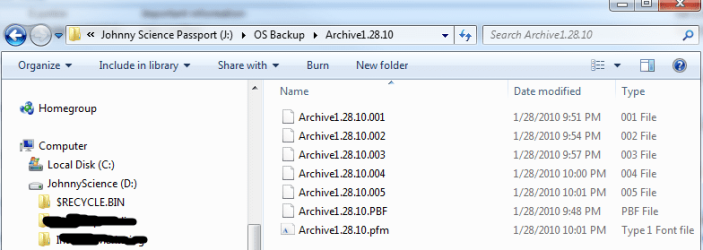
here is what was created:
 

Attachments

  • Untitled5.png
    Untitled5.png
    20.4 KB · Views: 38

My Computer My Computer

At a glance

Windows 7 64 & Ubuntu 64Intel Quad Core Q6600 2.40GHz8gNvidia 9600 GT & 9800 GT
Computer Manufacturer/Model Number
Built it myself
OS
Windows 7 64 & Ubuntu 64
CPU
Intel Quad Core Q6600 2.40GHz
Motherboard
Asus
Memory
8g
Graphics Card(s)
Nvidia 9600 GT & 9800 GT
Sound Card
Turtle Beach 5.1
Monitor(s) Displays
Three 19" Dell's & one 46" Samsung 750
The system image will be the one included with Windows 7. In the event that the Paragon Image does not work, you have the Windows 7, image to fall back on.

Go to back up and restore, and look for create system image in the left column.
 

My Computer My Computer

At a glance

Windows 10, Home Clean InstallIntel Core2 processsor Q8200(2.33Ghz 1333FSB)...6 gbATI Radeon 256MB HD3650
Computer type
PC/Desktop
Computer Manufacturer/Model Number
Dell XPS 420
OS
Windows 10, Home Clean Install
CPU
Intel Core2 processsor Q8200(2.33Ghz 1333FSB) Quad Core Tech
Motherboard
Dell
Memory
6 gb
Graphics Card(s)
ATI Radeon 256MB HD3650
Sound Card
Intergrated 7.1 Channel Audio
Monitor(s) Displays
Dell SP2009W 20"
Hard Drives
640 GB Serial ATA Hard drive
Cooling
Fan
Keyboard
Dell USB Keyboard
Mouse
Dell Premium Optical USB
Internet Speed
DSL 2.85
The system image will be the one included with Windows 7. In the event that the Paragon Image does not work, you have the Windows 7, image to fall back on.

Go to back up and restore, and look for create system image in the left column.

So there's no way to virtually test it? I have to run an actual restore?
 

My Computer My Computer

At a glance

Windows 7 64 & Ubuntu 64Intel Quad Core Q6600 2.40GHz8gNvidia 9600 GT & 9800 GT
Computer Manufacturer/Model Number
Built it myself
OS
Windows 7 64 & Ubuntu 64
CPU
Intel Quad Core Q6600 2.40GHz
Motherboard
Asus
Memory
8g
Graphics Card(s)
Nvidia 9600 GT & 9800 GT
Sound Card
Turtle Beach 5.1
Monitor(s) Displays
Three 19" Dell's & one 46" Samsung 750
Testing a back up - try mounting

well its not 100% I guess but what I do is to "mount the archive" (right clicking on the archive name in archive view of paragon) - you can then explore the archive as if it was another drive and this is also a good way to restore individual files from a full system archive. The only issue I have found is that the programme refuses to unmount the drive as it should - claiming that files are in use even when they are not - however a reboot effectively unmounts it so this is not a big issue.

I run a complete new system back up once a month (would be less frequent if i had a bigger external hard drive) and a differentail back up every three days - this takes relatively little time and runs in the background (though I run in the night anyway)

I bless this programme it has saved me from having to deal with two virus attacks - I didnt bother trying to explore the issue - I knew when the attack occured and simply restored the system from a back up rather than spend the usual hours and hours posting on forums to deal with the issue.

Restore on a 1TB system drive is a bit slow - but I simply ran it when I went to bed and the next day I had my system restored excactly as it had been two days before.
 

My Computer My Computer

At a glance

Windows 7 proAMD athlon 64 x2 4200+ 2.2GHz4gbATI Radeon HD 4600
Computer Manufacturer/Model Number
custom
OS
Windows 7 pro
CPU
AMD athlon 64 x2 4200+ 2.2GHz
Motherboard
gigabyte
Memory
4gb
Graphics Card(s)
ATI Radeon HD 4600
Sound Card
on board
Monitor(s) Displays
2 x gnr 19" widescreen
Hard Drives
Main 2x 1TB hitachi
back up 1 x seagate 1TB and 1x WD 500GB
PSU
700watt
Ok I just used Paragon for the first time 7 backed up my OS hdd.

So how do I check if everything backed up ok?
.
I'm using Paragon Backup & Recovery Free 10.1. I recently bought a new hard drive to replace my boot drive. I created an image with PB&R, put the new drive in, booted with the PB&R boot media and restored to the new drive. It worked perfectly.

To feel confident about your own setup I would make a couple of backup/images and confirm that they complete properly. I would also create and boot the CD/DVD media to confirm it can find the backup files. On my system the Paragon boot disk didn't support my usb ports so it couldn't find my external hard drive (I solved the problem by putting the hard drive with the backup image into the case). If you have an extra hard drive you could do an actual restore and confirm it boots.

Hope this helps.
 

My Computer My Computer

At a glance

Windows 7 x64Intel Core2 Extreme Q6850 3.00GHz8 GBRadeon R7 260X
Computer type
PC/Desktop
OS
Windows 7 x64
CPU
Intel Core2 Extreme Q6850 3.00GHz
Motherboard
EVGA 132-CK-NF79
Memory
8 GB
Graphics Card(s)
Radeon R7 260X
Sound Card
Xonar DS
Hard Drives
Hitachi Deskstar 1 tb
Last edited:

My Computers My Computers

  • At a glance

    7 X64i5 84002x8gb 3200mhz
    Computer type
    PC/Desktop
    OS
    7 X64
    CPU
    i5 8400
    Motherboard
    gigabyte b365m ds3h
    Memory
    2x8gb 3200mhz
    Hard Drives
    various
    PSU
    pure power 11 400w cm
    Case
    Coolermaster
    Cooling
    cryorig m9i
  • At a glance

    7x64g54008gb ddr4 2400
    Computer type
    PC/Desktop
    OS
    7x64
    CPU
    g5400
    Motherboard
    ga b365m ds3h
    Memory
    8gb ddr4 2400
    PSU
    xfx pro 450w
I have been playing around with a few imaging programs and I also teach a class about imaging at the local computer club. What I do for testing and class demo is to create a small 3GB data partition to where I copy a bunch of random files. Then I take an image of this partition followed by removing some of the data from that partition and a subsequent restore. If the removed data is back, I ( and the students) know that it worked.
This method is expedient and without any risk. It is still not a 100% guarantee that your OS backup is OK, but it proves at least that the process works (including the recovery disk).
 

My Computer My Computer

At a glance

Vista, Windows7, Mint Mate, Zorin, Windows 8from 1.6GHz Duo to i7
Computer Manufacturer/Model Number
HP, Dell, Gateway, Toshiba - 4 laptops and 2 desktops
OS
Vista, Windows7, Mint Mate, Zorin, Windows 8
CPU
from 1.6GHz Duo to i7
Monitor(s) Displays
2x HP w2207
Hard Drives
5x HDD, 7x SSD, 12x Externals
Keyboard
with trackball - no mices
Mouse
Trackball mice
Internet Speed
DSL 6000
Hi Victek,

Would you like to give this a go and let me know how you get on?

You need to rt click and run as admin on the 7clickonme.cmd

7pecreator.7z - Windows Live
.
Hi there. Can you tell me more about this? I downloaded the file, but at the moment can't open it. Is it compressed and does it need a specific tool to decompress it? The title reminds me of BartPE which is a boot disc creation tool based on XP.

Edit: OK, I get that I need to unzip this with 7zip. I'll have a look at it, and thanks for sharing :-)
 
Last edited:

My Computer My Computer

At a glance

Windows 7 x64Intel Core2 Extreme Q6850 3.00GHz8 GBRadeon R7 260X
Computer type
PC/Desktop
OS
Windows 7 x64
CPU
Intel Core2 Extreme Q6850 3.00GHz
Motherboard
EVGA 132-CK-NF79
Memory
8 GB
Graphics Card(s)
Radeon R7 260X
Sound Card
Xonar DS
Hard Drives
Hitachi Deskstar 1 tb

My Computers My Computers

  • At a glance

    7 X64i5 84002x8gb 3200mhz
    Computer type
    PC/Desktop
    OS
    7 X64
    CPU
    i5 8400
    Motherboard
    gigabyte b365m ds3h
    Memory
    2x8gb 3200mhz
    Hard Drives
    various
    PSU
    pure power 11 400w cm
    Case
    Coolermaster
    Cooling
    cryorig m9i
  • At a glance

    7x64g54008gb ddr4 2400
    Computer type
    PC/Desktop
    OS
    7x64
    CPU
    g5400
    Motherboard
    ga b365m ds3h
    Memory
    8gb ddr4 2400
    PSU
    xfx pro 450w

My Computers My Computers

  • At a glance

    7 X64i5 84002x8gb 3200mhz
    Computer type
    PC/Desktop
    OS
    7 X64
    CPU
    i5 8400
    Motherboard
    gigabyte b365m ds3h
    Memory
    2x8gb 3200mhz
    Hard Drives
    various
    PSU
    pure power 11 400w cm
    Case
    Coolermaster
    Cooling
    cryorig m9i
  • At a glance

    7x64g54008gb ddr4 2400
    Computer type
    PC/Desktop
    OS
    7x64
    CPU
    g5400
    Motherboard
    ga b365m ds3h
    Memory
    8gb ddr4 2400
    PSU
    xfx pro 450w
Back
Top