
How do I update to Windows 7 Service Pack 1

kakmca

New member
Local time
1:45 AM
Messages
1
Hi,
I am using Windows-7 ultimate.
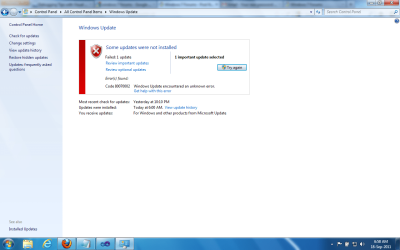
Long before only (nearly more than 2 months before), I got the Windows 7 Service Pack 1 into my Windows Update folder. From then onwards, whenever I am trying to install this update, after long delay, I am getting the error message something like Windows update could not install this update. More than 10 times I tried. :cry:

What could be the problem? Can anybody please suggest what to do to solve this problem?

I am attaching the screenshot for your reference.

Thanks for your help.
 

Attachments
  • Win7SP1Error.png
    Win7SP1Error.png
    61.6 KB · Views: 57

My Computer My Computer

At a glance

Windows 7 Enterprise x64
OS
Windows 7 Enterprise x64

My Computer My Computer

At a glance

Win 7 Ultimate 64-bit. SP1.Intel i7 -720QM.[1.6GHz Turbo Boost 2.8GHz. 6...8 DDR 3 RAM. 1066MHZATI 1024 MB. DDR3. Radeon HD5650
Computer Manufacturer/Model Number
LAPTOP. HP Pavilion dv7-4010TX .
OS
Win 7 Ultimate 64-bit. SP1.
CPU
Intel i7 -720QM.[1.6GHz Turbo Boost 2.8GHz. 6MB Cache.]
Memory
8 DDR 3 RAM. 1066MHZ
Graphics Card(s)
ATI 1024 MB. DDR3. Radeon HD5650
Monitor(s) Displays
17.3" High Definition Brightview LCD. LED Backlit.
Screen Resolution
1600 x 900.
Hard Drives
640GB
Case
Laptop / notebook.
Mouse
Logitech Anywhere mouse. MX.
Internet Speed
ADSL [ but too slow ]
Hi,
I am using Windows-7 ultimate.
Long before only (nearly more than 2 months before), I got the Windows 7 Service Pack 1 into my Windows Update folder. From then onwards, whenever I am trying to install this update, after long delay, I am getting the error message something like Windows update could not install this update. More than 10 times I tried. :cry:

What could be the problem? Can anybody please suggest what to do to solve this problem?

I am attaching the screenshot for your reference.

Thanks for your help.

kakmca Welcome to SevenForums,

Let's go for the easy solution:
Automatically diagnose and fix common problems with Windows Update

These FixIt solutions do not always work but when they do the are quick and painless.

Please let us know the results.
 

My Computer My Computer

At a glance

MS Windows 7 Ultimate SP1 64-bitAMD A10-4600M6.00 GB Dual-Channel DDR3 @ 798MHz (11-11-12-28)AMD Radeon HD 7660G
Computer Manufacturer/Model Number
Toshiba Satellite S875D-S7239 laptop
OS
MS Windows 7 Ultimate SP1 64-bit
CPU
AMD A10-4600M
Motherboard
AMD Pumori (Socket FT1)
Memory
6.00 GB Dual-Channel DDR3 @ 798MHz (11-11-12-28)
Graphics Card(s)
AMD Radeon HD 7660G
Sound Card
High Definition Audio Device
Monitor(s) Displays
Generic PnP Monitor (1600x900@60Hz)
Screen Resolution
1600x900@60Hz
Hard Drives
SSD 119GB Corsair CSSD-V128GB2 ATA Device
Keyboard
Standard PS/2 Keyboard
Mouse
HP Wireless Optical Mobile Mouse Model FHA-3410
Internet Speed
What the local pub, local coffee shop offers.
Other Info
Optical Drive:MATSHITA BD-CMB UJ160B ATA Device


Also have an Asus ha1002xp netbook with Win 7 Ultimate installed.

My Computer My Computer

At a glance

MS Windows 7 Ultimate SP1 64-bitAMD A10-4600M6.00 GB Dual-Channel DDR3 @ 798MHz (11-11-12-28)AMD Radeon HD 7660G
Computer Manufacturer/Model Number
Toshiba Satellite S875D-S7239 laptop
OS
MS Windows 7 Ultimate SP1 64-bit
CPU
AMD A10-4600M
Motherboard
AMD Pumori (Socket FT1)
Memory
6.00 GB Dual-Channel DDR3 @ 798MHz (11-11-12-28)
Graphics Card(s)
AMD Radeon HD 7660G
Sound Card
High Definition Audio Device
Monitor(s) Displays
Generic PnP Monitor (1600x900@60Hz)
Screen Resolution
1600x900@60Hz
Hard Drives
SSD 119GB Corsair CSSD-V128GB2 ATA Device
Keyboard
Standard PS/2 Keyboard
Mouse
HP Wireless Optical Mobile Mouse Model FHA-3410
Internet Speed
What the local pub, local coffee shop offers.
Other Info
Optical Drive:MATSHITA BD-CMB UJ160B ATA Device


Also have an Asus ha1002xp netbook with Win 7 Ultimate installed.
If the FixIt doesn't work,
then use
METHOD 2 of this Microsoft KB
Description of the System Update Readiness Tool for Windows Vista, for Windows Server 2008, for Windows 7, and for Windows Server 2008 R2

Download the System Update Readiness Tool appropriate for your system.

+1 :) This is an excellent step for this error.

@kakmca: Please follow all of the above advice from all three posts, and once you have run the System Update Readiness Tool, please upload your C:\Windows\Logs\CBS\CheckSUR.persist.log.

Thanks a lot!

Richard
 

My Computer My Computer

At a glance

Vista Home Premium x86 SP2Intel Core 2 Quad Q9300 2.50GHz4 gb (DDR2 800) 400MHzATI Radeon HD 3870 (512 MBytes)
Computer Manufacturer/Model Number
Dell XPS 420
OS
Vista Home Premium x86 SP2
CPU
Intel Core 2 Quad Q9300 2.50GHz
Motherboard
Stock Dell 0TP406
Memory
4 gb (DDR2 800) 400MHz
Graphics Card(s)
ATI Radeon HD 3870 (512 MBytes)
Monitor(s) Displays
1 x Dell 2007FP and 1 x (old) Sonic flat screen
Screen Resolution
1600 x 1200 and 1280 x 1204
Hard Drives
1 x 640Gb (SATA 300) Western Digital: WDC WD6400AAKS-75A7B0 1 x 1Tb (SATA 600) Western Digital: Caviar Black, SATA 6GB/S, 64Mb cache, 8ms Western Digital: WDC WD1002FAEX-00Z3A0 ATA Device
Case
Dell XPS 420
Cooling
Stock Fan
Keyboard
Dell Bluetooth
Mouse
Advent Optical ADE-WG01 (colour change light up)
Internet Speed
Varies from 10kb/s to 170kb/s. So unreliable it is not funny
Other Info
ASUS USB 3.0 5Gbps/SATA 6Gbps - PCI-Express Combo Controller Card (U3S6)
Back
Top