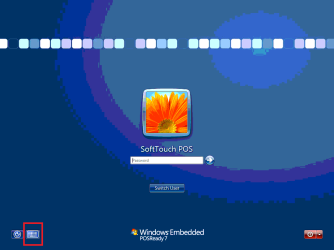
W windows7helpplz New member Local time 6:25 AM Messages 1 Dec 1, 2016 #1 Does anyone know how to add this button (red square around it) to the login ui? Attachments _My Delicious Deli T1_2016-12-01_1.png 18.1 KB · Views: 4 _My Delicious Deli T1_2016-12-01_2.png 23.7 KB · Views: 2 My Computer My Computer At a glance Windows 7 32 bitComputer typePC/DesktopOSWindows 7 32 bit
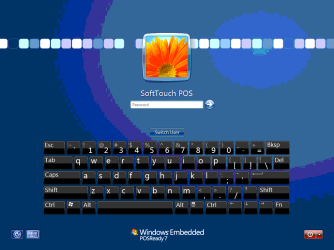
cyanna New member Power User VIP Local time 6:25 AM Messages 240 Dec 4, 2016 #2 Go to the Easy of Access control panel, choose Use the computer without a mouse or keyboard, check Use On-Screen Keyboard, click Ok. Go to the Easy of Access control panel, choose Change administrative settings, check Apply all settings to the logon desktop, click Ok. Logoff This will show the whole keyboard on the logon screen My Computer My Computer At a glance windows 7 ultimate x64Computer typePC/DesktopOSwindows 7 ultimate x64
Go to the Easy of Access control panel, choose Use the computer without a mouse or keyboard, check Use On-Screen Keyboard, click Ok. Go to the Easy of Access control panel, choose Change administrative settings, check Apply all settings to the logon desktop, click Ok. Logoff This will show the whole keyboard on the logon screen