Solved How do you create a USB boot drive

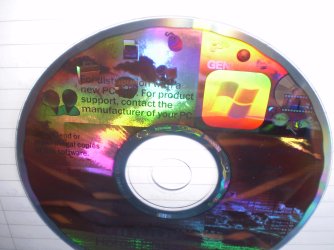
the disk is definately xp, I just don't know what it does with xp!!! have uploaded a pic, hope u can help! Will my usb from previous post work, is it worth a try or will it install xp, I only want it to boot it!
 

Attachments

  • P9250002.JPG
    P9250002.JPG
    473.5 KB · Views: 2
  • P9250001.JPG
    P9250001.JPG
    151.4 KB · Views: 1

My Computer

Computer Manufacturer/Model Number
Packard Bell
OS
Windows 7 Home Premium 64bit
CPU
AMD Turion(tm) Dual-Core Mobile M500
Motherboard
Packard Bell EasyNote LJ71
Memory
4GB (2x2GB) DDR2
Graphics Card(s)
AMD M880G with ATI Mobility Radeon HD 4200
Sound Card
ATI High Definition Audio Device (Integrated)
Monitor(s) Displays
1st: Built in 17.3" 16:9 2nd: Philips 17.1" 4:3
Screen Resolution
1st: 1600x900 2nd: 1280x1024
Hard Drives
2x WD blue scorpio 500GB
PSU
Laptop battery/power brick
Case
Laptop
Cooling
Custom built cooling stand
Keyboard
Integrated
Mouse
Touchpad & logitek wireless mouse M205
Internet Speed
0.2mb/s download
Other Info
Wireless adapter:
Atheros AR5B39 Wireless Network Adapter
Earlier you said you don't have a windows disk, now you've uploaded these shiny pics. What do you really want to do? If you want to install win7 from the flash drive or just want a bootable flash drive, follow the links given by other members earlier. If you want to install XP from the flash drive, follow the article I linked.
 

My Computer

Computer Manufacturer/Model Number
Too many to describe...
OS
Windows 7 x64 pro/ Windows 7 x86 Pro/ XP SP3 x86
I want to create a bootable flash drive that won't install the os, just boot it. That disc is very old and came with a computer bought about 5 years ago. I want to do this with win7 but am going to try it with xp first. I only want to create bootable flash drives, not ones that install the software - that is really important. Also, I just wasn't certain that was the right disc for xp booting. I don't have any discs for win7, that is certain, however, am trying to find one!!!
 

My Computer

Computer Manufacturer/Model Number
Packard Bell
OS
Windows 7 Home Premium 64bit
CPU
AMD Turion(tm) Dual-Core Mobile M500
Motherboard
Packard Bell EasyNote LJ71
Memory
4GB (2x2GB) DDR2
Graphics Card(s)
AMD M880G with ATI Mobility Radeon HD 4200
Sound Card
ATI High Definition Audio Device (Integrated)
Monitor(s) Displays
1st: Built in 17.3" 16:9 2nd: Philips 17.1" 4:3
Screen Resolution
1st: 1600x900 2nd: 1280x1024
Hard Drives
2x WD blue scorpio 500GB
PSU
Laptop battery/power brick
Case
Laptop
Cooling
Custom built cooling stand
Keyboard
Integrated
Mouse
Touchpad & logitek wireless mouse M205
Internet Speed
0.2mb/s download
Other Info
Wireless adapter:
Atheros AR5B39 Wireless Network Adapter
You mean you want to install win7 ON the flash drive? Or do you mean you just want a simple flash drive that can be booted from but doesn't have a win7 installer? if the former, forget it, not a very good idea. If latter, follow option 2 in this tut, just stop before extracting the win7 iso to it (i.e. stop at step 18).
 

My Computer

Computer Manufacturer/Model Number
Too many to describe...
OS
Windows 7 x64 pro/ Windows 7 x86 Pro/ XP SP3 x86
You have confused me!!! I want to create a usb that I can plug in, change the boot sequence in the bios and run windows from it. I do not want to install windows from it!!!
 

My Computer

Computer Manufacturer/Model Number
Packard Bell
OS
Windows 7 Home Premium 64bit
CPU
AMD Turion(tm) Dual-Core Mobile M500
Motherboard
Packard Bell EasyNote LJ71
Memory
4GB (2x2GB) DDR2
Graphics Card(s)
AMD M880G with ATI Mobility Radeon HD 4200
Sound Card
ATI High Definition Audio Device (Integrated)
Monitor(s) Displays
1st: Built in 17.3" 16:9 2nd: Philips 17.1" 4:3
Screen Resolution
1st: 1600x900 2nd: 1280x1024
Hard Drives
2x WD blue scorpio 500GB
PSU
Laptop battery/power brick
Case
Laptop
Cooling
Custom built cooling stand
Keyboard
Integrated
Mouse
Touchpad & logitek wireless mouse M205
Internet Speed
0.2mb/s download
Other Info
Wireless adapter:
Atheros AR5B39 Wireless Network Adapter
You have confused me!!! I want to create a usb that I can plug in, change the boot sequence in the bios and run windows from it. I do not want to install windows from it!!!
Lol, its mutual. You mean you want to have windows running from the flash drive, right?
 

My Computer

Computer Manufacturer/Model Number
Too many to describe...
OS
Windows 7 x64 pro/ Windows 7 x86 Pro/ XP SP3 x86
Pretty much, I need to know how to do that. Firstly, what is that disc for, secondly, which of the methods should I use???
 

My Computer

Computer Manufacturer/Model Number
Packard Bell
OS
Windows 7 Home Premium 64bit
CPU
AMD Turion(tm) Dual-Core Mobile M500
Motherboard
Packard Bell EasyNote LJ71
Memory
4GB (2x2GB) DDR2
Graphics Card(s)
AMD M880G with ATI Mobility Radeon HD 4200
Sound Card
ATI High Definition Audio Device (Integrated)
Monitor(s) Displays
1st: Built in 17.3" 16:9 2nd: Philips 17.1" 4:3
Screen Resolution
1st: 1600x900 2nd: 1280x1024
Hard Drives
2x WD blue scorpio 500GB
PSU
Laptop battery/power brick
Case
Laptop
Cooling
Custom built cooling stand
Keyboard
Integrated
Mouse
Touchpad & logitek wireless mouse M205
Internet Speed
0.2mb/s download
Other Info
Wireless adapter:
Atheros AR5B39 Wireless Network Adapter
MS works hard to keep their OS off of USB drives or else people could carry it around in their pocket with major activation problems everywhere they plug it in.

The only way you can install to USB drive is if it is eSATA or cabled via SATA or IDE:

Others will dispute but to date they all admit that after great effort to workaround an install, it runs as slow as molasses. Haven't heard yet if this is the case with USB3.

How would you plan to activate the installation? And if you move it how does it hold activation since the hardware changes? It is viewed as a very sketchy proposition that should not have the attention of legitimate installers.

These threads have become less frequent, however, so I wonder how long it will take nowadays for claims it can be done. Let's watch. :geek:
 
I don't really know, I just wanted to put an operating system on a usb, just wondered if it was possible? You have seen what I have got I just want to create something like another hard drive that will basically just hold the os. Anyway of doing that???
 

My Computer

Computer Manufacturer/Model Number
Packard Bell
OS
Windows 7 Home Premium 64bit
CPU
AMD Turion(tm) Dual-Core Mobile M500
Motherboard
Packard Bell EasyNote LJ71
Memory
4GB (2x2GB) DDR2
Graphics Card(s)
AMD M880G with ATI Mobility Radeon HD 4200
Sound Card
ATI High Definition Audio Device (Integrated)
Monitor(s) Displays
1st: Built in 17.3" 16:9 2nd: Philips 17.1" 4:3
Screen Resolution
1st: 1600x900 2nd: 1280x1024
Hard Drives
2x WD blue scorpio 500GB
PSU
Laptop battery/power brick
Case
Laptop
Cooling
Custom built cooling stand
Keyboard
Integrated
Mouse
Touchpad & logitek wireless mouse M205
Internet Speed
0.2mb/s download
Other Info
Wireless adapter:
Atheros AR5B39 Wireless Network Adapter

My Computer

Computer type
PC/Desktop
Computer Manufacturer/Model Number
Home Built Desktop By DataTech
OS
Windows 7 Ultimate X64 SP1
CPU
Intel i5-2550K, Differing ~4.4-4.8GHz No built in GPU
Motherboard
ASUS P8Z68-V PRO/GEN3
Memory
16GB G.Skill Sniper 1866MHz @ 2133MHz 2x8GB
Graphics Card(s)
ASUS GTX650TIB-DC2OC-2GD5, (650TI Boost)
Sound Card
Onboard Realtek 5-1
Monitor(s) Displays
Samsung P2570HD
Screen Resolution
1920x1080
Hard Drives
Samsung 840 Pro 256GB SSD for OS, 500GB Seagate Constellation (Enterprise drive) for Data
PSU
Corsair HX650W
Case
Inwin Dragon Rider
Cooling
Hyper 212 EVO w/two Noctua fans, push-pull, @1300 RPM
Keyboard
E-Z Eyes, bright yellow keys with large characters
Mouse
steelseries SENSEI Laser Pro Gaming
Internet Speed
48-51Mbs Mbs down, 11 Mbs up Xfinity Cable
Antivirus
Norton Internet Security 2013
Browser
IE 10, Opera, Pale Moon if needed
Other Info
4 case fans, LG BluRay-RE, ASUS DVD-RW, Mr. Fusion power supply, 1.21 gigawatts.
How To make Bootable USB

this is how i made mine and i did put the win 7 pro x64 on it along with visual studio 2010 professional, and other programs. it works
 

My Computer

Computer Manufacturer/Model Number
Custom Box
OS
Windows 7 Professional x64
CPU
AMD Phenom II X4 980 Black Edition @ 4.1Ghz
Motherboard
ECS Elite Group IC780M-A V2.0
Memory
8GB Crucial DDR2 PC5300
Graphics Card(s)
Asus Radeon HD 5450
Sound Card
On Board
Monitor(s) Displays
Dual Monitor Setup
Hard Drives
60GB OCZ Vertex 3 SSD,
320GB, 250GB, & Dual 160GB HDD's
PSU
Cooler Master eXtreme Power Plus 500w
Case
Cooler Master Elite 310
Cooling
Dual 120mm Cooler Master Case Fans
Keyboard
Logitech...
Mouse
Microsoft Mouse 4000
Internet Speed
Super Fast
Is that going to boot from the stick or will it install the whole os???
 

My Computer

Computer Manufacturer/Model Number
Packard Bell
OS
Windows 7 Home Premium 64bit
CPU
AMD Turion(tm) Dual-Core Mobile M500
Motherboard
Packard Bell EasyNote LJ71
Memory
4GB (2x2GB) DDR2
Graphics Card(s)
AMD M880G with ATI Mobility Radeon HD 4200
Sound Card
ATI High Definition Audio Device (Integrated)
Monitor(s) Displays
1st: Built in 17.3" 16:9 2nd: Philips 17.1" 4:3
Screen Resolution
1st: 1600x900 2nd: 1280x1024
Hard Drives
2x WD blue scorpio 500GB
PSU
Laptop battery/power brick
Case
Laptop
Cooling
Custom built cooling stand
Keyboard
Integrated
Mouse
Touchpad & logitek wireless mouse M205
Internet Speed
0.2mb/s download
Other Info
Wireless adapter:
Atheros AR5B39 Wireless Network Adapter
The flash sticks we discuss here are for installing Win7. Yes they boot, and yes they install the entire OS.

You seem to want to put the Win7 OS itself on a flash stick to boot and run Win7, however you never quite make this clear because I don't think you understand exactly what it is you want. So you'll have to decide and then we can help you.
 
I just want to have an os on a usb that will just boot from the stick and won't install the os, that is very important, I only want it to boot, no install, hope that is clear!!!
 

My Computer

Computer Manufacturer/Model Number
Packard Bell
OS
Windows 7 Home Premium 64bit
CPU
AMD Turion(tm) Dual-Core Mobile M500
Motherboard
Packard Bell EasyNote LJ71
Memory
4GB (2x2GB) DDR2
Graphics Card(s)
AMD M880G with ATI Mobility Radeon HD 4200
Sound Card
ATI High Definition Audio Device (Integrated)
Monitor(s) Displays
1st: Built in 17.3" 16:9 2nd: Philips 17.1" 4:3
Screen Resolution
1st: 1600x900 2nd: 1280x1024
Hard Drives
2x WD blue scorpio 500GB
PSU
Laptop battery/power brick
Case
Laptop
Cooling
Custom built cooling stand
Keyboard
Integrated
Mouse
Touchpad & logitek wireless mouse M205
Internet Speed
0.2mb/s download
Other Info
Wireless adapter:
Atheros AR5B39 Wireless Network Adapter
Can't be done with any kind of decent performance. Sorry.

You can do this, however, with XP and Linux. Google to see how.
 
ok, thanks for the clarity!!! will find out how!
 

My Computer

Computer Manufacturer/Model Number
Packard Bell
OS
Windows 7 Home Premium 64bit
CPU
AMD Turion(tm) Dual-Core Mobile M500
Motherboard
Packard Bell EasyNote LJ71
Memory
4GB (2x2GB) DDR2
Graphics Card(s)
AMD M880G with ATI Mobility Radeon HD 4200
Sound Card
ATI High Definition Audio Device (Integrated)
Monitor(s) Displays
1st: Built in 17.3" 16:9 2nd: Philips 17.1" 4:3
Screen Resolution
1st: 1600x900 2nd: 1280x1024
Hard Drives
2x WD blue scorpio 500GB
PSU
Laptop battery/power brick
Case
Laptop
Cooling
Custom built cooling stand
Keyboard
Integrated
Mouse
Touchpad & logitek wireless mouse M205
Internet Speed
0.2mb/s download
Other Info
Wireless adapter:
Atheros AR5B39 Wireless Network Adapter
Back
Top