Solved How do you create a USB boot drive

Music Guy123

New member
Member
VIP
Local time
6:28 AM
Messages
197
I am sure this question has come up before and is very easily answered but I really need some help!!! Please could someone tell me how to make a bootable usb drive with windows 7. Please can you make the instructions really clear because I don't want to muck up!!!

Any help much appreciated

P.S. Hope I have got this in the right part of this forum!!!
 

My Computer

Computer Manufacturer/Model Number
Packard Bell
OS
Windows 7 Home Premium 64bit
CPU
AMD Turion(tm) Dual-Core Mobile M500
Motherboard
Packard Bell EasyNote LJ71
Memory
4GB (2x2GB) DDR2
Graphics Card(s)
AMD M880G with ATI Mobility Radeon HD 4200
Sound Card
ATI High Definition Audio Device (Integrated)
Monitor(s) Displays
1st: Built in 17.3" 16:9 2nd: Philips 17.1" 4:3
Screen Resolution
1st: 1600x900 2nd: 1280x1024
Hard Drives
2x WD blue scorpio 500GB
PSU
Laptop battery/power brick
Case
Laptop
Cooling
Custom built cooling stand
Keyboard
Integrated
Mouse
Touchpad & logitek wireless mouse M205
Internet Speed
0.2mb/s download
Other Info
Wireless adapter:
Atheros AR5B39 Wireless Network Adapter
I had picked the wrong link - sorry.
 

My Computer

Computer Manufacturer/Model Number
HP, Dell, Gateway, Toshiba - 4 laptops and 2 desktops
OS
Vista, Windows7, Mint Mate, Zorin, Windows 8
CPU
from 1.6GHz Duo to i7
Monitor(s) Displays
2x HP w2207
Hard Drives
5x HDD, 7x SSD, 12x Externals
Keyboard
with trackball - no mices
Mouse
Trackball mice
Internet Speed
DSL 6000

My Computer

Computer Manufacturer/Model Number
acer aspire 5935g
OS
Windows 7 Home Premium x64 SP1
CPU
intel(R)core(TM)2 duo CPU T6600 @ 2.20GHz
Motherboard
intel gm45/gm47 revision 07
Memory
3 gb ddr3
Graphics Card(s)
ati radeon hd4570/512mb
Monitor(s) Displays
lop156wh2-tle1 15.3 flat
Screen Resolution
1366x768
Hard Drives
OCZ-Agility3 60gig ssd
320gig external hdd
500gig external hdd
Mouse
Optical
Internet Speed
30Mbps Down/30Mbps Up
You can follow the steps to make a USB drive bootable.

1)Insert the USB (4GB+ preferable) stick to the system and backup all the data from the USB as we are going to format the USB to make it as bootable.

2) Open elevated Command Prompt. To do this, type in CMD in Start menu search field and hit Ctrl + Shift + Enter. Alternatively, navigate to Start > All programs >Accessories > right click on Command Prompt and select run as administrator.

3) When the Command Prompt opens, enter the following command:
DISKPART and hit enter.
LIST DISK and hit enter.
Once you enter the LIST DISK command, it will show the disk number of your USB drive.

4) In this step you need to enter all the below commands one by one and hit enter. As these commands are self explanatory, you can easily guess what these commands do.
SELECT DISK 1 (Replace DISK 1 with your disk number)
CLEAN
CREATE PARTITION PRIMARY
SELECT PARTITION 1
ACTIVE
FORMAT FS=NTFS
(Format process may take few seconds)
ASSIGN
EXIT

Don’t close the command prompt as we need to execute one more command at the next step. Just minimize it.

5) Insert your Windows DVD in the optical drive and note down the drive letter of the optical drive and USB media. Here I use “D” as my optical (DVD) drive letter and “H” as my USB drive letter.
6. Go back to command prompt and execute the following commands:
D:CD BOOT and hit enter. Where “D” is your DVD drive letter.
CD BOOT and hit enter to see the below message.
BOOTSECT.EXE/NT60 H:
(Where “H” is your USB drive letter)

6) Copy Windows DVD contents to USB.

You are done with the USB bootable drive. You can now use this bootable USB as bootable DVD on any computer that comes with USB boot feature
 

My Computer

OS
Windows 7
Memory
6 GB
Graphics Card(s)
ATI Radeon
Hard Drives
Segate
My problem is that I don't have a windows instalation DVD, is there any way I could get one/make one for either free or cheaply???
 

My Computer

Computer Manufacturer/Model Number
Packard Bell
OS
Windows 7 Home Premium 64bit
CPU
AMD Turion(tm) Dual-Core Mobile M500
Motherboard
Packard Bell EasyNote LJ71
Memory
4GB (2x2GB) DDR2
Graphics Card(s)
AMD M880G with ATI Mobility Radeon HD 4200
Sound Card
ATI High Definition Audio Device (Integrated)
Monitor(s) Displays
1st: Built in 17.3" 16:9 2nd: Philips 17.1" 4:3
Screen Resolution
1st: 1600x900 2nd: 1280x1024
Hard Drives
2x WD blue scorpio 500GB
PSU
Laptop battery/power brick
Case
Laptop
Cooling
Custom built cooling stand
Keyboard
Integrated
Mouse
Touchpad & logitek wireless mouse M205
Internet Speed
0.2mb/s download
Other Info
Wireless adapter:
Atheros AR5B39 Wireless Network Adapter
Do you have a genuine Windows 7 key? If you do have, then you can borrow the particular version Windows 7 media from a friend and make an ISO.
 

My Computer

OS
Windows 7 Home Premium 32 bit
Yeah i do, do you mean borrow the disc and use my key to activate it or what...I am just a bit confused!!!
 

My Computer

Computer Manufacturer/Model Number
Packard Bell
OS
Windows 7 Home Premium 64bit
CPU
AMD Turion(tm) Dual-Core Mobile M500
Motherboard
Packard Bell EasyNote LJ71
Memory
4GB (2x2GB) DDR2
Graphics Card(s)
AMD M880G with ATI Mobility Radeon HD 4200
Sound Card
ATI High Definition Audio Device (Integrated)
Monitor(s) Displays
1st: Built in 17.3" 16:9 2nd: Philips 17.1" 4:3
Screen Resolution
1st: 1600x900 2nd: 1280x1024
Hard Drives
2x WD blue scorpio 500GB
PSU
Laptop battery/power brick
Case
Laptop
Cooling
Custom built cooling stand
Keyboard
Integrated
Mouse
Touchpad & logitek wireless mouse M205
Internet Speed
0.2mb/s download
Other Info
Wireless adapter:
Atheros AR5B39 Wireless Network Adapter
Yes. Only your key is unique. The Windows disk is not unique.
 

My Computer

Computer type
PC/Desktop
Computer Manufacturer/Model Number
Ignatz Special; 4 speed manual gearbox; factory air conditioning; one of one
OS
Windows 7 Home Premium SP1, 64-bit
CPU
Intel Skylake i5-6600K, not overclocked
Motherboard
AsRock Z170M Extreme 4, micro ATX
Memory
8 GB HyperX DDR4-2666 (2 x 4 GB)
Graphics Card(s)
none; graphics are integrated on CPU
Sound Card
onboard: Realtek ALC1150; external: USB Behringer UF0-202
Monitor(s) Displays
Dell S2340M 23 inch IPS
Screen Resolution
1600 x 900
Hard Drives
System: Crucial MX100 series SSD, 128 GB;
Data: Samsung Spinpoint 103SJ, 1 TB;
Backup: WD Caviar Green WD30EZRX-00D8PB0, 3 TB
PSU
Rosewill SilentNight 500 watt fanless, semi-modular
Case
Antec Solo II
Cooling
Noctua NH-U12S; Noctua F12 intake, Noctua S12A exhaust
Keyboard
Microsoft 200 6JH-00001 USB
Mouse
Dell or Microsoft optical wired; USB
Antivirus
Microsoft Security Essentials and Malwarebytes Premium
Browser
Pale Moon
Other Info
All fans PWM; speeds at idle: CPU circa 500 rpm; intake circa 600 rpm; exhaust circa 600 rpm; CPU temps 27 idle and 47 C load in a warm room (27 C/81 F) when running Intel Extreme Tuning Utility stress test.
Have another look at the link I posted at the beginning of the thread. It will show you how to create a installation usb from your friends disk which you can install from then activate with your key

Danny
 

My Computer

Computer Manufacturer/Model Number
acer aspire 5935g
OS
Windows 7 Home Premium x64 SP1
CPU
intel(R)core(TM)2 duo CPU T6600 @ 2.20GHz
Motherboard
intel gm45/gm47 revision 07
Memory
3 gb ddr3
Graphics Card(s)
ati radeon hd4570/512mb
Monitor(s) Displays
lop156wh2-tle1 15.3 flat
Screen Resolution
1366x768
Hard Drives
OCZ-Agility3 60gig ssd
320gig external hdd
500gig external hdd
Mouse
Optical
Internet Speed
30Mbps Down/30Mbps Up
Alright, will now go find a windows installation disk!!!
 

My Computer

Computer Manufacturer/Model Number
Packard Bell
OS
Windows 7 Home Premium 64bit
CPU
AMD Turion(tm) Dual-Core Mobile M500
Motherboard
Packard Bell EasyNote LJ71
Memory
4GB (2x2GB) DDR2
Graphics Card(s)
AMD M880G with ATI Mobility Radeon HD 4200
Sound Card
ATI High Definition Audio Device (Integrated)
Monitor(s) Displays
1st: Built in 17.3" 16:9 2nd: Philips 17.1" 4:3
Screen Resolution
1st: 1600x900 2nd: 1280x1024
Hard Drives
2x WD blue scorpio 500GB
PSU
Laptop battery/power brick
Case
Laptop
Cooling
Custom built cooling stand
Keyboard
Integrated
Mouse
Touchpad & logitek wireless mouse M205
Internet Speed
0.2mb/s download
Other Info
Wireless adapter:
Atheros AR5B39 Wireless Network Adapter

My Computer

Computer Manufacturer/Model Number
acer aspire 5935g
OS
Windows 7 Home Premium x64 SP1
CPU
intel(R)core(TM)2 duo CPU T6600 @ 2.20GHz
Motherboard
intel gm45/gm47 revision 07
Memory
3 gb ddr3
Graphics Card(s)
ati radeon hd4570/512mb
Monitor(s) Displays
lop156wh2-tle1 15.3 flat
Screen Resolution
1366x768
Hard Drives
OCZ-Agility3 60gig ssd
320gig external hdd
500gig external hdd
Mouse
Optical
Internet Speed
30Mbps Down/30Mbps Up
I appreciate it, however I provided an alternative, that instead of a software disk part can be used.
 

My Computer

OS
Windows 7
Memory
6 GB
Graphics Card(s)
ATI Radeon
Hard Drives
Segate
Please let us know Music Guy 123 how the installation goes.
 

My Computer

OS
Windows 7
Memory
6 GB
Graphics Card(s)
ATI Radeon
Hard Drives
Segate
cheers, am going to try with an xp installation disc as have that... will see how it goes, thanks for the help though!!!
 

My Computer

Computer Manufacturer/Model Number
Packard Bell
OS
Windows 7 Home Premium 64bit
CPU
AMD Turion(tm) Dual-Core Mobile M500
Motherboard
Packard Bell EasyNote LJ71
Memory
4GB (2x2GB) DDR2
Graphics Card(s)
AMD M880G with ATI Mobility Radeon HD 4200
Sound Card
ATI High Definition Audio Device (Integrated)
Monitor(s) Displays
1st: Built in 17.3" 16:9 2nd: Philips 17.1" 4:3
Screen Resolution
1st: 1600x900 2nd: 1280x1024
Hard Drives
2x WD blue scorpio 500GB
PSU
Laptop battery/power brick
Case
Laptop
Cooling
Custom built cooling stand
Keyboard
Integrated
Mouse
Touchpad & logitek wireless mouse M205
Internet Speed
0.2mb/s download
Other Info
Wireless adapter:
Atheros AR5B39 Wireless Network Adapter
cheers, am going to try with an xp installation disc as have that... will see how it goes, thanks for the help though!!!
Lol, it wont work with XP....but best to learn from failure.
 

My Computer

Computer Manufacturer/Model Number
Too many to describe...
OS
Windows 7 x64 pro/ Windows 7 x86 Pro/ XP SP3 x86
I don't think I've ever gotten XP installer to boot on a flash stick. But then I always had CD drives available.

At one time Win2Flash advertised it wrote XP to stick, but it never worked for me. However an OP I was helping got it to write the Win7 Repair CD to stick and it worked fine.
 
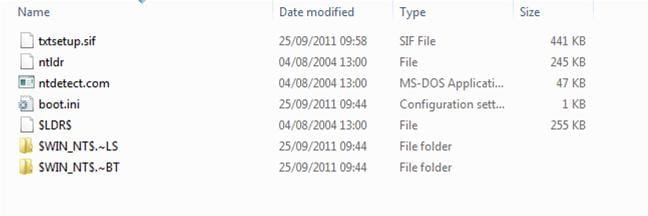
why not, although i do believe u!!! I used wintoflash with what i thought was a winxp disc. I am not really sure what the disc was for, I am worried if i boot with the usb, winxp will over run my system!!! There is no iso on the usb or disc, I have screen printed the files from my usb, what will happen if i boot from it??? Thanks for your help.
 

Attachments

  • USB boot.jpg
    USB boot.jpg
    11.8 KB · Views: 3

My Computer

Computer Manufacturer/Model Number
Packard Bell
OS
Windows 7 Home Premium 64bit
CPU
AMD Turion(tm) Dual-Core Mobile M500
Motherboard
Packard Bell EasyNote LJ71
Memory
4GB (2x2GB) DDR2
Graphics Card(s)
AMD M880G with ATI Mobility Radeon HD 4200
Sound Card
ATI High Definition Audio Device (Integrated)
Monitor(s) Displays
1st: Built in 17.3" 16:9 2nd: Philips 17.1" 4:3
Screen Resolution
1st: 1600x900 2nd: 1280x1024
Hard Drives
2x WD blue scorpio 500GB
PSU
Laptop battery/power brick
Case
Laptop
Cooling
Custom built cooling stand
Keyboard
Integrated
Mouse
Touchpad & logitek wireless mouse M205
Internet Speed
0.2mb/s download
Other Info
Wireless adapter:
Atheros AR5B39 Wireless Network Adapter
Back
Top