How do you delete /OpenWithProgids

Dunno why I bother posting.

Your posts, I'm sure, are appreciative. But I have never trusted third party registry software. CCleaner excluded. Glennc, and others, are free to try third parties until they receive successful results. If unsuccessful, well..., "When all else fails".
 

My Computer

Computer Manufacturer/Model Number
Dell Inspiron 1545
OS
Windows 7 Ultimate x32
CPU
Pentium Dual-Core T4300 @ 2.1 GHz
Motherboard
ACPI x86 based PC
Memory
3 GB
Graphics Card(s)
Mobile Intel 4 Series Express Chipset Family
Sound Card
IDT High Definition Audio CODEC
Monitor(s) Displays
Generic PnP Monitor
Hard Drives
250 GB
LOL.

Regscanner is not a registry cleaner.

It is a search tool. Nir Sofer is probably the most respected developer of all time.
 

My Computers

System One System Two

  • Computer type
    PC/Desktop
    OS
    7 X64
    CPU
    i5 8400
    Motherboard
    gigabyte b365m ds3h
    Memory
    2x8gb 3200mhz
    Hard Drives
    various
    PSU
    pure power 11 400w cm
    Case
    Coolermaster
    Cooling
    cryorig m9i
  • Computer type
    PC/Desktop
    OS
    7x64
    CPU
    g5400
    Motherboard
    ga b365m ds3h
    Memory
    8gb ddr4 2400
    PSU
    xfx pro 450w
Regscanner is not a registry cleaner.
Sorry, but in any of my previous post I never mentioned that Regscanner was a registry cleaner. I never mentioned Regscanner at all. I didn't mean to compare it to CCleaner as a registry cleaner. I was talking about third party registry programs in general. Be they cleaners, editors, scanners, etc...
 

My Computer

Computer Manufacturer/Model Number
Dell Inspiron 1545
OS
Windows 7 Ultimate x32
CPU
Pentium Dual-Core T4300 @ 2.1 GHz
Motherboard
ACPI x86 based PC
Memory
3 GB
Graphics Card(s)
Mobile Intel 4 Series Express Chipset Family
Sound Card
IDT High Definition Audio CODEC
Monitor(s) Displays
Generic PnP Monitor
Hard Drives
250 GB
It might be helpful to review exactly what the registry is and what it was meant to do.

The Windows Registry

A lot of people will say Windows 7 registy is not the same as Windows 98 or even Windows XP. And that's certainly true. But the basic underlying function is still the same . . . It keeps track of all software installed on the computer and (perhaps most importantly) how each program relates to and interacts with all the other programs on the computer. And this is where many registry editors/cleaners give the appearance that they're not doing the cleanup very well.

Let's say you uninstall Program A. It's very possible that Program A hooked itself into a couple hundred registry keys, and some of those keys belong to Program B and Program C. A registry cleaner (at least the reputable ones) will err on the side of caution and NOT remove the registry entries JUST IN CASE they are still needed by Programs B and C. Personally, I'd rather have a few hundred or even a few thousand unneeded registry entries than to have a program crash because a needed key was mistakenly removed.

And to repeat an often stated fact, Windows 7 is not your father's Windows XP where tweaks and cleaners were the norm in order to keep XP working the way it was supposed to.

Hello marsimar,
Thank you for the quick clear explanation of the more basics of the registry. I rarely use any program more intrusive than CCleaner. I get nervous. Thanks again.
Glenn
 

My Computer

Computer type
PC/Desktop
Computer Manufacturer/Model Number
Self-Built
OS
Windows 7 Ultimate
CPU
AMD Phenom-II X4 965
Motherboard
Gigabyte GA-MA785GM-US2H
Memory
8192 MB DDR2-SDRAM
Graphics Card(s)
ATI Radeon HD 4200
Sound Card
ATI Radeon HD 4200 High Definition Audo
Monitor(s) Displays
LG Electronics W1943
Screen Resolution
1360 X 768
Hard Drives
C: 500 GB Caviar Black SATA
E: 500 GB Caviar Black SATA
PSU
Ultra LSP 750
Case
Ultra XBlaster
Cooling
2 Fans, CPU Fan, PS Fan
Keyboard
Acer
Mouse
Logitech
Internet Speed
6 MB
Rather than deleting them in the registry, why not change them in the File associations?

Go Start>Default Programs and select them from there.

Seems to me it's not accepting the changes because you haven't told it what to change it to.

Hello severedsolo,
Have attempted that several times. No luck. The particular file extensions don't even show up in File Associations. Thanks for another plan of action. Take care.
glennc
 

My Computer

Computer type
PC/Desktop
Computer Manufacturer/Model Number
Self-Built
OS
Windows 7 Ultimate
CPU
AMD Phenom-II X4 965
Motherboard
Gigabyte GA-MA785GM-US2H
Memory
8192 MB DDR2-SDRAM
Graphics Card(s)
ATI Radeon HD 4200
Sound Card
ATI Radeon HD 4200 High Definition Audo
Monitor(s) Displays
LG Electronics W1943
Screen Resolution
1360 X 768
Hard Drives
C: 500 GB Caviar Black SATA
E: 500 GB Caviar Black SATA
PSU
Ultra LSP 750
Case
Ultra XBlaster
Cooling
2 Fans, CPU Fan, PS Fan
Keyboard
Acer
Mouse
Logitech
Internet Speed
6 MB
To reset your file associations to default you can follow this tutorial which will get rid of the Irfan problem (but also reset any others you have setup!):-
http://www.sevenforums.com/tutorials/19449-default-file-type-associations-restore.html

Hello wilywombat,
Resetting my file associations to default through an unknown program, and let me say I have been on this forum long enough to trust Brink explicitly, is not my intention. I have file associations that I don't wan't back to default. I may have to resort to it, but I would just like to get the dang program boogers out. I have used blazerquitar's suggestion and I either failed to do it right or it doesn't work fully. All the OpenProgramWith stuff is back with the references to Ifanview and Foxit.
Thanks for you time and assistance. Take care
Glenn
 

My Computer

Computer type
PC/Desktop
Computer Manufacturer/Model Number
Self-Built
OS
Windows 7 Ultimate
CPU
AMD Phenom-II X4 965
Motherboard
Gigabyte GA-MA785GM-US2H
Memory
8192 MB DDR2-SDRAM
Graphics Card(s)
ATI Radeon HD 4200
Sound Card
ATI Radeon HD 4200 High Definition Audo
Monitor(s) Displays
LG Electronics W1943
Screen Resolution
1360 X 768
Hard Drives
C: 500 GB Caviar Black SATA
E: 500 GB Caviar Black SATA
PSU
Ultra LSP 750
Case
Ultra XBlaster
Cooling
2 Fans, CPU Fan, PS Fan
Keyboard
Acer
Mouse
Logitech
Internet Speed
6 MB
Rather than deleting them in the registry, why not change them in the File associations?

Go Start>Default Programs and select them from there.

Seems to me it's not accepting the changes because you haven't told it what to change it to.

Why have those entries in the registry when the program is no longer installed on the system.
That is how the registry gets bloated. Entries from all kinds of stuff that is no longer needed.

Shootist,
Definitely agree with you! Bloated, but severely crucial. Thanks.
 

My Computer

Computer type
PC/Desktop
Computer Manufacturer/Model Number
Self-Built
OS
Windows 7 Ultimate
CPU
AMD Phenom-II X4 965
Motherboard
Gigabyte GA-MA785GM-US2H
Memory
8192 MB DDR2-SDRAM
Graphics Card(s)
ATI Radeon HD 4200
Sound Card
ATI Radeon HD 4200 High Definition Audo
Monitor(s) Displays
LG Electronics W1943
Screen Resolution
1360 X 768
Hard Drives
C: 500 GB Caviar Black SATA
E: 500 GB Caviar Black SATA
PSU
Ultra LSP 750
Case
Ultra XBlaster
Cooling
2 Fans, CPU Fan, PS Fan
Keyboard
Acer
Mouse
Logitech
Internet Speed
6 MB
Rather than deleting them in the registry, why not change them in the File associations?

Go Start>Default Programs and select them from there.

Seems to me it's not accepting the changes because you haven't told it what to change it to.

Why have those entries in the registry when the program is no longer installed on the system.
That is how the registry gets bloated. Entries from all kinds of stuff that is no longer needed.

Just a small but very, very important point when advising anyone to go into the Registry. Always, Always make a backup of the Registry before you touch it. One very small mistake in the registry can stop your PC working completely. With a backup you can easily put things right, without it you could be in serious trouble.
Here's Brink's tutorial on how to backup the Registry;
http://www.sevenforums.com/tutorials/4230-registry-backup-restore.html

Hellooo mitchell65,
Thanks for stepping in to the arduous fray. Thanks for the great reminder to do a Registry Backup. Excellent and I didn't think of it, in time:(. So hopefully I can still find a way out of the issue.

Glenn
 

My Computer

Computer type
PC/Desktop
Computer Manufacturer/Model Number
Self-Built
OS
Windows 7 Ultimate
CPU
AMD Phenom-II X4 965
Motherboard
Gigabyte GA-MA785GM-US2H
Memory
8192 MB DDR2-SDRAM
Graphics Card(s)
ATI Radeon HD 4200
Sound Card
ATI Radeon HD 4200 High Definition Audo
Monitor(s) Displays
LG Electronics W1943
Screen Resolution
1360 X 768
Hard Drives
C: 500 GB Caviar Black SATA
E: 500 GB Caviar Black SATA
PSU
Ultra LSP 750
Case
Ultra XBlaster
Cooling
2 Fans, CPU Fan, PS Fan
Keyboard
Acer
Mouse
Logitech
Internet Speed
6 MB
You could have a look with RegScanner - search - then rt click each entry and Jump to key.

RegScanner: Alternative to RegEdit find/search/scan of Windows

I know you can do a similar search with Regedit - but this finds and lists them all in one go - bit more convenient.

Hello SIW2,
Just got to look at it. Seems a bit daunting. It relys on my knowledge of the registry, but does seem to be easier that regedit. Downloaded and now seeing if I am man enough to jump back into the fray. Thank for the assistance and your time.
glennc
 

My Computer

Computer type
PC/Desktop
Computer Manufacturer/Model Number
Self-Built
OS
Windows 7 Ultimate
CPU
AMD Phenom-II X4 965
Motherboard
Gigabyte GA-MA785GM-US2H
Memory
8192 MB DDR2-SDRAM
Graphics Card(s)
ATI Radeon HD 4200
Sound Card
ATI Radeon HD 4200 High Definition Audo
Monitor(s) Displays
LG Electronics W1943
Screen Resolution
1360 X 768
Hard Drives
C: 500 GB Caviar Black SATA
E: 500 GB Caviar Black SATA
PSU
Ultra LSP 750
Case
Ultra XBlaster
Cooling
2 Fans, CPU Fan, PS Fan
Keyboard
Acer
Mouse
Logitech
Internet Speed
6 MB
The particular file extensions don't even show up in File Associations.

If when you select a program the particular file extension that you are using is not in the list that means that program cannot handle that type of file! What file extension/s and what program have you selected. That way we can replicate the problem!
 

My Computer

Computer type
PC/Desktop
OS
Microsoft Windows 7 Home Premium 64-bit 7601 Multiprocessor Free Service Pack 1
CPU
Intel(R) Core(TM) i7-3770 CPU @ 3.40GHz
Motherboard
ASUSTeK COMPUTER INC. P8H77-M
Memory
8.00 GB
Graphics Card(s)
Intel(R) HD Graphics 4000
Sound Card
On Board
Monitor(s) Displays
Dell 24"
Screen Resolution
1920 x 1080
Hard Drives
(1) INTEL SSDSC2CT180A3 ATA Device (2) ST500DM002-1BD142 ATA Device (3) WDC WD3200AAKS-75L9A0 ATA Device (4) Generic- Compact Flash USB Device (5) Generic- MS/MS-Pro USB Device (6) Generic- SD/MMC USB Device (7) Generic- SM/xD-Picture USB
PSU
500w Corsair
Case
Cooler Master
Cooling
3 Fans
Keyboard
Logitech MK300
Mouse
Logitech WOM
Internet Speed
75Mb
Antivirus
Norton 360
Browser
Firefox, Opera, IE
Have you tried my suggestion in post #8 yet? It should work.

Hello wilywombat,
No not as yet. I am saving that as the weapon of last resort, for the reasons that I explained in your initial posting of this neat way to return to default. Thanks much for you time and advice.
Glenn
 

My Computer

Computer type
PC/Desktop
Computer Manufacturer/Model Number
Self-Built
OS
Windows 7 Ultimate
CPU
AMD Phenom-II X4 965
Motherboard
Gigabyte GA-MA785GM-US2H
Memory
8192 MB DDR2-SDRAM
Graphics Card(s)
ATI Radeon HD 4200
Sound Card
ATI Radeon HD 4200 High Definition Audo
Monitor(s) Displays
LG Electronics W1943
Screen Resolution
1360 X 768
Hard Drives
C: 500 GB Caviar Black SATA
E: 500 GB Caviar Black SATA
PSU
Ultra LSP 750
Case
Ultra XBlaster
Cooling
2 Fans, CPU Fan, PS Fan
Keyboard
Acer
Mouse
Logitech
Internet Speed
6 MB
Hey blazerguitar831m
You are unfortunately correct. They have returned. I removed them, but found them back again. Frustrating, but that computers for you. Still appreciate your time and effort.
Glenn


BTW, thanks blazerguitar831!!!

You're welcome. But you might want to hold on to your gratitude for just a bit. After a recent restart I ran a registry scan and the errors returned. The deleted entries also returned in the registry. If sevenforums can't provide a solid solution to this problem we have then I doubt any other Windows 7 related forum can help us. Default Programs fail. Redundant file extensions related to the removed program still exist. System Restore fails. "When all else fails," a good clean install of the OS works every time. I've done a clean install more than half a dozen times in the past year and a half I've been using Win 7. Before Win7SP1 I could have my PC back online and looking as if I never installed Winamp in less than four hours from starting the clean install. After SP1, a little over five hours. But if a clean install is not an option for you or you would rather continue searching for a registry solution, then good luck my friend. And you're still welcome.
 

My Computer

Computer type
PC/Desktop
Computer Manufacturer/Model Number
Self-Built
OS
Windows 7 Ultimate
CPU
AMD Phenom-II X4 965
Motherboard
Gigabyte GA-MA785GM-US2H
Memory
8192 MB DDR2-SDRAM
Graphics Card(s)
ATI Radeon HD 4200
Sound Card
ATI Radeon HD 4200 High Definition Audo
Monitor(s) Displays
LG Electronics W1943
Screen Resolution
1360 X 768
Hard Drives
C: 500 GB Caviar Black SATA
E: 500 GB Caviar Black SATA
PSU
Ultra LSP 750
Case
Ultra XBlaster
Cooling
2 Fans, CPU Fan, PS Fan
Keyboard
Acer
Mouse
Logitech
Internet Speed
6 MB
Dunno why I bother posting.

Hello SIW2,
Well I hope the answer to that is that you have a self-less and helpful nature, attempting to assist those less fortunate in experience then yourself. I am sorry that I have been recalcitrant in keeping up with the posts on this issue. I am attempting now to catch up. As of yet I am still plaqued.
With regscanner or however, when I go to /Microsoft/Windows/CurrentVersion/Explorer/fileext/ say .wma, what should I delete, there are several subcategores and multiple entries in each. The first time I just went the the OpenWithProg section and deleted the one of three lines that said IrfanView. This was apparently incorrect as they have returned. Appreciate any of your assistance, now and in the past.
Glenn
 

My Computer

Computer type
PC/Desktop
Computer Manufacturer/Model Number
Self-Built
OS
Windows 7 Ultimate
CPU
AMD Phenom-II X4 965
Motherboard
Gigabyte GA-MA785GM-US2H
Memory
8192 MB DDR2-SDRAM
Graphics Card(s)
ATI Radeon HD 4200
Sound Card
ATI Radeon HD 4200 High Definition Audo
Monitor(s) Displays
LG Electronics W1943
Screen Resolution
1360 X 768
Hard Drives
C: 500 GB Caviar Black SATA
E: 500 GB Caviar Black SATA
PSU
Ultra LSP 750
Case
Ultra XBlaster
Cooling
2 Fans, CPU Fan, PS Fan
Keyboard
Acer
Mouse
Logitech
Internet Speed
6 MB
Dunno why I bother posting.

Your posts, I'm sure, are appreciative. But I have never trusted third party registry software. CCleaner excluded. Glennc, and others, are free to try third parties until they receive successful results. If unsuccessful, well..., "When all else fails".

LOL.

Regscanner is not a registry cleaner.

It is a search tool. Nir Sofer is probably the most respected developer of all time.

Regscanner is not a registry cleaner.
Sorry, but in any of my previous post I never mentioned that Regscanner was a registry cleaner. I never mentioned Regscanner at all. I didn't mean to compare it to CCleaner as a registry cleaner. I was talking about third party registry programs in general. Be they cleaners, editors, scanners, etc...

Dear gentlemen,
So far these have not been Germain or assistive in my quest for release of the dark powers of the registry using any method. BUT I do appreaciate you all's information and help.
Glenn
 

My Computer

Computer type
PC/Desktop
Computer Manufacturer/Model Number
Self-Built
OS
Windows 7 Ultimate
CPU
AMD Phenom-II X4 965
Motherboard
Gigabyte GA-MA785GM-US2H
Memory
8192 MB DDR2-SDRAM
Graphics Card(s)
ATI Radeon HD 4200
Sound Card
ATI Radeon HD 4200 High Definition Audo
Monitor(s) Displays
LG Electronics W1943
Screen Resolution
1360 X 768
Hard Drives
C: 500 GB Caviar Black SATA
E: 500 GB Caviar Black SATA
PSU
Ultra LSP 750
Case
Ultra XBlaster
Cooling
2 Fans, CPU Fan, PS Fan
Keyboard
Acer
Mouse
Logitech
Internet Speed
6 MB
Dunno why I bother posting.

Hello SIW2,
Well I hope the answer to that is that you have a self-less and helpful nature, attempting to assist those less fortunate in experience then yourself. I am sorry that I have been recalcitrant in keeping up with the posts on this issue. I am attempting now to catch up. As of yet I am still plaqued.
With regscanner or however, when I go to /Microsoft/Windows/CurrentVersion/Explorer/fileext/ say .wma, what should I delete, there are several subcategores and multiple entries in each. The first time I just went the the OpenWithProg section and deleted the one of three lines that said IrfanView. This was apparently incorrect as they have returned. Appreciate any of your assistance, now and in the past.
Glenn

Are you sure you have completely removed Irfanview from your system? Deleting the folder the program was installed to? Searching for any reference folder with the name irfanview, like in the user area ( your users name\Appdata\local and Roaming and in the All Users folders).

If the program is really removed/deleted/unistalled from your system then when you delete registry keys from that program or referencing that program they will NOT return.

You say some that you delete return. That shouldn't happen.
 

My Computer

Computer Manufacturer/Model Number
Built be Me
OS
Windows 7 Pro x64
CPU
i5 760
Motherboard
Asus P7P55D-E Pro
Memory
16GB
Graphics Card(s)
Nvidia GTS450
Sound Card
On board
Monitor(s) Displays
Dell 2007WFP Dell 1800FP
Screen Resolution
1680x1050 1280x1024
Hard Drives
Seagate 250GB & 750GB
WD 1TB
PSU
Antec 750
Case
In Win
Cooling
Cooler Master Hyper 212+
Keyboard
IBM
Mouse
MS
The particular file extensions don't even show up in File Associations.

If when you select a program the particular file extension that you are using is not in the list that means that program cannot handle that type of file! What file extension/s and what program have you selected. That way we can replicate the problem!

Hello again mitchell65,
I want to be crystal clearer. When I said they don't show up in the File Associations, I meant in the Windows Default Program options. Two that I remember are .rle and .wmf. In the registry they did show up, I just as of yet have been unable to rid myself of them successfully of a non-existent Open With Association or whatever the technical term is. I am trying not to do a default restore as I have numerous programs that take certain associations on purpose.
Thank you kind Sir!
Glenn
 

My Computer

Computer type
PC/Desktop
Computer Manufacturer/Model Number
Self-Built
OS
Windows 7 Ultimate
CPU
AMD Phenom-II X4 965
Motherboard
Gigabyte GA-MA785GM-US2H
Memory
8192 MB DDR2-SDRAM
Graphics Card(s)
ATI Radeon HD 4200
Sound Card
ATI Radeon HD 4200 High Definition Audo
Monitor(s) Displays
LG Electronics W1943
Screen Resolution
1360 X 768
Hard Drives
C: 500 GB Caviar Black SATA
E: 500 GB Caviar Black SATA
PSU
Ultra LSP 750
Case
Ultra XBlaster
Cooling
2 Fans, CPU Fan, PS Fan
Keyboard
Acer
Mouse
Logitech
Internet Speed
6 MB
I ask again for the last time...Tried post #8 yet?

You wilywombat,
Again must apologize for not keeping up with the posts regularly. Don't want you to feel ignored. But I still haven't tried it as the two previous post's answer indicate. It is my safe reset final option. Thank you for your info.
Glenn
 

My Computer

Computer type
PC/Desktop
Computer Manufacturer/Model Number
Self-Built
OS
Windows 7 Ultimate
CPU
AMD Phenom-II X4 965
Motherboard
Gigabyte GA-MA785GM-US2H
Memory
8192 MB DDR2-SDRAM
Graphics Card(s)
ATI Radeon HD 4200
Sound Card
ATI Radeon HD 4200 High Definition Audo
Monitor(s) Displays
LG Electronics W1943
Screen Resolution
1360 X 768
Hard Drives
C: 500 GB Caviar Black SATA
E: 500 GB Caviar Black SATA
PSU
Ultra LSP 750
Case
Ultra XBlaster
Cooling
2 Fans, CPU Fan, PS Fan
Keyboard
Acer
Mouse
Logitech
Internet Speed
6 MB
When I said they don't show up in the File Associations, I meant in the Windows Default Program options. Two that I remember are .rle and .wmf.

When in the Defaults program window you click " Associate a file type with a protocol or program" In the list that follows if as you say .rle and .wmf are not in the list I fear the only way you will solve your problems is a re install the operating system. I think you have a serious problem here. I have tried to ascertain how you could loose file extensions from the list and cannot so how it happened I have no idea!
 

My Computer

Computer type
PC/Desktop
OS
Microsoft Windows 7 Home Premium 64-bit 7601 Multiprocessor Free Service Pack 1
CPU
Intel(R) Core(TM) i7-3770 CPU @ 3.40GHz
Motherboard
ASUSTeK COMPUTER INC. P8H77-M
Memory
8.00 GB
Graphics Card(s)
Intel(R) HD Graphics 4000
Sound Card
On Board
Monitor(s) Displays
Dell 24"
Screen Resolution
1920 x 1080
Hard Drives
(1) INTEL SSDSC2CT180A3 ATA Device (2) ST500DM002-1BD142 ATA Device (3) WDC WD3200AAKS-75L9A0 ATA Device (4) Generic- Compact Flash USB Device (5) Generic- MS/MS-Pro USB Device (6) Generic- SD/MMC USB Device (7) Generic- SM/xD-Picture USB
PSU
500w Corsair
Case
Cooler Master
Cooling
3 Fans
Keyboard
Logitech MK300
Mouse
Logitech WOM
Internet Speed
75Mb
Antivirus
Norton 360
Browser
Firefox, Opera, IE
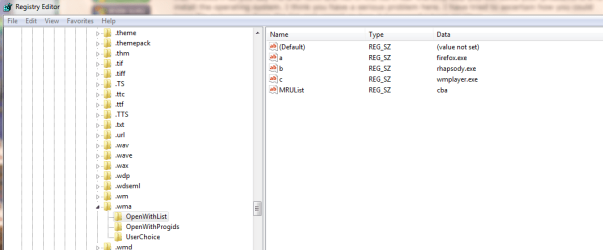
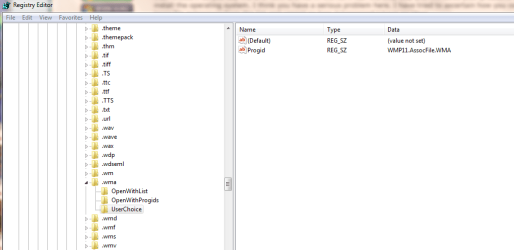
Again I must say I appreciate all of your help. I have made snippets of what I see in the Registry Editor for .wma entry. It includes all the subsections in order. If you look you can see that Registry Editor show above the example I am showing, an entry for .wmf. Again this does not show up in the Default Applications.

Registry Editor for .wma

Capture.PNG

First Subsection

Capture2.PNG

Second Subsection

Capture3.PNG

Final Subsection

Capture4.PNG

Hopefully you can tell me what of all or any of the entries in the subsections or the subsections themselves that should be deleted.
Thank you
Glenn
 

My Computer

Computer type
PC/Desktop
Computer Manufacturer/Model Number
Self-Built
OS
Windows 7 Ultimate
CPU
AMD Phenom-II X4 965
Motherboard
Gigabyte GA-MA785GM-US2H
Memory
8192 MB DDR2-SDRAM
Graphics Card(s)
ATI Radeon HD 4200
Sound Card
ATI Radeon HD 4200 High Definition Audo
Monitor(s) Displays
LG Electronics W1943
Screen Resolution
1360 X 768
Hard Drives
C: 500 GB Caviar Black SATA
E: 500 GB Caviar Black SATA
PSU
Ultra LSP 750
Case
Ultra XBlaster
Cooling
2 Fans, CPU Fan, PS Fan
Keyboard
Acer
Mouse
Logitech
Internet Speed
6 MB
Back
Top