How do you diagnose Windows Startup?

panamamike

New member
Local time
4:41 PM
Messages
3
I'm trying to determine which process is stalling/not responding during the later part of my windows 7 boot.

It pretty much gets to the main desktop window. It the allows for me to start a program if I do it immediately after reaching the desktop screen.

If I wait a while, the machine is still in the process of running some startup apps/services ect... it eventually gets stuck. I can't start any new programs, current programs aren't responsive. Putting the mouse over the start button results in a blue spinning circle.

If I try to start apps ect. a message will typically appearing letting me know a process is not responding, do I want to stop it?

If I do, the desktop disappears, only leaving the wall paper,.it then takes some 5 to 10 minutes to return. Then all is well.

Similar behavior if I just sit and wait for the blue busy spinner to stop. The 10 minute wait is killing me. Does this on every boot.

There have been times when the wait occurs between the login process and the windows desktop screen.

I've tried turning off all of the optional startup programs via msconfig.
I've run chkdisk

I've tried to see what program starts to run when the freeze occurs using the task manager. No luck, I don't see any processes start up, and the CPU utilization stays low. No heavy activity of any kind.

Any ideas would be much appreciated.

Regards,

Mike
 

My Computer

OS
Windows 7 Ultimate x64
Can you fill out your system specs to include more than your OS?

Is this a brand new build?
 

My Computer

Computer type
PC/Desktop
Computer Manufacturer/Model Number
Ignatz Special; 4 speed manual gearbox; factory air conditioning; one of one
OS
Windows 7 Home Premium SP1, 64-bit
CPU
Intel Skylake i5-6600K, not overclocked
Motherboard
AsRock Z170M Extreme 4, micro ATX
Memory
8 GB HyperX DDR4-2666 (2 x 4 GB)
Graphics Card(s)
none; graphics are integrated on CPU
Sound Card
onboard: Realtek ALC1150; external: USB Behringer UF0-202
Monitor(s) Displays
Dell S2340M 23 inch IPS
Screen Resolution
1600 x 900
Hard Drives
System: Crucial MX100 series SSD, 128 GB;
Data: Samsung Spinpoint 103SJ, 1 TB;
Backup: WD Caviar Green WD30EZRX-00D8PB0, 3 TB
PSU
Rosewill SilentNight 500 watt fanless, semi-modular
Case
Antec Solo II
Cooling
Noctua NH-U12S; Noctua F12 intake, Noctua S12A exhaust
Keyboard
Microsoft 200 6JH-00001 USB
Mouse
Dell or Microsoft optical wired; USB
Antivirus
Microsoft Security Essentials and Malwarebytes Premium
Browser
Pale Moon
Other Info
All fans PWM; speeds at idle: CPU circa 500 rpm; intake circa 600 rpm; exhaust circa 600 rpm; CPU temps 27 idle and 47 C load in a warm room (27 C/81 F) when running Intel Extreme Tuning Utility stress test.
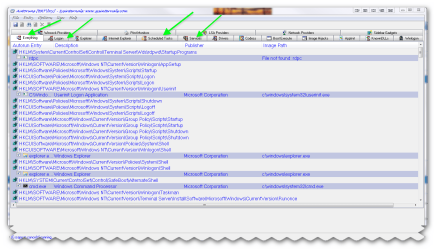
the best program i use is autoruns sysinternals

Autoruns for Windows v10.06 By Mark Russinovich and Bryce Cogswell

LINK :ar: Autoruns for Windows

This utility, which has the most comprehensive knowledge of auto-starting locations of any startup monitor, shows you what programs are configured to run during system bootup or login, and shows you the entries in the order Windows processes them. These programs include ones in your startup folder, Run, RunOnce, and other Registry keys. You can configure Autoruns to show other locations, including Explorer shell extensions, toolbars, browser helper objects, Winlogon notifications, auto-start services, and much more. Autoruns goes way beyond the MSConfig utility bundled with Windows Me and XP.

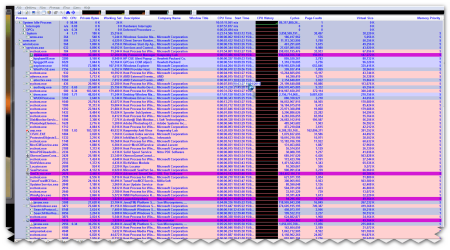
ALSO :ar: Process Explorer v14.01 By Mark Russinovich LINK :ar: http://technet.microsoft.com/en-us/sysinternals/bb896653

Ever wondered which program has a particular file or directory open? Now you can find out. Process Explorer shows you information about which handles and DLLs processes have opened or loaded.

The Process Explorer display consists of two sub-windows. The top window always shows a list of the currently active processes, including the names of their owning accounts, whereas the information displayed in the bottom window depends on the mode that Process Explorer is in: if it is in handle mode you'll see the handles that the process selected in the top window has opened; if Process Explorer is in DLL mode you'll see the DLLs and memory-mapped files that the process has loaded. Process Explorer also has a powerful search capability that will quickly show you which processes have particular handles opened or DLLs loaded.

The unique capabilities of Process Explorer make it useful for tracking down DLL-version problems or handle leaks, and provide insight into the way Windows and applications work.
 

Attachments

  • brys snap ?14 ?January ?2011 07h34m08s.png
    brys snap ?14 ?January ?2011 07h34m08s.png
    51.5 KB · Views: 118
  • brys snap ?15 ?January ?2011 23h00m07s.png
    brys snap ?15 ?January ?2011 23h00m07s.png
    137.6 KB · Views: 96

My Computer

Computer Manufacturer/Model Number
packard bell IXTREME M5722
OS
Operating System : Windows 7 Home Premium Edition 6.01.7600 SP1 (x64)
CPU
Processor : Intel Core 2 Quad Q8300 @ 2500 MHz
Motherboard
Mainboard : Packard Bell (Acer EG43M )
Memory
Physical Memory :8GB Corsair4x 2GB 800MHz C5 DDR2
Graphics Card(s)
Video Card : XFX 6700 AMD
Monitor(s) Displays
Maestro 234DL - BenQ V2220 - BenQ VW2420H
Screen Resolution
Current Display :1920x1080p pixels at 60 Hz in HD LED
Hard Drives
Hard Disks : WDC (1000 GB)
Drive C: (Hard Disk) : 428 GB available on 491 GB
Drive D: (Hard Disk) : 426 GB available on 492 GB
SAMSUNG spinpoint HD103SJ 1000.2 GB
(X 2) KINGSTON SSD NOW V 30GB
PSU
XFX ProSeries 550W PSU
Case
PACKARD BELL IXTREME
Cooling
System Blower Current: 150mA Air Flow16CFM ;Akasa 90mm rear
Keyboard
Gigabyte Aivia K8100
Mouse
TRUST-Wireless Laser Mouse - Carbon edition MI-7770C
Internet Speed
TP-LINK > TL-WN951N / AV500 Gigabit Powerline Adapters
Browser
chrome dev
Other Info
EXTRA COOLING>(FAN CONTROLLER) PC Bay Cooler 3 x 40mm fans; Akasa AK-HD-BL Blue hard drive cooler 2 x 40 mm fan 4500 rpm 29.7 dBA
Bios> American Megatrends Inc.
Version : P01-A1
Date : 08/31/2009
Use msconfig to determine what is causing the problem.

These are good tutorials on using msconfig in XP, Vista or Windows 7:
How to use msconfig in Windows XP
How to use msconfig in Windows Vista
How to use msconfig in Windows 7

Click on Start then Run, type msconfig and press Enter.
Click on the Startup tab, record what is currently starting then click the Disable All button.
Reboot and see if it runs normal.
If yes then use msconfig to enable several items at a time till you find the culprit.

If no, boot to Safe Mode again, start msconfig and click on the Services tab.
Check the Hide All Microsoft Services box, record what is currently starting then click the Disable All button.
Again, do a regular boot, see if it runs normal.
If yes then use msconfig to enable services till you find the culprit.

Once you've found the culprit, uninstall it or find out how to eliminate it from your system.
Simply disabling it in msconfig is a temporary fix at best.
Enable everything else you disabled.
 

My Computer

Computer type
PC/Desktop
Computer Manufacturer/Model Number
Lenovo IdeaCenter 450
OS
Windows 10 Pro X64
CPU
Intel Quad Core i7-4770 @ 3.4Ghz
Memory
16.0GB PC3-12800 DDR3 SDRAM 1600 MHz
Graphics Card(s)
Intel Integrated HD Graphics
Sound Card
Realtek HD Audio
Monitor(s) Displays
HP 22" LCD
Screen Resolution
1680 x 1050
Hard Drives
250GB Samsung EVO SATA-3 SSD
2TB Seagate ST2000DM001 SATA-2
1.5TB Seagate ST3150041AS SATA
Keyboard
Dell USB
Mouse
Lenovo USB
Internet Speed
Cable via Road Runner 3MB Upload, 30MB Download
Antivirus
Windows Defender, MBAM Pro, MBAE
Browser
Seamonkey
Other Info
UEFI/GPT
PLDS DVD-RW DH16AERSH
Thanks to all for the responses.

The machine in question is a DELL E6410 Laptop
It's a pretty clean build.
i5 Core
4GB of Memory
integrated graphics solution.
Win7 64bit Pro

I used Event Viewer to track down some suspects.

Occur right before freeze
Search 1003
Looks like ESENT EventID: 102

First app to run after freeze
IAStorDataMgrSvc

Doesn't seem like any of these should be causing an issue, but I'm not clear
what they are doing. For instance, what is Search doing?

Regards,

Mike
 

My Computer

OS
Windows 7 Ultimate x64

My Computer

Computer type
PC/Desktop
OS
Windows 10 Home x64
CPU
INTEL Core i5-750 Quad-Core 3.37GHz
Motherboard
ASUS P7P55D
Memory
HyperX Fury Black Series 8GB (2 x 4GB) 1866Mhz
Graphics Card(s)
EVGA GeForce GTX 750 Superclocked 1GB 128-Bit GDDR5
Monitor(s) Displays
LG 32MA68HY 32" IPS
Screen Resolution
1920 x 1080
Hard Drives
Samsung 840 Evo 120GB, SEAGATE 500GB Barracuda® 7200.12, SATA 3 Gb/s, 7200 RPM, 16MB cache
PSU
ANTEC TruePower New TP-550, 80 PLUS, 550W
Case
ANTEC Three Hundred Illusion
Cooling
COOLER MASTER Hyper 212 Plus, 4 x 120mm 1 x 140mm Noctua's
Internet Speed
85 + Mbps
Antivirus
Avast
Browser
Vivaldi
Everything here is useful, but I would add one last step before repairing - xperf (well, technically xbootmgr). Install the WPT, run the command to trace your boot, and you will actually *see* the boot process broken down by memory usage, disk I/O, process start/lifetime/end times, etc. It will show you what is happening, graphically.
 

My Computer

Computer type
PC/Desktop
Computer Manufacturer/Model Number
Custom
OS
Windows 10 Pro x64
CPU
Intel Core i7 4790K @ 4.5GHz
Motherboard
Asus Maximus Hero VII
Memory
32GB DDR3
Graphics Card(s)
Nvidia GeForce GTX970
Sound Card
Realtek HD Audio
Screen Resolution
1920x1200
Hard Drives
1x Samsung 250GB SSD
4x WD RE 2TB (RAIDZ)
PSU
Corsair AX760i
Case
Fractal Design Define R4
Cooling
Noctua NH-D15
You could also give Soluto a try. I did and waas able to eliminate 16 seconds from my boot time. I uninstalled it once I understood how to make the changes Soluto made permanent. It monitors your system boot and provides three levels fixes, No Brainer, Maybe and NO NO (don't remember the exact wording).

You can apply each one separately and see what it does for you. It tells you how much time it will reduce your boot by.

I uninstalled it because it was one more program running at boot time but you may chose to leave it active.

Worth looking at.
 

My Computer

Computer type
PC/Desktop
Computer Manufacturer/Model Number
Lenovo IdeaCenter 450
OS
Windows 10 Pro X64
CPU
Intel Quad Core i7-4770 @ 3.4Ghz
Memory
16.0GB PC3-12800 DDR3 SDRAM 1600 MHz
Graphics Card(s)
Intel Integrated HD Graphics
Sound Card
Realtek HD Audio
Monitor(s) Displays
HP 22" LCD
Screen Resolution
1680 x 1050
Hard Drives
250GB Samsung EVO SATA-3 SSD
2TB Seagate ST2000DM001 SATA-2
1.5TB Seagate ST3150041AS SATA
Keyboard
Dell USB
Mouse
Lenovo USB
Internet Speed
Cable via Road Runner 3MB Upload, 30MB Download
Antivirus
Windows Defender, MBAM Pro, MBAE
Browser
Seamonkey
Other Info
UEFI/GPT
PLDS DVD-RW DH16AERSH
yes i have used that soluto but i had problems with it so i was waiting for bug fixes i will have a look on the site again thanks for posting :) i think its still in beta?
 

My Computer

Computer Manufacturer/Model Number
packard bell IXTREME M5722
OS
Operating System : Windows 7 Home Premium Edition 6.01.7600 SP1 (x64)
CPU
Processor : Intel Core 2 Quad Q8300 @ 2500 MHz
Motherboard
Mainboard : Packard Bell (Acer EG43M )
Memory
Physical Memory :8GB Corsair4x 2GB 800MHz C5 DDR2
Graphics Card(s)
Video Card : XFX 6700 AMD
Monitor(s) Displays
Maestro 234DL - BenQ V2220 - BenQ VW2420H
Screen Resolution
Current Display :1920x1080p pixels at 60 Hz in HD LED
Hard Drives
Hard Disks : WDC (1000 GB)
Drive C: (Hard Disk) : 428 GB available on 491 GB
Drive D: (Hard Disk) : 426 GB available on 492 GB
SAMSUNG spinpoint HD103SJ 1000.2 GB
(X 2) KINGSTON SSD NOW V 30GB
PSU
XFX ProSeries 550W PSU
Case
PACKARD BELL IXTREME
Cooling
System Blower Current: 150mA Air Flow16CFM ;Akasa 90mm rear
Keyboard
Gigabyte Aivia K8100
Mouse
TRUST-Wireless Laser Mouse - Carbon edition MI-7770C
Internet Speed
TP-LINK > TL-WN951N / AV500 Gigabit Powerline Adapters
Browser
chrome dev
Other Info
EXTRA COOLING>(FAN CONTROLLER) PC Bay Cooler 3 x 40mm fans; Akasa AK-HD-BL Blue hard drive cooler 2 x 40 mm fan 4500 rpm 29.7 dBA
Bios> American Megatrends Inc.
Version : P01-A1
Date : 08/31/2009
Use msconfig to determine what is causing the problem.

These are good tutorials on using msconfig in XP, Vista or Windows 7:
How to use msconfig in Windows XP
How to use msconfig in Windows Vista
How to use msconfig in Windows 7

Click on Start then Run, type msconfig and press Enter.
Click on the Startup tab, record what is currently starting then click the Disable All button.
Reboot and see if it runs normal.
If yes then use msconfig to enable several items at a time till you find the culprit.

If no, boot to Safe Mode again, start msconfig and click on the Services tab.
Check the Hide All Microsoft Services box, record what is currently starting then click the Disable All button.
Again, do a regular boot, see if it runs normal.
If yes then use msconfig to enable services till you find the culprit.

Once you've found the culprit, uninstall it or find out how to eliminate it from your system.
Simply disabling it in msconfig is a temporary fix at best.
Enable everything else you disabled.

Thanks to all for the help, all very good ideas that I will probably use again in the future. In the end, this approach helped identify the culprit, it was indeed a service.

OfficeScanNT RealTime Scan Trend Micro Inc.

Not sure why it's causing the issue, but this is the cause.

Regards,

Mike
 

My Computer

OS
Windows 7 Ultimate x64
Best to stick with MSE or Avast with Windows Firewall, Malwarebytes on demand. They just work.
 
Yes, Soluto is still Beta.
 

My Computer

Computer type
PC/Desktop
Computer Manufacturer/Model Number
Lenovo IdeaCenter 450
OS
Windows 10 Pro X64
CPU
Intel Quad Core i7-4770 @ 3.4Ghz
Memory
16.0GB PC3-12800 DDR3 SDRAM 1600 MHz
Graphics Card(s)
Intel Integrated HD Graphics
Sound Card
Realtek HD Audio
Monitor(s) Displays
HP 22" LCD
Screen Resolution
1680 x 1050
Hard Drives
250GB Samsung EVO SATA-3 SSD
2TB Seagate ST2000DM001 SATA-2
1.5TB Seagate ST3150041AS SATA
Keyboard
Dell USB
Mouse
Lenovo USB
Internet Speed
Cable via Road Runner 3MB Upload, 30MB Download
Antivirus
Windows Defender, MBAM Pro, MBAE
Browser
Seamonkey
Other Info
UEFI/GPT
PLDS DVD-RW DH16AERSH
Lol, every new version is beta, it's a beta program :)

A Guy
 

My Computer

Computer type
PC/Desktop
OS
Windows 10 Home x64
CPU
INTEL Core i5-750 Quad-Core 3.37GHz
Motherboard
ASUS P7P55D
Memory
HyperX Fury Black Series 8GB (2 x 4GB) 1866Mhz
Graphics Card(s)
EVGA GeForce GTX 750 Superclocked 1GB 128-Bit GDDR5
Monitor(s) Displays
LG 32MA68HY 32" IPS
Screen Resolution
1920 x 1080
Hard Drives
Samsung 840 Evo 120GB, SEAGATE 500GB Barracuda® 7200.12, SATA 3 Gb/s, 7200 RPM, 16MB cache
PSU
ANTEC TruePower New TP-550, 80 PLUS, 550W
Case
ANTEC Three Hundred Illusion
Cooling
COOLER MASTER Hyper 212 Plus, 4 x 120mm 1 x 140mm Noctua's
Internet Speed
85 + Mbps
Antivirus
Avast
Browser
Vivaldi
Soluto has real promise, but needs to build up its database on startups and work out some bugs.

When the public becomes aware of how important limiting startup items is to good performance (think of freeloaders clawing your back) a free program like this will be highly valued and energized to perfect itself like a CCleaner.

The last install fritzed a clean reinstall I was doing so I am giving it a rest for awhile.
 
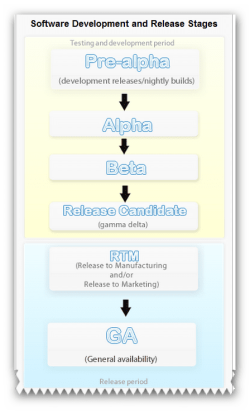
Software release life cycle :ar: Software release life cycle - Wikipedia, the free encyclopedia

The term beta test comes from an IBM convention, dating back to punched card tabulating and sorting machines. Hardware first went through an alpha test for preliminary functionality and small scale manufacturing feasibility. Then came a beta test, to verify that the hardware correctly performed the intended functions and could be manufactured at scale. Ultimately, a gamma test was performed to verify safety.
When IBM began testing software, it used the same terminology as it had for hardware. As other companies began developing their own software, they adopted and kept the same terminology.
 

Attachments

  • brys snap ?18 ?January ?2011 06h11m51s.png
    brys snap ?18 ?January ?2011 06h11m51s.png
    37.8 KB · Views: 8

My Computer

Computer Manufacturer/Model Number
packard bell IXTREME M5722
OS
Operating System : Windows 7 Home Premium Edition 6.01.7600 SP1 (x64)
CPU
Processor : Intel Core 2 Quad Q8300 @ 2500 MHz
Motherboard
Mainboard : Packard Bell (Acer EG43M )
Memory
Physical Memory :8GB Corsair4x 2GB 800MHz C5 DDR2
Graphics Card(s)
Video Card : XFX 6700 AMD
Monitor(s) Displays
Maestro 234DL - BenQ V2220 - BenQ VW2420H
Screen Resolution
Current Display :1920x1080p pixels at 60 Hz in HD LED
Hard Drives
Hard Disks : WDC (1000 GB)
Drive C: (Hard Disk) : 428 GB available on 491 GB
Drive D: (Hard Disk) : 426 GB available on 492 GB
SAMSUNG spinpoint HD103SJ 1000.2 GB
(X 2) KINGSTON SSD NOW V 30GB
PSU
XFX ProSeries 550W PSU
Case
PACKARD BELL IXTREME
Cooling
System Blower Current: 150mA Air Flow16CFM ;Akasa 90mm rear
Keyboard
Gigabyte Aivia K8100
Mouse
TRUST-Wireless Laser Mouse - Carbon edition MI-7770C
Internet Speed
TP-LINK > TL-WN951N / AV500 Gigabit Powerline Adapters
Browser
chrome dev
Other Info
EXTRA COOLING>(FAN CONTROLLER) PC Bay Cooler 3 x 40mm fans; Akasa AK-HD-BL Blue hard drive cooler 2 x 40 mm fan 4500 rpm 29.7 dBA
Bios> American Megatrends Inc.
Version : P01-A1
Date : 08/31/2009
Don't forget RTW - Released To Web ;).
 

My Computer

Computer type
PC/Desktop
Computer Manufacturer/Model Number
Custom
OS
Windows 10 Pro x64
CPU
Intel Core i7 4790K @ 4.5GHz
Motherboard
Asus Maximus Hero VII
Memory
32GB DDR3
Graphics Card(s)
Nvidia GeForce GTX970
Sound Card
Realtek HD Audio
Screen Resolution
1920x1200
Hard Drives
1x Samsung 250GB SSD
4x WD RE 2TB (RAIDZ)
PSU
Corsair AX760i
Case
Fractal Design Define R4
Cooling
Noctua NH-D15
Back
Top