
I have no clue if this is the correct forum to post this in. I will like to explain how I have gotten to this point. For some reason, there was some weird things happening to my laptop. When I ctrl+alt+del, there was no options other than lock the computer and log off. The task manager completely disappeared. I had no clue why that happened. Secondly, my context menus wouldn't work on the start menu, so deleting a folder or a program out of my start menu was impossible unless I went through the countless folders in my C drive to do it that way. The problem was, the option to enable or disable context menus was missing from my properties, which caused the issue to begin with.
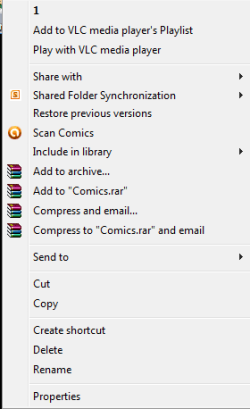
I went on countless websites, trying to remedy the problem. I finally came across the tutorials on this site and fixed both issues quickly! The issue I am having now is a fix I tried before I knew what I was doing and I have no clue how to change it back. When I open the context menu in explorer, instead of the first option being 'Open', there is only a 1. It was when I tried to go into Regedit and fix the issue there. I am wondering is there is any way to change it back to 'Open' and how would I go about doing this?
I am going to attach a picture so you guys will understand what I am talking about.
I went on countless websites, trying to remedy the problem. I finally came across the tutorials on this site and fixed both issues quickly! The issue I am having now is a fix I tried before I knew what I was doing and I have no clue how to change it back. When I open the context menu in explorer, instead of the first option being 'Open', there is only a 1. It was when I tried to go into Regedit and fix the issue there. I am wondering is there is any way to change it back to 'Open' and how would I go about doing this?
I am going to attach a picture so you guys will understand what I am talking about.
Attachments
My Computer
At a glance
64-bit Windows 7 Home PremiumIntel(R) Core(TM) i5-2410M CPU @ 2.30GHz, 230...8.00 GB
- Computer type
- Laptop
- Computer Manufacturer/Model Number
- HP
- OS
- 64-bit Windows 7 Home Premium
- CPU
- Intel(R) Core(TM) i5-2410M CPU @ 2.30GHz, 2301 Mhz
- Memory
- 8.00 GB
- Antivirus
- Avast
- Browser
- Chrome


