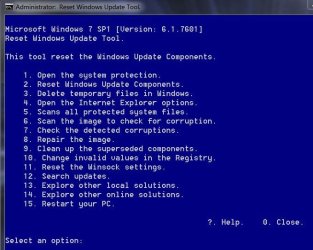
How do you fix corrupted files found by SFC /SCANNOW?

Here's the error sequence from the CBS log...
Code:
2015-10-21 12:08:55, Info                  CBS    Setting RollbackFailed flag to 0
2015-10-21 12:08:55, Info                  CBS    Clearing HangDetect value
2015-10-21 12:08:55, Info                  CBS    Saved last global progress. Current: 0, Limit: 1, ExecuteState: ExecuteStateNone
2015-10-21 12:08:55, Info                  CBS    Exec: Cancelled pending transactions after rollback. [HRESULT = 0x00000000 - S_OK]
2015-10-21 12:08:55, Error                 CBS    Exec: An error occurred while committing the transaction, the transaction could not be rolled back. [HRESULT = 0x80070643 - ERROR_INSTALL_FAILURE]
2015-10-21 12:08:55, Info                  CSI    00000afd@2015/10/21:19:08:55.257 CSI Transaction @0x3bfbb0 destroyed
2015-10-21 12:08:55, Info                  CBS    Perf: InstallUninstallChain complete.
2015-10-21 12:08:55, Info                  CBS    Failed to execute execution chain. [HRESULT = 0x80070643 - ERROR_INSTALL_FAILURE]
2015-10-21 12:08:55, Error                 CBS    Failed to process single phase execution. [HRESULT = 0x80070643 - ERROR_INSTALL_FAILURE]
2015-10-21 12:08:55, Info                  CBS    WER: Generating failure report for package: Microsoft-Windows-Foundation-Package~31bf3856ad364e35~amd64~~6.1.7601.17514, status: 0x80070643, failure source: Execute, start state: Installed, target state: Installed, client id: Windows Optional Component Manager
2015-10-21 12:08:55, Info                  CBS    Failed to query DisableWerReporting flag.  Assuming not set... [HRESULT = 0x80070002 - ERROR_FILE_NOT_FOUND]
2015-10-21 12:08:55, Info                  CBS    Failed to add %windir%\winsxs\pending.xml to WER report because it is missing.  Continuing without it...
2015-10-21 12:08:55, Info                  CBS    Failed to add %windir%\winsxs\pending.xml.bad to WER report because it is missing.  Continuing without it...
2015-10-21 12:08:55, Info                  CBS    Reboot mark refs: 0
2015-10-21 12:08:55, Info                  CBS    SQM: Reporting selectable update change for package: Microsoft-Windows-NetFx3-OC-Package~31bf3856ad364e35~amd64~~6.1.7601.17514, update: NetFx3, start: Installed, applicable: Staged, target: Staged, client id: Windows Optional Component Manager, initiated offline: False, execution sequence: 844, first merged sequence: 844
2015-10-21 12:08:55, Info                  CBS    SQM: Upload requested for report: UpdateChange_NetFx3_Microsoft-Windows-NetFx3-OC-Package~31bf3856ad364e35~amd64~~6.1.7601.17514, session id: 142860, sample type: Standard
2015-10-21 12:08:55, Info                  CBS    SQM: Ignoring upload request because the sample type is not enabled: Standard
2015-10-21 12:08:55, Info                  CBS    SQM: Reporting package change for package: Microsoft-Windows-NetFx3-OC-Package~31bf3856ad364e35~amd64~~6.1.7601.17514, current: Installed, pending: Default, start: Installed, applicable: Installed, target: Installed, limit: Installed, hotpatch status: DisabledBecauseNoHotpatchPackagesInitiated, status: 0x0, failure source: Execute, reboot required: False, client id: Windows Optional Component Manager, initiated offline: False, execution sequence: 844, first merged sequence: 844
2015-10-21 12:08:55, Info                  CBS    Failed to get IVssSnapshotMgmt interface. [HRESULT = 0x8007043c - ERROR_NOT_SAFEBOOT_SERVICE]
2015-10-21 12:08:55, Info                  CBS    SQM: Warning: Failed to get System Restore max diff area. The data won't be available. [HRESULT = 0x8007043c - ERROR_NOT_SAFEBOOT_SERVICE]
2015-10-21 12:08:55, Info                  CBS    SQM: Upload requested for report: PackageChangeBegin_Microsoft-Windows-NetFx3-OC-Package~31bf3856ad364e35~amd64~~6.1.7601.17514, session id: 142859, sample type: Standard
2015-10-21 12:08:55, Info                  CBS    SQM: Ignoring upload request because the sample type is not enabled: Standard
2015-10-21 12:08:55, Info                  CBS    SQM: Reporting package change completion for package: Microsoft-Windows-NetFx3-OC-Package~31bf3856ad364e35~amd64~~6.1.7601.17514, current: Installed, original: Installed, target: Installed, status: 0x80070643, failure source: Execute, failure details: "(null)", client id: Windows Optional Component Manager, initiated offline: False, execution sequence: 844, first merged sequence: 844
2015-10-21 12:08:55, Info                  CBS    SQM: execute time performance datapoint is invalid. [HRESULT = 0x80070490 - ERROR_NOT_FOUND]
2015-10-21 12:08:55, Info                  CBS    SQM: Upload requested for report: PackageChangeEnd_Microsoft-Windows-NetFx3-OC-Package~31bf3856ad364e35~amd64~~6.1.7601.17514, session id: 142862, sample type: Standard
2015-10-21 12:08:55, Info                  CBS    SQM: Ignoring upload request because the sample type is not enabled: Standard
2015-10-21 12:08:55, Info                  CBS    Enabling LKG boot option
2015-10-21 12:08:55, Info                  CBS    Restored system sleep block state: 0x80000000
2015-10-21 12:08:55, Info                  CBS    Client aborted the install. [HRESULT = 0x800f0821 - CBS_E_ABORT]
2015-10-21 12:08:55, Info                  CBS    Exec: Processing complete.  Session: 30477363_3653006544, Package: Microsoft-Windows-Foundation-Package~31bf3856ad364e35~amd64~~6.1.7601.17514 [HRESULT = 0x80070643 - ERROR_INSTALL_FAILURE]
2015-10-21 12:08:55, Error                 CBS    Failed to perform operation.  [HRESULT = 0x80070643 - ERROR_INSTALL_FAILURE]
2015-10-21 12:08:55, Info                  CBS    Session: 30477363_3653006544 finalized. Reboot required: no [HRESULT = 0x80070643 - ERROR_INSTALL_FAILURE]
2015-10-21 12:08:55, Error                 CBS    Attempt to change a finalized session [HRESULT = 0x800f0842 - CBS_E_SESSION_FINALIZED]

It's not one I recall seeing before - so I'll have t do some research before making any guesses!

There's no obvious corruption visible in the Components hive in a quick scan.

I'll try and delve a bit deeper tomorrow and come back to you.
 

My Computer My Computer

At a glance

Win 7 x64 Home Premium (and x86 VirtualBox VM...i3 370M/i7 6500U8GB - finally :)/8GBit's an i3, dude!/dual Intel&nVidia
Computer type
Laptop
Computer Manufacturer/Model Number
Asus K52F or Lenovo B51-80
OS
Win 7 x64 Home Premium (and x86 VirtualBox VM)/Win10
CPU
i3 370M/i7 6500U
Motherboard
Asus/Lenovo
Memory
8GB - finally :)/8GB
Graphics Card(s)
it's an i3, dude!/dual Intel&nVidia
Sound Card
onboard
Monitor(s) Displays
15.6" built-in
Screen Resolution
1366x768/1920x1080
Hard Drives
750GB Seagate internal
Sundry external drives attached to other computers on the local network
1TB SSD on the Lenovo
PSU
n/a
Internet Speed
as much as I can get - usually on a dongle/phone, so <1MB/s
Antivirus
MSE/Defender
Browser
IE11/12/Edge/Chrome/FF(if I must)
did you forget about me?
 

My Computer My Computer

At a glance

Windows 7 Ultimate x64AMD FX 9590Corsair 1600MHz DDR3 8GBEVGA GTX 980 SC ACX 2.0
Computer type
PC/Desktop
Computer Manufacturer/Model Number
Custom Build
OS
Windows 7 Ultimate x64
CPU
AMD FX 9590
Motherboard
ASUS Crosshair Formula-Z
Memory
Corsair 1600MHz DDR3 8GB
Graphics Card(s)
EVGA GTX 980 SC ACX 2.0
Sound Card
Built in Sound: SupremeFX III
Monitor(s) Displays
Element 50" TV
Screen Resolution
1920x1080
Hard Drives
Corsair Force LX SSD 256GB - Main Drive
Seagate ST2000DM001 1GB - Games Install Drive
Western Digital WD10EARS 2GB - Storage Drive
PSU
Corsair AX860
Case
Thor v2
Cooling
CoolMaster V8 GTS
Keyboard
Genius K9
Mouse
Genius DeathTaker
Internet Speed
TWC 300Mbps
Antivirus
Microsoft Defender
Browser
Chrome
Other Info
Upgrades I am getting in a few months:

2 GTX980 for tri SLI Performance
16GB DDR3 Corsair Vengeance Pro (2stick) 2400MHz
Corsair AX1500i PSU
Logitech G502 Mouse
Logitech G510 Keyboard
Genius GX Gaming 5.1 Speakers
Noel is a bit under the weather so his responses will come a little slower.
 

My Computer My Computer

At a glance

Windows 10 Pro. 64/ version 1709 Windows 7 Pr...Intel i7-6800K @ 4.3Corsair Platinum 16 gig @2400EVGA GTX 1070 OC
Computer type
PC/Desktop
Computer Manufacturer/Model Number
Home made Desktop
OS
Windows 10 Pro. 64/ version 1709 Windows 7 Pro/64
CPU
Intel i7-6800K @ 4.3
Motherboard
ASUS X-99 Deluxe II
Memory
Corsair Platinum 16 gig @2400
Graphics Card(s)
EVGA GTX 1070 OC
Monitor(s) Displays
Asus 27" LED LCD/VE278Q
Screen Resolution
1920-1080 or 1280-720 HDMI
Hard Drives
INTEL SSD 730-240 Gb Sata 3.0/
PSU
EVGA Platium 1200W
Case
Phanteks Luxe Tempered Glass 8 fans/ one radiator
Cooling
XSPC/ Water Cooled CPU
Keyboard
Das 4 Professional
Mouse
Logitech M705/MX Anywhere 2-S
Internet Speed
100 mbits
Antivirus
Microsoft Security Essentials/ Malwarebytes Premium 3.0/ SAS
Browser
I.E. 11 default/Firefox/ ISP Time Warner Cable/Spectrum
Other Info
LG BluRay Burner/
Sound system-KLipsch-THX/
Icy Dock ssd Hot Swap bays.
I think I may have been looking at the wrong error :(
The sequence above shows failure apparently because the system was being booted to Safe Mode rather than normal mode?

I'm going to have to delve into the logs again and see if I can find something else that's more relevant.
(Sorry about the wait - it's just that my eyesight is deteriorating rather rapidly at present, which makes it difficult to concentrate on anything visual :( )
 

My Computer My Computer

At a glance

Win 7 x64 Home Premium (and x86 VirtualBox VM...i3 370M/i7 6500U8GB - finally :)/8GBit's an i3, dude!/dual Intel&nVidia
Computer type
Laptop
Computer Manufacturer/Model Number
Asus K52F or Lenovo B51-80
OS
Win 7 x64 Home Premium (and x86 VirtualBox VM)/Win10
CPU
i3 370M/i7 6500U
Motherboard
Asus/Lenovo
Memory
8GB - finally :)/8GB
Graphics Card(s)
it's an i3, dude!/dual Intel&nVidia
Sound Card
onboard
Monitor(s) Displays
15.6" built-in
Screen Resolution
1366x768/1920x1080
Hard Drives
750GB Seagate internal
Sundry external drives attached to other computers on the local network
1TB SSD on the Lenovo
PSU
n/a
Internet Speed
as much as I can get - usually on a dongle/phone, so <1MB/s
Antivirus
MSE/Defender
Browser
IE11/12/Edge/Chrome/FF(if I must)
See if you have any of these installed, if so uninstall them, then hide them when they pop back up in windows update.
Right click the update to hide it.

KB2876229 SKYPE
KB2923545
KB2970228
KB2977728
KB2978092
KB2994023
KB3022345
KB3035583
KB2990214
KB3021917
KB2952664

Thanks for the above list- I found and uninstalled 6 of them and now my machine no longer nags me to "upgrade" to Windows 10! YAY! Also, SFC now runs without errors!

However, Windows Update still tries to push Windows 10 on me via the Optional Updates list even though I have explicitly hidden that "update" at least 8-10 times. In their arrogance, they even pre-check the "Install Windows 10" box for me. How kind of them. :mad: Based on them stooping so low as to try to trick users into installing Win 10 by pre-checking the box and unhiding the "update," I am convinced that there is a financial reason why MS is giving Windows 10 away and pushing it so hard as to be truly obnoxious, not to mention shamefully devious, about it. I just haven't figured out what that plot is yet.

It is truly scary to me that Microsoft:
1. Releases and "Recommends" updates that cause harm to their customers' machines; and
2. Mandates that the next Windows version will install all published updates whether customers like it or not.

"Free upgrade" or not, I'm staying with Win 7 as long as I possibly can, then I'll probably look for an alternative to Windows.
 

My Computer My Computer

At a glance

Windows 7 Home Premium 64 BitIntel Core i5 3570K16GB Corsair DDR3 1600 +Gigabyte GV-N970WF3OC-4GD (GEForce GTX 970)
Computer type
PC/Desktop
Computer Manufacturer/Model Number
Custom Build
OS
Windows 7 Home Premium 64 Bit
CPU
Intel Core i5 3570K
Motherboard
ASRock Z77 Extreme 4/A/ASR
Memory
16GB Corsair DDR3 1600 +
Graphics Card(s)
Gigabyte GV-N970WF3OC-4GD (GEForce GTX 970)
Hard Drives
WD 1TB SATA 6GB
Seagate 2TB SATA 6GB
ADATA 64GB SSD SATA 6GB (System Drive)
Antivirus
Emsisoft Anti-Malware; Malwarebytes; Bitdefender
Browser
Firefox
1. From the site "https://support.microsoft.com/en-us/kb/929833":
"The sfc /scannow command will scan all protected system files, and replace corrupted files with a cached copy that is located in a compressed folder at %WinDir%\System32\dllcache."

2. I ran sfc /scannow and then the findstr command. I think all was good except the following lines:

015-12-03 03:05:31, Info CSI 00000353 [SR] Cannot repair member file [l:24{12}]"utc.app.json" of Microsoft-Windows-Unified-Telemetry-Client, Version = 6.1.7601.18869, pA = PROCESSOR_ARCHITECTURE_AMD64 (9), Culture neutral, VersionScope = 1 nonSxS, PublicKeyToken = {l:8 b:31bf3856ad364e35}, Type neutral, TypeName neutral, PublicKey neutral in the store, hash mismatch
2015-12-03 03:05:31, Info CSI 00000355 [SR] Cannot repair member file [l:66{33}]"telemetry.ASM-WindowsDefault.json" of Microsoft-Windows-Unified-Telemetry-Client, Version = 6.1.7601.18869, pA = PROCESSOR_ARCHITECTURE_AMD64 (9), Culture neutral, VersionScope = 1 nonSxS, PublicKeyToken = {l:8 b:31bf3856ad364e35}, Type neutral, TypeName neutral, PublicKey neutral in the store, hash mismatch
2015-12-03 03:05:31, Info CSI 00000357 [SR] Cannot repair member file [l:24{12}]"utc.app.json" of Microsoft-Windows-Unified-Telemetry-Client, Version = 6.1.7601.18869, pA = PROCESSOR_ARCHITECTURE_AMD64 (9), Culture neutral, VersionScope = 1 nonSxS, PublicKeyToken = {l:8 b:31bf3856ad364e35}, Type neutral, TypeName neutral, PublicKey neutral in the store, hash mismatch
2015-12-03 03:05:31, Info CSI 00000358 [SR] This component was referenced by [l:162{81}]"Package_250_for_KB3068708~31bf3856ad364e35~amd64~~6.1.1.0.3068708-814_neutral_GDR"
2015-12-03 03:05:31, Info CSI 0000035a [SR] Cannot repair member file [l:66{33}]"telemetry.ASM-WindowsDefault.json" of Microsoft-Windows-Unified-Telemetry-Client, Version = 6.1.7601.18869, pA = PROCESSOR_ARCHITECTURE_AMD64 (9), Culture neutral, VersionScope = 1 nonSxS, PublicKeyToken = {l:8 b:31bf3856ad364e35}, Type neutral, TypeName neutral, PublicKey neutral in the store, hash mismatch
2015-12-03 03:05:31, Info CSI 0000035b [SR] This component was referenced by [l:162{81}]"Package_250_for_KB3068708~31bf3856ad364e35~amd64~~6.1.1.0.3068708-814_neutral_GDR"
2015-12-03 03:05:31, Info CSI 0000035e [SR] Repair complete
2015-12-03 03:05:31, Info CSI 0000035f [SR] Committing transaction
2015-12-03 03:05:31, Info CSI 00000363 [SR] Verify and Repair Transaction completed. All files and registry keys listed in this transaction have been successfully repaired.


3. I cannot find the "dllcache" folder on the C: drive on either my tower (Windows 7 64 bit Professional) or my laptop (Windows 7 64 bit Ultimate).

4. Does the "dllcache" folder have a different name?

5. For manually correcting the problem Microsoft says to copy the file from a system where the file is not corrupted or missing. Can I copy the file from my laptop (Ultimate) to my tower (Professional) or are the files different versions?
 

My Computer My Computer

At a glance

Windows 7 64 bit Professionali7-4770K32GBEVGA NVidia Geforce GTX 980Ti
Computer type
PC/Desktop
Computer Manufacturer/Model Number
Powerspec G400
OS
Windows 7 64 bit Professional
CPU
i7-4770K
Motherboard
AsRock Z87 Extreme 3
Memory
32GB
Graphics Card(s)
EVGA NVidia Geforce GTX 980Ti
Hard Drives
120 GB ssd (C:), 2 TB (D:), 4 TB (H:, I:, J:), 1 TB (K:), 1 TB (M:),
4TB (M:). DVD, BluRay-BE
Antivirus
BitDefender Total Security 2015; MalwareBytes Anti-Malware
Browser
Firefox vers 42.0 (as of 3 Dec 2015)
Brand new install of Windows 7 and after installing Windows update KB3022345 I received this issue with SFC. Microsoft really needs to fix this issue. Luckily it is an optional update so I can choose to not install it. I will not be disabling auto updates and not installing any updates as some users have suggested. You don't fix a problem by creating new ones.
Thanks to everyone that got to the bottom of this and found the offending update. Good work :party:

I just wanted to say thanks to you and the others who realized those two updates were why my SFC scans weren't coming up clean like they normally do. I thought it was because I disabled numerous windows services I don't use but it was those two damn updates.

Sadly, MS keeps rolling bad updates out, most have to do with Windows 10 but don't say they do. I try to look them up before I install them, and they are listed as important at times, but sometimes one sneaks through.

Wish they gave us an option to just block all updates to do with Windows 10 because I have no intention of upgrading until I build a new pc, which may not be for another 2 years.
 

My Computer My Computer

At a glance

Windows 7 64bitI5 2300 Sandy Bridge 2.80ghz4gb DDR3 PatriotNvidia GTS 450
Computer type
PC/Desktop
Computer Manufacturer/Model Number
Custom Build
OS
Windows 7 64bit
CPU
I5 2300 Sandy Bridge 2.80ghz
Motherboard
Asus P8P67 LE
Memory
4gb DDR3 Patriot
Graphics Card(s)
Nvidia GTS 450
Sound Card
Realtek Integrated Audio
Screen Resolution
1920x1080
Hard Drives
C: Seagate 500GB (Primary
D: Western Digital Black (Secondary)
Case
Antec Two Hundred
Cooling
1 120MM rear case fan, 1 140mm top of the case fan
Antivirus
Eset 5
Browser
Chrome
hello Deviancy,

There are good way's to block these updates for Windows 10 on this forum.

Have a look at this: Ultimate Outsider - Software Downloads

See if that works for you
 

My Computer My Computer

At a glance

windows 7 professional 64 bitCPU Genuine Intel (R) CPU [email protected]RAM 3 GBToshiba MK2555 GSX ATA
Computer type
Laptop
Computer Manufacturer/Model Number
HP Presario CQ70
OS
windows 7 professional 64 bit
CPU
CPU Genuine Intel (R) CPU [email protected]
Motherboard
APCI x 64 - based PC
Memory
RAM 3 GB
Graphics Card(s)
Toshiba MK2555 GSX ATA
Sound Card
Conexant High Def Smart Audio 221,
Monitor(s) Displays
monitor Generic PnP.
Screen Resolution
?
Hard Drives
HDAUDIO Soft Data Fax Modern with smart CP
PSU
?
Keyboard
Standard PS/2 keyboard
Mouse
PS/2 Compatible mouse
Antivirus
Hyjackthis and Superanti spyware, Mamb Ccleaner
Browser
Google Chrome
My pc does the same thing when i update to Windows 10 from Windows 8.1 pro.
 

Attachments

My Computer My Computer

At a glance

Windows 8.1 Pro x64Intel i3-324016GB Corsair VengeanceNvidia GeForce
Computer type
PC/Desktop
Computer Manufacturer/Model Number
custom build
OS
Windows 8.1 Pro x64
CPU
Intel i3-3240
Memory
16GB Corsair Vengeance
Graphics Card(s)
Nvidia GeForce
Browser
Google Chome
Errors on SFC but Details said is OK

Hello,
My PC drives me crazy since the last month or so.
Slow boot ,3-5 minutes, slow start of the programs, many times a program or a right click in a file end up in "Program not responding", and i have to use task manager.
I checked for Malware with MalwareBytes Pro, but no infection.
I checked for virus with Panda free but no virus.
I tried to install Kaspersky or Webroot, the trial version but never installed.
Installation starts , then get stuck and i have to kill it.
As a last resort, i tried SFC. First i do not know how to read that long file. I did what was posted by others and end up with a sfcdetails, but i do not see where is the issue.
SFC report at the end, errors not fixed, but where and how to fix them.
Please help, as i am at the end of the rope and my PC is my bread and butter.
I program microprocessors for clients which needs me.
Thank you
Ion
 

Attachments

My Computer My Computer

At a glance

xp , vista
OS
xp , vista
Good afternoon,
I'm also having issues with files that cannot be fixed. I have attached my sfc detail log. I would appreciate it someone could take a look at it and help me resolve this issue. Thanks again!
Tom
 

Attachments

My Computer My Computer

At a glance

Windows 8.1 Home 64 bitIntel i3
Computer type
PC/Desktop
Computer Manufacturer/Model Number
Intel NUC
OS
Windows 8.1 Home 64 bit
CPU
Intel i3
Hello.
Having read your forum, I also have a problem, and do not have the installation disk.
Would you be so kind to help me resolve this problem?
I thank you in advance.
Please find the scan log enclosed.
Regards, MarkmBha
 

Attachments

My Computer My Computer

At a glance

Windows 7 Ultimate.
Computer type
Laptop
Computer Manufacturer/Model Number
HP G6
OS
Windows 7 Ultimate.
Antivirus
Norton Security
Browser
IE 11/Chrome/Msn Explorer/Firefox
I know this thread is old....

Hello all.

Glad I found this... I have multiple machines running 7, 8 and 10

current machine had 7 upgraded to 10 and recently came back from Lenovo running, but Outlook isn't working and I get a MAPI can't find emsmdb.32.dll well worked on that for a little bit and discovered the whole MAPI folder is missing, it won't even open the Mail in Control Panel.

so I ran a sfc /scannow
it came back with errors but couldn't repair.

Love the script to look at the detailed log. I see it has an issue with the opencl.dll -can't repair.
working on that now....


So, does the fact that I upgraded this to 10 disqualify me from asking for assistance here? I am sure that if it does, when I have a question on windows 7 I'll check here first.
Also I know this thread is old... got off subject a little and came back around... So am I wrong to keep it alive, it does have some good information.
 

My Computer My Computer

At a glance

Multiple machines
Computer type
PC/Desktop
OS
Multiple machines

My Computer My Computer

At a glance

Windows 10 Pro x64Intel Core i7 6700KGSkill TridentZ RGB 16GB 3600 16-16-16-36EVGA GTX 980 Ti SC x2
Computer type
PC/Desktop
Computer Manufacturer/Model Number
Skylake Special #666
OS
Windows 10 Pro x64
CPU
Intel Core i7 6700K
Motherboard
Asus Sabertooth Z170 Mark 1
Memory
GSkill TridentZ RGB 16GB 3600 16-16-16-36
Graphics Card(s)
EVGA GTX 980 Ti SC x2
Sound Card
Realtek High Definition
Monitor(s) Displays
AOC G2460PG
Screen Resolution
1920 x 1080 144Hz
Hard Drives
Samsung 860 Pro 256GB, Seagate Barracuda 4TB x2
PSU
EVGA 1000 P2, EVGA White Custom Braided Cables
Case
Corsair Vengeance C70 Gunmetal Black
Cooling
Corsair H100i v2, Corsair ML120 x2, Thermal Grizzly Kryonaut
Keyboard
Logitech G910 Orion Spectrum
Mouse
Logitech G700s
Internet Speed
Verizon Fios Quantum Gateway 75/75
Antivirus
Windows Defender, Malwarebytes Free 3.8.3
Browser
Chrome
Other Info
Corsair SP120 x4, LG Blu-ray Drive, Durabrand HT-395 100 Watt Dolby Digital Amp, Corsair H2100 Wireless 7.1 Headset

My Computer My Computer

At a glance

Win-7-Pro64bit 7-H-Prem-64biti7-5930K 2nd i9-9940x both water blocked VRM'...Trident-z 3200C14 2nd Trident-z 3600C16EVGA 1080ti ftw3 2nd Titan Xp both water blocked
Computer type
PC/Desktop
Computer Manufacturer/Model Number
Custom assembled by me :}
OS
Win-7-Pro64bit 7-H-Prem-64bit
CPU
i7-5930K 2nd i9-9940x both water blocked VRM's too
Motherboard
ASUS SABERTOOTH X99 2nd ASUS x299 Apex
Memory
Trident-z 3200C14 2nd Trident-z 3600C16
Graphics Card(s)
EVGA 1080ti ftw3 2nd Titan Xp both water blocked
Sound Card
Built-in Realtek
Monitor(s) Displays
1-AOC G2460PG 24"G-Sync 144Hz/ 2nd 1-ASUS VG248QE 24" 144Hz
Screen Resolution
1920 x 1080 144Hz
Hard Drives
2-Samsung M.2 Evo & Evo Plus
2-Samsung 850 EVO 500GB SSD's/ 3-2.5 W.D. Black 1tb-&3-1tb/3-3.5 WD Black 1tb hdd's
PSU
EVGA SuperNOVA 1000-P2 2nd 1200-P2
Case
2-Corsair Obsidian Series 450D Black ATX Mid Tower
Cooling
Custom water loops
Keyboard
Logitech G710+/ 2nd Logitech G910
Mouse
2-RedDragon M901 Perdition 16400 dpi Gaming mouse = wired
Internet Speed
Comcast Ping 19ms 89.31mbps download speed 6.12mbps upload
Antivirus
Malwarebytes Pro/ Superantispyware Pro
Browser
FireFox & Pale moon
Other Info
2nd ASUS X299 Apex/Intel i9-9940x with Custom water loop/7H-Prem-x64/Corsair 450D case/Ram Trident-z 3600C16 4x8gb / Samsung970Evo plus 500gb SSD/Dual ssd EZ swap evo/PSU EVGA SuperNova 1200w-P2 80+Platinum/GPU Titan Xp /8-ML-140 on push-pull on 2-280GTX rads
Hi KitrKat,
W10 has had some problems in this area,
have a read here
Microsoft Community

Roy
 

My Computer My Computer

At a glance

W7 home premium 32bit/W7HP 64bit/w10 tp insid...E5300 dual core3gbNvidia Geforce 7100 Nforce 630i
Computer type
PC/Desktop
Computer Manufacturer/Model Number
medionl/Aspire 6930G/acer x55a
OS
W7 home premium 32bit/W7HP 64bit/w10 tp insider ring
CPU
E5300 dual core
Motherboard
medion MS7366
Memory
3gb
Graphics Card(s)
Nvidia Geforce 7100 Nforce 630i
Monitor(s) Displays
avixc
Internet Speed
n (isp resticted to 72)
Antivirus
mse/pands
Browser
palemoon
Other Info
Belkin Fd7050 n USB using Railink RT2870 drivers, more upto date
I m going through the same issues with my laptop but I can see already that this is the place to be for advice. I have a little work to do before I present any questions but you people are incredible, outstanding level of assistance....
 

My Computer My Computer

At a glance

Win7 PRO 64-bit (laptop)i5 2520m4GB
Computer type
Laptop
Computer Manufacturer/Model Number
HP EliteBook 2760P
OS
Win7 PRO 64-bit (laptop)
CPU
i5 2520m
Memory
4GB
Hard Drives
120gb ssd
Antivirus
Norton
Browser
IE
back from the grave

Sorry to bring back alive. I have attached cbs.log file. can you review and let me know what i should do to fix my same issue?

Thanks

Hi Bill,

Before we begin I just wanted to mention something Gary touched on. I'm currently a student doing a Maths degree and have 4 crucial exams coming up, of which my first is on the 13th, so my time is very limited at the moment and I might not be able to post much (once a day minimum), but I will get you up and running again! So just hang in there and we'll fix this as soon as possible! If you haven't heard from me in a while, feel free to shoot me a PM to remind me - at the last count, I have 24 tabs open that I need to reply to so it's quite easy to lose one in the mix.

Hmm, strangely in all 653,711 lines of your last CBS.log I can't see any sign of SFC being run so let's run it again (now redundant) and get a new log:

SFC Scan

  1. Click on the Start
    Start%20Orb.jpg
    button and in the search box, type Command Prompt
  2. When you see Command Prompt on the list, right-click on it and select Run as administrator
  3. When command prompt opens, copy and paste the following commands into it, press enter after each

    del %windir%\Logs\CBS\CBS.log

    sfc /scannow

    Wait for this to finish before you continue

    copy %windir%\logs\cbs\cbs.log %userprofile%\Desktop\cbs.txt
  4. This will create a file, cbs.txt on your Desktop. Please zip it up and attach this to your next post.

Tom
 

My Computer My Computer

At a glance

windows 7 pro x64 sp1AMD A8 5500crucial ballistic 8gbnone
Computer type
PC/Desktop
Computer Manufacturer/Model Number
custom
OS
windows 7 pro x64 sp1
CPU
AMD A8 5500
Motherboard
ASRock
Memory
crucial ballistic 8gb
Graphics Card(s)
none
Hard Drives
Scandisk ssd
Antivirus
avg
Browser
chrome
The end of your CBS log shows the following error...
Code:
2017-07-17 20:36:21, Info                  CSI    00000226 [SR] Beginning Verify and Repair transaction
2017-07-17 20:36:22, Error                 CSI    00000227 (F) STATUS_FILE_IS_A_DIRECTORY #5614704# from Windows::Rtl::SystemImplementation::DirectFileSystemProvider::SysCreateFile(flags = (AllowFileNotFound|AllowSharingViolation|AllowAccessDenied), handle = {provider=NULL, handle=0}, da = (SYNCHRONIZE|FILE_READ_ATTRIBUTES|FILE_READ_DATA), oa = @0xc9d110->OBJECT_ATTRIBUTES {s:48; rd:NULL; on:[131]"\SystemRoot\WinSxS\amd64_security-malware-windows-defender-events_31bf3856ad364e35_6.1.7600.16385_none_118cf1dcd54a3dea\MpEvMsg.dll"; a:(OBJ_CASE_INSENSITIVE)}, iosb = @0xc9d1c0, as = (null), fa = 0, sa = (FILE_SHARE_READ|FILE_SHARE_WRITE|FILE_SHARE_DELETE), cd = FILE_OPEN, co = (FILE_NON_DIRECTORY_FILE|FILE_SYNCHRONOUS_IO_NONALERT), eab = NULL, eal = 0, disp = Invalid)
[gle=0xd00000ba]
2017-07-17 20:36:22, Error                 CSI    00000228@2017/7/18:00:36:22.719 (F) d:\w7rtm\base\wcp\sil\merged\ntu\ntsystem.cpp(2057): Error STATUS_FILE_IS_A_DIRECTORY originated in function Windows::Rtl::SystemImplementation::DirectFileSystemProvider::SysCreateFile expression: (null)
[gle=0x80004005]
2017-07-17 20:36:23, Error                 CSI    00000229 (F) STATUS_FILE_IS_A_DIRECTORY #5614703# from Windows::Rtl::SystemImplementation::CDirectory::OpenExistingFile(...)[gle=0xd00000ba]
2017-07-17 20:36:23, Error                 CSI    0000022a (F) STATUS_FILE_IS_A_DIRECTORY #5614702# from Windows::Rtl::SystemImplementation::CDirectory_IRtlDirectoryTearoff::OpenExistingFile(flags = (MissingFileIsOk|SharingViolationIsOk|AccessDeniedIsOk), da = (SYNCHRONIZE|FILE_READ_DATA), oa = @0xc9d7b8->SIL_OBJECT_ATTRIBUTES {s:40; on:"MpEvMsg.dll"; a:(OBJ_CASE_INSENSITIVE)}, sa = (FILE_SHARE_READ|FILE_SHARE_WRITE|FILE_SHARE_DELETE), oo = (FILE_SYNCHRONOUS_IO_NONALERT|FILE_NON_DIRECTORY_FILE), file = NULL, disp = Invalid)
[gle=0xd00000ba]
This is a complex error, but means that where SFC is looking for a file, it's actually finding what looks like a folder.

In the few cases that I've seen of this, the error is itself the tip of a rather large iceberg.

You may well find that the quickest solution is going to be a repair install.
 

My Computer My Computer

At a glance

Win 7 x64 Home Premium (and x86 VirtualBox VM...i3 370M/i7 6500U8GB - finally :)/8GBit's an i3, dude!/dual Intel&nVidia
Computer type
Laptop
Computer Manufacturer/Model Number
Asus K52F or Lenovo B51-80
OS
Win 7 x64 Home Premium (and x86 VirtualBox VM)/Win10
CPU
i3 370M/i7 6500U
Motherboard
Asus/Lenovo
Memory
8GB - finally :)/8GB
Graphics Card(s)
it's an i3, dude!/dual Intel&nVidia
Sound Card
onboard
Monitor(s) Displays
15.6" built-in
Screen Resolution
1366x768/1920x1080
Hard Drives
750GB Seagate internal
Sundry external drives attached to other computers on the local network
1TB SSD on the Lenovo
PSU
n/a
Internet Speed
as much as I can get - usually on a dongle/phone, so <1MB/s
Antivirus
MSE/Defender
Browser
IE11/12/Edge/Chrome/FF(if I must)
Back
Top