How do you make a modified footnote style the default in a template?

Bubbles0125

New member
Local time
10:32 PM
Messages
1
Hi I am using Word 2010 on a Windows 7 pc. I have created a template and I want to have the footnotes that are typed in the document to appear differently from the default footnote style. I created a modified footnote style within the template and it appears in the ribbon when the template is run. When you apply the style to the first footnote, it appears as I expect it to, but if you create footnotes on the following pages, they go back to "no" style. How can I have my modified template footnote style appear throughout the entire document without having to apply it in each instance? I don't normally use styles so I am not sure if what I am doing is right at all. Thanks in advance for any help.
 

My Computer My Computer

At a glance

Windows 7 32 bit
Computer type
PC/Desktop
Computer Manufacturer/Model Number
Lenovo ThinkCentre
OS
Windows 7 32 bit
Hi Bubbles0125, welcome to the Forum.

When you modify the template to the style that you want, are you saving it as a New Word Template?.

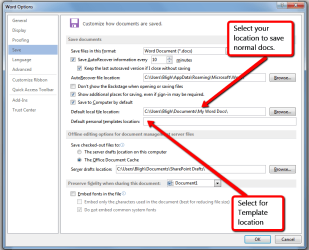
When you modify the template that you are referring to it saves it for that particular one, but it does not change the template permanently. So if you save it as a new template, then that formatting will be saved for use with that template whenever you use it. When you save the template give it a name that suits you & store it in a folder in your Documents Library that could be called Word Templates or something like that. The screen shot below might help you as well.

I don't use templates in Word, but I do in Excel & I have a few saved Excel templates that I use for certain spreadsheets that are laid out the way I want them. In order to be able to find those templates I have a folder in my Documents Library called Excel Spreadsheet Templates.

In Word 2013 you can select where you want Word Templates saved to. Word 2010 should be very similar.

Word_saving_file_&_template_location.png
 

My Computer My Computer

At a glance

Windows 7 Home Premium 64 bit sp1Intel i5 3570 3.4Ghz Ivy Bridge SKT 1155 quad...G-Skill Rip Jaws 16Gb (8x2) DDR3 -1600 PC3 12...Gigabyte NVIDIA GT610 1Gb DDR3 810/1200 PCI-E...
Computer type
PC/Desktop
Computer Manufacturer/Model Number
Self built using existing case
OS
Windows 7 Home Premium 64 bit sp1
CPU
Intel i5 3570 3.4Ghz Ivy Bridge SKT 1155 quad core
Motherboard
Gigabyte Z77-HD3 SKT 1155 2xSata 3, 4x USB 3.0
Memory
G-Skill Rip Jaws 16Gb (8x2) DDR3 -1600 PC3 12800 CL 10 red
Graphics Card(s)
Gigabyte NVIDIA GT610 1Gb DDR3 810/1200 PCI-E 2.0 Silent
Sound Card
NVIDIA High Definition & Realtech High Definition Audio
Monitor(s) Displays
2 x Philips 226V4L 16:9 aspect ratio
Screen Resolution
1920 x 1080 HD
Hard Drives
Samsung 840 Pro 256gb SSD, SATA 3.
Hitachi Touro Portable 1tb, USB 3.0 HDD used for image b/ups.
PSU
Corsair VS450
Case
Codeng
Cooling
PSU fan & CPU fan
Keyboard
Logitech
Mouse
Logitech Wireless trackball M570
Internet Speed
Wireless 3G. 3mg down & 550kb up.
Antivirus
Bitdefender Internet Security 2020
Browser
Opera (Current Version) & Firefox
Other Info
MS Office 2013 Pro. Davis weather station software. MGE Nova 600 avr UPS.
Back
Top