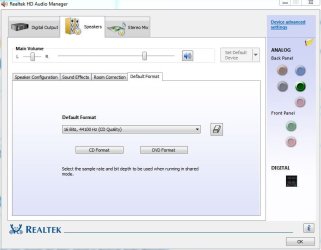
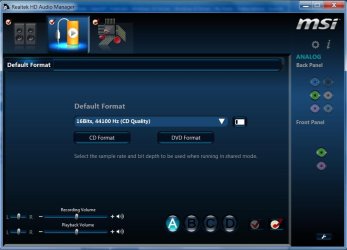
How does one change the kbps speed in RealTek Audio Manager?
I have this setup:
Win 7 Home Premium 64bit, I5, 6GB RAM, and
RealTek HD Audio Manager:
Audio Driver Version:6.0.1.6586
DirectX Version irectX 11.0
Audio Controller:HD Audio
Audio Codec:ALC892
This is what I'm doing:
Right-click on the Realtek HD Audio Manager icon in the system tray. Select "Sound Manager."
Select the "Default Format" tab. Select a sample rate and bit rate from the drop-down menu.
I choose 16Bits, 192,000 Hz.
Click "OK" to close the audio manager(there is no 'OK', I 'X' out the program).
Right-click on the Realtek HD Audio Manager icon again. Select "Sound Recorder."
Press the "Start Recording" button to start recording.
It records at 92kbps, not what I have chosen.
How do I get this to record at the kbps that I choose?
Thanks!
I have this setup:
Win 7 Home Premium 64bit, I5, 6GB RAM, and
RealTek HD Audio Manager:
Audio Driver Version:6.0.1.6586
DirectX Version
irectX 11.0Audio Controller:HD Audio
Audio Codec:ALC892
This is what I'm doing:
Right-click on the Realtek HD Audio Manager icon in the system tray. Select "Sound Manager."
Select the "Default Format" tab. Select a sample rate and bit rate from the drop-down menu.
I choose 16Bits, 192,000 Hz.
Click "OK" to close the audio manager(there is no 'OK', I 'X' out the program).
Right-click on the Realtek HD Audio Manager icon again. Select "Sound Recorder."
Press the "Start Recording" button to start recording.
It records at 92kbps, not what I have chosen.
How do I get this to record at the kbps that I choose?
Thanks!
My Computer
At a glance
Win 7 64 bitI56GBNvidia
- Computer type
- PC/Desktop
- Computer Manufacturer/Model Number
- Custom
- OS
- Win 7 64 bit
- CPU
- I5
- Memory
- 6GB
- Graphics Card(s)
- Nvidia