
Preface
I've installed Windows 7 a billion times, give or take, and have never encountered the infinite 'Checking for Updates' before.
I clean installed Windows 7 Pro 32bit on a rubbish, AMD chipped, laptop. Ran Windows Update, the Windows Update Agent updated, it then showed four important updates and about 16 optional. One of the four important updates was SP1. I installed SP1, when that had completed I ran Windows Update again. Windows Update Agent updated to 7.6.7600.320. Then the infinite 'Checking for Updates' kicked in. It maxes out one CPU core and uses 350-550MB RAM. You can leave it for hours, overnight, and nothing will change.
Repeated all this another two times trying every 'fix' under the sun. Uninstalling SP1 lets the Windows Update check for updates fast, however the only update available is then SP1. Install that and you're back to infinite 'Checking for Updates'...
Maybe it's Windows Update Agent 7.6.7600.320, maybe it's the low-spec laptop speed, who knows, regardless, this is what I did.
Solution
Use WSUS Offline Update. This handy software downloads 'all' the Windows updates and creates an auto-install package for you.
Instructions
Create Update Package:
Install Update Package:
Good luck!
I've installed Windows 7 a billion times, give or take, and have never encountered the infinite 'Checking for Updates' before.
I clean installed Windows 7 Pro 32bit on a rubbish, AMD chipped, laptop. Ran Windows Update, the Windows Update Agent updated, it then showed four important updates and about 16 optional. One of the four important updates was SP1. I installed SP1, when that had completed I ran Windows Update again. Windows Update Agent updated to 7.6.7600.320. Then the infinite 'Checking for Updates' kicked in. It maxes out one CPU core and uses 350-550MB RAM. You can leave it for hours, overnight, and nothing will change.
Repeated all this another two times trying every 'fix' under the sun. Uninstalling SP1 lets the Windows Update check for updates fast, however the only update available is then SP1. Install that and you're back to infinite 'Checking for Updates'...
Maybe it's Windows Update Agent 7.6.7600.320, maybe it's the low-spec laptop speed, who knows, regardless, this is what I did.
Solution
Use WSUS Offline Update. This handy software downloads 'all' the Windows updates and creates an auto-install package for you.
Instructions
Create Update Package:
- I created the update package on another machine, but I don't suppose there's any reason why you can't create it on the target machine
- Download WSUS Offline Update: WSUS Offline Update - Update Microsoft Windows and Office without an Internet connection
- Extract zip file
- Windows Update packages will be downloaded into the folders where you have extracted the zip to
- Run wsusoffline\UpdateGenerator.exe
- I configured it like this:
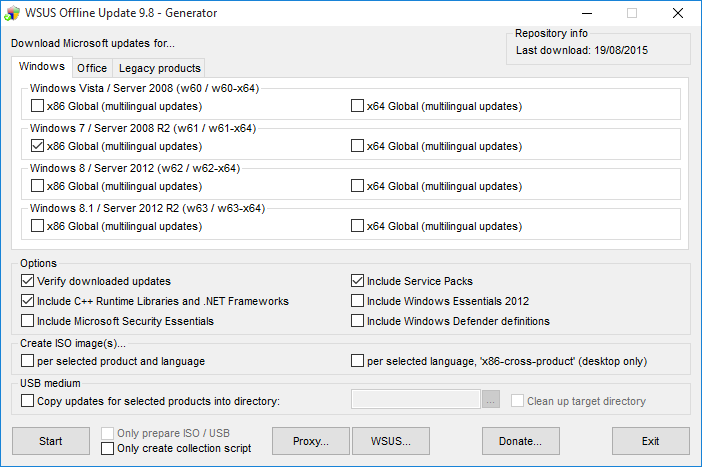
- It downloaded ~2GB of updates
- I then copied the wsusoffline\client folder to a USB stick. (There are options to create an ISO package or USB but I just did it manually)
Install Update Package:
- First I uninstalled Service Pack 1 on the target machine, then set Windows Update to 'Never check for updates'
- I copied the client folder to C:\ on the target machine
- Run C:\client\UpdateInstaller.exe
- I configured it like this:
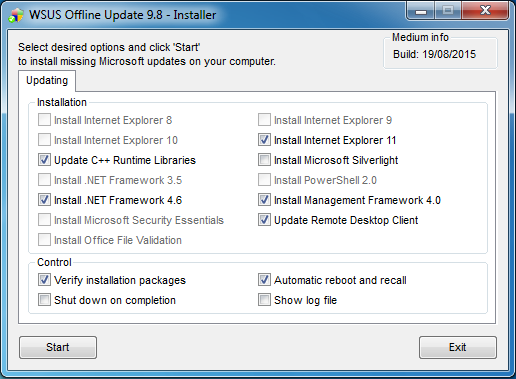
- It set a temporary theme and power plan, which were returned to normal afterwards
- The installer then ran, and did the job flawlessly, auto rebooting when necessary
- At the point where it got to 'Listing ids of missing updates (please be patient, this will take
- a while)...' it took two hours to complete. I suspect this is connected to the infinite 'Checking for Updates' problems. So, just have patience at this point and let it run it's course
- When the installer completed I ran Windows Update. Now the time to check for updates is back to normal. It showed 12 important updates and 56 optional. I installed them all and on the next check was happy to finally see:

Good luck!
My Computer
- Computer type
- PC/Desktop
- OS
- Win 10 Pro 64bit


