How is my build?

Ishraq

New member
Local time
11:21 PM
Messages
95
Hello all, I am new and I have created my second custom PC...
Specs:

Intel Core i7 4820K at 4.60GHz OC
Corsair CX750M PSU
8GB (1X8GB) Corsair DDR3 1600MHz RAM
ASUS RAMPAGE IV BLACK EDITION
Corsair H100i
Zalman Z11 Plus
Seagate 4TB HDD
NVIDIA GTX 750 <---I had to cut costs, if I could I would've got a 780/780ti

Future plans...
Corsair AX1200i PSU
Thermaltake Level 10GT Case
Custom watercooling loop
Dual SLI 780ti (or maybe quad, not sure if it is overkill or not)
256GB SSD (I need good cheap recommendations on this)
Red LED fans (140mm I also need recommendations please on good airflow and low noise)
Gaming keyboard and mouse (recommendations please, preferably with red keys)

Temps:
Idle CPU = 35 degrees
Full load = 45 degrees
Motherboard temp = 31 degrees


Here are some pics, please ignore the bad cable management, as the mobo was a tight squeeze and wire gaps were cut off in some areas.

350kkg1.jpg

102q8pi.jpg

334jcih.jpg

2uqhqg0.jpg

2ytwq5e.jpg

jb0c60.jpg

j59rw8.jpg

b487c2.jpg

1he4ah.jpg

2e0k67k.jpg

352i074.jpg

29o1izp.jpg

Say what you'd like, advise me please oh wise ones of custom builds
 

My Computer

Computer type
PC/Desktop
Computer Manufacturer/Model Number
RandomPC
OS
Windows 7 Ultimate x64
CPU
Intel Core i7 4820K at 4.60GHz
Motherboard
ASUS Rampage IV Black Edition
Memory
Corsair 8GB DDR3 1600MHz
Graphics Card(s)
NVIDIA GTX 750
Hard Drives
Seagate 4TB
Browser
Google Chrome
Welcome to the forum Ishraq.

Nice build with some good hardware.

Because I use the same cpu at 4.6 I recommend watching your cpu temps.
Your Corsair cooler is a great AIO cooler but because I don't use one I don't know if it will handle 4.6 under load.
What do you have your vcore set at.

What method are you using to get your temp readings? What program?
At a 100% load 45C is a great temp if the reading are correct.

I use the newest Real Temp program.
The newest programs are a must with that cpu.

See my System Specs.
 

My Computer

Computer type
PC/Desktop
Computer Manufacturer/Model Number
Home made Desktop
OS
Windows 10 Pro. 64/ version 1709 Windows 7 Pro/64
CPU
Intel i7-6800K @ 4.3
Motherboard
ASUS X-99 Deluxe II
Memory
Corsair Platinum 16 gig @2400
Graphics Card(s)
EVGA GTX 1070 OC
Monitor(s) Displays
Asus 27" LED LCD/VE278Q
Screen Resolution
1920-1080 or 1280-720 HDMI
Hard Drives
INTEL SSD 730-240 Gb Sata 3.0/
PSU
EVGA Platium 1200W
Case
Phanteks Luxe Tempered Glass 8 fans/ one radiator
Cooling
XSPC/ Water Cooled CPU
Keyboard
Das 4 Professional
Mouse
Logitech M705/MX Anywhere 2-S
Internet Speed
100 mbits
Antivirus
Microsoft Security Essentials/ Malwarebytes Premium 3.0/ SAS
Browser
I.E. 11 default/Firefox/ ISP Time Warner Cable/Spectrum
Other Info
LG BluRay Burner/
Sound system-KLipsch-THX/
Icy Dock ssd Hot Swap bays.
Welcome to SF Ishraq. Nice build with quality components. Many great choices for the SSD and the longer you wait the lower the pricing but I still feel the Samsung 840 pro is the choice, so start watching.
 

My Computer

Computer type
PC/Desktop
Computer Manufacturer/Model Number
A blend of brains, brawn and dumb luck.
OS
Windows 7 Ultimate 64
CPU
i7 3770k OC'd 4.6 @ 1.17v, also FX 8120 & i5 miniITX
Motherboard
MSI P67A-GD80 b3
Memory
32 gb G.Skill Sniper DDR3 10-12-12-31 @ 2133
Graphics Card(s)
XFX Radeon 7870 2GB DDR5
Sound Card
Sound Blaster Z Series Card
Monitor(s) Displays
(2) LG LED 23" 1920 x 1080 2ms Monitors via mini d-port
Screen Resolution
1680 X 1050 p
Hard Drives
Samsung 256 gb 830 SSD sata III
(1) 1 tb WD Black
(2) 1 tb Hitachi deskmates/sata II
(2) 1 tb WD green/sata II
(2) 3 tb Seagate Barracuda
(1) 120 gb OCZ Vertex SS
(1) Drobo 5N w/5 Seagate 3tb
PSU
EVGA modular 1000G2 80% gold rating & APC 1200 RS
Case
CoolerMaster Storm Styker
Cooling
7 case fans 140mm & 120mm, NZXT Kraken X60
Keyboard
(2) Logitech Illuminated Keyboards (1) usb (1) wireless
Mouse
Logitech G700 & T-BC21 - nano nx for the laptop
Internet Speed
Basic 120mbps down
Antivirus
Trend Micro Titanium Max Security & Malwarebytes Premium
Browser
Chrome and IE 10
Other Info
5 Noctua case fans + 3 Noctua in p/p on NZXT cooler
Integrated hot swap drive bays for 2.5" Drives
(2) Lite-on dvd/cd/Blu Ray optical 22X
Integrated fan controller and led on/off
HP Officejet Pro 8630 all-n-one
Hot-swappable 3.5" hard drive bay
Netgear Nighthawk router
Asus USB 3 & sata 6 PCIe card
Vantec IDE to sata adptr./Ultra sata adptr
Lenovo L420 i5 lappy with m sata
Drobo 5N advanced NAS
Welcome to SF Ishraq. Nice build with quality components. Many great choices for the SSD and the longer you wait the lower the pricing but I still feel the Samsung 840 pro is the choice, so start watching.

Or the Samsung 840 EVO if pro is too expensive. I reccomend the Corsair Vengeance K70 for your keyboard. They come with either Cherry MX Red, Blue, or Brown switches. I'd look up about them and the differences if I were you and even test each for the feel if possible. I remember reading about them in a website but I don't remember it unfortunately so you have to search it up yourself.

Also, is that fan on the motherboard a chipset cooler?
 

My Computer

Computer type
PC/Desktop
Computer Manufacturer/Model Number
Dell Vostro 400/Dell XPS 8700(Slightly Customized for me by Dell)/Toshiba Satellite T135
OS
Windows 7 Professional 32-bit/Windows 8 64-bit/Win7 Pro64-bit
CPU
Intel Core 2 Quad Q6600/Intel Core i7 4790/Intel Pentium
Memory
2GB/16GB/4GB
Graphics Card(s)
Intel G33/G31 Express(Vostro)/NVIDIA GeForce GTX 745(XPS)
Monitor(s) Displays
HP 2009m(Vostro)/ViewSonic VX2250wm-LED(XPS)
Screen Resolution
1600x900(Vostro)/1920x1080(XPS)
Hard Drives
Seagate ST3160815AS(Vostro)/Western Digital Blue(Satellite)
External:
Western Digital My Passport 0748
Samsung HM121HC
Keyboard
Dell L100)(Vostro)/Dell KB2133p(XPS)
Mouse
Dell M-UAV-DEL8(XPS)
Internet Speed
100 Mbit/s(Only when IPTV is plugged out)
Antivirus
Avast, Malwarebytes PRO
Browser
Internet Explorer 11
Other Info
Note: Names with slashes between two different parts mean that the left is my old desktop and the right is my old laptop and the middle is my new desktop.(Unless specified)
Ping is horrible for servers overseas in US and Europe.
New laptop:LG Gram(Not available in US) Processor:Intel Core i3 4th Gen Ultra Low Power RAM:4GB Hard Drive:SK Hynix OEM MSATA or M.2 Graphics:Intel HD
I agree that the Samsung 840 Pro would be the best choice for an SSD but the EVOs are also a good choice when on a budget.
 

My Computer

Computer type
PC/Desktop
Computer Manufacturer/Model Number
Custom Build
OS
Win 7 Ultimate 64 bit
CPU
Intel i7-3930K
Motherboard
ASUS P9X79 WS
Memory
Kingston HyperX Genesis 32GB Kit (8x4GB Modules) 1600MHz DDR
Graphics Card(s)
MSI R7850 Twin Frozr 2GD5/OC Radeon HD 7850 2GB 256-bit GDDR
Sound Card
Asus Xonar Essence STX
Monitor(s) Displays
3x Asus VG248QE 24", Vizio 32" TV
Screen Resolution
1920 x 1080, ?
Hard Drives
Samsung 128GB 840 Pro SSD (1),
Samsung 4TB 850 EVO SSDs (4)
Samsung 4TB 850 EVO SSDs (16) external backup drives used in 2.5" hot swap bays in the computer.
PSU
Corsair HX750w
Case
Antec Two Hundred v2 (modified)
Cooling
Cooler Master GeminII S524 120mm (fan replaced with a 140mm)
Keyboard
Logitech G510s
Mouse
Logitech M525 (two in use)
Internet Speed
=< 32Mbps down, 8Mbps up
Antivirus
AVAST!, MBAM, SAS, Spybot S&D (all but MBAM free) Glary Util
Browser
IE11
Other Info
LSI 9211-8i HBA card (8 SATA III ports), 2.5" & 3.5" Hot Swap Bays, HooToo HT-CR001 PCI-E to USB 3.0 Internal Hub + 6 Slot Card Reader, and LG Model CH12LS28 BD-ROM Optical Drive. Also, ScanSnap S1500 ADF duplexing scanner, Canon 9000F flat bed scanner, Corsair SP2500 2.1 speakers, Samsung CLP 415nw laser color printer, Cyberpower PP2200SW UPS
Welcome to SF Ishraq. Nice build with quality components. Many great choices for the SSD and the longer you wait the lower the pricing but I still feel the Samsung 840 pro is the choice, so start watching.

Or the Samsung 840 EVO if pro is too expensive. I reccomend the Corsair Vengeance K70 for your keyboard. They come with either Cherry MX Red, Blue, or Brown switches. I'd look up about them and the differences if I were you and even test each for the feel if possible. I remember reading about them in a website but I don't remember it unfortunately so you have to search it up yourself.

Also, is that fan on the motherboard a chipset cooler?


Lol tbh that is actually just an 80mm fan stuck on it. I dont have the tools to screw it in or anything

What's the difference between the EVO and PRO? I mean in performance terms... also in the windows experience index how can I get 7.9 for storage
 

My Computer

Computer type
PC/Desktop
Computer Manufacturer/Model Number
RandomPC
OS
Windows 7 Ultimate x64
CPU
Intel Core i7 4820K at 4.60GHz
Motherboard
ASUS Rampage IV Black Edition
Memory
Corsair 8GB DDR3 1600MHz
Graphics Card(s)
NVIDIA GTX 750
Hard Drives
Seagate 4TB
Browser
Google Chrome
The PRO version is most suitable for cases where the number of writes is extremely high--as in a corporate database that is being hammered 24 hours a day. I found a study saying the projected life is about 60 years if 10 GB per day are written to it. Compared to 20 years for the EVO.

There's very little chance you would know whether you had the EVO or the PRO in day to day operation.

Or buy the PRO because it costs more and you might feel that gives you some bragging rights.

Windows Experience scores are good for bragging rights and not much else.

Here's a comparison of the 256 GB versions:

http://www.ubergizmo.com/2013/05/samsung-840-pro-review-256gb/
 
Last edited:

My Computer

Computer type
PC/Desktop
Computer Manufacturer/Model Number
Ignatz Special; 4 speed manual gearbox; factory air conditioning; one of one
OS
Windows 7 Home Premium SP1, 64-bit
CPU
Intel Skylake i5-6600K, not overclocked
Motherboard
AsRock Z170M Extreme 4, micro ATX
Memory
8 GB HyperX DDR4-2666 (2 x 4 GB)
Graphics Card(s)
none; graphics are integrated on CPU
Sound Card
onboard: Realtek ALC1150; external: USB Behringer UF0-202
Monitor(s) Displays
Dell S2340M 23 inch IPS
Screen Resolution
1600 x 900
Hard Drives
System: Crucial MX100 series SSD, 128 GB;
Data: Samsung Spinpoint 103SJ, 1 TB;
Backup: WD Caviar Green WD30EZRX-00D8PB0, 3 TB
PSU
Rosewill SilentNight 500 watt fanless, semi-modular
Case
Antec Solo II
Cooling
Noctua NH-U12S; Noctua F12 intake, Noctua S12A exhaust
Keyboard
Microsoft 200 6JH-00001 USB
Mouse
Dell or Microsoft optical wired; USB
Antivirus
Microsoft Security Essentials and Malwarebytes Premium
Browser
Pale Moon
Other Info
All fans PWM; speeds at idle: CPU circa 500 rpm; intake circa 600 rpm; exhaust circa 600 rpm; CPU temps 27 idle and 47 C load in a warm room (27 C/81 F) when running Intel Extreme Tuning Utility stress test.
The biggest advantage of the Pro over the EVO for most of us is the longer warranty. There is a speed advantage now that RAPID is available for the Pros but most people won't notice that. Most of us won't use an SSD enough to be concerned with the comparatively lower life of an EVO. For a small SSD, such as the 120-128GB range, I feel the Pro is worth the money. For a bigger SSD 250-512TB, it depends a lot on budget and the cost of the equipment using it. For example, I couldn't justify getting a 512GB Pro for a notebook that cost less or only a bit more than the SSD itself; however I was able to justify the cost of the EVO. It might have been different for a $1000 laptop. For over 512GB, the EVO is the only game in town when using a single drive machine.
 

My Computer

Computer type
PC/Desktop
Computer Manufacturer/Model Number
Custom Build
OS
Win 7 Ultimate 64 bit
CPU
Intel i7-3930K
Motherboard
ASUS P9X79 WS
Memory
Kingston HyperX Genesis 32GB Kit (8x4GB Modules) 1600MHz DDR
Graphics Card(s)
MSI R7850 Twin Frozr 2GD5/OC Radeon HD 7850 2GB 256-bit GDDR
Sound Card
Asus Xonar Essence STX
Monitor(s) Displays
3x Asus VG248QE 24", Vizio 32" TV
Screen Resolution
1920 x 1080, ?
Hard Drives
Samsung 128GB 840 Pro SSD (1),
Samsung 4TB 850 EVO SSDs (4)
Samsung 4TB 850 EVO SSDs (16) external backup drives used in 2.5" hot swap bays in the computer.
PSU
Corsair HX750w
Case
Antec Two Hundred v2 (modified)
Cooling
Cooler Master GeminII S524 120mm (fan replaced with a 140mm)
Keyboard
Logitech G510s
Mouse
Logitech M525 (two in use)
Internet Speed
=< 32Mbps down, 8Mbps up
Antivirus
AVAST!, MBAM, SAS, Spybot S&D (all but MBAM free) Glary Util
Browser
IE11
Other Info
LSI 9211-8i HBA card (8 SATA III ports), 2.5" & 3.5" Hot Swap Bays, HooToo HT-CR001 PCI-E to USB 3.0 Internal Hub + 6 Slot Card Reader, and LG Model CH12LS28 BD-ROM Optical Drive. Also, ScanSnap S1500 ADF duplexing scanner, Canon 9000F flat bed scanner, Corsair SP2500 2.1 speakers, Samsung CLP 415nw laser color printer, Cyberpower PP2200SW UPS
The biggest advantage of the Pro over the EVO for most of us is the longer warranty. There is a speed advantage now that RAPID is available for the Pros but most people won't notice that. Most of us won't use an SSD enough to be concerned with the comparatively lower life of an EVO. For a small SSD, such as the 120-128GB range, I feel the Pro is worth the money. For a bigger SSD 250-512TB, it depends a lot on budget and the cost of the equipment using it. For example, I couldn't justify getting a 512GB Pro for a notebook that cost less or only a bit more than the SSD itself; however I was able to justify the cost of the EVO. It might have been different for a $1000 laptop. For over 512GB, the EVO is the only game in town when using a single drive machine.

Can I also use RAID 10 on these and also can I use RAIDs on the ASMEDIA SATA ports too?

Plus thanks for the thorough explanation, if there was a thanks button, I'd press it.
 

My Computer

Computer type
PC/Desktop
Computer Manufacturer/Model Number
RandomPC
OS
Windows 7 Ultimate x64
CPU
Intel Core i7 4820K at 4.60GHz
Motherboard
ASUS Rampage IV Black Edition
Memory
Corsair 8GB DDR3 1600MHz
Graphics Card(s)
NVIDIA GTX 750
Hard Drives
Seagate 4TB
Browser
Google Chrome
The PRO version is most suitable for cases where the number of writes is extremely high--as in a corporate database that is being hammered 24 hours a day. I found a study saying the projected life is about 60 years if 10 GB per day are written to it. Compared to 20 years for the EVO.

There's very little chance you would know whether you had the EVO or the PRO in day to day operation.

Or buy the PRO because it costs more and you might feel that gives you some bragging rights.

Windows Experience scores are good for bragging rights and not much else.

Here's a comparison of the 256 GB versions:

Samsung 840 Pro Review (256GB) | Ubergizmo

Thanks, I think I can brag with a PRO...
 

My Computer

Computer type
PC/Desktop
Computer Manufacturer/Model Number
RandomPC
OS
Windows 7 Ultimate x64
CPU
Intel Core i7 4820K at 4.60GHz
Motherboard
ASUS Rampage IV Black Edition
Memory
Corsair 8GB DDR3 1600MHz
Graphics Card(s)
NVIDIA GTX 750
Hard Drives
Seagate 4TB
Browser
Google Chrome
The biggest advantage of the Pro over the EVO for most of us is the longer warranty. There is a speed advantage now that RAPID is available for the Pros but most people won't notice that. Most of us won't use an SSD enough to be concerned with the comparatively lower life of an EVO. For a small SSD, such as the 120-128GB range, I feel the Pro is worth the money. For a bigger SSD 250-512TB, it depends a lot on budget and the cost of the equipment using it. For example, I couldn't justify getting a 512GB Pro for a notebook that cost less or only a bit more than the SSD itself; however I was able to justify the cost of the EVO. It might have been different for a $1000 laptop. For over 512GB, the EVO is the only game in town when using a single drive machine.

Can I also use RAID 10 on these and also can I use RAIDs on the ASMEDIA SATA ports too?

Plus thanks for the thorough explanation, if there was a thanks button, I'd press it.

You can use RAID 10 but you won't gain much. Most of the advantage of an SSD is faster boot times. Data reads and writes with an SSD are faster but not all that much compared to the faster HDDs. When you run RAID, boot times will be reduced because the RAID has to be initialized. Also, the SATA ports will cap the top speed available from a RAID and SSDs are pushing those speeds already so the only thing you would gain from RAID 10 is more capacity with some redundancy at the cost of reliability. You would be better off using the extra SSDs as external drives for making proper backups (read my sig) or saving a choice chunk of change and buying HDDs instead for the backups.
 

My Computer

Computer type
PC/Desktop
Computer Manufacturer/Model Number
Custom Build
OS
Win 7 Ultimate 64 bit
CPU
Intel i7-3930K
Motherboard
ASUS P9X79 WS
Memory
Kingston HyperX Genesis 32GB Kit (8x4GB Modules) 1600MHz DDR
Graphics Card(s)
MSI R7850 Twin Frozr 2GD5/OC Radeon HD 7850 2GB 256-bit GDDR
Sound Card
Asus Xonar Essence STX
Monitor(s) Displays
3x Asus VG248QE 24", Vizio 32" TV
Screen Resolution
1920 x 1080, ?
Hard Drives
Samsung 128GB 840 Pro SSD (1),
Samsung 4TB 850 EVO SSDs (4)
Samsung 4TB 850 EVO SSDs (16) external backup drives used in 2.5" hot swap bays in the computer.
PSU
Corsair HX750w
Case
Antec Two Hundred v2 (modified)
Cooling
Cooler Master GeminII S524 120mm (fan replaced with a 140mm)
Keyboard
Logitech G510s
Mouse
Logitech M525 (two in use)
Internet Speed
=< 32Mbps down, 8Mbps up
Antivirus
AVAST!, MBAM, SAS, Spybot S&D (all but MBAM free) Glary Util
Browser
IE11
Other Info
LSI 9211-8i HBA card (8 SATA III ports), 2.5" & 3.5" Hot Swap Bays, HooToo HT-CR001 PCI-E to USB 3.0 Internal Hub + 6 Slot Card Reader, and LG Model CH12LS28 BD-ROM Optical Drive. Also, ScanSnap S1500 ADF duplexing scanner, Canon 9000F flat bed scanner, Corsair SP2500 2.1 speakers, Samsung CLP 415nw laser color printer, Cyberpower PP2200SW UPS
The biggest advantage of the Pro over the EVO for most of us is the longer warranty. There is a speed advantage now that RAPID is available for the Pros but most people won't notice that. Most of us won't use an SSD enough to be concerned with the comparatively lower life of an EVO. For a small SSD, such as the 120-128GB range, I feel the Pro is worth the money. For a bigger SSD 250-512TB, it depends a lot on budget and the cost of the equipment using it. For example, I couldn't justify getting a 512GB Pro for a notebook that cost less or only a bit more than the SSD itself; however I was able to justify the cost of the EVO. It might have been different for a $1000 laptop. For over 512GB, the EVO is the only game in town when using a single drive machine.

Can I also use RAID 10 on these and also can I use RAIDs on the ASMEDIA SATA ports too?

Plus thanks for the thorough explanation, if there was a thanks button, I'd press it.

You can use RAID 10 but you won't gain much. Most of the advantage of an SSD is faster boot times. Data reads and writes with an SSD are faster but not all that much compared to the faster HDDs. When you run RAID, boot times will be reduced because the RAID has to be initialized. Also, the SATA ports will cap the top speed available from a RAID and SSDs are pushing those speeds already so the only thing you would gain from RAID 10 is more capacity with some redundancy at the cost of reliability. You would be better off using the extra SSDs as external drives for making proper backups (read my sig) or saving a choice chunk of change and buying HDDs instead for the backups.

Thank you.
 

My Computer

Computer type
PC/Desktop
Computer Manufacturer/Model Number
RandomPC
OS
Windows 7 Ultimate x64
CPU
Intel Core i7 4820K at 4.60GHz
Motherboard
ASUS Rampage IV Black Edition
Memory
Corsair 8GB DDR3 1600MHz
Graphics Card(s)
NVIDIA GTX 750
Hard Drives
Seagate 4TB
Browser
Google Chrome
Great build Ishraq, welcome to SevenForums
 

My Computer

Computer type
PC/Desktop
Computer Manufacturer/Model Number
Dude Build
OS
Windows 10 Pro X64
CPU
Intel(R) Core(TM) i5-3570K CPU OC@ 4.5GHZ Turbo
Motherboard
MSI Z77A-G45 Gaming
Memory
8.00 GB DDR3 1600Mhz
Graphics Card(s)
MSI Gaming X GTX 1070
Sound Card
Realtek High Definition
Monitor(s) Displays
Dell S23O9W, HP L1710
Screen Resolution
DELL-1920 x 1080 HP-1280 x1024
Hard Drives
Crucial m4 256 SSD, WD 7200RPM 500GB WD 1TB
PSU
Seasonic X650 GOLD
Case
Zalman Z12
Cooling
Antec Kuhler 920
Keyboard
Logitech
Mouse
MSI DS100 Interceptor
Internet Speed
50 down and 5 up
Antivirus
MSE
Browser
Chrome, IE 11
Other Info
Logitech X-620 Speakers
Hy people.im new and i have a question..
My pc parts
Zalman z11 plus (atx)
Asus rampage black edition (e-atx)

Are the two parts fit together?
I mean the mainboard in the case?
Also a corsair 750w.thanks
 

My Computer

Computer type
PC/Desktop
OS
64b
My pc parts
Zalman z11 plus (atx)
Asus rampage black edition (e-atx)

Are the two parts fit together?
I mean the mainboard in the case?

I doubt it.

Extended ATX motherboards typically require an extended ATX case.

That motherboard is 12 inches by 10.7 inches. Standard ATX boards are about 12 inches by 9 inches

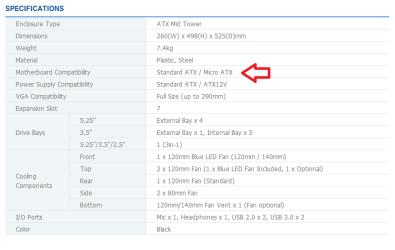
The Newegg specs for the case say it is compatible with ATX and Micro ATX.

You'd probably need a case like the Corsair 900D or Rosewill Thor V2.
 

My Computer

Computer type
PC/Desktop
Computer Manufacturer/Model Number
Ignatz Special; 4 speed manual gearbox; factory air conditioning; one of one
OS
Windows 7 Home Premium SP1, 64-bit
CPU
Intel Skylake i5-6600K, not overclocked
Motherboard
AsRock Z170M Extreme 4, micro ATX
Memory
8 GB HyperX DDR4-2666 (2 x 4 GB)
Graphics Card(s)
none; graphics are integrated on CPU
Sound Card
onboard: Realtek ALC1150; external: USB Behringer UF0-202
Monitor(s) Displays
Dell S2340M 23 inch IPS
Screen Resolution
1600 x 900
Hard Drives
System: Crucial MX100 series SSD, 128 GB;
Data: Samsung Spinpoint 103SJ, 1 TB;
Backup: WD Caviar Green WD30EZRX-00D8PB0, 3 TB
PSU
Rosewill SilentNight 500 watt fanless, semi-modular
Case
Antec Solo II
Cooling
Noctua NH-U12S; Noctua F12 intake, Noctua S12A exhaust
Keyboard
Microsoft 200 6JH-00001 USB
Mouse
Dell or Microsoft optical wired; USB
Antivirus
Microsoft Security Essentials and Malwarebytes Premium
Browser
Pale Moon
Other Info
All fans PWM; speeds at idle: CPU circa 500 rpm; intake circa 600 rpm; exhaust circa 600 rpm; CPU temps 27 idle and 47 C load in a warm room (27 C/81 F) when running Intel Extreme Tuning Utility stress test.
You can't always go by the product description to determine if an e-ATX board will fit. Neither my Antec Two Hundred v2 nor my Corsair 650D are rated for extended ATX but both will still take an extended ATX board. The Antec is pretty crowded but it works (and has been for the past year and a half). The 650D will be less crowded.

However, in the case of the Zalman case, it will not fit.
 

My Computer

Computer type
PC/Desktop
Computer Manufacturer/Model Number
Custom Build
OS
Win 7 Ultimate 64 bit
CPU
Intel i7-3930K
Motherboard
ASUS P9X79 WS
Memory
Kingston HyperX Genesis 32GB Kit (8x4GB Modules) 1600MHz DDR
Graphics Card(s)
MSI R7850 Twin Frozr 2GD5/OC Radeon HD 7850 2GB 256-bit GDDR
Sound Card
Asus Xonar Essence STX
Monitor(s) Displays
3x Asus VG248QE 24", Vizio 32" TV
Screen Resolution
1920 x 1080, ?
Hard Drives
Samsung 128GB 840 Pro SSD (1),
Samsung 4TB 850 EVO SSDs (4)
Samsung 4TB 850 EVO SSDs (16) external backup drives used in 2.5" hot swap bays in the computer.
PSU
Corsair HX750w
Case
Antec Two Hundred v2 (modified)
Cooling
Cooler Master GeminII S524 120mm (fan replaced with a 140mm)
Keyboard
Logitech G510s
Mouse
Logitech M525 (two in use)
Internet Speed
=< 32Mbps down, 8Mbps up
Antivirus
AVAST!, MBAM, SAS, Spybot S&D (all but MBAM free) Glary Util
Browser
IE11
Other Info
LSI 9211-8i HBA card (8 SATA III ports), 2.5" & 3.5" Hot Swap Bays, HooToo HT-CR001 PCI-E to USB 3.0 Internal Hub + 6 Slot Card Reader, and LG Model CH12LS28 BD-ROM Optical Drive. Also, ScanSnap S1500 ADF duplexing scanner, Canon 9000F flat bed scanner, Corsair SP2500 2.1 speakers, Samsung CLP 415nw laser color printer, Cyberpower PP2200SW UPS
Remember when you buy a motherboard and a case that are not designed to be used together you could have motherboard stand off problems.
If you are going to buy a extended motherboard just buy a case designed for it's use.
It makes no sense to buy problems.
 

My Computer

Computer type
PC/Desktop
Computer Manufacturer/Model Number
Home made Desktop
OS
Windows 10 Pro. 64/ version 1709 Windows 7 Pro/64
CPU
Intel i7-6800K @ 4.3
Motherboard
ASUS X-99 Deluxe II
Memory
Corsair Platinum 16 gig @2400
Graphics Card(s)
EVGA GTX 1070 OC
Monitor(s) Displays
Asus 27" LED LCD/VE278Q
Screen Resolution
1920-1080 or 1280-720 HDMI
Hard Drives
INTEL SSD 730-240 Gb Sata 3.0/
PSU
EVGA Platium 1200W
Case
Phanteks Luxe Tempered Glass 8 fans/ one radiator
Cooling
XSPC/ Water Cooled CPU
Keyboard
Das 4 Professional
Mouse
Logitech M705/MX Anywhere 2-S
Internet Speed
100 mbits
Antivirus
Microsoft Security Essentials/ Malwarebytes Premium 3.0/ SAS
Browser
I.E. 11 default/Firefox/ ISP Time Warner Cable/Spectrum
Other Info
LG BluRay Burner/
Sound system-KLipsch-THX/
Icy Dock ssd Hot Swap bays.
Just asked.because ishraq case is to a zalman z11 and a rampage 4 black edition and thei fit together
 

My Computer

Computer type
PC/Desktop
OS
64b
Just asked.because ishraq case is to a zalman z11 and a rampage 4 black edition and thei fit together

My apologies ghostk1d. You are correct. It looks like a very tight fit for the cables on the right hand side of the motherboard but yes it obviously fits.

Paul.
 

My Computer

OS
Windows 7 Professional 64 bit
Back
Top