How is your home network designed?

FliGi7

New member
Guru
VIP
Local time
8:46 PM
Messages
1,814
I am curious to know everyone's home networking implementations to include the design, topology, hardware, configuration, and monitoring applications. I'm also looking for new ideas.

Post up what you got :geek:
 

My Computer

OS
XP / Win7 x64 Pro
CPU
Intel Quad-Core Q9450 @ 3.2GHz
Motherboard
Asus P5-E
Memory
2x2GB GSkill DDR2
Graphics Card(s)
NVIDIA GeForce 8600 GTS (EVGA)
Monitor(s) Displays
Dell 2408WFP
Screen Resolution
1920x1200
Basic setup,
Modem, Wireless Router, GigE switch, PC, and HP 4500DN Color Laserjet downstairs.
Wireless Router (used as an Access Point), GigE and 10/100 switches, Main Rig, HTPC, 2 Xbox 360's, wireless Brother MFC Printer, Panasonic Blu Ray Player upstairs.

the 2 GigE switches are connected together for faster transfers between machines since 10/100 is soooo slow.
No monitoring software or anything, we don't' really need it for our simple network.
 

My Computer

Computer Manufacturer/Model Number
HAL-9000
OS
Windows 7 Ultimate 64bit
CPU
Intel i7 3770K
Motherboard
Asus Sabertooth Z77
Memory
16GB DDR3 1333 Corsair XMS3
Graphics Card(s)
XFX HD6950 2GB EyeFinity
Sound Card
Logitech G35 & Sennheiser PC135 & VIA HD
Monitor(s) Displays
23" HP 2310e, 23" Samsung B2230, 21.5" Viewsonic
Screen Resolution
5760x1080
Hard Drives
16TB of Storage
128GB & 256GB Crucial M4 SSD's, 2X 1TB WD Black, 3x 2TB WD, 3x 2TB Samsung F4, 1.5TB Seagate, WD 500GB,
PSU
Antec True Power New 650watt
Case
Cooler Master HAF-932
Cooling
Corsair H60 Hydro Cooler, 3x 230mm Fans, 2x120mm Fan
Keyboard
Logitech G15 and G13
Mouse
Logitech G700 Gaming Mouse
Internet Speed
50/10 Mbit
Other Info
Speakers : Alesis M1 Active Mk2 Studio Monitors , APC RS 1200 UPS, HP 4500DN Color Laser, HP P1006 mono Laser, Kodak 8500 Dye-Sub, Epson 1280 inkjet, Epson Worforce 610 MFC
Internet<->Cable modem<->Mikrotik router<->8 port gigabit switch<->4 PCs + 1 AP +iPhone + 3 laptops/netbooks

zzz2496
 

My Computer

Computer Manufacturer/Model Number
Self Built
OS
Windows7 Ultimate 64bit
CPU
Intel Core 2 Quad Q6600
Motherboard
Abit IN9-32X-MMAX
Memory
DDR2 Adata 4GB
Graphics Card(s)
Nvidia GeForce GTX 285 1024 and Nvidia GeForce 8800GT 512
Sound Card
Asus Xonar HDAV 1.3
Monitor(s) Displays
Dell 2407WFP and BenQ 2400v and Philips 150v3
Screen Resolution
3840x1200 and 1024x768
Hard Drives
2 WDC 1TB
1 WDC 1.5TB
1 WDC 640GB
1 WDC 320GB
1 Seagate 200GB
PSU
Corsair TX 850W
Case
Cooler Master HAF932
Cooling
Arctic Cooling Freezer Extreme and plenty of fans...
Keyboard
MicrosoftNaturalKeyboard 4000/Apple Alu keyboard/Dinovo mini
Mouse
Logitech G5/MarbleMouseTrackball/PerformanceMX/SpacePilotPRO
Internet Speed
1.5Mbps down/384Kbps up
Other Info
APC SURT 1000XL
Logitech Z-560
Wiimote
Mikrotik Router
Linksys (now Cisco) SD2008 8 port Gigabit switch
Linksys WRT54G (acting as AP)
Apple wireless Aluminium keyboard
Apple Magic Mouse
Xbox360 wired controller
So you guys are also plugging in a switch to your router? I assume that is just to multiply the ports for more devices?

I'm trying to figure out what would be the best route to take for wiring a home network... to have a 8 or 10 port switch at the router and then route all those lines to different rooms, or just route the 4 or so lines from the router ports to different rooms and then use a switch in each room as necessary.
 

My Computer

OS
XP / Win7 x64 Pro
CPU
Intel Quad-Core Q9450 @ 3.2GHz
Motherboard
Asus P5-E
Memory
2x2GB GSkill DDR2
Graphics Card(s)
NVIDIA GeForce 8600 GTS (EVGA)
Monitor(s) Displays
Dell 2408WFP
Screen Resolution
1920x1200
I'd go with a managed gigabit switch as a "core switch" which will be connected to another switch that will provide connection in each section of your house. That is if you do have that many computers at home. Having a "smart" switch will help you in monitoring which part of the house use how many bandwidth in any given time. Having a smart router will show you the actual traffic as it goes through from your network to the internet and vice versa. Some smarter routers (like Mikrotik) can even report what connection goes where at what speed, what protocol, what port number, and many other information. Even smarter, you can "tag" a connection and put it into a "queue" so that it doesn't eat too much bandwidth (fine grained traffic shaping, even QoS), and Mikrotik has integrated traffic grapher in it, so you can see your bandwidth utilization as a graph...

zzz2496
 

My Computer

Computer Manufacturer/Model Number
Self Built
OS
Windows7 Ultimate 64bit
CPU
Intel Core 2 Quad Q6600
Motherboard
Abit IN9-32X-MMAX
Memory
DDR2 Adata 4GB
Graphics Card(s)
Nvidia GeForce GTX 285 1024 and Nvidia GeForce 8800GT 512
Sound Card
Asus Xonar HDAV 1.3
Monitor(s) Displays
Dell 2407WFP and BenQ 2400v and Philips 150v3
Screen Resolution
3840x1200 and 1024x768
Hard Drives
2 WDC 1TB
1 WDC 1.5TB
1 WDC 640GB
1 WDC 320GB
1 Seagate 200GB
PSU
Corsair TX 850W
Case
Cooler Master HAF932
Cooling
Arctic Cooling Freezer Extreme and plenty of fans...
Keyboard
MicrosoftNaturalKeyboard 4000/Apple Alu keyboard/Dinovo mini
Mouse
Logitech G5/MarbleMouseTrackball/PerformanceMX/SpacePilotPRO
Internet Speed
1.5Mbps down/384Kbps up
Other Info
APC SURT 1000XL
Logitech Z-560
Wiimote
Mikrotik Router
Linksys (now Cisco) SD2008 8 port Gigabit switch
Linksys WRT54G (acting as AP)
Apple wireless Aluminium keyboard
Apple Magic Mouse
Xbox360 wired controller
Mine:-

Router downstairs -> cat6 to roof space where I have a small network cab with patch panel and 24 port gigabit switch which then distributes my network via cat6 (external) cable to every room and to two 'N' access points (one at each side of the house).

No monitoring.
 

My Computer

Computer type
PC/Desktop
OS
Windows 11
I'm trying to figure out what would be the best route to take for wiring a home network... to have a 8 or 10 port switch at the router and then route all those lines to different rooms, or just route the 4 or so lines from the router ports to different rooms and then use a switch in each room as necessary.

I would think in a setting like this (multiple storie building) it would be more efficient to run a "backbone" to the top floor with a switch on each level and spread it out from there.

-DG
 

My Computer

Computer Manufacturer/Model Number
HP m8000n
OS
Windows 7 Ultimate x86
CPU
DualCore AMD Athlon 64 X2, 2600 MHz 5200+
Motherboard
Asus M2N68-LA (Narra)
Memory
Samsung 2GB DDR2
Graphics Card(s)
Onboard NVIDIA GeForce 6150SE nForce 430
Sound Card
Onboard nVIDIA nForce 6100-430 (MCP61P)
Monitor(s) Displays
Westinghouse 19" LED
Screen Resolution
1280x1024
Hard Drives
SATA II Seagate Barracuda 500GB
USB II WD Elements 500GB
USB II WD My Book 1TB
USB II WD My Book 2TB
PSU
Stock (HP)
Case
Stock (HP)
Cooling
Stock
Keyboard
Logitech Classic KB 200
Mouse
Standard HP opticle USB mouse
I was considering using a Linksys WRT54GL as my main router. Then I could put a hub right behind it for the connections to all rooms, or just route the 4 ports to 4 diff rooms of the house and then put a hub/switch at each of those as necessary.
 

My Computer

OS
XP / Win7 x64 Pro
CPU
Intel Quad-Core Q9450 @ 3.2GHz
Motherboard
Asus P5-E
Memory
2x2GB GSkill DDR2
Graphics Card(s)
NVIDIA GeForce 8600 GTS (EVGA)
Monitor(s) Displays
Dell 2408WFP
Screen Resolution
1920x1200
Also, I'm not too keen on patch panels, so I'm not too sure what they offer me as compared to piecing things together with other networking components.
 

My Computer

OS
XP / Win7 x64 Pro
CPU
Intel Quad-Core Q9450 @ 3.2GHz
Motherboard
Asus P5-E
Memory
2x2GB GSkill DDR2
Graphics Card(s)
NVIDIA GeForce 8600 GTS (EVGA)
Monitor(s) Displays
Dell 2408WFP
Screen Resolution
1920x1200
A patch panel basically is a splice to multiply the amount of ports you'll have available to connect your hardware to
(There are also intelligent/managed types available that double as a switch...i.e. a switch with more ports than usual)

-DG
 

My Computer

Computer Manufacturer/Model Number
HP m8000n
OS
Windows 7 Ultimate x86
CPU
DualCore AMD Athlon 64 X2, 2600 MHz 5200+
Motherboard
Asus M2N68-LA (Narra)
Memory
Samsung 2GB DDR2
Graphics Card(s)
Onboard NVIDIA GeForce 6150SE nForce 430
Sound Card
Onboard nVIDIA nForce 6100-430 (MCP61P)
Monitor(s) Displays
Westinghouse 19" LED
Screen Resolution
1280x1024
Hard Drives
SATA II Seagate Barracuda 500GB
USB II WD Elements 500GB
USB II WD My Book 1TB
USB II WD My Book 2TB
PSU
Stock (HP)
Case
Stock (HP)
Cooling
Stock
Keyboard
Logitech Classic KB 200
Mouse
Standard HP opticle USB mouse
I was considering using a Linksys WRT54GL as my main router. Then I could put a hub right behind it for the connections to all rooms, or just route the 4 ports to 4 diff rooms of the house and then put a hub/switch at each of those as necessary.

That router has limited specs and is outdated by todays standards.

I highly recommend you go with a router that has Gigabyte LAN and WAN with wireless N, they don't cost much more and won't be limiting your file transfers and connection speeds like the 54Mbps wireless G router will. If you go that route also get switches that are gigabyte capible.

As for the switch locations and wires. For the longest runs try going with just one eithernet wire with a switch at the end of the run then divide up the shorter runs from the switch to the other rooms. I would really need a floor plan of the house to give you the best possible lay out.
 

My Computer

Computer type
PC/Desktop
Computer Manufacturer/Model Number
Home built
OS
Windows 7 Ult, Windows 8.1 Pro,
CPU
Q9650-4.275GHz, E8600 4.5GHz, E6750-3.8GHz
Motherboard
Evga 780i FTW
Memory
G.Skill PC2 9600 1200Mhz 5 5 5 15 2T
Graphics Card(s)
GTX480
Sound Card
Asus Xonar D2
Monitor(s) Displays
HannsG
Screen Resolution
1680X1050
Hard Drives
GSkill Phoenix Pro 120GB SSD
PSU
ThermalTake Toughpower 1000Watt modular
Case
ThermalTake XaserV
Cooling
Xigmatek S1283
Keyboard
Logitech G15
Mouse
Logitech G9
Internet Speed
T1
I've heard and seen good things about TP-Link and they happen to have a Gigabit Wireless B/G/N router I was also considering. I am just unsure if DD-WRT can be flashed onto it at the moment.
 

My Computer

OS
XP / Win7 x64 Pro
CPU
Intel Quad-Core Q9450 @ 3.2GHz
Motherboard
Asus P5-E
Memory
2x2GB GSkill DDR2
Graphics Card(s)
NVIDIA GeForce 8600 GTS (EVGA)
Monitor(s) Displays
Dell 2408WFP
Screen Resolution
1920x1200
Those look ok but... I don't see them with Gigabyte LAN which is a big one for me. They seem to be limited to 10/100 LAN rather than todays standard 10/100/1000 LAN which pretty much all PC's have these days, or maybe I just can't find the gigabyte version?

ok found it I think, looks a lot like my D-link Dir-655 but costs less which is good.

http://www.mwave.com/mwave/SKUSearch_v3.asp?scriteria=AA97469&pagetitle=TP-LINK
 

My Computer

Computer type
PC/Desktop
Computer Manufacturer/Model Number
Home built
OS
Windows 7 Ult, Windows 8.1 Pro,
CPU
Q9650-4.275GHz, E8600 4.5GHz, E6750-3.8GHz
Motherboard
Evga 780i FTW
Memory
G.Skill PC2 9600 1200Mhz 5 5 5 15 2T
Graphics Card(s)
GTX480
Sound Card
Asus Xonar D2
Monitor(s) Displays
HannsG
Screen Resolution
1680X1050
Hard Drives
GSkill Phoenix Pro 120GB SSD
PSU
ThermalTake Toughpower 1000Watt modular
Case
ThermalTake XaserV
Cooling
Xigmatek S1283
Keyboard
Logitech G15
Mouse
Logitech G9
Internet Speed
T1
Yep, that's the one.
 

My Computer

OS
XP / Win7 x64 Pro
CPU
Intel Quad-Core Q9450 @ 3.2GHz
Motherboard
Asus P5-E
Memory
2x2GB GSkill DDR2
Graphics Card(s)
NVIDIA GeForce 8600 GTS (EVGA)
Monitor(s) Displays
Dell 2408WFP
Screen Resolution
1920x1200
I have a rather simple setup. I have 12Mb cable with a SB6120 modem. It feeds a D-Link DGL-4100 router with 4 GigE Lan ports. My main PC is in the same room and has Cat5e to the router. Also have my Vonage box run to the router. I then feed a Powerline device to the other room for the wife's laptop. Had too many problems with WiFi so went with Powerline. I recently bought a Brother laser printer with Lan connection but use it on the main PC via usb, but plan to try and hook it to the router to network it. Nothing fancy but works great so far. In my other life I did a lot of network setups with my job so now I keep it simple.

Jim :geek:
 

My Computer

Computer type
PC/Desktop
Computer Manufacturer/Model Number
Home Built
OS
Windows 8.1 Pro w/Media Center 64bit, Windows 7 HP 64bit
CPU
Phenom II X6 1100T
Motherboard
ASUS M5A99X EVO
Memory
Crucial Balistic 8gb DDR3-1866 CL9
Graphics Card(s)
MSI R6850 Cyclone IGD5 PE
Sound Card
On Board
Monitor(s) Displays
ASUS VE258Q 25" LED with DVI-HDMI-DisplayPort
Screen Resolution
1920 x 1080
Hard Drives
Two WD Cavier Black 2TB Sata III, WD My Book Essential 2TB USB 3.0
PSU
Seasonic X650 80 Plus GOLD Modular
Case
Corsair 400R
Cooling
Antec Kuhler H2O 620, Two 120mm and four 140mm
Keyboard
Logitech K120
Mouse
Logitech Marble Mouse USB, Logitech Precision Game Pad
Internet Speed
15MB
Antivirus
Norton IS 2013, Malwarebytes Pro Beta 2
Browser
IE-11, FF-27
Other Info
APC UPS ES 750, Netgear WNR3500L Gigabit & Wireless N Router with SamKnows Test Program, Motorola SB6120 Gigabit Cable Modem. Brother HL-2170W Laser Printer, Epson V300 Scanner
A reminder, network gears measures in bits not bytes, the difference is eight fold... 1 byte = 8 bits. A GigE interface can transfer as much as 90 MBytes to 95 MBytes per second (with good NIC that has ToE).

zzz2496
 

My Computer

Computer Manufacturer/Model Number
Self Built
OS
Windows7 Ultimate 64bit
CPU
Intel Core 2 Quad Q6600
Motherboard
Abit IN9-32X-MMAX
Memory
DDR2 Adata 4GB
Graphics Card(s)
Nvidia GeForce GTX 285 1024 and Nvidia GeForce 8800GT 512
Sound Card
Asus Xonar HDAV 1.3
Monitor(s) Displays
Dell 2407WFP and BenQ 2400v and Philips 150v3
Screen Resolution
3840x1200 and 1024x768
Hard Drives
2 WDC 1TB
1 WDC 1.5TB
1 WDC 640GB
1 WDC 320GB
1 Seagate 200GB
PSU
Corsair TX 850W
Case
Cooler Master HAF932
Cooling
Arctic Cooling Freezer Extreme and plenty of fans...
Keyboard
MicrosoftNaturalKeyboard 4000/Apple Alu keyboard/Dinovo mini
Mouse
Logitech G5/MarbleMouseTrackball/PerformanceMX/SpacePilotPRO
Internet Speed
1.5Mbps down/384Kbps up
Other Info
APC SURT 1000XL
Logitech Z-560
Wiimote
Mikrotik Router
Linksys (now Cisco) SD2008 8 port Gigabit switch
Linksys WRT54G (acting as AP)
Apple wireless Aluminium keyboard
Apple Magic Mouse
Xbox360 wired controller
Cable >modem >Dlink gaming router >in wall switch >wall ports throughout the house (two xbox360's, a Ps3, 3 laptops, 5 desktops...)
 

My Computer

Computer Manufacturer/Model Number
Pugh Technologies
OS
W7 Professional x64
CPU
AMD Athlon II X3 445 Rana 3.10 GHz
Motherboard
MSI 870A-G54
Memory
PNY XLR DDR3 1600 4x2GB
Graphics Card(s)
NVIDIA GeForce GTS 450 (fermi) 1GB GDDR5
Sound Card
Realtek ALC892 onboard
Monitor(s) Displays
ASUS VE205t, Viewsonic VX2035WM
Screen Resolution
1600x900, 1600x1050
Hard Drives
977GB Hitachi Hitachi HDS721010CLA332
244GB Western Digital WDC WD2500AAJS-65B4A0
488GB Western Digital WDC WD5000AAJS-00A8B0
488GB Western Digital WDC WD5000AAKS-00UU3A0
PSU
Antec EarthWatts EA650 650W
Case
ThermalTake Armor A90 Mid Tower
Cooling
3x 120mm in, 1x 120mm & 200mm out, self built hydro-cooler
Keyboard
Logitec 55
Mouse
Razer Deathadder
Internet Speed
20 Mbps D/L, 9 Mbps U/L
My setup is pretty straight forward and simple. Cable modem plugs into my Linksys WRT54GL wireless router. Wireless router plugs into a 16 port Netgear 10/100 switch that I keep in my back room for testing. My file server is connected directly into that switch From that switch, I uplink to 2 different 5 port 10/100 Linksys switches (one on my desk) and another upstairs in my living room. On my switch on my desk, I plug in my Win7 box, and my Linux box. On the switch in my living room, I attach to my Xbox360 and my BluRay player. My laptop and my wife's laptop connect via wireless at 54g....and my Droid and her iPhone connect to our wireless as well. oh yeah, our kid's Wii also connects to wireless.

I don't monitor my internal home network.
 

My Computer

Computer Manufacturer/Model Number
Self-Built in July 2009
OS
Windows 7 Ultimate x64
CPU
Intel Q9550 2.83Ghz OC'd to 3.40Ghz
Motherboard
Gigabyte GA-EP45-UD3R rev. 1.1, F12 BIOS
Memory
8GB G.Skill PI DDR2-800, 4-4-4-12 timings
Graphics Card(s)
EVGA 1280MB Nvidia GeForce GTX570
Sound Card
Realtek ALC899A 8 channel onboard audio
Monitor(s) Displays
23" Acer x233H
Screen Resolution
1920x1080
Hard Drives
Intel X25-M 80GB Gen 2 SSD
Western Digital 1TB Caviar Black, 32MB cache. WD1001FALS
PSU
Corsair 620HX modular
Case
Antec P182
Cooling
stock
Keyboard
ABS M1 Mechanical
Mouse
Logitech G9 Laser Mouse
Internet Speed
15/2 cable modem
Other Info
Windows and Linux enthusiast. Logitech G35 Headset.
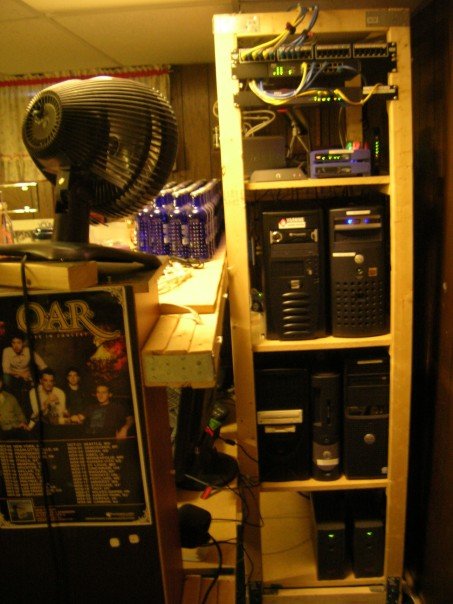
I have a little enviroment at home I play around with...

WRT54GL (The Linux version, old school) - Wireless, DHCP for wireless - limited #

8PT gigabit (servers), 2 PC's
16PT 10/100 (junk, 2nd NIC's in servers)

Wired systems all have manually assigned IP's

Server 2008 Ent. - Domain Controller, DNS, WSUS
Server 2008 R2 Ent. - File server (4TB), Remote Desktop Services/RD WebApps
Server 2008 Ent. - Sandbox, MS server stuff
Windows 7 - Sandbox/remote access/Backup GFI +Mozy

This is a picture from a few years back. It basically still looks like this, except all the computers are cleaned up and have newer parts.

722459323_9de895fc69_o.jpg
 

My Computer

Computer Manufacturer/Model Number
Apple MacBook Pro
OS
Windows 7 Ultimate x64
Memory
4GB
Monitor(s) Displays
22" Samsung
Back
Top