
How long does it take to format a 500GB HD

Russellreno

New member
Member
Local time
10:49 AM
Messages
24
Location
Turlock
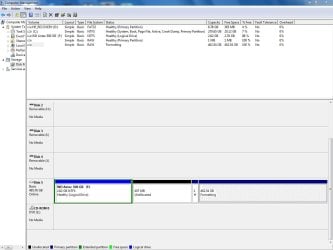
I am reformatting a 500GB Western Digital drive via a USB connection. See that attached jpg for the current configuration.

The 462 gb partition format ran last night with no change. Today it has run at least 20minutes and continues. How long should I let it run?
 

Attachments
  • Format WD HDD.jpg
    Format WD HDD.jpg
    89 KB · Views: 742

My Computer My Computer

At a glance

OS Name Microsoft Windows 7 Home Premium OS V...AMD Athlon II x4 630 Processor6GB 1066MhzATI Radeon HD 4200
Computer type
PC/Desktop
Computer Manufacturer/Model Number
HP Pavillion
OS
OS Name Microsoft Windows 7 Home Premium OS Version 6.1.7601
CPU
AMD Athlon II x4 630 Processor
Motherboard
Aloe Foxconn
Memory
6GB 1066Mhz
Graphics Card(s)
ATI Radeon HD 4200
Sound Card
Realtek High Definition Audio
Monitor(s) Displays
HP w2338h Wide LCD Monitor
Screen Resolution
1080x1920
what do you plan on using it for, i would just quick reformat it
 

My Computer My Computer

At a glance

Windows 7 Ultimate2.0 GHz4GB DDR3
Computer Manufacturer/Model Number
Lenovo Y430
OS
Windows 7 Ultimate
CPU
2.0 GHz
Memory
4GB DDR3
Monitor(s) Displays
1280x800
Hard Drives
500GB; 5400 RPM
I don't know the exact time it takes to format a 500 GB drive but it's taking too long; something isn't right.
 

My Computer My Computer

At a glance

Windows XP2 GB
Computer Manufacturer/Model Number
MSI K9N4 SLI-F
OS
Windows XP
Motherboard
MSI K9N4 SLI-F
Memory
2 GB
A full format will take several hours. A quick format (which is usually sufficient) will take a few seconds. A full format verifies every track on the disk, so it takes about as long as writing 500GB of data to the disk. A quick format just writes the control records (e.g. MFT).
 

My Computer My Computer

At a glance

Vista, Windows7, Mint Mate, Zorin, Windows 8from 1.6GHz Duo to i7
Computer Manufacturer/Model Number
HP, Dell, Gateway, Toshiba - 4 laptops and 2 desktops
OS
Vista, Windows7, Mint Mate, Zorin, Windows 8
CPU
from 1.6GHz Duo to i7
Monitor(s) Displays
2x HP w2207
Hard Drives
5x HDD, 7x SSD, 12x Externals
Keyboard
with trackball - no mices
Mouse
Trackball mice
Internet Speed
DSL 6000
Now I am wondering if the HD is defective.

When I use Computer Management I get inconsistent results. Sometimes the Virtual Disk Service under Disk Management reads all my drives quickly, other times it takes minutes.

Computer Management consistently hangs too.

The 462GB did not format. I was able to create a simple volumn but Computer Management cannot read any drives now.
 

My Computer My Computer

At a glance

OS Name Microsoft Windows 7 Home Premium OS V...AMD Athlon II x4 630 Processor6GB 1066MhzATI Radeon HD 4200
Computer type
PC/Desktop
Computer Manufacturer/Model Number
HP Pavillion
OS
OS Name Microsoft Windows 7 Home Premium OS Version 6.1.7601
CPU
AMD Athlon II x4 630 Processor
Motherboard
Aloe Foxconn
Memory
6GB 1066Mhz
Graphics Card(s)
ATI Radeon HD 4200
Sound Card
Realtek High Definition Audio
Monitor(s) Displays
HP w2338h Wide LCD Monitor
Screen Resolution
1080x1920
suggest you run a chkdsk /f in elevated cmd
 

My Computer My Computer

At a glance

Vista, Windows7, Mint Mate, Zorin, Windows 8from 1.6GHz Duo to i7
Computer Manufacturer/Model Number
HP, Dell, Gateway, Toshiba - 4 laptops and 2 desktops
OS
Vista, Windows7, Mint Mate, Zorin, Windows 8
CPU
from 1.6GHz Duo to i7
Monitor(s) Displays
2x HP w2207
Hard Drives
5x HDD, 7x SSD, 12x Externals
Keyboard
with trackball - no mices
Mouse
Trackball mice
Internet Speed
DSL 6000
chkdsk /f

The type of file system is RAW.
 

My Computer My Computer

At a glance

OS Name Microsoft Windows 7 Home Premium OS V...AMD Athlon II x4 630 Processor6GB 1066MhzATI Radeon HD 4200
Computer type
PC/Desktop
Computer Manufacturer/Model Number
HP Pavillion
OS
OS Name Microsoft Windows 7 Home Premium OS Version 6.1.7601
CPU
AMD Athlon II x4 630 Processor
Motherboard
Aloe Foxconn
Memory
6GB 1066Mhz
Graphics Card(s)
ATI Radeon HD 4200
Sound Card
Realtek High Definition Audio
Monitor(s) Displays
HP w2338h Wide LCD Monitor
Screen Resolution
1080x1920
Uh-oh... that's not good.

Not exactly sure how to get it abck to NTFS..
 

My Computer My Computer

At a glance

W7 RTM Ultimate x64Intel Q8400 @ 2.66GHZ4GB DDR2-800Gainward GTS 450 GLH 1GB Edition
Computer Manufacturer/Model Number
Custom Build
OS
W7 RTM Ultimate x64
CPU
Intel Q8400 @ 2.66GHZ
Motherboard
Gigabyte GA-EG45M-UD2H
Memory
4GB DDR2-800
Graphics Card(s)
Gainward GTS 450 GLH 1GB Edition
Sound Card
Integrated 8 Channel
Monitor(s) Displays
AOC 23.6 Inch Widescreen LCD
Screen Resolution
1920x1080
Hard Drives
Seagate 500GB Internal
Western Digital 1TB Internal

Hitachi 1TB External
PSU
Apevia Java Power 500W
Case
Cooler Master HAF 922 Black
Cooling
Stock Intel CPU Fan
Keyboard
HP SK-2960 Multimedia Keyboard
Mouse
Logitech M350 Wireless Gaming Mouse
Internet Speed
1.5MB
Wow.

I just run Format F: /NTFS /Q

It formated in seconds.

KIS Keep it simple.

Thanks for your support.

Russell
 

My Computer My Computer

At a glance

OS Name Microsoft Windows 7 Home Premium OS V...AMD Athlon II x4 630 Processor6GB 1066MhzATI Radeon HD 4200
Computer type
PC/Desktop
Computer Manufacturer/Model Number
HP Pavillion
OS
OS Name Microsoft Windows 7 Home Premium OS Version 6.1.7601
CPU
AMD Athlon II x4 630 Processor
Motherboard
Aloe Foxconn
Memory
6GB 1066Mhz
Graphics Card(s)
ATI Radeon HD 4200
Sound Card
Realtek High Definition Audio
Monitor(s) Displays
HP w2338h Wide LCD Monitor
Screen Resolution
1080x1920
RAW usually means that Windows cannot deal with the filetype. Something is wrong on the disk. Usually I would say that you have a defective boot sector - but this is a new disk. Another possibility is that you have a defunct OS. Run sfc /scannow in elevated cmd. Maybe it helps. If you get a CBS.log, deal with it as follows:

When it is done, you can end up with the following different results:
1. SFC did not find any corrupted files
2. SFC did find corrupted files and was able to fix the files
3. SFC was not able to fix all corrupted files
SFC stores the results in the CBS.log which you find in C:\Windows\Logs\CBS\CBS.log. This is a massive file of approximately 5MB and if you care to see it all, you must send CBS.log to one of your own folders or the desktop from where you can double click on it. It will then open with Notepad. Note: You cannot open it inside the CBS folder. You will get an Access denied message.
But most likely you are only interested in the part that shows the corrupted files that were fixed – or not fixed. For that you need a significant data reduction. You do that as follows:
Open another elevated Command Prompt and paste this command into it:

findstr /c:"[SR]" %windir%\logs\cbs\cbs.log

This will show all the files you want to see in the Command Prompt window.
Since that window is not very practical for a detailed study, you want to paste the content into a Notepad, Wordpad or Word file.
For that you right click on the Command Prompt window (any place is good) and click Select All. Then you right click anywhere in the window. Now this whole text is stored on the clipboard and you can paste it into a document file (e.g. Notepad) where you can analyze it.

Edit: Looks like all of that is for the birds - LOL. Maybe it helps someone else.
 

My Computer My Computer

At a glance

Vista, Windows7, Mint Mate, Zorin, Windows 8from 1.6GHz Duo to i7
Computer Manufacturer/Model Number
HP, Dell, Gateway, Toshiba - 4 laptops and 2 desktops
OS
Vista, Windows7, Mint Mate, Zorin, Windows 8
CPU
from 1.6GHz Duo to i7
Monitor(s) Displays
2x HP w2207
Hard Drives
5x HDD, 7x SSD, 12x Externals
Keyboard
with trackball - no mices
Mouse
Trackball mice
Internet Speed
DSL 6000
I'm back.

I did not say this drive came out of a Western Digital 1 TB drive. This is one of two drive in the case.

After the format I copied 9GB to the drive when it hung again.

Disk Management could not read any drives so I powered off the USB drive. DM read the C and D drives. DM then read the USB drive F when i powered it on.

DM reported disk 5 (USB F:) as 465.76 GB NTFS (Healthy Primary Partition). I then changed it to Active.

It is running fine now. I will report back within 12-24 hrs.
 

My Computer My Computer

At a glance

OS Name Microsoft Windows 7 Home Premium OS V...AMD Athlon II x4 630 Processor6GB 1066MhzATI Radeon HD 4200
Computer type
PC/Desktop
Computer Manufacturer/Model Number
HP Pavillion
OS
OS Name Microsoft Windows 7 Home Premium OS Version 6.1.7601
CPU
AMD Athlon II x4 630 Processor
Motherboard
Aloe Foxconn
Memory
6GB 1066Mhz
Graphics Card(s)
ATI Radeon HD 4200
Sound Card
Realtek High Definition Audio
Monitor(s) Displays
HP w2338h Wide LCD Monitor
Screen Resolution
1080x1920
Back
Top