How Much RAM Should I Have?

I would have to agree - going beyond 4GBs of RAM will probably not do much for you. More RAM may be used for additional caching depending on the type of program you will be running - and that increases performance. But for gaming, a decent graphics card will probably do you more good.
 
Last edited:

My Computer My Computer

Computer Manufacturer/Model Number
HP, Dell, Gateway, Toshiba - 4 laptops and 2 desktops
OS
Vista, Windows7, Mint Mate, Zorin, Windows 8
CPU
from 1.6GHz Duo to i7
Monitor(s) Displays
2x HP w2207
Hard Drives
5x HDD, 7x SSD, 12x Externals
Keyboard
with trackball - no mices
Mouse
Trackball mice
Internet Speed
DSL 6000
8GB of RAM will only help you in certain situations.

1. Running multiple Virtual Machines
2. Heavy Video Encoding work (Primarily HD content)

Even then, it likely will not use all of it. I do alot of heavy HD encoding and typically can reach around 5.5GB of use with 8GB installed. But thats also with many other things going on at the same time.

3. Some of the more heavy Photoshop work and 3D rendering.

Although it will help slightly doing these type of things, 4GB would still be sufficent IMO. 8GB will only be useful is you do these types of things very often.

As stated already, as far as Gaming & amount of RAM is concerned, 8GB is simply too much. 4GB is plenty (At least at this point)


So as many have stated, and I too agree:
For 90% of everyone 4GB of physical RAM is more than enough.
The rest that can make use of it will see the benefits, but could get by with out as well.

Also remember, More RAM (4x2GB) puts more of a strain on the system, Or more heat. many may not see this a issue, but something to think about none-the-less.
Especially if you really do not need all that extra RAM.

For gaming, your better off getting a good set of 2x2GB RAM, and put that money youd save from that second set towards a better GPU,CPU,SSD for the OS, or a better Power Supply (if needed for the GPU) even. You'll see far better results.
 

My Computer My Computer

Computer Manufacturer/Model Number
Custom (Self Build)
OS
Windows 7 Home Premium 64bit
CPU
Intel Core i7 2700k
Motherboard
eVGA P67 SLI
Memory
8GB Mushkin Redline Ridgebacks @1866
Graphics Card(s)
EVGA GTX570 SC
Sound Card
XiFi Titanium HD
Monitor(s) Displays
LG W2453V
Screen Resolution
1920x1080
Hard Drives
Intel 320 80GB -- Intel X25-V 40GB --WD Black 1TB x2 -- WD Blue 640GB
PSU
Seasonic x750
Case
Corsair 600T SE White
Cooling
eVGA Superclocked CPU Cooler
Keyboard
Saitek Cyborg
Antivirus
Kaspersky
Browser
IE
Other Info
LG BD/DVD
As for what Doc said, you can use 667mhz RAM, but with RAM if you have 400mhz RAM already installed, running both will set all to the lower speed. I didn't know you could use PC2-5300 (667mhz)... the info I saw from your specs is that you are currently using PC2-3200 (399mhz)

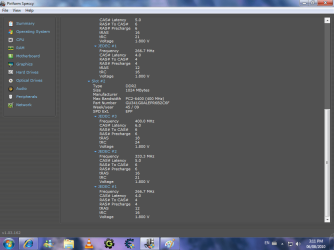
Almost willing to bet that he actually has DDR2 800. Danielzxzx in Speccy click on RAM and post a screen shot of it please.
 

My Computer My Computer

Computer type
PC/Desktop
Computer Manufacturer/Model Number
Me
OS
Win 7 Ultimate x64
CPU
FX-8350 @ 4.6 GHz so far
Motherboard
Asus M5A97 EVO
Memory
ADATA XPG V1 Series Black 8GB DDR3 1600
Graphics Card(s)
Sapphire R9 270x Dual-X
Sound Card
Xonar DGX w/ Corsair Vengence 1300
Monitor(s) Displays
Acer S232HL Abid
Screen Resolution
1920x1080
Hard Drives
120 GB OCZ Vertex 3
500 GB Seagate 7200.12
PSU
Antec Earthwatts 650W Green
Case
Antec Three Hundred
Cooling
Cooler Master 212 EVO
Keyboard
Logitech G510
Mouse
Logitech G500s
Internet Speed
35000/3000
Ok here is the pictures. I had to make 2 pictures to get all the info.
 

Attachments

  • number3.png
    number3.png
    48.6 KB · Views: 23
  • number4.png
    number4.png
    48 KB · Views: 13

My Computer My Computer

OS
Windows 7
Yep, DDR2 800 RAM. I stand by what I said before. Go for a new video card.
 

My Computer My Computer

Computer type
Laptop
Computer Manufacturer/Model Number
Toshiba P775-S7100
OS
Windows 7 Professional SP1 64-bit
CPU
Intel Core i5-2450M @2.5 GHz
Memory
6 GB DDR3 1333MHz
Graphics Card(s)
Intel HD 3000
Monitor(s) Displays
Built-in 17.3" LED; 22" Insignia NS-L22Q-10A
Screen Resolution
1600x900; 1360x768
Hard Drives
750 GB Hitachi
1TB Seagate FreeAgent External
Internet Speed
Verizon DSL Speed(Down/Up): 3360 Kbps / 800 Kbps
Antivirus
MSE and MBAM Pro
Browser
IE10
Yep, DDR2 800 RAM. I stand by what I said before. Go for a new video card.
How come I do not see DDR2 800. I see DDR2 400 with a high CAS latency.
 

My Computer My Computer

Computer Manufacturer/Model Number
HP, Dell, Gateway, Toshiba - 4 laptops and 2 desktops
OS
Vista, Windows7, Mint Mate, Zorin, Windows 8
CPU
from 1.6GHz Duo to i7
Monitor(s) Displays
2x HP w2207
Hard Drives
5x HDD, 7x SSD, 12x Externals
Keyboard
with trackball - no mices
Mouse
Trackball mice
Internet Speed
DSL 6000
Yep, DDR2 800 RAM. I stand by what I said before. Go for a new video card.

This would be your best choice. More ram will not improve how fast the onboard video works, only a video card can help with that. The one good thing is that if you do decide to go to 4 GB for example you should only need to get a similar spec'ed 2 GB stick to go with the one you already have.

How come I do not see DDR2 800. I see DDR2 400 with a high CAS latency.

Because you're forgetting the double in DDR. ;) If it helps any Speccy shows mine the exact same way and I know for a fact that it is DDR2 800 in mine.
What would be interesting is if those 2 sticks (1 GB and 2 GB) will work in dual channel mode if put in the proper slots (usually 1-2/3-4 or 1-3/2-4).
 

My Computer My Computer

Computer type
PC/Desktop
Computer Manufacturer/Model Number
Me
OS
Win 7 Ultimate x64
CPU
FX-8350 @ 4.6 GHz so far
Motherboard
Asus M5A97 EVO
Memory
ADATA XPG V1 Series Black 8GB DDR3 1600
Graphics Card(s)
Sapphire R9 270x Dual-X
Sound Card
Xonar DGX w/ Corsair Vengence 1300
Monitor(s) Displays
Acer S232HL Abid
Screen Resolution
1920x1080
Hard Drives
120 GB OCZ Vertex 3
500 GB Seagate 7200.12
PSU
Antec Earthwatts 650W Green
Case
Antec Three Hundred
Cooling
Cooler Master 212 EVO
Keyboard
Logitech G510
Mouse
Logitech G500s
Internet Speed
35000/3000
ok so is there any way to find out which graphics card is compatible?
 

My Computer My Computer

OS
Windows 7
ok so is there any way to find out which graphics card is compatible?
There is usually no big problem with the compatibility. You need a PCI Express 2.0x16 (or 2.1x16) and the proper space in the box. It is more a matte of price and whether your PSU has enough power.
 

My Computer My Computer

Computer Manufacturer/Model Number
HP, Dell, Gateway, Toshiba - 4 laptops and 2 desktops
OS
Vista, Windows7, Mint Mate, Zorin, Windows 8
CPU
from 1.6GHz Duo to i7
Monitor(s) Displays
2x HP w2207
Hard Drives
5x HDD, 7x SSD, 12x Externals
Keyboard
with trackball - no mices
Mouse
Trackball mice
Internet Speed
DSL 6000
Ok, I will look for a graphics card that is not too expensive and when I found one, I'll tell you and see if it is good enough.
 

My Computer My Computer

OS
Windows 7
Not sure what your budget is but a couple suggestions if you care to look.

This 4850 would be 1 good choice:
Newegg.com - SAPPHIRE Vapor-X 100273L Radeon HD 4850 1GB 256-bit GDDR3 PCI Express 2.0 x16 HDCP Ready CrossFireX Support Video Card

The downdside is doesn't have DX11 capability but can do DX10.1.
It also uses a bit more power than the 5K series.

This 5770 is a decent card and uses less power. it is also capable of DX 11, but costs more.
Newegg.com - SAPPHIRE 100283-3L Radeon HD 5770 1GB 128-bit GDDR5 PCI Express 2.0 x16 HDCP Ready CrossFireX Support Video Card

As far as a PSU:
400W (30A) Corsair
Newegg.com - CORSAIR CMPSU-400CX 400W ATX12V V2.2 80 PLUS Certified Compatible with Core i7 Power Supply
Or
450W (33A) Corsair
Newegg.com - CORSAIR CMPSU-450VX 450W ATX12V V2.2 80 PLUS Certified Active PFC Compatible with Core i7 Power Supply

If DX11 isnt a huge deal to you, I would go with the 4850 and one of the 2 Power Supplies.

The 400W should be able to power a single 4850 without issue. the 450 will give just a little more headroom for future upgrades.
Should also be a huge improvement gaming for you.

But, it really comes down to preference and budget I suppose.
Just some thoughts and suggestions.

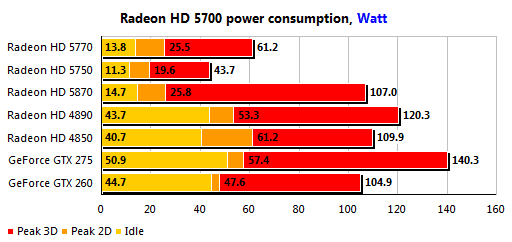
Found this earlier looking around. A comparison of power use for a few ATI cards. If it helps any.
 

Attachments

  • 5700_power3dm.png
    5700_power3dm.png
    4.9 KB · Views: 9

My Computer My Computer

Computer Manufacturer/Model Number
Custom (Self Build)
OS
Windows 7 Home Premium 64bit
CPU
Intel Core i7 2700k
Motherboard
eVGA P67 SLI
Memory
8GB Mushkin Redline Ridgebacks @1866
Graphics Card(s)
EVGA GTX570 SC
Sound Card
XiFi Titanium HD
Monitor(s) Displays
LG W2453V
Screen Resolution
1920x1080
Hard Drives
Intel 320 80GB -- Intel X25-V 40GB --WD Black 1TB x2 -- WD Blue 640GB
PSU
Seasonic x750
Case
Corsair 600T SE White
Cooling
eVGA Superclocked CPU Cooler
Keyboard
Saitek Cyborg
Antivirus
Kaspersky
Browser
IE
Other Info
LG BD/DVD
I might go with the 4850 as it is cheaper and it should work. DX11 is not a big deal to me since I don't even know what things require DX11. If you know any, tell me since I would like to know to make sure the I don't have anything that uses DX11. Anyway, so 4850 should increase performance and graphics in games but what my dolphin wii emulator. Those games require really good computer. Would 4850 be good enough to take out the lag in my dolphin wii emulator?
 

My Computer My Computer

OS
Windows 7
8GB of RAM will only help you in certain situations.

1. Running multiple Virtual Machines
2. Heavy Video Encoding work (Primarily HD content)

Even then, it likely will not use all of it. I do alot of heavy HD encoding and typically can reach around 5.5GB of use with 8GB installed. But thats also with many other things going on at the same time.

3. Some of the more heavy Photoshop work and 3D rendering.

why do you need lots of ram for video encoding?
One of our HD workstations only has 2GB of ram and when doing encodes, the source footage is on one drive and the encode gets written to another drive.
 

My Computer My Computer

Computer Manufacturer/Model Number
HAL-9000
OS
Windows 7 Ultimate 64bit
CPU
Intel i7 3770K
Motherboard
Asus Sabertooth Z77
Memory
16GB DDR3 1333 Corsair XMS3
Graphics Card(s)
XFX HD6950 2GB EyeFinity
Sound Card
Logitech G35 & Sennheiser PC135 & VIA HD
Monitor(s) Displays
23" HP 2310e, 23" Samsung B2230, 21.5" Viewsonic
Screen Resolution
5760x1080
Hard Drives
16TB of Storage
128GB & 256GB Crucial M4 SSD's, 2X 1TB WD Black, 3x 2TB WD, 3x 2TB Samsung F4, 1.5TB Seagate, WD 500GB,
PSU
Antec True Power New 650watt
Case
Cooler Master HAF-932
Cooling
Corsair H60 Hydro Cooler, 3x 230mm Fans, 2x120mm Fan
Keyboard
Logitech G15 and G13
Mouse
Logitech G700 Gaming Mouse
Internet Speed
50/10 Mbit
Other Info
Speakers : Alesis M1 Active Mk2 Studio Monitors , APC RS 1200 UPS, HP 4500DN Color Laser, HP P1006 mono Laser, Kodak 8500 Dye-Sub, Epson 1280 inkjet, Epson Worforce 610 MFC
If I were you I would get 4GB of ram or more if possible. If you game a lot than 4-6GB should be great. I currently have 4GB of DDR3 in my laptop and it runs Modern Warfare and Battlefield and Starcraft 2 just fine.
 
Last edited:

My Computer My Computer

Computer type
Laptop
Computer Manufacturer/Model Number
Thinkpad W520
OS
Windows 10,Windows 7,Mac OSX
CPU
2.2Ghz Core i7 2720QM
Memory
16GB DDR3
Graphics Card(s)
NVidea Quatro 2000m 2Gb DDR3
Screen Resolution
1900x1200
Hard Drives
180GB Intel SSD
Browser
Chrome
Other Info
Mac Mini 2.3Ghz Core i5;16GB;1.75TB;Mac OS Sierra
Google Pixel 32GB;12.9 iPad pro 128GB iOS 10.2.1
Back
Top