How reputable is ProcessLibrary.com (by Uniblue)

bawldiggle

GrayGhost2 ret.
Pro User
VIP
Local time
1:30 PM
Messages
895
Location
Australia
Not sure if my question fits into "Performance & Maintenance" or 'Software" sub-forums.

How reputable is ProcessLibrary.com (by Uniblue) ... and the information they offer ?

While investigating an orphaned registry key:- HKEY_CURRENT_USER\Software\Conduit
- using a DDG search "what is conduit in registry ?" I found conduit.exe** and About ProcessLibrary.com
- **(browser adblockers might hide important links on conduit.exe web page. )

The blurb on About ProcessLibrary.com for Uniblues ProcessQuickLink (plugin for Windows Task Manager) is full of sales pitch which I take with a shovel full of salt, although the plug-in is free ?
- buried in the back of my memory is "Uniblue" ... but I cannot recall any details :huh:

Q1: Has anybody used ProcessLibrary.com ?
Q2: Is Uniblue's ProcessLibraryLibrary.com reliable?
Q3: Is the ProcessQuickLink plugin worth the effort or is it just a toy

I would appreciate any experienced comments ... thank you ;)
 

My Computer My Computer

Computer type
PC/Desktop
Computer Manufacturer/Model Number
Toshiba, Lenovo (laptops) + 4 rigs
OS
XP Pro (x86) | 7 HP (x86) & (x64) | 7 Pro (x64)
If I get you right, you can use MS Sysinternals program "Process Explorer". Once running, Options - VirusTotal.com - Check VirusTotal com (then accept the EULA). Will submit all processes.

Or right click a process - Check VirusTotal

Redundant
Then double click the process and click on VirusTotal box (over the number x/57) to visit VirusTotal page for that process

just click VirusTotal column (x/57) on the processes view

Then there is Sysinternals Autoruns which can work with VirusTotal
 

My Computer My Computer

Computer type
PC/Desktop
Computer Manufacturer/Model Number
Custom Build
OS
Windows 7 Ultimate x64 SP1
CPU
AMD Phenom 2 1090T
Motherboard
Gigabyte GA-890FXA-UD5
Memory
2x8GB Kingston HyperX Fury Black 1600Mhz Unganged
Graphics Card(s)
MSI GTX 970 Gaming 4G
Sound Card
Realtek On-Board HD 7.1 Audio / Logitech G35
Monitor(s) Displays
3xAcer GD245HQ
Screen Resolution
1920x1080
Hard Drives
Samsung 850 Pro 512GB SSD - OS /
WD Caviar Black SATA 3 - 1 TBx2 - Dynamic RAID 0 /
WD Caviar Green SATA 2 - 640GBx2 - Dynamic RAID 0 /
WD Caviar Green SATA 2 - 640GB - Internal Backup /
Seagate Barracude SATA 3 - 3TB - External Backup/ Sync
PSU
HighPower 1000W
Case
Cooler Master HAF 932
Cooling
Noctua NH-D14
Keyboard
Logitech G19
Mouse
Logitech G500
Internet Speed
100/4 Mbit Cable (100GB quota)
Antivirus
ZoneAlarm Extreme Security / MBAM Pro / MBAE Free / SAS Free
Browser
IE 11 - Firefox - Chrome
Other Info
Logitech F710/ G27/ G940/ Z5500 // TrackIR 5 // Nvidia 3D Surround Vision
I don't know about ProcessLibrary.com but I don't think very highly of Uniblue. Apparently I am not alone.
 

My Computer My Computer

Computer type
PC/Desktop
Computer Manufacturer/Model Number
HP
OS
Windows 7 Pro 64 bit
CPU
Xeon W3520
Memory
8 GB
Graphics Card(s)
Nvidia Geforce 210
@ GokAy ... thank you for your response :)

Process Explorer:
- somewhere in the past I have downloaded and extracted "Process Explorer" but I was not sure how to "read" or use it.
- I use Task Manager" when required to kill stubborn programs.
- the colors in Process Explorer had me bluffed until I found Lesson 2: Understanding Process Explorer (courtesy of HTG) today
What I don't understand is how "VirusTotal" gives feedback, even as a long time user of VirusTotal (to check downloads) ?
----------
Just discovered the "Virus Total" field was out of view ... :doh:
- there were some of the VirusTotal results ... as links to the VirusTotal scan web-page.
virus_total_results.png

-----------
AutoRuns:
GokAy said:
Just click VirusTotal column (x/57) on the processes view
Now that had me guessing !
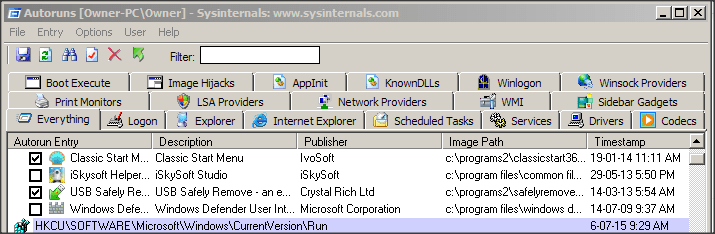
- with a AutoRuns startup process selected and right-clicking the "Check with Virus total" immediately opens my browser at VirusTotal - Terms of Service and Privacy Policy web-page and AutoRuns window hidden ... which had me perplexed for about an hour

Then –> another light bulb moment ... VirusTotal column/field in AutoRuns was out of view :o
- for about 3 years I have used "AutoRuns" and never drag resized the AutoRuns window
- and there was "a" Virus Total column/field

AutoRuns_1.png

AutoRuns_2.png

Don't tell anyone I have spent more than an hour grappling with the VirusTotal feature

Thank you for the enlightenment ... very much appreciated ;)

---------------------------------
For newbies:
Process Explorer v16.05 Alternative "TaskManager" with steroids
Autoruns for Windows v13.4 Startup management tool ... use extreme caution
 

My Computer My Computer

Computer type
PC/Desktop
Computer Manufacturer/Model Number
Toshiba, Lenovo (laptops) + 4 rigs
OS
XP Pro (x86) | 7 HP (x86) & (x64) | 7 Pro (x64)
@ LMiller7

Your warning was an understatement !
DuckDuckGo (DDG) search Uniblue Reputation was a real eye opener :eek:

I am so glad I checked in here ...

Thank you for your very timely advice ;)
 

My Computer My Computer

Computer type
PC/Desktop
Computer Manufacturer/Model Number
Toshiba, Lenovo (laptops) + 4 rigs
OS
XP Pro (x86) | 7 HP (x86) & (x64) | 7 Pro (x64)
This tutorial might have saved you some time :-)
http://www.sevenforums.com/tutorial...er-virustotal-check-all-processes-50-avs.html

If you intend to do step 10 in the tutorial above, do not do this:
When you start Procexp.exe on a 64bit OS, it creates/starts Procexp64.exe in a temp folder. Then Procexp.exe ends. You can skip that if you copy Procexp64.exe to some folder and make a shortcut to that. I set the shortcut to run as admin.

You might also want to read about boot logging via Process Monitor. Another good tool to have.
 

My Computer My Computer

Computer type
Laptop
Computer Manufacturer/Model Number
Employer provided Dell Latitude
OS
W7 Pro SP1 64bit
CPU
i7
Memory
8GB
Graphics Card(s)
Intel HD Graphics
Hard Drives
crappy SSD
Antivirus
Employer mandated Symantec Endpoint Protection
Browser
Pale Moon 64bit, IE11 64bit & Chrome 64bit
BTW, don't delete every "yellow" line that you see in Autoruns.
It seems to be wrong about C:\Windows\system32\ie4uinit.exe
...something to do with hard links...
 

My Computer My Computer

Computer type
Laptop
Computer Manufacturer/Model Number
Employer provided Dell Latitude
OS
W7 Pro SP1 64bit
CPU
i7
Memory
8GB
Graphics Card(s)
Intel HD Graphics
Hard Drives
crappy SSD
Antivirus
Employer mandated Symantec Endpoint Protection
Browser
Pale Moon 64bit, IE11 64bit & Chrome 64bit
UsernameIssues: Thanks for the comments and the tutorial link. You thaught me about this virustotal integration 2 months ago :) tutorial will make it easier in the future

I will have to check that 64bit trick when I get home.
 

My Computer My Computer

Computer type
PC/Desktop
Computer Manufacturer/Model Number
Custom Build
OS
Windows 7 Ultimate x64 SP1
CPU
AMD Phenom 2 1090T
Motherboard
Gigabyte GA-890FXA-UD5
Memory
2x8GB Kingston HyperX Fury Black 1600Mhz Unganged
Graphics Card(s)
MSI GTX 970 Gaming 4G
Sound Card
Realtek On-Board HD 7.1 Audio / Logitech G35
Monitor(s) Displays
3xAcer GD245HQ
Screen Resolution
1920x1080
Hard Drives
Samsung 850 Pro 512GB SSD - OS /
WD Caviar Black SATA 3 - 1 TBx2 - Dynamic RAID 0 /
WD Caviar Green SATA 2 - 640GBx2 - Dynamic RAID 0 /
WD Caviar Green SATA 2 - 640GB - Internal Backup /
Seagate Barracude SATA 3 - 3TB - External Backup/ Sync
PSU
HighPower 1000W
Case
Cooler Master HAF 932
Cooling
Noctua NH-D14
Keyboard
Logitech G19
Mouse
Logitech G500
Internet Speed
100/4 Mbit Cable (100GB quota)
Antivirus
ZoneAlarm Extreme Security / MBAM Pro / MBAE Free / SAS Free
Browser
IE 11 - Firefox - Chrome
Other Info
Logitech F710/ G27/ G940/ Z5500 // TrackIR 5 // Nvidia 3D Surround Vision
The same is true for Process Monitor.

I use CryptoPrevent and it prevents Process Monitor and Process Explorer from running their 64bit file from the root of the user temp folder. But I noticed this before installing CryptoPrevent. I had Process Explorer running when I launched Process monitor. It showed the 32 bit version of Process Monitor launching the 64 bit version... then the 32 bit ending.

On a related note:
For people that updated from IE8 on a 64bit OS...
...they might still have a pinned a shortcut to:
"C:\Program Files (x86)\Internet Explorer\iexplore.exe"

Starting with IE10, the 32bit version loads,
then it loads the 64bit version
then the 32bit version ends.

That 64bit version "parent" then starts one or more 32bit version "children" to display websites; unless EPM is enabled.

I would suggest that people update the pinned Task Bar shortcuts and/or Quick Launch shortcuts to avoid that silly dancing around each time IE starts.
 

My Computer My Computer

Computer type
Laptop
Computer Manufacturer/Model Number
Employer provided Dell Latitude
OS
W7 Pro SP1 64bit
CPU
i7
Memory
8GB
Graphics Card(s)
Intel HD Graphics
Hard Drives
crappy SSD
Antivirus
Employer mandated Symantec Endpoint Protection
Browser
Pale Moon 64bit, IE11 64bit & Chrome 64bit
Back
Top