How to access my BIOS? (Version/Date = American Megatrends Inc. V2.4)

synnchan

New member
Local time
4:29 PM
Messages
18
I want to format my computer and reinstall windows 7 from a flash driver. I have everything set for that already, except that I can't access my BIOS.

I need to access the BIOS to change the boot sequence and put my flash driver on 1st priority.

Here is my system information:
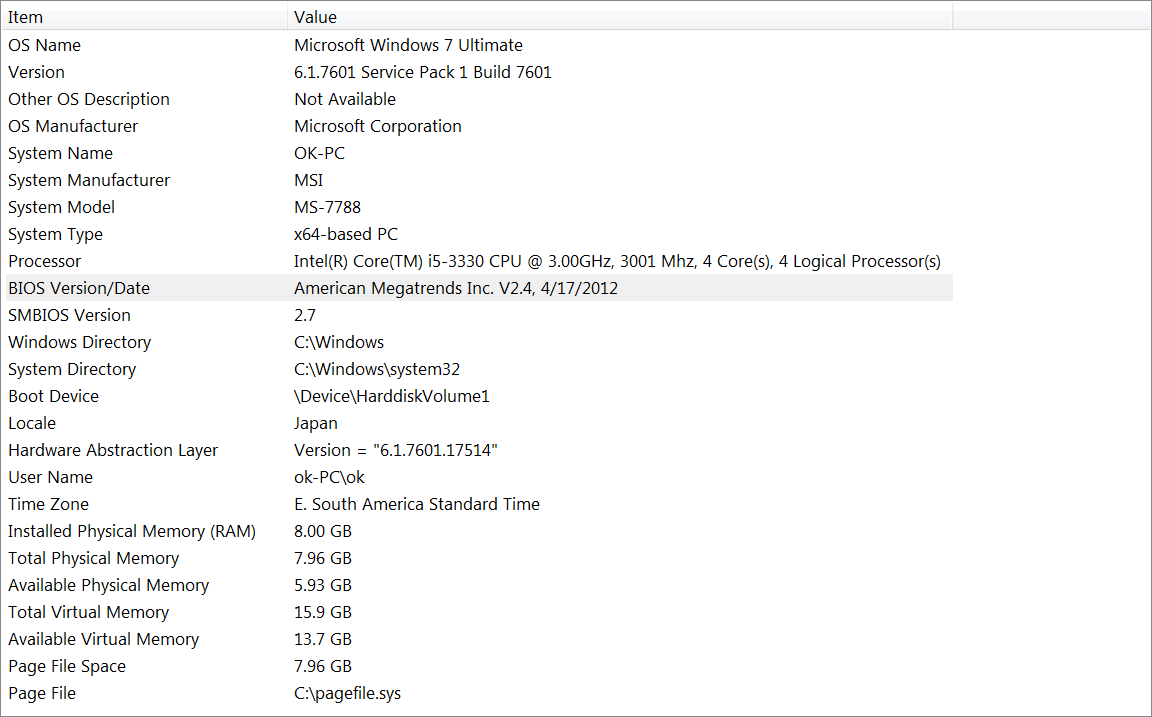
4mMjCLH.png


How can I access the BIOS? Help please.
 

My Computer My Computer

At a glance

Windows 7 Ultimate 64-bit SP1Intel Core i5 3330 @ 3.00GHz | Ivy Bridge 22n...8.00GB Dual-Channel DDR3 @ 665MHz (9-9-9-24)1023MB NVIDIA GeForce GTX 650 (ZOTAC Internat...
Computer type
PC/Desktop
Computer Manufacturer/Model Number
msi© MS-7788
OS
Windows 7 Ultimate 64-bit SP1
CPU
Intel Core i5 3330 @ 3.00GHz | Ivy Bridge 22nm Technology
Motherboard
MSI H61M-P31 (G3) (MS-7788) (SOCKET 0)
Memory
8.00GB Dual-Channel DDR3 @ 665MHz (9-9-9-24)
Graphics Card(s)
1023MB NVIDIA GeForce GTX 650 (ZOTAC International)
Hard Drives
931GB Seagate ST31000524AS ATA Device (SATA)
465GB Seagate Portable USB Device [USB (SATA)]
Antivirus
avast! 2014.9.0.2021 140820-0
Browser
Mozilla Firefox 31.0
Power on the computer and the system will start the POST (Power On Self Test) process. When the message "Press DEL to enter Setup Menu" appears on the screen, press <DEL> key to enter Setup.

Regards,
GEWB
 

My Computer My Computer

At a glance

Linux Mint / XP / Win7 Home, Pro, Ultimate / ...
Computer type
PC/Desktop
Computer Manufacturer/Model Number
(7 different computers booting up to 10 systems)
OS
Linux Mint / XP / Win7 Home, Pro, Ultimate / Win8.1 / Win10
Other Info
Four desktops, two laptops, one notebook and one tablet
When you boot the machine it usually displays a message such as
"press F2 to enter setup" Other popular keys are Del, F12

it varies with the manufacturer.
 

My Computer My Computer

At a glance

Windows 7 32 bitAMD 5200+ dual core2 GBNVidia GeForce 6150SE 128 MB
Computer Manufacturer/Model Number
HP Media Center
OS
Windows 7 32 bit
CPU
AMD 5200+ dual core
Memory
2 GB
Graphics Card(s)
NVidia GeForce 6150SE 128 MB
Monitor(s) Displays
CRT
Screen Resolution
1280x1024
Hard Drives
500 GB Sata internal :

SIIG USB 3.0 docking stations w/WD Caviar Black 6 Gb/s drives
Keyboard
PS/2
Mouse
PS/2 Wheel Mouse
Other Info
SIIG USB 3.0 PCIexpress card.
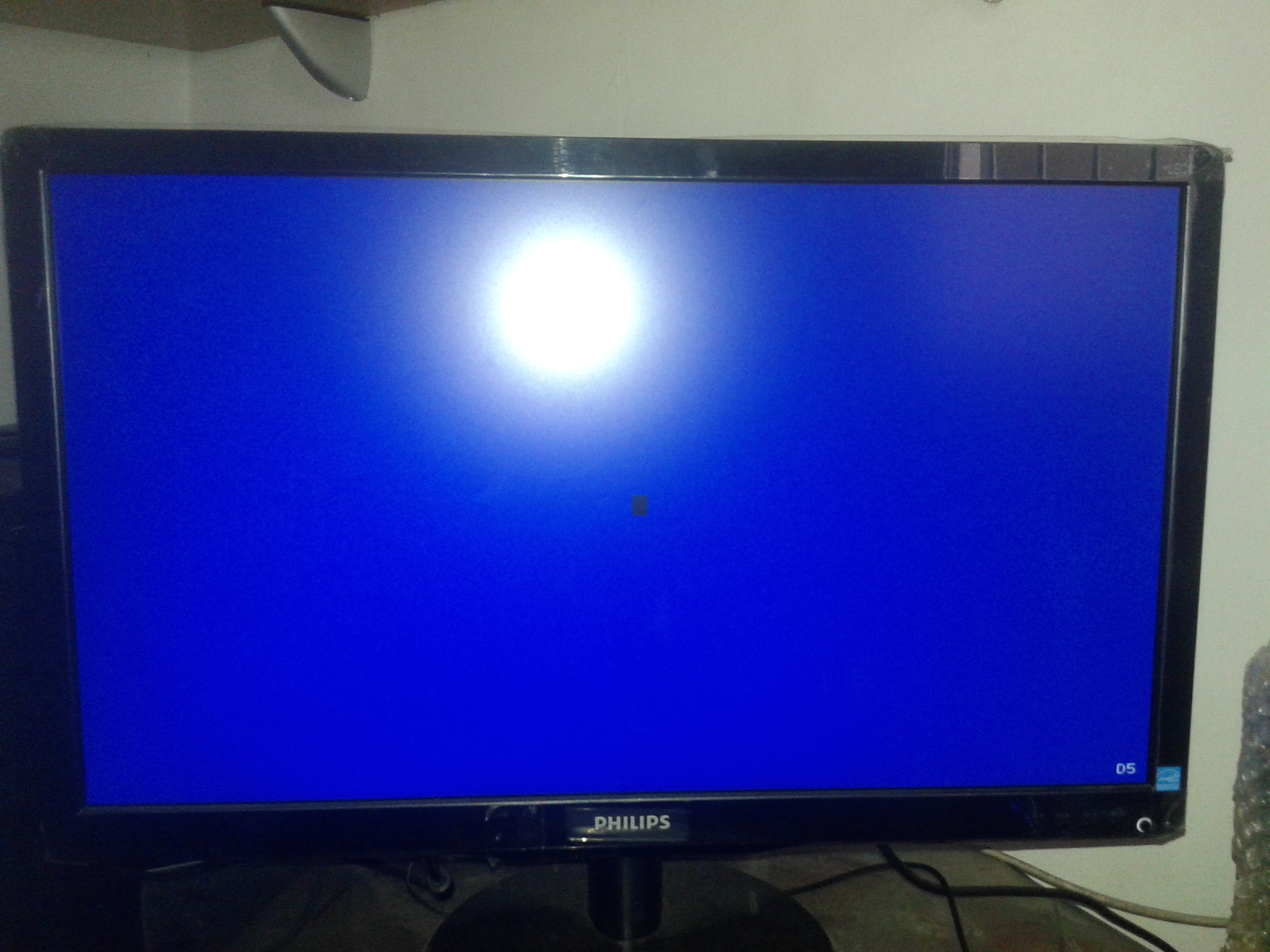
When I pressed del, it gave me a completely frozen blue screen with nothing written on it apart from a "D5" on the bottom right corner of the screen iirc. I had to force the computer to reboot.

When I pressed the other keys, it just sent to that screen asking if I want to get on safe mode, or repair my computer... etc.
 

My Computer My Computer

At a glance

Windows 7 Ultimate 64-bit SP1Intel Core i5 3330 @ 3.00GHz | Ivy Bridge 22n...8.00GB Dual-Channel DDR3 @ 665MHz (9-9-9-24)1023MB NVIDIA GeForce GTX 650 (ZOTAC Internat...
Computer type
PC/Desktop
Computer Manufacturer/Model Number
msi© MS-7788
OS
Windows 7 Ultimate 64-bit SP1
CPU
Intel Core i5 3330 @ 3.00GHz | Ivy Bridge 22nm Technology
Motherboard
MSI H61M-P31 (G3) (MS-7788) (SOCKET 0)
Memory
8.00GB Dual-Channel DDR3 @ 665MHz (9-9-9-24)
Graphics Card(s)
1023MB NVIDIA GeForce GTX 650 (ZOTAC International)
Hard Drives
931GB Seagate ST31000524AS ATA Device (SATA)
465GB Seagate Portable USB Device [USB (SATA)]
Antivirus
avast! 2014.9.0.2021 140820-0
Browser
Mozilla Firefox 31.0
If it does not show the key to enter the BIOS settings when the console first comes up then you need to find out from either the user manual or the manufacturer's help forum what the key is. I've never seen a PC that didn't prompt which key to press during startup.
 

My Computer My Computer

At a glance

Windows 7 32 bitAMD 5200+ dual core2 GBNVidia GeForce 6150SE 128 MB
Computer Manufacturer/Model Number
HP Media Center
OS
Windows 7 32 bit
CPU
AMD 5200+ dual core
Memory
2 GB
Graphics Card(s)
NVidia GeForce 6150SE 128 MB
Monitor(s) Displays
CRT
Screen Resolution
1280x1024
Hard Drives
500 GB Sata internal :

SIIG USB 3.0 docking stations w/WD Caviar Black 6 Gb/s drives
Keyboard
PS/2
Mouse
PS/2 Wheel Mouse
Other Info
SIIG USB 3.0 PCIexpress card.
When installing from a flash drive, I prefer to use the one-time boot menu to boot from the USB drive. When the computer needs to restart (during install process), it just goes to the HDD as per usual, even though the flash is still plugged in.

Actually changing the boot order in BIOS to flash usb 1st can often be a hassle, because when the machine restarts, flash is still 1st and it (sometimes) wants to begin the install again. One time boot menu is F11 on most of my boxes (but YMMV), and it gives you a choice of boot devices eg usb, uefi usb, HDD, DVD etc.
 

My Computer My Computer

At a glance

W10 Pro x64, W7 Pro x64 in VMwarei7 2600K @ 4.4GHz8GB Mushkin @ 1600MHzNvidia GTX 750 Ti
Computer type
PC/Desktop
Computer Manufacturer/Model Number
self build
OS
W10 Pro x64, W7 Pro x64 in VMware
CPU
i7 2600K @ 4.4GHz
Motherboard
MSI Z68A-GD80
Memory
8GB Mushkin @ 1600MHz
Graphics Card(s)
Nvidia GTX 750 Ti
Monitor(s) Displays
27" Benq + 27" LG
Screen Resolution
1080p
Hard Drives
500GB 850 Evo SSD + 3 * 2TB Seagate
PSU
EVGA 650 GS modular
Case
Antec 300
Cooling
Seidon 120V v2
Internet Speed
62/18 Mbps
Antivirus
Defender (W10) + MSE (W7)
Browser
Firefox
When installing from a flash drive, I prefer to use the one-time boot menu to boot from the USB drive. When the computer needs to restart (during install process), it just goes to the HDD as per usual, even though the flash is still plugged in.

Actually changing the boot order in BIOS to flash usb 1st can often be a hassle, because when the machine restarts, flash is still 1st and it (sometimes) wants to begin the install again. One time boot menu is F11 on most of my boxes (but YMMV), and it gives you a choice of boot devices eg usb, uefi usb, HDD, DVD etc.

He still needs to find out the key on his machine. On my Laptop F12 will one time boot to the selected device and at the bottom of the list is the option to boot to setup. Or I can press F2 to go directly to setup. I just rebooted then shut down and booted to try it. It gives no indication which keys to press. It just shows the logon screen. But I believe most desktops do. At least during cold boot.

Most PC makers provide a PDF user manual for download.
 

My Computer My Computer

At a glance

Windows 7 32 bitAMD 5200+ dual core2 GBNVidia GeForce 6150SE 128 MB
Computer Manufacturer/Model Number
HP Media Center
OS
Windows 7 32 bit
CPU
AMD 5200+ dual core
Memory
2 GB
Graphics Card(s)
NVidia GeForce 6150SE 128 MB
Monitor(s) Displays
CRT
Screen Resolution
1280x1024
Hard Drives
500 GB Sata internal :

SIIG USB 3.0 docking stations w/WD Caviar Black 6 Gb/s drives
Keyboard
PS/2
Mouse
PS/2 Wheel Mouse
Other Info
SIIG USB 3.0 PCIexpress card.
Not a good idea to set USB as the first boot device as you can easily end up in an install loop since it will boot the flash drive each time you restart the computer.

Use the one time boot key as others have suggested.

Also, according to the manual:
BioS SetuP
Power on the computer and the system will start PoSt (Power on Self test)
process. When the message below appears on the screen, press <deL> key to
enter Setup.
Press deL to enter Setup Menu
if the message disappears before you respond and you still wish to enter Setup,
restart the system by turning it oFF and on or pressing the reSet button. you
may also restart the system by simultaneously pressing <Ctrl>, <Alt>, and <delete> keys.
 

My Computer My Computer

At a glance

Windows 10 Pro X64Intel Quad Core i7-4770 @ 3.4Ghz16.0GB PC3-12800 DDR3 SDRAM 1600 MHzIntel Integrated HD Graphics
Computer type
PC/Desktop
Computer Manufacturer/Model Number
Lenovo IdeaCenter 450
OS
Windows 10 Pro X64
CPU
Intel Quad Core i7-4770 @ 3.4Ghz
Memory
16.0GB PC3-12800 DDR3 SDRAM 1600 MHz
Graphics Card(s)
Intel Integrated HD Graphics
Sound Card
Realtek HD Audio
Monitor(s) Displays
HP 22" LCD
Screen Resolution
1680 x 1050
Hard Drives
250GB Samsung EVO SATA-3 SSD
2TB Seagate ST2000DM001 SATA-2
1.5TB Seagate ST3150041AS SATA
Keyboard
Dell USB
Mouse
Lenovo USB
Internet Speed
Cable via Road Runner 3MB Upload, 30MB Download
Antivirus
Windows Defender, MBAM Pro, MBAE
Browser
Seamonkey
Other Info
UEFI/GPT
PLDS DVD-RW DH16AERSH
errr... ok. But what exactly is this "one time boot" stuff everyone is talking about? I've never heard of it before. I don't know what I'm supposed to do.

I could probably do what you guys are talking about, but first I need to know how it's done.
 

My Computer My Computer

At a glance

Windows 7 Ultimate 64-bit SP1Intel Core i5 3330 @ 3.00GHz | Ivy Bridge 22n...8.00GB Dual-Channel DDR3 @ 665MHz (9-9-9-24)1023MB NVIDIA GeForce GTX 650 (ZOTAC Internat...
Computer type
PC/Desktop
Computer Manufacturer/Model Number
msi© MS-7788
OS
Windows 7 Ultimate 64-bit SP1
CPU
Intel Core i5 3330 @ 3.00GHz | Ivy Bridge 22nm Technology
Motherboard
MSI H61M-P31 (G3) (MS-7788) (SOCKET 0)
Memory
8.00GB Dual-Channel DDR3 @ 665MHz (9-9-9-24)
Graphics Card(s)
1023MB NVIDIA GeForce GTX 650 (ZOTAC International)
Hard Drives
931GB Seagate ST31000524AS ATA Device (SATA)
465GB Seagate Portable USB Device [USB (SATA)]
Antivirus
avast! 2014.9.0.2021 140820-0
Browser
Mozilla Firefox 31.0
On both my Asus motherboards tapping (not pressing) the Del (Delete key) gets me into the bois.
Tapping the F8 key gets me into the Once Boot Selection.

synnchan the needed information for your system should all be in the motherboard users manual.
 

My Computer My Computer

At a glance

Windows 10 Pro. 64/ version 1709 Windows 7 Pr...Intel i7-6800K @ 4.3Corsair Platinum 16 gig @2400EVGA GTX 1070 OC
Computer type
PC/Desktop
Computer Manufacturer/Model Number
Home made Desktop
OS
Windows 10 Pro. 64/ version 1709 Windows 7 Pro/64
CPU
Intel i7-6800K @ 4.3
Motherboard
ASUS X-99 Deluxe II
Memory
Corsair Platinum 16 gig @2400
Graphics Card(s)
EVGA GTX 1070 OC
Monitor(s) Displays
Asus 27" LED LCD/VE278Q
Screen Resolution
1920-1080 or 1280-720 HDMI
Hard Drives
INTEL SSD 730-240 Gb Sata 3.0/
PSU
EVGA Platium 1200W
Case
Phanteks Luxe Tempered Glass 8 fans/ one radiator
Cooling
XSPC/ Water Cooled CPU
Keyboard
Das 4 Professional
Mouse
Logitech M705/MX Anywhere 2-S
Internet Speed
100 mbits
Antivirus
Microsoft Security Essentials/ Malwarebytes Premium 3.0/ SAS
Browser
I.E. 11 default/Firefox/ ISP Time Warner Cable/Spectrum
Other Info
LG BluRay Burner/
Sound system-KLipsch-THX/
Icy Dock ssd Hot Swap bays.
My response (post #2) to press <DEL> was based on:
> Reading synnchan's listed System Specs to get his mobo model
> Downloading and reading the ops manual for that mobo

Regards,
GEWB
 

My Computer My Computer

At a glance

Linux Mint / XP / Win7 Home, Pro, Ultimate / ...
Computer type
PC/Desktop
Computer Manufacturer/Model Number
(7 different computers booting up to 10 systems)
OS
Linux Mint / XP / Win7 Home, Pro, Ultimate / Win8.1 / Win10
Other Info
Four desktops, two laptops, one notebook and one tablet
I finally managed to get to my BIOS screen. On my earlier attempts, whenever I'd press the "delete" key, it'd send me to a blue screen with a black square on the center and with "D5" written on the bottom right corner. I took a photo of it:

kgXpf13.jpg


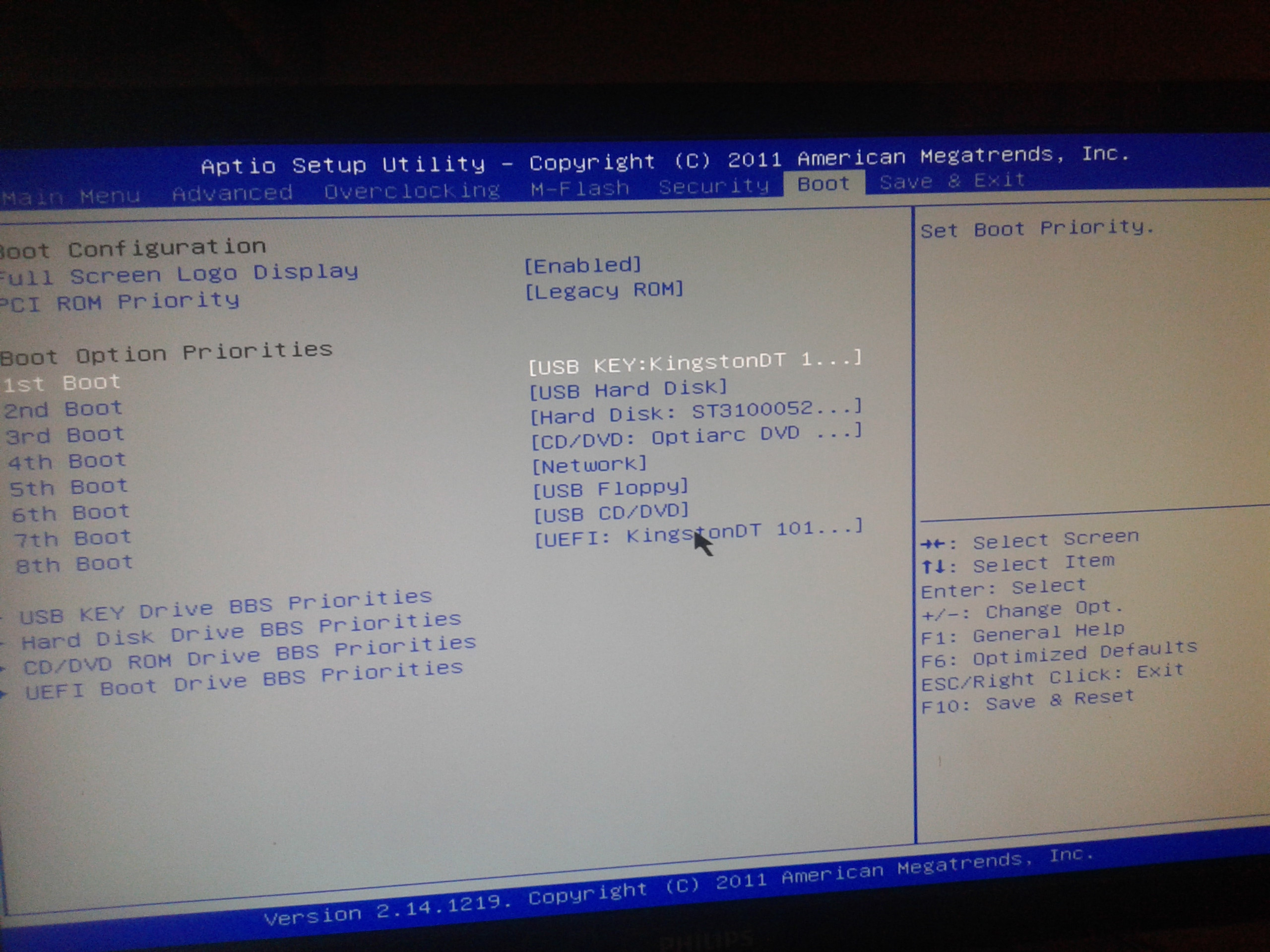
But I tried it again today and it magically worked for some reason. But now I have another problem. I changed my boot sequence stuff and put the flash driver on higher priority than my HDD. That's is how I left the configurations:

YffE3OW.jpg


But my flash driver is still not activating. I put it as 2nd boot and my HDD as 3rd boot, but it's still not working. Am I doing things right?

I'm getting really frustrated here. I'm starting to think I will never be able to format this computer but I really need to.

(By the way, does anyone know what was causing the weird blue screen with black square?)
 

My Computer My Computer

At a glance

Windows 7 Ultimate 64-bit SP1Intel Core i5 3330 @ 3.00GHz | Ivy Bridge 22n...8.00GB Dual-Channel DDR3 @ 665MHz (9-9-9-24)1023MB NVIDIA GeForce GTX 650 (ZOTAC Internat...
Computer type
PC/Desktop
Computer Manufacturer/Model Number
msi© MS-7788
OS
Windows 7 Ultimate 64-bit SP1
CPU
Intel Core i5 3330 @ 3.00GHz | Ivy Bridge 22nm Technology
Motherboard
MSI H61M-P31 (G3) (MS-7788) (SOCKET 0)
Memory
8.00GB Dual-Channel DDR3 @ 665MHz (9-9-9-24)
Graphics Card(s)
1023MB NVIDIA GeForce GTX 650 (ZOTAC International)
Hard Drives
931GB Seagate ST31000524AS ATA Device (SATA)
465GB Seagate Portable USB Device [USB (SATA)]
Antivirus
avast! 2014.9.0.2021 140820-0
Browser
Mozilla Firefox 31.0
You have a DVD drive according to your picture. I would recommend asking a friend burn a live Linux DVD and use that to format your drive. For your task I recommend Puppy Linux:

Download latest Puppy Linux release

As to setting your boot sequence, I would use:
1) CD/DVD
2) USB
3) HDD

Regards,
GEWB
 

My Computer My Computer

At a glance

Linux Mint / XP / Win7 Home, Pro, Ultimate / ...
Computer type
PC/Desktop
Computer Manufacturer/Model Number
(7 different computers booting up to 10 systems)
OS
Linux Mint / XP / Win7 Home, Pro, Ultimate / Win8.1 / Win10
Other Info
Four desktops, two laptops, one notebook and one tablet
Back
Top