How to access OEM Partition

shankargo

New member
Local time
3:54 AM
Messages
3
Hi

I have a lenovo ideapad y560p. suddenly it stopped booting with error message "PXE-E61: Media test failure, check cable, Operating System not found."
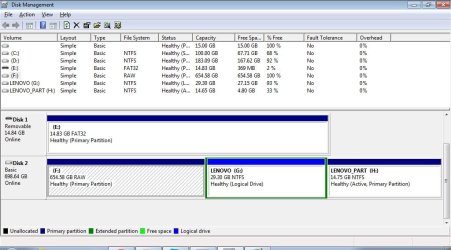
I had removed the harddisk and connected it as a external harddrive(750GB size) to my other laptop. But i can see only 29GB accessible as F: in windows explorer. when looking into the diskpart, most of the drive is listed as a OEM type. How can i access this? I can't assign a volume letter to this. I need to get my data from the disk so that i can install windows 7 fresh on the disk again.
or if anyone has come across the issue "Unable to boot : PXE-E61: Media test failure, check cable, Operating System not found." with lenovo laptop and sorted it pls. let me know
Thanks in advance for the help.
 

Attachments
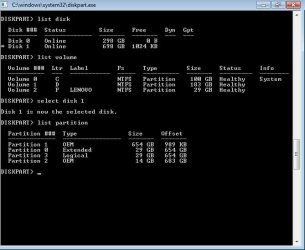
  • partition.jpg
    partition.jpg
    37.3 KB · Views: 50

My Computer

Computer type
Laptop
Computer Manufacturer/Model Number
lenovo
OS
windows 7 32 bit

My Computers

System One System Two

  • Computer type
    PC/Desktop
    OS
    7 X64
    CPU
    i5 8400
    Motherboard
    gigabyte b365m ds3h
    Memory
    2x8gb 3200mhz
    Hard Drives
    various
    PSU
    pure power 11 400w cm
    Case
    Coolermaster
    Cooling
    cryorig m9i
  • Computer type
    PC/Desktop
    OS
    7x64
    CPU
    g5400
    Motherboard
    ga b365m ds3h
    Memory
    8gb ddr4 2400
    PSU
    xfx pro 450w
Hi
I have just tried with partition guru. It shows the partition as unformatted and no files are listed.
Thanks
 

My Computer

Computer type
Laptop
Computer Manufacturer/Model Number
lenovo
OS
windows 7 32 bit
Does Partition Guru have a "Rebuild MBR" function? You could try that.
If not, free Partition Wizard bootable CD does.
 

My Computer

Computer type
PC/Desktop
Computer Manufacturer/Model Number
Home Built - Jan 2013
OS
Windows 7 64 Bit Home Premium SP1
CPU
i7-3820
Motherboard
Asus P9X79-PRO - Bios 4608
Memory
GSkill F3-14900CL9Q - 16GB
Graphics Card(s)
EVGA GeForce GTX660 - Driver 352.86
Sound Card
On board Realtek ALC898
Monitor(s) Displays
Acer S271HL
Screen Resolution
1920 x 1080
Hard Drives
#1- Samsung 840 Pro Series
#2- Western Digital WD1002FAEX Sata3 Black
#3- Western Digital WD1002FAEX Sata3 Black
PSU
Corsair CMPSU-850TX-V2 - 850 watt (by Seasonic)
Case
Corsair Obsidian 550D
Cooling
Standard 3 120mm case fans, Cooler Master Hyper 212 EVO
Keyboard
MS KC-0405
Mouse
Intellimouse 5-button
Internet Speed
56 Mbits/Sec (on a good day)
Antivirus
Avast & Malwarebytes
Browser
Firefox
Other Info
Asus DVD - DRW-24B1ST 24X
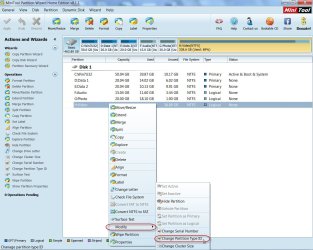
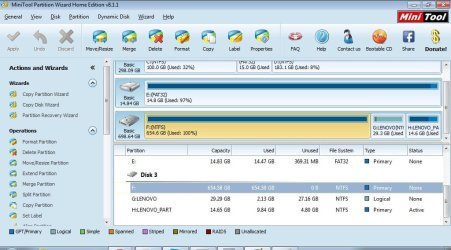
You may try Partition Wizard Home Edition 8.1.1, to check the partition type and change it to 0x07 as SIW2 suggested in post #2.

24-11-2014 18-46-07.jpg

Also a screenshot of Windows Disk Management is desirable.
 

My Computer

OS
Windows 7 Home Premium 32 bit
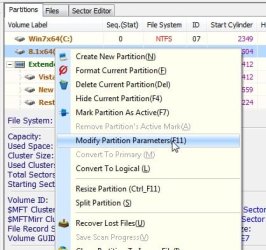
1) Rt click the partition and select "Modify partition parameters"

PG1.jpg


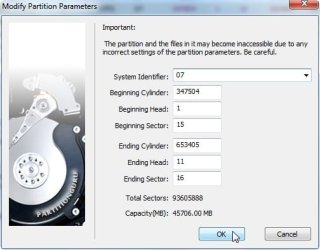
2) Select 0x7NTFS in the dropdown

PG2.jpg


3) Click Ok.

PG3.jpg
 

My Computers

System One System Two

  • Computer type
    PC/Desktop
    OS
    7 X64
    CPU
    i5 8400
    Motherboard
    gigabyte b365m ds3h
    Memory
    2x8gb 3200mhz
    Hard Drives
    various
    PSU
    pure power 11 400w cm
    Case
    Coolermaster
    Cooling
    cryorig m9i
  • Computer type
    PC/Desktop
    OS
    7x64
    CPU
    g5400
    Motherboard
    ga b365m ds3h
    Memory
    8gb ddr4 2400
    PSU
    xfx pro 450w

My Computer

Computer Manufacturer/Model Number
HP, Dell, Gateway, Toshiba - 4 laptops and 2 desktops
OS
Vista, Windows7, Mint Mate, Zorin, Windows 8
CPU
from 1.6GHz Duo to i7
Monitor(s) Displays
2x HP w2207
Hard Drives
5x HDD, 7x SSD, 12x Externals
Keyboard
with trackball - no mices
Mouse
Trackball mice
Internet Speed
DSL 6000
Tried changing the partitionid. still couldn't explore the disk. Shows as unformatted.
 

Attachments

  • disk.jpg
    disk.jpg
    77.4 KB · Views: 0
  • mini.jpg
    mini.jpg
    87.3 KB · Views: 0

My Computer

Computer type
Laptop
Computer Manufacturer/Model Number
lenovo
OS
windows 7 32 bit
Ever find a resolution?

I'm a Lenovo Y50 owner in a similar situation. Did you ever find a resolution?

-A
 

My Computer

Computer type
PC/Desktop
OS
Windows 7
Back
Top