How to access OEM Partition

shankargo

New member
Local time
11:13 AM
Messages
3
Hi

I have a lenovo ideapad y560p. suddenly it stopped booting with error message "PXE-E61: Media test failure, check cable, Operating System not found."
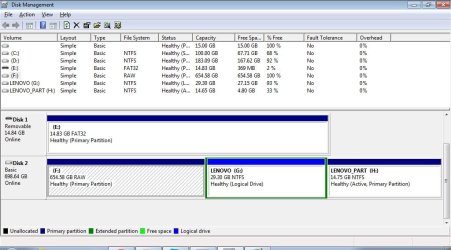
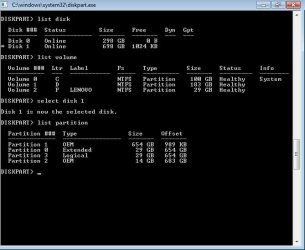
I had removed the harddisk and connected it as a external harddrive(750GB size) to my other laptop. But i can see only 29GB accessible as F: in windows explorer. when looking into the diskpart, most of the drive is listed as a OEM type. How can i access this? I can't assign a volume letter to this. I need to get my data from the disk so that i can install windows 7 fresh on the disk again.
or if anyone has come across the issue "Unable to boot : PXE-E61: Media test failure, check cable, Operating System not found." with lenovo laptop and sorted it pls. let me know
Thanks in advance for the help.
 

Attachments
  • partition.jpg
    partition.jpg
    37.3 KB · Views: 50

My Computer My Computer

At a glance

windows 7 32 bit
Computer type
Laptop
Computer Manufacturer/Model Number
lenovo
OS
windows 7 32 bit

My Computers My Computers

  • At a glance

    7 X64i5 84002x8gb 3200mhz
    Computer type
    PC/Desktop
    OS
    7 X64
    CPU
    i5 8400
    Motherboard
    gigabyte b365m ds3h
    Memory
    2x8gb 3200mhz
    Hard Drives
    various
    PSU
    pure power 11 400w cm
    Case
    Coolermaster
    Cooling
    cryorig m9i
  • At a glance

    7x64g54008gb ddr4 2400
    Computer type
    PC/Desktop
    OS
    7x64
    CPU
    g5400
    Motherboard
    ga b365m ds3h
    Memory
    8gb ddr4 2400
    PSU
    xfx pro 450w
Hi
I have just tried with partition guru. It shows the partition as unformatted and no files are listed.
Thanks
 

My Computer My Computer

At a glance

windows 7 32 bit
Computer type
Laptop
Computer Manufacturer/Model Number
lenovo
OS
windows 7 32 bit
Does Partition Guru have a "Rebuild MBR" function? You could try that.
If not, free Partition Wizard bootable CD does.
 

My Computer My Computer

At a glance

Windows 7 64 Bit Home Premium SP1i7-3820GSkill F3-14900CL9Q - 16GBEVGA GeForce GTX660 - Driver 352.86
Computer type
PC/Desktop
Computer Manufacturer/Model Number
Home Built - Jan 2013
OS
Windows 7 64 Bit Home Premium SP1
CPU
i7-3820
Motherboard
Asus P9X79-PRO - Bios 4608
Memory
GSkill F3-14900CL9Q - 16GB
Graphics Card(s)
EVGA GeForce GTX660 - Driver 352.86
Sound Card
On board Realtek ALC898
Monitor(s) Displays
Acer S271HL
Screen Resolution
1920 x 1080
Hard Drives
#1- Samsung 840 Pro Series
#2- Western Digital WD1002FAEX Sata3 Black
#3- Western Digital WD1002FAEX Sata3 Black
PSU
Corsair CMPSU-850TX-V2 - 850 watt (by Seasonic)
Case
Corsair Obsidian 550D
Cooling
Standard 3 120mm case fans, Cooler Master Hyper 212 EVO
Keyboard
MS KC-0405
Mouse
Intellimouse 5-button
Internet Speed
56 Mbits/Sec (on a good day)
Antivirus
Avast & Malwarebytes
Browser
Firefox
Other Info
Asus DVD - DRW-24B1ST 24X
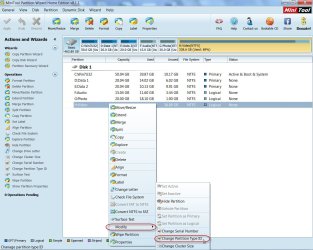
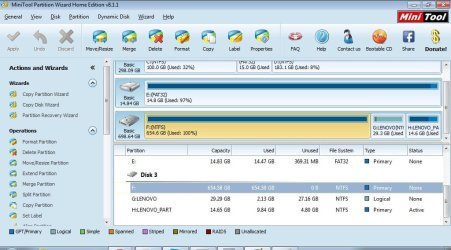
You may try Partition Wizard Home Edition 8.1.1, to check the partition type and change it to 0x07 as SIW2 suggested in post #2.

24-11-2014 18-46-07.jpg

Also a screenshot of Windows Disk Management is desirable.
 

My Computer My Computer

At a glance

Windows 7 Home Premium 32 bit
OS
Windows 7 Home Premium 32 bit
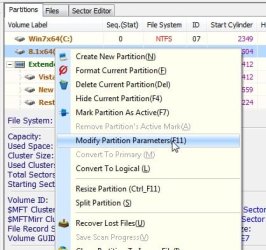
1) Rt click the partition and select "Modify partition parameters"

PG1.jpg


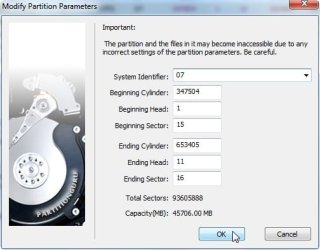
2) Select 0x7NTFS in the dropdown

PG2.jpg


3) Click Ok.

PG3.jpg
 

My Computers My Computers

  • At a glance

    7 X64i5 84002x8gb 3200mhz
    Computer type
    PC/Desktop
    OS
    7 X64
    CPU
    i5 8400
    Motherboard
    gigabyte b365m ds3h
    Memory
    2x8gb 3200mhz
    Hard Drives
    various
    PSU
    pure power 11 400w cm
    Case
    Coolermaster
    Cooling
    cryorig m9i
  • At a glance

    7x64g54008gb ddr4 2400
    Computer type
    PC/Desktop
    OS
    7x64
    CPU
    g5400
    Motherboard
    ga b365m ds3h
    Memory
    8gb ddr4 2400
    PSU
    xfx pro 450w

My Computer My Computer

At a glance

Vista, Windows7, Mint Mate, Zorin, Windows 8from 1.6GHz Duo to i7
Computer Manufacturer/Model Number
HP, Dell, Gateway, Toshiba - 4 laptops and 2 desktops
OS
Vista, Windows7, Mint Mate, Zorin, Windows 8
CPU
from 1.6GHz Duo to i7
Monitor(s) Displays
2x HP w2207
Hard Drives
5x HDD, 7x SSD, 12x Externals
Keyboard
with trackball - no mices
Mouse
Trackball mice
Internet Speed
DSL 6000
Tried changing the partitionid. still couldn't explore the disk. Shows as unformatted.
 

Attachments

  • disk.jpg
    disk.jpg
    77.4 KB · Views: 0
  • mini.jpg
    mini.jpg
    87.3 KB · Views: 0

My Computer My Computer

At a glance

windows 7 32 bit
Computer type
Laptop
Computer Manufacturer/Model Number
lenovo
OS
windows 7 32 bit
Ever find a resolution?

I'm a Lenovo Y50 owner in a similar situation. Did you ever find a resolution?

-A
 

My Computer My Computer

At a glance

Windows 7
Computer type
PC/Desktop
OS
Windows 7
Back
Top