

My job, when I was at work, was in IT. I have a great deal of experience with networks but wasn't involved with wireless at that time. My only experience of wireless networks is at home.
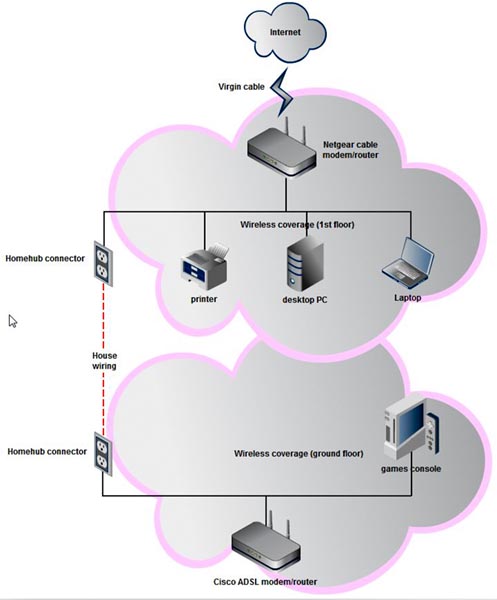
I have a cable modem in the "office" on the 1st floor, which is where the cable (Virgin) network cable terminates. The modem/router has gigabit networking ports and my PCs and printer are connected by gigabit ethernet cable. I use homehub devices to extend the wired network to the ground floor where, until recently, the only device was my games console. This was plugged into the second homehub device. I used homehubs because the wireless signal on the ground floor was very poor.
I have recently upgraded my "smart phone" which has Wi-Fi and also bought a tablet for use in the lounge on the ground floor. Both devices get a good signal anywhere upstairs but a poor signal anywhere downstairs. I therefore needed to extend my wireless coverage to improve downstairs reception. I tried all the usual solutions but none were satisfactory. I then decided to add a second "wireless access point" in the lounge. I already had a couple of ADSL modem/routers from when my broadband was from my phone company so decided to use one of those as a wireless access point.
My setup is now like this.
My problem is this.
I cannot find a way to have the two wireless devices seem like one wireless network. I have turned off DHCP in the ground floor router and assigned it a "nailed" IP address. I have tried giving both routers the same SSID. At present my wireless devices can see both networks and I can just connect to whichever one is giving the best signal but I can't just have my phone or tablet connect to the strongest signal as I roam about the house.
Not a big deal but I'm sure It's acheivable. Anyone know how, without the expense of a dedicated wireless access point.
I have a cable modem in the "office" on the 1st floor, which is where the cable (Virgin) network cable terminates. The modem/router has gigabit networking ports and my PCs and printer are connected by gigabit ethernet cable. I use homehub devices to extend the wired network to the ground floor where, until recently, the only device was my games console. This was plugged into the second homehub device. I used homehubs because the wireless signal on the ground floor was very poor.
I have recently upgraded my "smart phone" which has Wi-Fi and also bought a tablet for use in the lounge on the ground floor. Both devices get a good signal anywhere upstairs but a poor signal anywhere downstairs. I therefore needed to extend my wireless coverage to improve downstairs reception. I tried all the usual solutions but none were satisfactory. I then decided to add a second "wireless access point" in the lounge. I already had a couple of ADSL modem/routers from when my broadband was from my phone company so decided to use one of those as a wireless access point.
My setup is now like this.
My problem is this.
I cannot find a way to have the two wireless devices seem like one wireless network. I have turned off DHCP in the ground floor router and assigned it a "nailed" IP address. I have tried giving both routers the same SSID. At present my wireless devices can see both networks and I can just connect to whichever one is giving the best signal but I can't just have my phone or tablet connect to the strongest signal as I roam about the house.
Not a big deal but I'm sure It's acheivable. Anyone know how, without the expense of a dedicated wireless access point.
My Computer
At a glance
Windows 7 Ultimate (64 bit)Core 2 Quad Q6600 @ 2.4 ghz8 gbNVIDIA GeForce 8800 GTX
- Computer Manufacturer/Model Number
- Dell XPS720
- OS
- Windows 7 Ultimate (64 bit)
- CPU
- Core 2 Quad Q6600 @ 2.4 ghz
- Motherboard
- Dell
- Memory
- 8 gb
- Graphics Card(s)
- NVIDIA GeForce 8800 GTX
- Sound Card
- Creative SB X-Fi
- Monitor(s) Displays
- Dell 2707 WFP
- Screen Resolution
- 1920 X 1200
- Hard Drives
- 4 Sata disks in 2 RAID 0 arrays
c: = 921 gb
d: = 745 gb
NVIDIA raid controller on MB
- PSU
- Dell XPS 720 Std.
- Case
- Dell XPS 720 Std.
- Cooling
- Dell XPS 720 Std.
- Keyboard
- Dell
- Mouse
- Dell
- Internet Speed
- Download Speed: 80713 kbps (10089.1 KB/sec ) Upload Speed:


