how to add/show Custom Columns in Windows explorer's Detail view

novice84

New member
Local time
7:43 PM
Messages
4
in windows explorer, if we change view type to detail view, we can see file properties in columns, e.g. type, size, etc. etc. We can right click on any column heading and click more to add more columns.
I want to show more file properties which are not standard but custom file properties, which we can view after right click go to properties and in custom tab.
I have searched so much about this, but could not find any solution.
 

My Computer My Computer

At a glance

Windows 7 Ultimate x64
Computer type
PC/Desktop
Computer Manufacturer/Model Number
Custom Build
OS
Windows 7 Ultimate x64
what properties do you want to add to the details columns?
 

My Computer My Computer

At a glance

windows 7 premium x64
OS
windows 7 premium x64
I am asking about custom properties, which you can add yourself in any office file. you can do it by right click on any office file and click properties, go to custom tab, there you can type any word to assign a property name and value to that file.
 

My Computer My Computer

At a glance

Windows 7 Ultimate x64
Computer type
PC/Desktop
Computer Manufacturer/Model Number
Custom Build
OS
Windows 7 Ultimate x64
I am asking about custom properties, which you can add yourself in any office file. you can do it by right click on any office file and click properties, go to custom tab, there you can type any word to assign a property name and value to that file.

try this as far as i know standard explorer does not have custom properties but it does have a ton of options. i think if you scroll through them more list you may find what your looking for, but since you arnt being specific of what properties you would like to add its the best i can do.
 

My Computer My Computer

At a glance

windows 7 premium x64
OS
windows 7 premium x64

My Computer My Computer

At a glance

Windows 7 Ultimate x64
Computer type
PC/Desktop
Computer Manufacturer/Model Number
Custom Build
OS
Windows 7 Ultimate x64
it almost same situation like this post below :
http://www.sevenforums.com/customization/238004-can-we-modify-add-custom-columns-explorer.html
as you can see only standard columns we can add, but can type our own column title to show in explorer.

Explorer++ doesn't have that option to add custom columns too.
it shows same standard column headers.

when you go to more there are a ton of options you can add, what exactly are you trying to sort by? or do you just want to change the name of an existing property?
 

My Computer My Computer

At a glance

windows 7 premium x64
OS
windows 7 premium x64
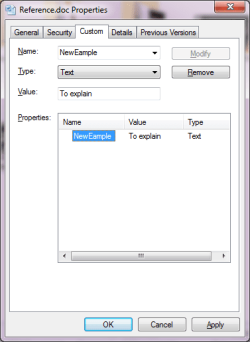
please see attached image.
this is showing Custom tab of a word Document.
in that I have added a property "NewExample" and assigned value "To explain"
we can assign any property name
can these user assigned custom properties we can see in Detail view of file explorer ?
 

Attachments

  • Custom Properties Example.png
    Custom Properties Example.png
    12 KB · Views: 29

My Computer My Computer

At a glance

Windows 7 Ultimate x64
Computer type
PC/Desktop
Computer Manufacturer/Model Number
Custom Build
OS
Windows 7 Ultimate x64
please see attached image.
this is showing Custom tab of a word Document.
in that I have added a property "NewExample" and assigned value "To explain"
we can assign any property name
can these user assigned custom properties we can see in Detail view of file explorer ?

this is not an avalible feature in windows explorer or any of its alternatives beacuse the catagories are coded into the windows shell....unless you know c++ its unchangable sorry :/
 

My Computer My Computer

At a glance

windows 7 premium x64
OS
windows 7 premium x64
Back
Top