how to assign admin privilage to specific program to run.

skumar

New member
Local time
2:40 PM
Messages
22
Location
INDIA
Hello,

Some program asks admin rights to run even on domain user.

so how do i give such program's right to such standard user ?

properties of the program's shortcut - advanced - run as administrator option doesn't work for me.

please help me.

Snehal
 

My Computer My Computer

OS
Windows 7 Professional x64
Hi Snehal,

You will need to have access to the Server (Domain Controller). I also found one of your Threads with the same concern and you have never replied. It will be nice if you can post an update this time so that we can further assist you. :D
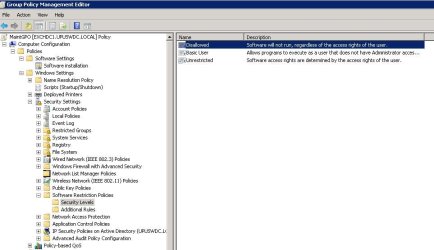
Open up GP Management Editor expand Policies>> Windows Settings>> Security Settings>> Software Restriction Policies, fiddle with the Security Levels and Additional Rules settings.
 

Attachments

  • GPO - restrictions on running programs image2.JPG
    GPO - restrictions on running programs image2.JPG
    58.4 KB · Views: 1

My Computer My Computer

Computer Manufacturer/Model Number
Lenovo Desktop/Samsung Laptop
OS
Win7 & Win8 64bit
CPU
Intel i5
Internet Speed
Charter-20 Mbps
Antivirus
Avast
Browser
FF, IE9 and Chrome
Sorry for late reply,
it works for me.
thank you very much sir.
 

My Computer My Computer

OS
Windows 7 Professional x64
Easy solution

This may help another user,

An easy way.

First enable administrator account by (net user administrator /active:yes)

then,

make a shortcut of program you want to run as administrator by right click on desktop select new and shortcut.

in shortcut put the program's location as below:

(runas /user:computername\administrator /savecred "C:\Path to program.exe").
 

My Computer My Computer

OS
Windows 7 Professional x64
Back
Top