How to auto-kill orphaned processes if there is still a live one?

MrWoody

New member
Local time
12:56 AM
Messages
5
I just started my first IT job last month for a company that makes/markets foodservice items (mostly bakeware/servingware), and we have a Lenovo M79 tower and a monitor set up just outside out CEO's office for the purpose of displaying the security cameras at our new warehouse. (very impressive....blah blah blah) We had to run the security camera IP addresses in firefox, but i can't remember exactly why.
We were hoping to make this run self-sufficient without anyone having to babysit it. I used a small app called caffeine to keep the computer from ever going to sleep, the firefox add-on "ReloadEvery" to refresh the page every 5 minutes so the stream doesn’t freeze up, and "Wise Memory Optimizer" which is SUPPOSED to clean the memory if it drops below a certain level (5GB), but here’s the problem:

Every time the page refreshes, it starts a new "jp2launcher" process for java. It doesn’t shut down the old ones, it just starts a new one. So the last time I checked in task manager, it had almost 80 "jp2launcher" processes sitting there doing nothing but taking up memory and just one that was actually running. I could barely get it to respond enough to restart it. I know I can shut them down one by one, but then i'm the babysitter stopping by several times a day to wipe it's butt. is there a program that could shut them down automatically as soon as they are orphaned even though there is one instance still running?

This computer has literally been used by no one else for anything else, so i wouldn't suspect malware.

Thanks in advance :)

MrWoody
 

My Computer My Computer

At a glance

Windows 7 Professional 64 bit8GB
Computer type
PC/Desktop
Computer Manufacturer/Model Number
Lenovo ThinkCentre M79
OS
Windows 7 Professional 64 bit
Memory
8GB
Antivirus
McAffee
Browser
Firefox
You would do well avoiding "Wise Memory Optimizer" and all programs of it's kind. Windows 7 has very good memory management, does not need, and will not benefit from such programs. The only dubious benefit of these programs is to make the Task Manager numbers more attractive to people who do not understand what they mean.

I actually tried this program, just to see what it did mind you, and was thoroughly unimpressed. For a program claiming to optimize memory it did everything wrong.

At free this program is overpriced.
 

My Computer My Computer

At a glance

Windows 7 Pro 64 bitXeon W35208 GBNvidia Geforce 210
Computer type
PC/Desktop
Computer Manufacturer/Model Number
HP
OS
Windows 7 Pro 64 bit
CPU
Xeon W3520
Memory
8 GB
Graphics Card(s)
Nvidia Geforce 210
Every time the page refreshes, it starts a new "jp2launcher" process for java. It doesn’t shut down the old ones, it just starts a new one. So the last time I checked in task manager, it had almost 80 "jp2launcher" processes sitting there doing nothing but taking up memory and just one that was actually running. I could barely get it to respond enough to restart it. I know I can shut them down one by one, but then i'm the babysitter stopping by several times a day to wipe it's butt. is there a program that could shut them down automatically as soon as they are orphaned even though there is one instance still running?

You can try using the taskkill command to kill the orphaned tasks.
Open a Command Prompt (CMD) and enter this command to read the help for taskkill:
taskkill /?

Here is a GUESS at a command that might be what you are looking for.
Hopefully this would kill all jp2launcher processes that have a status not equal RUNNING:
taskkill /IM jp2launcher /FI "STATUS ne RUNNING"

If you get the command to do what you want, save the command as a BAT file.
You could then set up a Scheduled Task to run the BAT file as often as you want.

hth,
David
 

My Computer My Computer

At a glance

Multi-Boot W7_Pro_x64 W8.1_Pro_x64 W10_Pro_x6...AMD Athlon II x4 6206GB GSkill DDR2 800AMD 4670 GPU + AMD 4200 IGP
Computer type
PC/Desktop
Computer Manufacturer/Model Number
home built
OS
Multi-Boot W7_Pro_x64 W8.1_Pro_x64 W10_Pro_x64 +Linux_VMs +Chromium_VM
CPU
AMD Athlon II x4 620
Motherboard
Gigabyte GA-MA785G-UD3H
Memory
6GB GSkill DDR2 800
Graphics Card(s)
AMD 4670 GPU + AMD 4200 IGP
Sound Card
on board Realtek ALC889A
Monitor(s) Displays
RCA 40" LCD TV, Insignia 32" LCD TV, HP 15" LCD monitor
Screen Resolution
1680 x 1050
Hard Drives
OCZ Vertex 3 120GB,
Samsung F3 1TB (3),
Several others - WD, Seagate, Hitachi, ...
PSU
Corsair 500 W
Case
Rosewill mid tower
Cooling
CM 90mm rifle
Keyboard
Gyration wireless, Logitech wireless, Dell USB wired
Mouse
Gyration wireless, Logitech wireless, V7 USB wired
Internet Speed
Spectrum - 100Mbps D / 10Mbps U
Antivirus
Avast, MBAM3, EMET, WinPatrol
Browser
Pale Moon, Firefox, IE
Other Info
2 multi-boot PC's
Mainly HTPC/Office/Gen purpose (no gaming).
Trendnet USB KVM.
LG DVD burner/Blue Ray Player.
Tray system for removable SATA backup drives.

Not currently OCd, under-volted.
I use Hybrid sleep, rarely re-boot or shutdown.

Hauppauge HD-PVR, Avermedia PCIe TV Tuner, Hauppauge PCI TV Tuner.
I agree with LMiller7. Uninstall anything from WISE.

You should not need any app just to prevent the computer from going to sleep. Just set the power settings as desired.

DavidE has given a good solution to killing old jp2launcher processes, but you really should not have to do that. Reloading a website that uses Java should start a second instance of jp2launcher, but that second instance should exit when it sees the first instance is running.

What version of Firefox are you using?
What version of Java?
Both will need attention to update...
...but if people won't be surfing elsewhere
...then maybe not updating is okay.

Before you settled in on using Firefox, did you look into using VLC? You can show multiple cameras at once.
 

My Computer My Computer

At a glance

W7 Pro SP1 64biti78GBIntel HD Graphics
Computer type
Laptop
Computer Manufacturer/Model Number
Employer provided Dell Latitude
OS
W7 Pro SP1 64bit
CPU
i7
Memory
8GB
Graphics Card(s)
Intel HD Graphics
Hard Drives
crappy SSD
Antivirus
Employer mandated Symantec Endpoint Protection
Browser
Pale Moon 64bit, IE11 64bit & Chrome 64bit
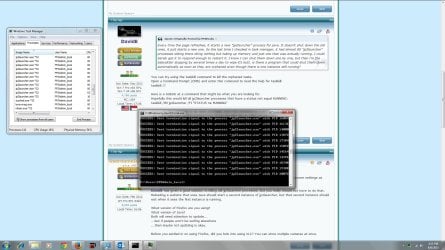
ok, so point well taken on the wise deal. it's now deleted. So, being brand new to all this, i couldn't tell you what the reasoning was behind running it in firefox, but i do have the IP address, and i suppose i could try running it in something else. As far as the use of the caffeine program, the power settings for "never sleep" did not work. i would walk by several time a day and it would be asleep with the screen off and i would have to log back in. The caffeine app emulates the "F15" keystroke every 59 seconds to keep it awake and seems to work wonderfully. I did try the command line DavidE suggested, but it did not work. I restarted the computer earlier, and set the refresh to every 10s just to make them pile up to try the command and get a good screenshot. It should be attached.

As far as Firefox, i am running v39.0
Java: Version 8 update 51

I'll keep working on this, thanks for the input and help to a noob
 

Attachments

  • Camera issues.jpg
    Camera issues.jpg
    292.8 KB · Views: 8

My Computer My Computer

At a glance

Windows 7 Professional 64 bit8GB
Computer type
PC/Desktop
Computer Manufacturer/Model Number
Lenovo ThinkCentre M79
OS
Windows 7 Professional 64 bit
Memory
8GB
Antivirus
McAffee
Browser
Firefox
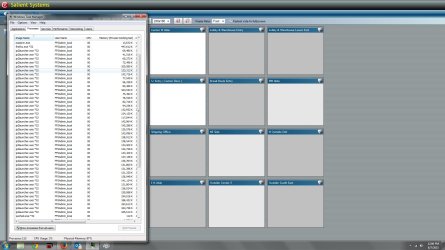
OK, so i just decided to try killing all of them just for the fun of it. Again....i'm new to this, so bear with my ignorance.

The attached screenshot shows where it killed them, but i tried refreshing and re-starting the task manager, and they are all still there.....thoughts?
 

Attachments

  • Cam ISS 2.jpg
    Cam ISS 2.jpg
    227.1 KB · Views: 8

My Computer My Computer

At a glance

Windows 7 Professional 64 bit8GB
Computer type
PC/Desktop
Computer Manufacturer/Model Number
Lenovo ThinkCentre M79
OS
Windows 7 Professional 64 bit
Memory
8GB
Antivirus
McAffee
Browser
Firefox
Have you asked Salient Systems (Contact Us | Salient Systems) why this happens when refreshing the browser?

Having 16 VLC windows might not look as nice, but they could be (automatically?*) arranged so that all of the screen's real estate is used.


*I would script the opening, size and loation of each VLC window using AutoIt... which I might be able to help you with.
 

My Computer My Computer

At a glance

W7 Pro SP1 64biti78GBIntel HD Graphics
Computer type
Laptop
Computer Manufacturer/Model Number
Employer provided Dell Latitude
OS
W7 Pro SP1 64bit
CPU
i7
Memory
8GB
Graphics Card(s)
Intel HD Graphics
Hard Drives
crappy SSD
Antivirus
Employer mandated Symantec Endpoint Protection
Browser
Pale Moon 64bit, IE11 64bit & Chrome 64bit
i've emailed Salient and am currently looking into Java Runtime Environment. I just thought i was "good with computers" till i took this job lol
 

My Computer My Computer

At a glance

Windows 7 Professional 64 bit8GB
Computer type
PC/Desktop
Computer Manufacturer/Model Number
Lenovo ThinkCentre M79
OS
Windows 7 Professional 64 bit
Memory
8GB
Antivirus
McAffee
Browser
Firefox
There are tons of things that you will encounter at work that just never come up for the home user.

Maybe as a test, you could stream one of the cameras to VLC and just minimize that window. It would be interesting to see if VLC solves the freeze that you mentioned: "ReloadEvery" to refresh the page every 5 minutes so the stream doesn’t freeze up.


But back to working on your current setup:
While we wait to hear back from Salient, what happens if you kill all instances of jp2launcher? Does the Salient app still work within firefox? My thinking is: jp2launcher might just launch the Java apps. It might not be needed after that. If it turns out that you do not need any instances of jp2launcher running after the Java apps load, then maybe a script could kill each instance of jp2launcher after a period of time (e.g. kill jp2launcher two minutes after jp2launcher first appears).

To test this, restart the computer so that you one have one or two instances of jp2launcher to manually kill via Task Manager. I know that you failed to kill jp2launcher in post #6... but give it a try via Task Manager.


If Salient cannot solve the issue with their software and we must stick with the Firefox/Salient combo, then we can stop using ReloadEvery and use a script to exit and then restart Firefox. Not pretty, but functional.
 

My Computer My Computer

At a glance

W7 Pro SP1 64biti78GBIntel HD Graphics
Computer type
Laptop
Computer Manufacturer/Model Number
Employer provided Dell Latitude
OS
W7 Pro SP1 64bit
CPU
i7
Memory
8GB
Graphics Card(s)
Intel HD Graphics
Hard Drives
crappy SSD
Antivirus
Employer mandated Symantec Endpoint Protection
Browser
Pale Moon 64bit, IE11 64bit & Chrome 64bit
Thanks so much for the help.
So, interesting thing just happened. This morning i set the parameters in Java so that it could use no more than 512mb of memory, but apparently that didn't work. I walked by the aforementioned computer and all the "cameras" had gone white. I already had task manager pulled up, and took the attached screenshot. When i tried to paste it into paint, the computer informed me that memory was low and suggested i terminate.........firefox. Before i could even decide on the matter, it did it for me.

I then watched in the task manager as one-by-one the "jp2launcher" processes closed by themselves. This, of course, leads me to believe that i could do as USERNAMEISSUES mentioned and do a script to re-start firefox. The problem with that is that there is a username/password for the camera's webaddress. it auto-populates when the site is opened, but someone has to click "ok", correct? or is there a script for that as well? (again....never done a script).
Also, i will keep looking into using VLC. i've just been busy today.
 

Attachments

  • CI.jpg
    CI.jpg
    221 KB · Views: 4

My Computer My Computer

At a glance

Windows 7 Professional 64 bit8GB
Computer type
PC/Desktop
Computer Manufacturer/Model Number
Lenovo ThinkCentre M79
OS
Windows 7 Professional 64 bit
Memory
8GB
Antivirus
McAffee
Browser
Firefox
We could probably get the "OK" button to be clicked on via that same script that restarts Firefox; however, it might be possible to make the userID and password a part of the URL. (Unless you don't want the password shown. In which case, you should have a master password set for Firefox to prevent Firefox from showing all stored passwords.)

For VLC, the syntax for authentication might be:
rtsp://userID:Password@IPaddress:Port#
I've not worked with authentication and VLC.
 

My Computer My Computer

At a glance

W7 Pro SP1 64biti78GBIntel HD Graphics
Computer type
Laptop
Computer Manufacturer/Model Number
Employer provided Dell Latitude
OS
W7 Pro SP1 64bit
CPU
i7
Memory
8GB
Graphics Card(s)
Intel HD Graphics
Hard Drives
crappy SSD
Antivirus
Employer mandated Symantec Endpoint Protection
Browser
Pale Moon 64bit, IE11 64bit & Chrome 64bit
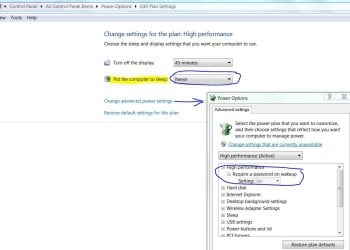
You don't need additional software to keep the PC "alive". Just change the power settings to never sleep. In the example below, I turn off the display after 45 minutes of no activity and have a screen savor for the first 15 minutes of that but you can select to never turn off the display.
 

Attachments

  • Power Setting-Sleep.JPG
    Power Setting-Sleep.JPG
    78.4 KB · Views: 0

My Computer My Computer

At a glance

Windows 7 Pro-x64i7-2600 3.4GHz - 3.8GHz Turbo8Gb - 2x4GB, Muskin 991770 PC3-1333Integrated Intel HD 2000
Computer type
PC/Desktop
Computer Manufacturer/Model Number
Built 2/11/2011
OS
Windows 7 Pro-x64
CPU
i7-2600 3.4GHz - 3.8GHz Turbo
Motherboard
Intel DH67BL-B3
Memory
8Gb - 2x4GB, Muskin 991770 PC3-1333
Graphics Card(s)
Integrated Intel HD 2000
Sound Card
Integrated Intel 10.1 HD, RealTek ALC892
Monitor(s) Displays
Asus LCD VH222H, Haier HL24XSL2a
Screen Resolution
1920x1080, 1920x1080
Hard Drives
Crucial SSD C300-128Gb,
Western Digital WD5002AALX - 500Gb,
Western Digital WD7501AALS - 750Gb
PSU
Seasonic 650W 80+ Gold Modular
Case
Rosewill Defender
Cooling
Stock CPU, Four 120mm case fans, PCH fan added
Keyboard
Logitech EX100 Y-RBH94 Wireless
Mouse
Logitech EX100 M-RCE95 Wireless
Internet Speed
3.0/1.5 Mbs
Antivirus
Microsoft Security Essentials
Browser
Microsoft Internet Explorer 11
Other Info
Antec Veris Premier-Multimedia IR Station,
Cyber Accoustics-3602 Speakers,
AFT XM-5U Card Reader,
Hauppauge TV-HVR-2250,
Sony LX300 USB Turntable
Back
Top