How to calculate the used file space on C?

OldGrantonian

New member
Member
Local time
10:49 PM
Messages
52
Location
Scotland
.
I have Win 7 Home Premium, 500 GB disk.

I'm getting a "low disk space" message for drive C.

Using "Properties" for C, I can see that the used space on C is 307 GB, and free space is 6.5 GB.

Note that when my laptop was new, I moved my entire "Documents" folder to the E: partition, using Windows tools. I have plenty of free space to shrink E, and increase C, using Partition Wizard.

My problem is that if I use "Properties" for each high-level folder, and sum the sizes for all the folders on C, it only comes to 55 GB. (That includes $RECYCLE.BIN. All hidden folders are shown.)

IMHO: 55 GB is too low, and 307 GB is too high :-)

What am I doing wrong?
.
 

My Computer My Computer

At a glance

Win 7 64-bit Home Premium4 GB
Computer type
Laptop
Computer Manufacturer/Model Number
Dell Inspiron 17R
OS
Win 7 64-bit Home Premium
Memory
4 GB

My Computer My Computer

At a glance

Windows 7 Home Premium SP1, 64-bitIntel Skylake i5-6600K, not overclocked8 GB HyperX DDR4-2666 (2 x 4 GB)none; graphics are integrated on CPU
Computer type
PC/Desktop
Computer Manufacturer/Model Number
Ignatz Special; 4 speed manual gearbox; factory air conditioning; one of one
OS
Windows 7 Home Premium SP1, 64-bit
CPU
Intel Skylake i5-6600K, not overclocked
Motherboard
AsRock Z170M Extreme 4, micro ATX
Memory
8 GB HyperX DDR4-2666 (2 x 4 GB)
Graphics Card(s)
none; graphics are integrated on CPU
Sound Card
onboard: Realtek ALC1150; external: USB Behringer UF0-202
Monitor(s) Displays
Dell S2340M 23 inch IPS
Screen Resolution
1600 x 900
Hard Drives
System: Crucial MX100 series SSD, 128 GB;
Data: Samsung Spinpoint 103SJ, 1 TB;
Backup: WD Caviar Green WD30EZRX-00D8PB0, 3 TB
PSU
Rosewill SilentNight 500 watt fanless, semi-modular
Case
Antec Solo II
Cooling
Noctua NH-U12S; Noctua F12 intake, Noctua S12A exhaust
Keyboard
Microsoft 200 6JH-00001 USB
Mouse
Dell or Microsoft optical wired; USB
Antivirus
Microsoft Security Essentials and Malwarebytes Premium
Browser
Pale Moon
Other Info
All fans PWM; speeds at idle: CPU circa 500 rpm; intake circa 600 rpm; exhaust circa 600 rpm; CPU temps 27 idle and 47 C load in a warm room (27 C/81 F) when running Intel Extreme Tuning Utility stress test.
I'd download Tree Size Free to get more details on what is using space.

Wow!

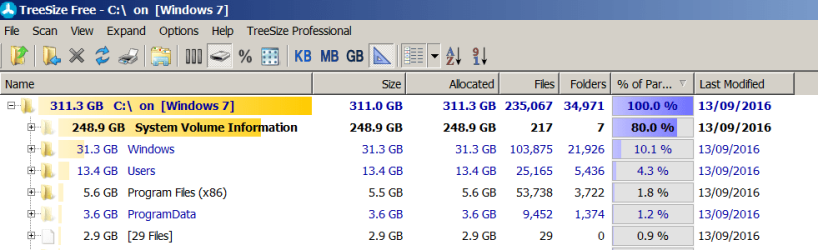
TreeSize shows that 80% of my C drive is being used by my Chines_, Russi_n, and North Kore_n friends to store all their wedding anniversaries in my "System Volume Information" (screenshot).

According to Windows Explorer, this file has zero bytes. TreeSize says the file is 248.9 GB, and uses 80% of my C partition.

The screenshot shows that the "bloated" Windows system only takes 10% of my C partition. (Linux fits on a 256 KB floppy - which I still have).

Thanks to ignatzatsonic
.
 

Attachments

  • 1.png
    1.png
    23.3 KB · Views: 2

My Computer My Computer

At a glance

Win 7 64-bit Home Premium4 GB
Computer type
Laptop
Computer Manufacturer/Model Number
Dell Inspiron 17R
OS
Win 7 64-bit Home Premium
Memory
4 GB
I'm not sure what you mean by Russian, Chinese, and North Korean friends.

The biggest files in the System Volume Information folder are usually various "System Restore" points, which can eat up gigabytes quickly.

Have you popped open that folder via the + sign shown next to that folder in Tree Size Free? Whatever's in it will spill out.

The System Restore points typically have a very long file name with seemingly random characters and are usually at least 1 GB each.

But maybe you've already looked in it and have attributed to your "friends" in Asia. I dunno what your cryptic remark means.
 

My Computer My Computer

At a glance

Windows 7 Home Premium SP1, 64-bitIntel Skylake i5-6600K, not overclocked8 GB HyperX DDR4-2666 (2 x 4 GB)none; graphics are integrated on CPU
Computer type
PC/Desktop
Computer Manufacturer/Model Number
Ignatz Special; 4 speed manual gearbox; factory air conditioning; one of one
OS
Windows 7 Home Premium SP1, 64-bit
CPU
Intel Skylake i5-6600K, not overclocked
Motherboard
AsRock Z170M Extreme 4, micro ATX
Memory
8 GB HyperX DDR4-2666 (2 x 4 GB)
Graphics Card(s)
none; graphics are integrated on CPU
Sound Card
onboard: Realtek ALC1150; external: USB Behringer UF0-202
Monitor(s) Displays
Dell S2340M 23 inch IPS
Screen Resolution
1600 x 900
Hard Drives
System: Crucial MX100 series SSD, 128 GB;
Data: Samsung Spinpoint 103SJ, 1 TB;
Backup: WD Caviar Green WD30EZRX-00D8PB0, 3 TB
PSU
Rosewill SilentNight 500 watt fanless, semi-modular
Case
Antec Solo II
Cooling
Noctua NH-U12S; Noctua F12 intake, Noctua S12A exhaust
Keyboard
Microsoft 200 6JH-00001 USB
Mouse
Dell or Microsoft optical wired; USB
Antivirus
Microsoft Security Essentials and Malwarebytes Premium
Browser
Pale Moon
Other Info
All fans PWM; speeds at idle: CPU circa 500 rpm; intake circa 600 rpm; exhaust circa 600 rpm; CPU temps 27 idle and 47 C load in a warm room (27 C/81 F) when running Intel Extreme Tuning Utility stress test.
Back
Top