.
I have Win 7 Home Premium, 500 GB disk.
I'm getting a "low disk space" message for drive C.
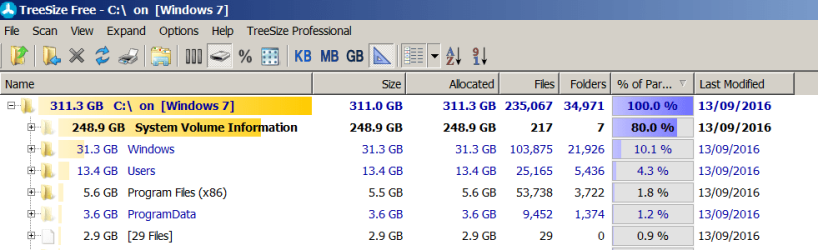
Using "Properties" for C, I can see that the used space on C is 307 GB, and free space is 6.5 GB.
Note that when my laptop was new, I moved my entire "Documents" folder to the E: partition, using Windows tools. I have plenty of free space to shrink E, and increase C, using Partition Wizard.
My problem is that if I use "Properties" for each high-level folder, and sum the sizes for all the folders on C, it only comes to 55 GB. (That includes $RECYCLE.BIN. All hidden folders are shown.)
IMHO: 55 GB is too low, and 307 GB is too high
What am I doing wrong?
.
I have Win 7 Home Premium, 500 GB disk.
I'm getting a "low disk space" message for drive C.
Using "Properties" for C, I can see that the used space on C is 307 GB, and free space is 6.5 GB.
Note that when my laptop was new, I moved my entire "Documents" folder to the E: partition, using Windows tools. I have plenty of free space to shrink E, and increase C, using Partition Wizard.
My problem is that if I use "Properties" for each high-level folder, and sum the sizes for all the folders on C, it only comes to 55 GB. (That includes $RECYCLE.BIN. All hidden folders are shown.)
IMHO: 55 GB is too low, and 307 GB is too high
What am I doing wrong?
.
My Computer
At a glance
Win 7 64-bit Home Premium4 GB
- Computer type
- Laptop
- Computer Manufacturer/Model Number
- Dell Inspiron 17R
- OS
- Win 7 64-bit Home Premium
- Memory
- 4 GB