How to calculate total uptime in my PC?

killer bee

New member
Power User
VIP
Local time
1:42 PM
Messages
406
Hi!
Are there any software for calculate my PC total up-time. Windows task manager can only calculate 1st season up-time. But windows task manager can't calculate today, this week, this month total up-times. So how do i do it?
Are there any special utility software for that?
 

My Computer My Computer

At a glance

windows7 Ultimate SP1 x32bitIntelKinsgton 1GB an Transcend 2GBIntel- onboard
Computer Manufacturer/Model Number
Intel DG31PR (Intel Dual core 2.5 E5200 @ 2.5GHz)
OS
windows7 Ultimate SP1 x32bit
CPU
Intel
Motherboard
Intel DG31PR
Memory
Kinsgton 1GB an Transcend 2GB
Graphics Card(s)
Intel- onboard
Sound Card
Intel- onboard
Monitor(s) Displays
ViewSonic LCD Widescreen 19
Screen Resolution
1400x900
Hard Drives
Samsung 256GB
PSU
Legend
Case
Legend
Cooling
Intel
Keyboard
Seemo
Mouse
Prolink
Internet Speed
Download Speed-512Kbps, Upload Speed-128Kbps (ADSL wired)
Other Info
UPS- Prolink Pro650s
Router Prolink H5201
Sub Woofer - Creative 2.1
I don't believe there is any way to calculate that figure. There is no system on the motherboard to keep track of total hours on, that I know of.
The OS only knows the hours it has been on since the last reboot.
 

My Computer My Computer

At a glance

Windows 7 Pro x64i5 76016GBNvidia GTS450
Computer Manufacturer/Model Number
Built be Me
OS
Windows 7 Pro x64
CPU
i5 760
Motherboard
Asus P7P55D-E Pro
Memory
16GB
Graphics Card(s)
Nvidia GTS450
Sound Card
On board
Monitor(s) Displays
Dell 2007WFP Dell 1800FP
Screen Resolution
1680x1050 1280x1024
Hard Drives
Seagate 250GB & 750GB
WD 1TB
PSU
Antec 750
Case
In Win
Cooling
Cooler Master Hyper 212+
Keyboard
IBM
Mouse
MS
I can't seem to find an app for that.
 

My Computer My Computer

At a glance

Windows 7 Ultimate 64bitIntel i7 3770K16GB DDR3 1333 Corsair XMS3XFX HD6950 2GB EyeFinity
Computer Manufacturer/Model Number
HAL-9000
OS
Windows 7 Ultimate 64bit
CPU
Intel i7 3770K
Motherboard
Asus Sabertooth Z77
Memory
16GB DDR3 1333 Corsair XMS3
Graphics Card(s)
XFX HD6950 2GB EyeFinity
Sound Card
Logitech G35 & Sennheiser PC135 & VIA HD
Monitor(s) Displays
23" HP 2310e, 23" Samsung B2230, 21.5" Viewsonic
Screen Resolution
5760x1080
Hard Drives
16TB of Storage
128GB & 256GB Crucial M4 SSD's, 2X 1TB WD Black, 3x 2TB WD, 3x 2TB Samsung F4, 1.5TB Seagate, WD 500GB,
PSU
Antec True Power New 650watt
Case
Cooler Master HAF-932
Cooling
Corsair H60 Hydro Cooler, 3x 230mm Fans, 2x120mm Fan
Keyboard
Logitech G15 and G13
Mouse
Logitech G700 Gaming Mouse
Internet Speed
50/10 Mbit
Other Info
Speakers : Alesis M1 Active Mk2 Studio Monitors , APC RS 1200 UPS, HP 4500DN Color Laser, HP P1006 mono Laser, Kodak 8500 Dye-Sub, Epson 1280 inkjet, Epson Worforce 610 MFC
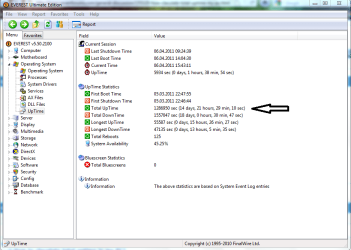
Hello there,you can see that in Everest. :)
Capture.PNG
 

My Computer My Computer

At a glance

Windows 10 Pro x64Intel Core i5 4440 @Stock4 x 4GB HyperX Fury DDR3Gigabyte GTX 1050Ti O4G
Computer type
PC/Desktop
Computer Manufacturer/Model Number
Custom Build
OS
Windows 10 Pro x64
CPU
Intel Core i5 4440 @Stock
Motherboard
Gigabyte Z97 D3H
Memory
4 x 4GB HyperX Fury DDR3
Graphics Card(s)
Gigabyte GTX 1050Ti O4G
Sound Card
Integrated
Monitor(s) Displays
Dell P2417H
Screen Resolution
1920 x 1080
Hard Drives
Samsung EVO 850 120GB / Toshiba DT01ACA050 1TB 7200prm 32MB
PSU
Riotoro Onyx 750W
Case
NZXT H500 Black-Red
Cooling
Stock CPU + NZXT 120mm + 2x120mm red fans
Keyboard
Modecom Volcano Lanparty
Mouse
Asus ROG Gladius / DeepCool E-Pad Plus
Internet Speed
DOCSIS 50/3 Mbit
Browser
Google Chrome
Other Info
Asus K55VJ(i5 3210M, GT635M / 2GB, 8GB DDR3, 500GB HDD)
I have two different UpTime desktop Gadgets ;)
 

My Computer My Computer

At a glance

Win7 Enterprise, Win7 x86 (Ult 7600), Win7 x6...AMD fx8350 4ghz, AMD-32 2400mhz, AMD-64 3200m...2gb, 4gb on the Ult 7600, 4gb on Technet RTM,...Draw my own Graphics, several nVidia cards
Computer type
PC/Desktop
Computer Manufacturer/Model Number
Built them myself, Science Experiments !
OS
Win7 Enterprise, Win7 x86 (Ult 7600), Win7 x64 Ult 7600, TechNet RTM on AMD x64 (2.8Ghz)
CPU
AMD fx8350 4ghz, AMD-32 2400mhz, AMD-64 3200mhz, AMDx64 2.8G
Motherboard
SIS 755, ECS-K8M890M-M (Ult 7600), GigaByte & others
Memory
2gb, 4gb on the Ult 7600, 4gb on Technet RTM, 32gb on FX8350
Graphics Card(s)
Draw my own Graphics, several nVidia cards
Sound Card
on motherboard
Monitor(s) Displays
19" flat scr, 28" I-Inc widescr,22" Emprex Widescr, 23" Acer
Screen Resolution
1280 x 1024, 1440 x 900, 1920 x 1080
Hard Drives
6 pata Ide HD's & 2 Sata HD's
added 80gb external on Ult 7600 computer,
numerous extra 1tb, 2TB, 3Tb SATA HD's
A collection of ext HD Docks w/ HDs
PSU
430w, 550w, 600w, 700, 800, etc
Case
All Generic Full Towers
Cooling
Open Air & a few fans, some w/ colored LEDs
Keyboard
Compaq & Dell recycled from GoodWill
Mouse
Made in China Optical Wired Mouse
Internet Speed
Fast Cable InterNet
Antivirus
AVG Free on 24 different Desktops, NO Problems!
Browser
IE 8 is preferred, but use FireFox sometimes
Other Info
Linksys Routers, switches, & Hubs
Too Many USB Flash Drives to count, Biggest is 64GB !
Eight computers in my home network.
Sixteen computers at my business network.
Linked via TeamViewer !
Lots of old used spare computer parts everywhere!
I just checked my home file server and I'm at 492 days. I knew it had been awhile.
 

My Computer My Computer

At a glance

Windows 7 Ultimate x64Intel Q9550 2.83Ghz OC'd to 3.40Ghz8GB G.Skill PI DDR2-800, 4-4-4-12 timingsEVGA 1280MB Nvidia GeForce GTX570
Computer Manufacturer/Model Number
Self-Built in July 2009
OS
Windows 7 Ultimate x64
CPU
Intel Q9550 2.83Ghz OC'd to 3.40Ghz
Motherboard
Gigabyte GA-EP45-UD3R rev. 1.1, F12 BIOS
Memory
8GB G.Skill PI DDR2-800, 4-4-4-12 timings
Graphics Card(s)
EVGA 1280MB Nvidia GeForce GTX570
Sound Card
Realtek ALC899A 8 channel onboard audio
Monitor(s) Displays
23" Acer x233H
Screen Resolution
1920x1080
Hard Drives
Intel X25-M 80GB Gen 2 SSD
Western Digital 1TB Caviar Black, 32MB cache. WD1001FALS
PSU
Corsair 620HX modular
Case
Antec P182
Cooling
stock
Keyboard
ABS M1 Mechanical
Mouse
Logitech G9 Laser Mouse
Internet Speed
15/2 cable modem
Other Info
Windows and Linux enthusiast. Logitech G35 Headset.
Just because I don't know. Why would one want this information.
 

My Computer My Computer

At a glance

Windows 10 Pro. 64/ version 1709 Windows 7 Pr...Intel i7-6800K @ 4.3Corsair Platinum 16 gig @2400EVGA GTX 1070 OC
Computer type
PC/Desktop
Computer Manufacturer/Model Number
Home made Desktop
OS
Windows 10 Pro. 64/ version 1709 Windows 7 Pro/64
CPU
Intel i7-6800K @ 4.3
Motherboard
ASUS X-99 Deluxe II
Memory
Corsair Platinum 16 gig @2400
Graphics Card(s)
EVGA GTX 1070 OC
Monitor(s) Displays
Asus 27" LED LCD/VE278Q
Screen Resolution
1920-1080 or 1280-720 HDMI
Hard Drives
INTEL SSD 730-240 Gb Sata 3.0/
PSU
EVGA Platium 1200W
Case
Phanteks Luxe Tempered Glass 8 fans/ one radiator
Cooling
XSPC/ Water Cooled CPU
Keyboard
Das 4 Professional
Mouse
Logitech M705/MX Anywhere 2-S
Internet Speed
100 mbits
Antivirus
Microsoft Security Essentials/ Malwarebytes Premium 3.0/ SAS
Browser
I.E. 11 default/Firefox/ ISP Time Warner Cable/Spectrum
Other Info
LG BluRay Burner/
Sound system-KLipsch-THX/
Icy Dock ssd Hot Swap bays.
Just because I don't know. Why would one want this information.

I think this is very helpful to plan for maintenance:
- change oil
- check engine
- check tires
- change wipers

...
 

My Computer My Computer

At a glance

Win7 pro 64Core i5-7504GB Patriot DDR3ATI RADEON HD5450
Computer Manufacturer/Model Number
Home made
OS
Win7 pro 64
CPU
Core i5-750
Motherboard
GA-P55M-UD4
Memory
4GB Patriot DDR3
Graphics Card(s)
ATI RADEON HD5450
Hard Drives
SSD Crucial CT250BX100SSD1 ATA
Internet Speed
DSL
Antivirus
Avast free
Hello there,you can see that in Everest. :)
View attachment 147664

Then that program is keeping a record of the times the PC is on. To do that is must be running all the time in the background. Not something I like to do.

This beg the real question of why does it matter.
 

My Computer My Computer

At a glance

Windows 7 Pro x64i5 76016GBNvidia GTS450
Computer Manufacturer/Model Number
Built be Me
OS
Windows 7 Pro x64
CPU
i5 760
Motherboard
Asus P7P55D-E Pro
Memory
16GB
Graphics Card(s)
Nvidia GTS450
Sound Card
On board
Monitor(s) Displays
Dell 2007WFP Dell 1800FP
Screen Resolution
1680x1050 1280x1024
Hard Drives
Seagate 250GB & 750GB
WD 1TB
PSU
Antec 750
Case
In Win
Cooling
Cooler Master Hyper 212+
Keyboard
IBM
Mouse
MS

My Computer My Computer

At a glance

Several, including Windows 7 x64 Ultimate
OS
Several, including Windows 7 x64 Ultimate
WinAudit (stand alone freeware) can show you total up time / down time and many more things works on 32 / 64 -bit Windows 7

MWSnap00030-1.png


WinAudit v2.28.2 - Free Computer Audit Software
 

My Computer My Computer

At a glance

Windows 7 Professional 64-bit SP1Intel E84004GB Crucial BallistixATI ASUS Radeon HD 4830
Computer Manufacturer/Model Number
Home Built
OS
Windows 7 Professional 64-bit SP1
CPU
Intel E8400
Motherboard
MSI P35 Neo
Memory
4GB Crucial Ballistix
Graphics Card(s)
ATI ASUS Radeon HD 4830
Sound Card
Realtek ALC888 on Board
Monitor(s) Displays
Asus 22-inch VH226H Widescreen
Screen Resolution
1920 x 1080
Hard Drives
Two Western Digital 500GB
PSU
Hiper HPU-4M 530W
Case
Thermaltake Tsunami Dream Black
Cooling
Air/Fans
Keyboard
Saitek Eclipse
Mouse
Razer
Internet Speed
Sky Broadband
Other Info
USB Hub/Card Reader - 2 Pen Drives, 1 Phone Dock
Just one point which is easily overlooked! If you are carrying out surveys, or studies on machine up-time, or anything like that, then remember that these programs only work accurately as long as the system they are on is running properly, and the system has not been re-installed, or any other changes made which prevent the program from running!

For accurate data you need a hardware log or counter/timer attached to the power supply of the machine itself, which operates and collects data automatically when the machine is switched on.

Regards....Mike Connor
 

My Computer My Computer

At a glance

Several, including Windows 7 x64 Ultimate
OS
Several, including Windows 7 x64 Ultimate
Mine shows from when I moved to 64-bit ... give it a run Killer bee ;)
 

My Computer My Computer

At a glance

Windows 7 Professional 64-bit SP1Intel E84004GB Crucial BallistixATI ASUS Radeon HD 4830
Computer Manufacturer/Model Number
Home Built
OS
Windows 7 Professional 64-bit SP1
CPU
Intel E8400
Motherboard
MSI P35 Neo
Memory
4GB Crucial Ballistix
Graphics Card(s)
ATI ASUS Radeon HD 4830
Sound Card
Realtek ALC888 on Board
Monitor(s) Displays
Asus 22-inch VH226H Widescreen
Screen Resolution
1920 x 1080
Hard Drives
Two Western Digital 500GB
PSU
Hiper HPU-4M 530W
Case
Thermaltake Tsunami Dream Black
Cooling
Air/Fans
Keyboard
Saitek Eclipse
Mouse
Razer
Internet Speed
Sky Broadband
Other Info
USB Hub/Card Reader - 2 Pen Drives, 1 Phone Dock
Hi,

There is also the System Uptime Monitor.
It calcualtes not only the total uptime of your PC, but is able to gather the uptime statistics about programs run and user login history.

Kind regards,
Gatis
 

My Computer My Computer

At a glance

Windows XP
OS
Windows XP
You can always just find the 6005/6009 events in the event log (showing the reboot) and do the math. That's basically what these uptime programs are (trying) to do anyway.
 

My Computer My Computer

At a glance

Windows 10 Pro x64Intel Core i7 4790K @ 4.5GHz32GB DDR3Nvidia GeForce GTX970
Computer type
PC/Desktop
Computer Manufacturer/Model Number
Custom
OS
Windows 10 Pro x64
CPU
Intel Core i7 4790K @ 4.5GHz
Motherboard
Asus Maximus Hero VII
Memory
32GB DDR3
Graphics Card(s)
Nvidia GeForce GTX970
Sound Card
Realtek HD Audio
Screen Resolution
1920x1200
Hard Drives
1x Samsung 250GB SSD
4x WD RE 2TB (RAIDZ)
PSU
Corsair AX760i
Case
Fractal Design Define R4
Cooling
Noctua NH-D15
You can always just find the 6005/6009 events in the event log (showing the reboot) and do the math. That's basically what these uptime programs are (trying) to do anyway.
Yes, this is true, but only to some extent.
1) The Windows Event Log usually is cleaned up from time to time, so you might be missing some earlier recordings;
2) If an unexpected power failure or similar event happens, the event log will be missing the event for shut-down;
3) As far as I remember, if Windows Suspend or Hibernate is used, then there are no specific entries about this inside the Event Log. So you can not actually calculate the time computer has been on;
4) The accuracy of the uptime you get if you rely only on Event log is not so great, because if you read out what your Event Log says, and compare it to actual Uptime (you can check it also from the Command Line), you will see that the numbers differ (at least it does on my Windows XP)

The System Uptime Monitor I mentioned above works without reading event from Windows Event log, but by relying on its own service.

Kind regards,
Gatis
 

My Computer My Computer

At a glance

Windows XP
OS
Windows XP
1) The Windows Event Log usually is cleaned up from time to time, so you might be missing some earlier recordings;
And if so, then a tool that stores it's own timestamps is useful. I tend to patch regularly, meaning this has never happened to me on a Windows client machine. Of note, if you're logging that many system events in your event log that you overrun the last boot, you have other problems you should probably be dealing with ;).

2) If an unexpected power failure or similar event happens, the event log will be missing the event for shut-down;
It will still have the unclean boot and system start events (6008/6009), thus still giving you valid timestamps.

3) As far as I remember, if Windows Suspend or Hibernate is used, then there are no specific entries about this inside the Event Log. So you can not actually calculate the time computer has been on;
On XP, correct, but incorrect for Vista and Windows 7 as sleep and wake events are logged.

4) The accuracy of the uptime you get if you rely only on Event log is not so great, because if you read out what your Event Log says, and compare it to actual Uptime (you can check it also from the Command Line), you will see that the numbers differ (at least it does on my Windows XP)
Again, Windows XP doesn't go by UTC time, and as such it can be (wildly) off at times with power events. Everything in Vista/7 internally is done in UTC, and the clock is much more accurate. Usually within a few seconds, the event log calculations are correct.

The System Uptime Monitor I mentioned above works without reading event from Windows Event log, but by relying on its own service.
Which simply stores and reads timestamps, just like the eventlog - so while a nice GUI is easier to use, it doesn't make it more accurate ;). Unless of course your system event log is getting overwritten within 60 days, which shouldn't be happening (see point #1).
 

My Computer My Computer

At a glance

Windows 10 Pro x64Intel Core i7 4790K @ 4.5GHz32GB DDR3Nvidia GeForce GTX970
Computer type
PC/Desktop
Computer Manufacturer/Model Number
Custom
OS
Windows 10 Pro x64
CPU
Intel Core i7 4790K @ 4.5GHz
Motherboard
Asus Maximus Hero VII
Memory
32GB DDR3
Graphics Card(s)
Nvidia GeForce GTX970
Sound Card
Realtek HD Audio
Screen Resolution
1920x1200
Hard Drives
1x Samsung 250GB SSD
4x WD RE 2TB (RAIDZ)
PSU
Corsair AX760i
Case
Fractal Design Define R4
Cooling
Noctua NH-D15
Hi, cluberti

Of note, if you're logging that many system events in your event log that you overrun the last boot, you have other problems you should probably be dealing with ;).
Hmm. Actually not that many events are logged. Only a line of some characters every minute or so to a text file (no performance issues here).

It will still have the unclean boot and system start events (6008/6009), thus still giving you valid timestamps.
Yes, but what about the missing power off event? You will need to decide what time-stamp to use for it manually for each record. Most likely this will be the event entry just before the boot event, I guess. Not sure how acurate it will be.

Again, Windows XP doesn't go by UTC time, and as such it can be (wildly) off at times with power events. Everything in Vista/7 internally is done in UTC, and the clock is much more accurate. Usually within a few seconds, the event log calculations are correct.
I mean something else here. I tired the following test case: Powered on my laptop (Vista) at 5:52:00 PM. The System Event log showed that computer started up at 5:52:55 PM (this is about when I saw the Vista logo inside the screen after all the loading). However, the Windows Uptime showed that it must have occurred at 5:52:15 PM (as calculating it from uptime seen in the Windows Task manager and actual time). So that is about 40 seconds difference between Uptime seen in Windows Task Manager and uptime I could calculate from the Event Log.

Event 6005 means "The Event log service was started". So the Task Manager does not take this time as the actual start time of your PC for calculating current Windows uptime.

Kind regards,
Gatis Avots
 
Last edited:

My Computer My Computer

At a glance

Windows XP
OS
Windows XP
Then that program is keeping a record of the times the PC is on. To do that is must be running all the time in the background. Not something I like to do.
This is simply not true. Tested it just now. Ran the program only now. Last time I ran it was ages ago. It reported correctly the uptime and downtime. It takes the info from System Event Log entries.
 

My Computer My Computer

At a glance

Win 7 x64
Computer type
Laptop
Computer Manufacturer/Model Number
HP
OS
Win 7 x64
Back
Top