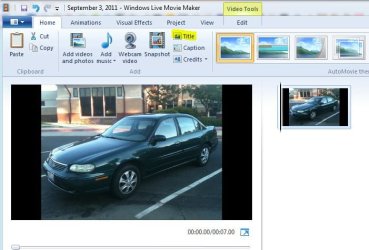
Solved how to change background colour in video slides

No disrespect taken.
I understand your frustration. When whs logs back in he told me he would check out your thread.

Meanwhile, have you looked at that movie maker forum I linked to?

Movie Maker Forum is too disorganized and to commercialized, not to mention feeling light-headed with all the colours and ads blasting all over.
 

My Computer My Computer

At a glance

Windows 7 Home Premium 64-bit, SP1Intel Pentium P6200, Cores 2, 2.13 GHz4 GBIntel HD
Computer Manufacturer/Model Number
Acer Aspire 7741Z
OS
Windows 7 Home Premium 64-bit, SP1
CPU
Intel Pentium P6200, Cores 2, 2.13 GHz
Memory
4 GB
Graphics Card(s)
Intel HD
Sound Card
unknown
Monitor(s) Displays
17.3 inches
Screen Resolution
1600 x 900
Hard Drives
640 GB, 5400 PRM
Here is the stupid part.....
I have to save the video first to my computer, then re-insert the video back to WLMM. Then Edit options come to live.
That could very well be. The WLMM reencodes the file and may add something that makes the difference. I also found that WLMM works better with .avi than with .wmv - strange too.
 

My Computer My Computer

At a glance

Vista, Windows7, Mint Mate, Zorin, Windows 8from 1.6GHz Duo to i7
Computer Manufacturer/Model Number
HP, Dell, Gateway, Toshiba - 4 laptops and 2 desktops
OS
Vista, Windows7, Mint Mate, Zorin, Windows 8
CPU
from 1.6GHz Duo to i7
Monitor(s) Displays
2x HP w2207
Hard Drives
5x HDD, 7x SSD, 12x Externals
Keyboard
with trackball - no mices
Mouse
Trackball mice
Internet Speed
DSL 6000
I'm unsure T, but maybe because pics aren't videos? Are the options available while a video plays?

Yes. You are right.
The Edit options are only for editing the exixsting videos, not for pictures.
Now I know. Wish Windows |Live said that off the bat.

Thank you.
t-4-2
 

My Computer My Computer

At a glance

Windows 7 Home Premium 64-bit, SP1Intel Pentium P6200, Cores 2, 2.13 GHz4 GBIntel HD
Computer Manufacturer/Model Number
Acer Aspire 7741Z
OS
Windows 7 Home Premium 64-bit, SP1
CPU
Intel Pentium P6200, Cores 2, 2.13 GHz
Memory
4 GB
Graphics Card(s)
Intel HD
Sound Card
unknown
Monitor(s) Displays
17.3 inches
Screen Resolution
1600 x 900
Hard Drives
640 GB, 5400 PRM
So.....
If I want to make a movie, I insert all the pictures and, maybe music files, and without the options to do editing, I have to " save " the project, then re-insert the movie back to WLMM, then do my editing ?

That is wild !!

Time to look for a " real " movie maker.

t-4-2
 

My Computer My Computer

At a glance

Windows 7 Home Premium 64-bit, SP1Intel Pentium P6200, Cores 2, 2.13 GHz4 GBIntel HD
Computer Manufacturer/Model Number
Acer Aspire 7741Z
OS
Windows 7 Home Premium 64-bit, SP1
CPU
Intel Pentium P6200, Cores 2, 2.13 GHz
Memory
4 GB
Graphics Card(s)
Intel HD
Sound Card
unknown
Monitor(s) Displays
17.3 inches
Screen Resolution
1600 x 900
Hard Drives
640 GB, 5400 PRM
I don't know either how to change the color. But did you try to change the aspect ratio (in the Project tab). Maybe you can get rid of the black stripes all together.

I already am using 4.3 aspect ratio. 16.9 would increase the size of the black strips.
I found some thing rediculously stupid.
I am able to activate all Edit options BUT one .....background color option is still grayed out.

You need to select Title on the home tab first, which will then give you a Text Tools tab, then you can go back to the edit tab and Change the color of the text but not the black area you are trying to change.
 

Attachments

  • title.JPG
    title.JPG
    53.8 KB · Views: 33
  • Untitled.jpg
    Untitled.jpg
    107.4 KB · Views: 53

My Computer My Computer

At a glance

Win 10 Pro x64Intel I5-2500K @3.3GHz16GB G.Skill Ripjaws X (4x4GB)EVGA GeForce 750 Ti SC 2GB
Computer type
PC/Desktop
Computer Manufacturer/Model Number
Self Built
OS
Win 10 Pro x64
CPU
Intel I5-2500K @3.3GHz
Motherboard
Asrock P67 Extreme4
Memory
16GB G.Skill Ripjaws X (4x4GB)
Graphics Card(s)
EVGA GeForce 750 Ti SC 2GB
Sound Card
ASUS Xonar DG 5.1 Channels 24-bit 96KHz PCI Interface Sound
Monitor(s) Displays
auria eq2367
Screen Resolution
1920 x 1080
Hard Drives
250GB Samsung 850 EVO SSD
1TB WD Blue
1TB Hitachi
PSU
SeaSonic X 650W 80 Plus Gold
Case
Corsair Obsidian 750D
Cooling
Corsair H60, Three 140mm case fans
Keyboard
Logitech Wireless Keyboard K520
Mouse
Logitech Wireless Mouse M310
Internet Speed
Wave Broadband ~ 100 dn 5 up
Antivirus
Windows Defender, Malwarebytes Premium
Browser
Edge, IE11, Chrome
Other Info
Laptop specs: HP g7-1365dx /
CPU: AMD A6-3420M APU with Radeon(tm) HD Graphics /
RAM: Crucial 8Gb (2x4Gb) /
SSD: Crucial M4-CT128M4SSD2 ATA Device/ FW 000F /
GFX: AMD Radeon HD 6520G /
OS: Windows 10 Pro x64
I am having this same issue and none of the suggestions have been helpful so far. The background color is still grayed out.

Has anyone questioned why Microsoft has not fixed this issue? That seems like the obvious answer. Is there a newer version I need to download?
 

My Computer My Computer

At a glance

Windows 7
OS
Windows 7
Welcome to SF TOJohnsom, you cant try this Windows Live Essentials: Movie Maker
I don't use it, or any video editor but it may be a newer one that what you have.

Some of THESE tutorials may help out.

I think we all question MS often. :sarc:
 

My Computer My Computer

At a glance

Windows 7 Ultimate X64 SP1Intel i5-2550K, Differing ~4.4-4.8GHz No buil...16GB G.Skill Sniper 1866MHz @ 2133MHz 2x8GBASUS GTX650TIB-DC2OC-2GD5, (650TI Boost)
Computer type
PC/Desktop
Computer Manufacturer/Model Number
Home Built Desktop By DataTech
OS
Windows 7 Ultimate X64 SP1
CPU
Intel i5-2550K, Differing ~4.4-4.8GHz No built in GPU
Motherboard
ASUS P8Z68-V PRO/GEN3
Memory
16GB G.Skill Sniper 1866MHz @ 2133MHz 2x8GB
Graphics Card(s)
ASUS GTX650TIB-DC2OC-2GD5, (650TI Boost)
Sound Card
Onboard Realtek 5-1
Monitor(s) Displays
Samsung P2570HD
Screen Resolution
1920x1080
Hard Drives
Samsung 840 Pro 256GB SSD for OS, 500GB Seagate Constellation (Enterprise drive) for Data
PSU
Corsair HX650W
Case
Inwin Dragon Rider
Cooling
Hyper 212 EVO w/two Noctua fans, push-pull, @1300 RPM
Keyboard
E-Z Eyes, bright yellow keys with large characters
Mouse
steelseries SENSEI Laser Pro Gaming
Internet Speed
48-51Mbs Mbs down, 11 Mbs up Xfinity Cable
Antivirus
Norton Internet Security 2013
Browser
IE 10, Opera, Pale Moon if needed
Other Info
4 case fans, LG BluRay-RE, ASUS DVD-RW, Mr. Fusion power supply, 1.21 gigawatts.
noway to found it (

i have switched to ezvid enven when it also gives problems: tryis to add more softwares when installing, later asks for your password in youtube, does not allow to save in the compunter directely, add advertisemenet in the youtube comments.
 
Last edited:

My Computer My Computer

At a glance

Barcelona
Computer type
PC/Desktop
OS
Barcelona
Antivirus
Spain
Back
Top