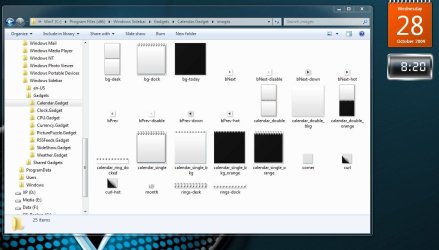
How to change base Calendar colour

EgyptianAcid

New member
Local time
11:23 PM
Messages
13
I really like the standard calendar however I wish to change its colour.

I read another thread which said the gadget info was stored here: C:\Users\Stu\AppData\Local\Microsoft\Windows Sidebar

and could be edited (like html for colours etc). However only my custom clock gadget was there - I didn't see any info on the Windows gadgets.

Anyone know a way to change the background colour of this calendar gadget?

Edit: Can someone mark this thread as solved please :)
 

Attachments

  • Calendar.PNG
    Calendar.PNG
    12.9 KB · Views: 210
Last edited:

My Computer My Computer

OS
Windows 7 Home Premium
CPU
Q9400
Motherboard
Gigabyte G41 mATX
Memory
4gb DDR2
Graphics Card(s)
HD4890
Monitor(s) Displays
Dell 2405
Hard Drives
1 320Gb, 1Tb
PSU
Antec 500W NeoHE
Case
Silverstone SG01
Cooling
Shuriken Scythe
Look here: C:\Program Files\Windows Sidebar\Gadgets, seek calendar gadget and edit images.
 

My Computer My Computer

OS
Windows 7 EXTREME
Hey etrifonoves - cheers. I found the files you were talking about. Unfortunately when I finished editing them it said I didn't have permission to save over them. Nor could I save as, then delete the original and rename the new files (again, it said I did not have permission).

I am the only user of this computer, shouldn't my login have Admin rights? Or is this not a user security issue and theres another way around this? Any help appreciated.
 

My Computer My Computer

OS
Windows 7 Home Premium
CPU
Q9400
Motherboard
Gigabyte G41 mATX
Memory
4gb DDR2
Graphics Card(s)
HD4890
Monitor(s) Displays
Dell 2405
Hard Drives
1 320Gb, 1Tb
PSU
Antec 500W NeoHE
Case
Silverstone SG01
Cooling
Shuriken Scythe

My Computer My Computer

Computer Manufacturer/Model Number
Home Brew
OS
Windows 7 Home Premium 32-bit
CPU
Core 2 Quad Q6600 2.4 GHz
Motherboard
Asus P5Q Motherboard
Memory
4 GB DDR 3
Graphics Card(s)
nVidia 9600 GT 512 MB ram
Sound Card
Realtek High Definition Audio
Monitor(s) Displays
Acer X223W
Screen Resolution
1680 X 1050
Hard Drives
300 GB Sata2 (Primary)
1 TB Sata2 (Secondary)
1 TB Sata2 (External)
PSU
ULTRA LS500 500W ATX
Case
Cooler Master Elite 330 Black ATX RoHS Case
Cooling
(2) 3.5" case fans + (1) 5" case fan
Keyboard
Microsoft Wireless Keyboard 1000
Mouse
Microsoft Wireless Optical Mouse 2000
Internet Speed
6mbps DSL
Gah I'm so newb.. that deviantArt pack was just what I wanted, but again I can't copy over the old gadget files (no permission). How do I ensure my single user has admin rights? I've tried playing with the permissions on the Gadgets/Sidebar folders, but it denies the changes.

Edit: Ok I'm inching my way closer..

I followed this link to enable 'take ownership' in the context menu. I did that, and managed to replace the gadget files. However when I launch the gadget again, the old files are still being used somehow? :huh:

Edit2: Ok I still don't know why the original calendar mod I did didn't work, I do have a better solution though - downloading this awesome gadget set. Includes the stock calender modified to black with opacity settings - perfect!
 

Attachments

  • Calendarv3.JPG
    Calendarv3.JPG
    90.4 KB · Views: 632
Last edited:

My Computer My Computer

OS
Windows 7 Home Premium
CPU
Q9400
Motherboard
Gigabyte G41 mATX
Memory
4gb DDR2
Graphics Card(s)
HD4890
Monitor(s) Displays
Dell 2405
Hard Drives
1 320Gb, 1Tb
PSU
Antec 500W NeoHE
Case
Silverstone SG01
Cooling
Shuriken Scythe
I like that black opaque gadget set also, very nice. Glad you found something that worked. :)

To install the color pack(s) you extract the zip file to your desktop, etc. then cut (or copy)/ paste the gadgets to C:\Program Files\Windows Sidebar\Gadgets
(Not into the Calendar gadget folder)
If you have UAC enabled it will prompt you to authenticate to move the files (as C:\Programs Files is a protected directory) and once you do they will copy.
You will then see 4-5 Calendar gadgets in your gallery, each with a different color.
If you want to get rid of any you don't care for or won't use, simply right click and choose uninstall on that particular gadget.

Rich
:)
 

My Computer My Computer

Computer Manufacturer/Model Number
Home Brew
OS
Windows 7 Home Premium 32-bit
CPU
Core 2 Quad Q6600 2.4 GHz
Motherboard
Asus P5Q Motherboard
Memory
4 GB DDR 3
Graphics Card(s)
nVidia 9600 GT 512 MB ram
Sound Card
Realtek High Definition Audio
Monitor(s) Displays
Acer X223W
Screen Resolution
1680 X 1050
Hard Drives
300 GB Sata2 (Primary)
1 TB Sata2 (Secondary)
1 TB Sata2 (External)
PSU
ULTRA LS500 500W ATX
Case
Cooler Master Elite 330 Black ATX RoHS Case
Cooling
(2) 3.5" case fans + (1) 5" case fan
Keyboard
Microsoft Wireless Keyboard 1000
Mouse
Microsoft Wireless Optical Mouse 2000
Internet Speed
6mbps DSL
Exactly what I was looking for! Thanks for the link and the explanation, Richie. Love it.
 

My Computer My Computer

OS
Windows 7 Ultimate 64bit version 6.1 (build 7600)

My Computer My Computer

Computer Manufacturer/Model Number
Home Brew
OS
Windows 7 Home Premium 32-bit
CPU
Core 2 Quad Q6600 2.4 GHz
Motherboard
Asus P5Q Motherboard
Memory
4 GB DDR 3
Graphics Card(s)
nVidia 9600 GT 512 MB ram
Sound Card
Realtek High Definition Audio
Monitor(s) Displays
Acer X223W
Screen Resolution
1680 X 1050
Hard Drives
300 GB Sata2 (Primary)
1 TB Sata2 (Secondary)
1 TB Sata2 (External)
PSU
ULTRA LS500 500W ATX
Case
Cooler Master Elite 330 Black ATX RoHS Case
Cooling
(2) 3.5" case fans + (1) 5" case fan
Keyboard
Microsoft Wireless Keyboard 1000
Mouse
Microsoft Wireless Optical Mouse 2000
Internet Speed
6mbps DSL
Back
Top