Solved How to change color of IE9 RC?

DBone

WOOF
Guru
VIP
Local time
7:26 AM
Messages
431
Location
SoCal USA
I am very much just an average computer user, with below average knowledge on how to change settings.

I downloaded IE9 RC today, on my Windows 7, x64, Home Premium machine. My question is, how do I change IE9 RC's color? I would like the entire web browser to be black/charcoal but I have no clue on how to do this.

I use Chrome because of the many customized themes, but would love to start using IE, but I just can't get used to the light blue color.


Thanks in advance for any help!!:geek:
 

My Computer My Computer

At a glance

Windows 7 Home Premium x64 SP1

OS
Windows 7 Home Premium x64 SP1
Hello Darryl,


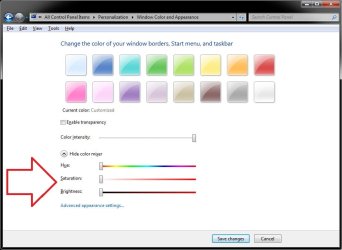
Other than downloading and installing some custom Windows 7 theme along with a theme program that includes this, you could do this:
Borders.jpg
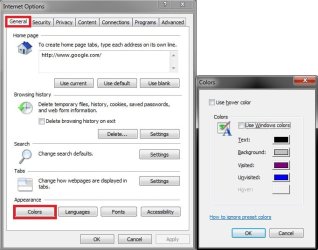
  • You could open Internet Options, then change the "Appearance" "Color" settings to be applied to certain areas of IE9.
Internet_Options.jpgAccessibility.jpg
Hope this helps some,
Shawn
 
Last edited:

My Computer My Computer

At a glance

64-bit Windows 11 Pro for WorkstationsIntel i7-8700K OC'd to 5 GHz64 GB (4x16GB) G.SKILL TridentZ RGB DDR4 3600...ASUS ROG-STRIX-GTX1080TI-O11G-GAMING
Computer type
PC/Desktop
Computer Manufacturer/Model Number
Self built custom
OS
64-bit Windows 11 Pro for Workstations
CPU
Intel i7-8700K OC'd to 5 GHz
Motherboard
ASUS ROG Maximus XI Formula Z390
Memory
64 GB (4x16GB) G.SKILL TridentZ RGB DDR4 3600 MHz
Graphics Card(s)
ASUS ROG-STRIX-GTX1080TI-O11G-GAMING
Sound Card
Integrated
Monitor(s) Displays
2 x Samsung Odyssey G7 27"
Screen Resolution
2560x1440
Hard Drives
1TB Samsung 990 PRO M.2,
4TB Samsung 990 PRO PRO M.2,
TerraMaster F8 SSD Plus NAS
PSU
Seasonic Prime Titanium 850W
Case
Thermaltake Core P3
Cooling
Corsair Hydro H115i
Keyboard
Logitech wireless K800
Mouse
Logitech MX Master 4
Internet Speed
2 Gb/s Download and 100 Mb/s Upload
Antivirus
Malwarebyte Anti-Malware Premium
Browser
Google Chrome
Other Info
Logitech Z625 speaker system,
Logitech BRIO 4K Pro webcam,
HP Color LaserJet Pro MFP M477fdn,
APC SMART-UPS RT 1000 XL - SURT1000XLI,
Galaxy S23 Plus phone
Thank You Shawn!
 

My Computer My Computer

At a glance

Windows 7 Home Premium x64 SP1
OS
Windows 7 Home Premium x64 SP1
You're welcome. :)
 

My Computer My Computer

At a glance

64-bit Windows 11 Pro for WorkstationsIntel i7-8700K OC'd to 5 GHz64 GB (4x16GB) G.SKILL TridentZ RGB DDR4 3600...ASUS ROG-STRIX-GTX1080TI-O11G-GAMING
Computer type
PC/Desktop
Computer Manufacturer/Model Number
Self built custom
OS
64-bit Windows 11 Pro for Workstations
CPU
Intel i7-8700K OC'd to 5 GHz
Motherboard
ASUS ROG Maximus XI Formula Z390
Memory
64 GB (4x16GB) G.SKILL TridentZ RGB DDR4 3600 MHz
Graphics Card(s)
ASUS ROG-STRIX-GTX1080TI-O11G-GAMING
Sound Card
Integrated
Monitor(s) Displays
2 x Samsung Odyssey G7 27"
Screen Resolution
2560x1440
Hard Drives
1TB Samsung 990 PRO M.2,
4TB Samsung 990 PRO PRO M.2,
TerraMaster F8 SSD Plus NAS
PSU
Seasonic Prime Titanium 850W
Case
Thermaltake Core P3
Cooling
Corsair Hydro H115i
Keyboard
Logitech wireless K800
Mouse
Logitech MX Master 4
Internet Speed
2 Gb/s Download and 100 Mb/s Upload
Antivirus
Malwarebyte Anti-Malware Premium
Browser
Google Chrome
Other Info
Logitech Z625 speaker system,
Logitech BRIO 4K Pro webcam,
HP Color LaserJet Pro MFP M477fdn,
APC SMART-UPS RT 1000 XL - SURT1000XLI,
Galaxy S23 Plus phone
Also if you create IE shortcuts to websites in Desktop or any other folder, or for instance to Quick Launch, launching the site from the shorcut colors the buttons of IE9 with the colors of the favicon of that site.

Here a few examples:

IE9_colors_1.png

IE9_colors_2.png

IE9_colors_3.png

Kari
 

My Computer My Computer

At a glance

Windows 10 Pro x64 EN-GB1.6 GHz Intel Core i7-720QM Processor6 GBATI Mobility Radeon HD 5850 Graphics
Computer type
Laptop
Computer Manufacturer/Model Number
HP ENVY 17-1150eg
OS
Windows 10 Pro x64 EN-GB
CPU
1.6 GHz Intel Core i7-720QM Processor
Memory
6 GB
Graphics Card(s)
ATI Mobility Radeon HD 5850 Graphics
Sound Card
Beats sound system with integrated subwoofer
Monitor(s) Displays
17" laptop display, 22" LED and 32" Full HD TV through HDMI
Screen Resolution
1600*900 (1), 1920*1080 (2&3)
Hard Drives
Internal: 2 x 500 GB SATA Hard Disk Drive 7200 rpm
External: 2TB for backups, 3TB USB3 network drive for media
Cooling
As Envy runs a bit warm, I have it on a Cooler Master pad
Keyboard
Logitech diNovo Media Desktop Laser (bluetooth)
Mouse
Logitech Performance Mouse MX
Internet Speed
50/10 Mbps VDSL
Antivirus
Windows Defender 4.3.9431.0
Browser
Maxthon 3.5.2., IE11
I got the area where the url address box and tab box are located to change to black. However I can not get the area below that, which for me is the "menu bar" and the "favorites bar". They are both still light blue.
 

My Computer My Computer

At a glance

Windows 7 Home Premium x64 SP1
OS
Windows 7 Home Premium x64 SP1
Changing IE9 baby blue toolbar area

I have directly called Microsoft about this issue in both IE8 and with Vista during testing, since I have visually impaired friends and family who had the same complaint about the dark colors (gray background and dark gray lettered address bar) and inability to change or find a explanation of how to change the color, font and size of the font, WITHOUT changing the rest of the windows or converting the theme. Which BTW, changing the Theme does NOT change the abusively tacky baby blue toolbar on an all black glass theme, as suggested in the Help & Support pages. I thought about Windows statements on how since Vista, we have heard about being more encompassing to personalization and flexibility of the user. Surely I was missing something, so I actually broke down and called support and paid for help.

You know what I found out after 2 hours and $150 of support? "I am sorry sir, it's not possible at this time to change the colors of IE8 nor possible to change the color of IE9 without changing the entire theme of Windows" which I could have saved $150 and 2 hours and claimed myself.

So forget about Grandma with the bad eyes and seeing dark gray on gray address bar writing. Sorry little Sally, you can NOT change the color of your browser tool bars to match the all pink theme of your computer. Sorry consumer, we know we said we made our products easier and able to personalize but you're asking too much. The short version is, you can NOT change the address bar area to black and white nor rid yourself of the baby blue glaring toolbar color in IE8 or IE9.
 

My Computer My Computer

At a glance

Windows 7 Home Premium 32 bit
OS
Windows 7 Home Premium 32 bit
A little late, but thanks for the info. What a shame that MS overlooked such a simple, yet important (to some) basic feature of their OS. It really should be as easy as a couple of clicks, for the end user to customize their entire computer's looks to suit their taste. FireFox and Chrome have no issues with this............Swing and a miss Microsoft.
 

My Computer My Computer

At a glance

Windows 7 Home Premium x64 SP1
OS
Windows 7 Home Premium x64 SP1
Back
Top