
Solved How to change default right click for highlighted text

PeterAL

New member
Local time
6:14 PM
Messages
6
Often when i`m cruising around, I`ll see something thaT I want to plug into Google to search. Until recently, I would highlight the word or phrase, then right click and one of the options was `Search Google

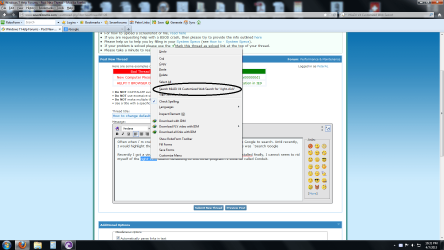
Recently I got a virus install of about 6 useless programs. I got them un-installed finally, I cannot seem to rid myself of the right-click search defaulting to this other program.. I think its called Mixi DJ V4.

Attached is a screenshot of what it looks like.

Can you folks help?
 

Attachments
  • rightclick.png
    rightclick.png
    112.8 KB · Views: 7

My Computer My Computer

At a glance

Wiindows 7
Computer type
PC/Desktop
OS
Wiindows 7
welcome to Seven Forums.
Mixi DJ V4 is a malware/virus/rogue toolbar app. In my sis are links to MalwareBytes ans SuperAntiSpyware, download both, update and run full scans, separately. Be sure to UNcheck Start Trial version for MalwareBytes.
 

My Computer My Computer

At a glance

Windows 7 Ultimate X64 SP1Intel i5-2550K, Differing ~4.4-4.8GHz No buil...16GB G.Skill Sniper 1866MHz @ 2133MHz 2x8GBASUS GTX650TIB-DC2OC-2GD5, (650TI Boost)
Computer type
PC/Desktop
Computer Manufacturer/Model Number
Home Built Desktop By DataTech
OS
Windows 7 Ultimate X64 SP1
CPU
Intel i5-2550K, Differing ~4.4-4.8GHz No built in GPU
Motherboard
ASUS P8Z68-V PRO/GEN3
Memory
16GB G.Skill Sniper 1866MHz @ 2133MHz 2x8GB
Graphics Card(s)
ASUS GTX650TIB-DC2OC-2GD5, (650TI Boost)
Sound Card
Onboard Realtek 5-1
Monitor(s) Displays
Samsung P2570HD
Screen Resolution
1920x1080
Hard Drives
Samsung 840 Pro 256GB SSD for OS, 500GB Seagate Constellation (Enterprise drive) for Data
PSU
Corsair HX650W
Case
Inwin Dragon Rider
Cooling
Hyper 212 EVO w/two Noctua fans, push-pull, @1300 RPM
Keyboard
E-Z Eyes, bright yellow keys with large characters
Mouse
steelseries SENSEI Laser Pro Gaming
Internet Speed
48-51Mbs Mbs down, 11 Mbs up Xfinity Cable
Antivirus
Norton Internet Security 2013
Browser
IE 10, Opera, Pale Moon if needed
Other Info
4 case fans, LG BluRay-RE, ASUS DVD-RW, Mr. Fusion power supply, 1.21 gigawatts.
The only thing I can think of is an extension that I use called Menu Editor. If this weren't from a virus, then I'd be recommending that you reinstall the program and check to see if you can configure it from within that program. So, I think Menu Editor may be your only hope. Maybe.

The reason I said "maybe" is you might also be able to get rid of it in about:config by doing an about:config search for "mixiDJ" (it's not case-sensitive). Right-click any "mxiDJ' entries and choose Reset and then restart Firefox.
 

My Computer My Computer

Computer type
PC/Desktop
Well, that was interesting...

Firs of all, to Britton and Two Cables, thank you very much for your fast answers to my query. Particularly on a Sunday evening!

So, what happened?

First Britton, I downloaded and installed SuperAntiSpyware and ran it. The first time I ran it, I ran it as "quick scan" and all it found was a bunch of tracking cookies. Then I re-ran it as a full scan and it found some more tracking cookies and it found a virus called PUP.CNETInstaller. I had to run it twice because I forgot to reboot after the first full scan.

Each time I ran it it found more tracking cookies, but finally the PUP virus was gone.

That is another good anti-virus tool on my desktop.

Bitton, the link on your sig for MalwareBytes is not a hot link. You may want to update that. I already had it installed and when I did a full scan it found nothing.

So, that removed the infection.

But it did not solve the right click problem.

So, then I followed Two Cables suggestions. Just to be clear for others, I entered àbout:config`in the address bar of Firefox. Then did the suggested search and found about 8 lines with the searched string in it. All but two deleted by right clicking and hitting `reset`, but two of them did not. For them, I double clicked on the entry, it popped up in its own window, and then I deleted and that erased it.

That solved the right click problem... but only in Firefox.

Apparently IE does not have an àbout:config` so I`m still getting the same old result in IE.

If anyone has further ideas on how to fix that I`ll be grateful.

Since I almost exclusively use Firefox, its not a big deal.

Thanks again to Britton and Two Cables.
 

My Computer My Computer

At a glance

Wiindows 7
Computer type
PC/Desktop
OS
Wiindows 7
Wow. Now this is what I call great teamwork. Also, I thank you for clarifying and for explaining everything step-by-step!

All we have to do now is figure out IE so that this can finally be shoved off the back burner (it feels like it was previously on the front burner) and it'll be good to go. :)

I have a suspicion that maybe IE's context menu is in the Registry.
 

My Computer My Computer

Computer type
PC/Desktop
Actually, I think I have resolved it for IE.

I noticed that when I started IE, it defaulted to a home page showing the virus search page. Once I changed that in the options for IE to my favorite Google home page that seemed to resolve the right click issue as well.

Actually, I'm not 100% certain,..... the right click issue may have been resolved by the virus scan.

In any event, everything is cool now.

So how did it happen? Well, I was visiting a torrent website and they gave me a popup, that said, "update your Flash Player'... Like a fool, I did and that allowed all this to happen. Serves me right, I guess.

An interesting sidebar, if you Google search the virus name PUP.CnetInstaller, you'll find plenty of entries talking about how CNET is bundling a virus in with their software. I doubt it. I suspect the original virus was bundled with the malware, and merely named with the CNET name. But I haven't checked it out.

What I learned was to be very careful of the sites I visit and what popups they suggest.

Thanks again Britton and Two Cables.

Peter
 

My Computer My Computer

At a glance

Wiindows 7
Computer type
PC/Desktop
OS
Wiindows 7
Yeah, I don't trust anything. I've had absolutely no problems for over 10 years with this lack of trust I have. hehe

Anyway, you're welcome. I am very relieved that this irritation is over with for you.
 

My Computer My Computer

Computer type
PC/Desktop
Peter thanks for the heads up on my link, it should work now.
For IE open it, go to Tools in the menu bar and click Manage Addons. Clcik the drop down menu and select All addons and scroll to the bad search item, if it's there, and click on Disable.

Another tool is AdwCleaner, see this post, http://www.sevenforums.com/system-security/266465-help-mocaflix-virus-3.html#post2193299 For our use, in step 2 instead of clicking Delete, click Search and post the log it generates.
 
Last edited:

My Computer My Computer

At a glance

Windows 7 Ultimate X64 SP1Intel i5-2550K, Differing ~4.4-4.8GHz No buil...16GB G.Skill Sniper 1866MHz @ 2133MHz 2x8GBASUS GTX650TIB-DC2OC-2GD5, (650TI Boost)
Computer type
PC/Desktop
Computer Manufacturer/Model Number
Home Built Desktop By DataTech
OS
Windows 7 Ultimate X64 SP1
CPU
Intel i5-2550K, Differing ~4.4-4.8GHz No built in GPU
Motherboard
ASUS P8Z68-V PRO/GEN3
Memory
16GB G.Skill Sniper 1866MHz @ 2133MHz 2x8GB
Graphics Card(s)
ASUS GTX650TIB-DC2OC-2GD5, (650TI Boost)
Sound Card
Onboard Realtek 5-1
Monitor(s) Displays
Samsung P2570HD
Screen Resolution
1920x1080
Hard Drives
Samsung 840 Pro 256GB SSD for OS, 500GB Seagate Constellation (Enterprise drive) for Data
PSU
Corsair HX650W
Case
Inwin Dragon Rider
Cooling
Hyper 212 EVO w/two Noctua fans, push-pull, @1300 RPM
Keyboard
E-Z Eyes, bright yellow keys with large characters
Mouse
steelseries SENSEI Laser Pro Gaming
Internet Speed
48-51Mbs Mbs down, 11 Mbs up Xfinity Cable
Antivirus
Norton Internet Security 2013
Browser
IE 10, Opera, Pale Moon if needed
Other Info
4 case fans, LG BluRay-RE, ASUS DVD-RW, Mr. Fusion power supply, 1.21 gigawatts.
Looks like I'm still getting some of the crap... its 3:30 am and I'm going to bed and will resume this tomorrow..

G'nite
 

My Computer My Computer

At a glance

Wiindows 7
Computer type
PC/Desktop
OS
Wiindows 7
I don't blame you, someone will be here tomorrow. :)
 

My Computer My Computer

At a glance

Windows 7 Ultimate X64 SP1Intel i5-2550K, Differing ~4.4-4.8GHz No buil...16GB G.Skill Sniper 1866MHz @ 2133MHz 2x8GBASUS GTX650TIB-DC2OC-2GD5, (650TI Boost)
Computer type
PC/Desktop
Computer Manufacturer/Model Number
Home Built Desktop By DataTech
OS
Windows 7 Ultimate X64 SP1
CPU
Intel i5-2550K, Differing ~4.4-4.8GHz No built in GPU
Motherboard
ASUS P8Z68-V PRO/GEN3
Memory
16GB G.Skill Sniper 1866MHz @ 2133MHz 2x8GB
Graphics Card(s)
ASUS GTX650TIB-DC2OC-2GD5, (650TI Boost)
Sound Card
Onboard Realtek 5-1
Monitor(s) Displays
Samsung P2570HD
Screen Resolution
1920x1080
Hard Drives
Samsung 840 Pro 256GB SSD for OS, 500GB Seagate Constellation (Enterprise drive) for Data
PSU
Corsair HX650W
Case
Inwin Dragon Rider
Cooling
Hyper 212 EVO w/two Noctua fans, push-pull, @1300 RPM
Keyboard
E-Z Eyes, bright yellow keys with large characters
Mouse
steelseries SENSEI Laser Pro Gaming
Internet Speed
48-51Mbs Mbs down, 11 Mbs up Xfinity Cable
Antivirus
Norton Internet Security 2013
Browser
IE 10, Opera, Pale Moon if needed
Other Info
4 case fans, LG BluRay-RE, ASUS DVD-RW, Mr. Fusion power supply, 1.21 gigawatts.
PeterAL,

To run AdwCleaner, as requested by Britton30, to make sure you are using the right option, please do the following:

Please download AdwCleaner:
http://general-changelog-team.fr/fr/downloads/finish/20-outils-de-xplode/2-adwcleaner
Save to the desktop.


Close all open programs.


To run the program, right-click AdwCleaner.exe and select: Run as Administrator


Click on Search and confirm the prompt.


After it finishes, a text file report opens.


Please post the content of the AdwCleaner report to your reply.
(A copy of the log is also saved at C:\AdwCleaner[S1].txt)
 

My Computer My Computer

At a glance

Windows 7 Home Premium
Computer type
PC/Desktop
Computer Manufacturer/Model Number
An ol' eMachines
OS
Windows 7 Home Premium
Internet Speed
Fine for me...I'm retired!
Well, thanks to your folks, I've solved it all.

This virus was a real PITA. It polluted my hardware with software I'll never use, it replaced my home page in Firefox, and it set up its own toolbar in Firefox.

All clean now in FF and IE...

Thanks to you guys who helped so much..

Peter
 
Last edited:

My Computer My Computer

At a glance

Wiindows 7
Computer type
PC/Desktop
OS
Wiindows 7
Good to hear Peter, thanks for letting us know. Toolbars and home page changers are a real PITA.
 

My Computer My Computer

At a glance

Windows 7 Ultimate X64 SP1Intel i5-2550K, Differing ~4.4-4.8GHz No buil...16GB G.Skill Sniper 1866MHz @ 2133MHz 2x8GBASUS GTX650TIB-DC2OC-2GD5, (650TI Boost)
Computer type
PC/Desktop
Computer Manufacturer/Model Number
Home Built Desktop By DataTech
OS
Windows 7 Ultimate X64 SP1
CPU
Intel i5-2550K, Differing ~4.4-4.8GHz No built in GPU
Motherboard
ASUS P8Z68-V PRO/GEN3
Memory
16GB G.Skill Sniper 1866MHz @ 2133MHz 2x8GB
Graphics Card(s)
ASUS GTX650TIB-DC2OC-2GD5, (650TI Boost)
Sound Card
Onboard Realtek 5-1
Monitor(s) Displays
Samsung P2570HD
Screen Resolution
1920x1080
Hard Drives
Samsung 840 Pro 256GB SSD for OS, 500GB Seagate Constellation (Enterprise drive) for Data
PSU
Corsair HX650W
Case
Inwin Dragon Rider
Cooling
Hyper 212 EVO w/two Noctua fans, push-pull, @1300 RPM
Keyboard
E-Z Eyes, bright yellow keys with large characters
Mouse
steelseries SENSEI Laser Pro Gaming
Internet Speed
48-51Mbs Mbs down, 11 Mbs up Xfinity Cable
Antivirus
Norton Internet Security 2013
Browser
IE 10, Opera, Pale Moon if needed
Other Info
4 case fans, LG BluRay-RE, ASUS DVD-RW, Mr. Fusion power supply, 1.21 gigawatts.
Back
Top