How to change LOCATION of a directory in Win 7

BarrieNoodles

New member
Member
Local time
12:15 PM
Messages
64
Location
Ontario, Canada
I just finished installing Win 7 on its own drive (for the 2nd time) and on a separate partition. The problem is that I can't point "Program Files" to its partition. I watched the video by W.H. Schroeder but when i click on "Properties" for the file folder "Program Files" Win 7 does not show a "Location" tab so could change it from C: to M:. There must be a way because others have multiple partitions in Win 7 but it seems to be eluding me.
 

My Computer My Computer

At a glance

Windows Vista Ultimate 32 bit & Win 7 Profess...Intel Core 2 E6320 Duo (4MB L2 cache, 1.86Ghz...4GB Kingston Dual Channel DDR2, PC2-5300, 667Mhz256MB nVidia GeForce 8600GTS
Computer Manufacturer/Model Number
Dell Dimension 9200
OS
Windows Vista Ultimate 32 bit & Win 7 Professional 32 bit
CPU
Intel Core 2 E6320 Duo (4MB L2 cache, 1.86Ghz, 1066FSB
Motherboard
Dell
Memory
4GB Kingston Dual Channel DDR2, PC2-5300, 667Mhz
Graphics Card(s)
256MB nVidia GeForce 8600GTS
Sound Card
Integrated Sound Blaster Audigy
Monitor(s) Displays
22 inch Widescreen Digital(Dell) @ 19" Acer LCD
Screen Resolution
Dell 1680 x 1050, Axcer 1280 x1024
Hard Drives
500GB Serial ATA 3Gb/s, 7200rpm w/ DataBurst Cache
1TB Seagate Barracuda 7200.12, 2 x 1TB USB drives for BU
PSU
APC Back UPS ES 750
Case
Standard
Cooling
Standard
Keyboard
MX5500 Logitech
Mouse
Logitech Bluetooth MX5500
Other Info
Dell Studio Laptop, Win 7 Pro 64 bit.
You can move the User folders if you want.
Documents, Pictures, Videos, Music, Podcasts

In fact, I would recommend do this, keeping User DATA seperate from the OS.

1) It keeps fragmentation down
2) I makes creating a system Image/Backup much faster.
3) In the even you must reinstall Windows, all of your User DATA in these folders will remain on the selected hard Drive, so you do not loose it by formating.

But you can not move "Program Files" or "Program Files (x86)"
And why would you want to?

If installed programs are not with the OS and you must restore a image or backup to a time BEFORE a certain app was installed, it may no longer work.

If you re-instal Windows, those applications on the other drive may no longer work either.
You will still have to re-install them.

Installed programs should be with Windows.

If for Some reason you want an Application installed to a different drive (separate from the OS) you can simply make a Folder on that drive for those programs.
Then manually choose the install directory.


Perhaps I am misunderstanding your question here. :confused:
 

My Computer My Computer

At a glance

Windows 7 Home Premium 64bitIntel Core i7 2700k8GB Mushkin Redline Ridgebacks @1866EVGA GTX570 SC
Computer Manufacturer/Model Number
Custom (Self Build)
OS
Windows 7 Home Premium 64bit
CPU
Intel Core i7 2700k
Motherboard
eVGA P67 SLI
Memory
8GB Mushkin Redline Ridgebacks @1866
Graphics Card(s)
EVGA GTX570 SC
Sound Card
XiFi Titanium HD
Monitor(s) Displays
LG W2453V
Screen Resolution
1920x1080
Hard Drives
Intel 320 80GB -- Intel X25-V 40GB --WD Black 1TB x2 -- WD Blue 640GB
PSU
Seasonic x750
Case
Corsair 600T SE White
Cooling
eVGA Superclocked CPU Cooler
Keyboard
Saitek Cyborg
Antivirus
Kaspersky
Browser
IE
Other Info
LG BD/DVD
You summed that one up correctly! Wishmaster

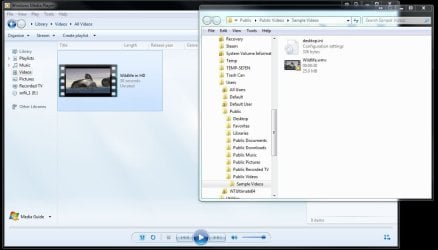
With a second fresh install and not having wiped the first out entirely with a reformat you should have seen the Windows.old folder created. For simply clicking on a sample video included with WMP12 the image below shows where that will be found.

Was the "video by W.H. Schroeder" something you downloaded/watched separately or one of the sample files? That would be found under "C:\users\user account name\My Videos" or "C:\users\user account\MyDocuments\My Videos" when simply found and played in WMP.

When booted into a particular installation of Windows as we previously explained on another thread that will see itself as being on C not M or any other drive letter. I'm assuming you still are seeing a Vista/7 dual boot with 7 on a second drive.
 

Attachments

  • WMP Sample Video.jpg
    WMP Sample Video.jpg
    80.4 KB · Views: 18

My Computers My Computers

  • At a glance

    W7 Ultimate x64/W10 Pro x64/W11 Pro Triple Bo...AMD Phenom II X4 975 Deneb 3.6ghz - 965 2nd r...Kingston Hyper X DDR3 1600 1.5v 16gb - Hyper ...MSI HD Radeon 5750 1gb - MSI HD Radeon 6450 o...
    Computer type
    PC/Desktop
    Computer Manufacturer/Model Number
    Custom builds = 2
    OS
    W7 Ultimate x64/W10 Pro x64/W11 Pro Triple Boot - Main PC W7 Remote PC Micro ATX W7 Pro x64/W11 Pro
    CPU
    AMD Phenom II X4 975 Deneb 3.6ghz - 965 2nd remote pc
    Motherboard
    Gigabyte GA-790XTA-UD4-Gigabyte GA-880GM-D2H remote pc
    Memory
    Kingston Hyper X DDR3 1600 1.5v 16gb - Hyper X Fury 8gb 2nd
    Graphics Card(s)
    MSI HD Radeon 5750 1gb - MSI HD Radeon 6450 on mini tower
    Sound Card
    Creative Labs X-Fi Xtreme Audio P - Realtek onooard 2nd case
    Monitor(s) Displays
    ASUS VW199T-P 19" HP 2082a Main-HP 2082a 20" remote pc
    Screen Resolution
    Asus 1440x900 - HP 1600x900
    Hard Drives
    WD Black 1TB HD per OS W7, W10, and pending W11 presently on 500gb OS Drive - Pending Triple 1TB HDs for Spanned Storage/backup volume
    Single 2TB external USB enclosure, single 1TB System 7 Host/Boot drive, Pending 8TB external HD for system image b
    PSU
    Corsair 750TX - primary / Corsair CX600 - second
    Case
    Antec 900-2 - SSD compatible / NZXT Vulcan mini tower
    Cooling
    Zalman CNPS9900A
    Keyboard
    AZIO L70 Backlit Letters Gaming - ONN Cordless/USB
    Mouse
    MSI DS200 Programmable, Logitech Cordless
    Internet Speed
    30mbps upgrade - primary hard wired - mini tower usb WiFi
    Antivirus
    GFI VIPRE Internet Security 2014 on W7 2016 beta on W10,
    Browser
    Cyberfox, WaterFox 64bit FF variants, FireFox x64, Pale Moon
    Other Info
    Accomdata fan cooled usb 2.0 PIDE/Sata II, III external enclosure.
    Sambient usb/eSata PATA/Sata II, III external enclosure.
  • At a glance

    W7 Pro x64/W11 ProAMD Deneb 3.6ghz - 965Kingston Hyper X Fury 8gbMSI HD Radeon 6450 DVI Output
    Computer type
    PC/Desktop
    System Manufacturer/Model Number
    CUSTOM ASSEMBLY
    OS
    W7 Pro x64/W11 Pro
    CPU
    AMD Deneb 3.6ghz - 965
    Motherboard
    Gigabyte GA-880GM-D2H remote pc
    Memory
    Kingston Hyper X Fury 8gb
    Graphics Card(s)
    MSI HD Radeon 6450 DVI Output
    Sound Card
    Realtek onooard Creative or Other separate PENDING
    Monitor(s) Displays
    VIZIO 32" LCD TV Separate LCD Pending
    Screen Resolution
    1600x1080
    Hard Drives
    WD 500GB OS Host/Boot WD Green 1TB Storage/Backup
    PSU
    Corsair 600W - THERMALTAKE 600W spare case
    Case
    NZXT Vulcan mini tower
    Cooling
    Twin 120mm Top Fans - 240mm Side Cover
    Keyboard
    ONN Cordless/USB Logitech Cordless
    Mouse
    ONN USB/Cordless - Logitech Cordless
    Internet Speed
    DSL 5G
    Browser
    MS Edge, FireFox, WaterFox x64, FireFox Nightly
    Other Info
    OS Testing-Remote Access to Main TeamViewer
I just finished installing Win 7 on its own drive (for the 2nd time) and on a separate partition. The problem is that I can't point "Program Files" to its partition. I watched the video by W.H. Schroeder but when i click on "Properties" for the file folder "Program Files" Win 7 does not show a "Location" tab so could change it from C: to M:. There must be a way because others have multiple partitions in Win 7 but it seems to be eluding me.

I recommend two and only two partitions, one for windows, program files, program data and the other for your normal data, such as documents, pictures, videos.

If you want complications, then by all means put the program files on another partition. If you want complications, then by all means put the ProgramData folder on another partition.

This is the voice of experience talking to you.

I have to partitions, d: and D:. I do not relocate douments, pictures and so forth to another partition as described in one of our tutorials. Incidentally, the tutoriail is excellent. My preferred approach is to create on D: a Pictures folder and add that folder to the the pictures library. I do the same for music, documents, and so forth. This gives me one small partition, c:, and one large partition d:. Libraries are handled properly by all MS software and thus I have no problems. I can make a system image backup of C using Windows Backup and Restore. I use SyncToy to backup my folders on D: to my backup drive.
 

My Computer My Computer

At a glance

MS Windows 7 Ultimate SP1 64-bitAMD A10-4600M6.00 GB Dual-Channel DDR3 @ 798MHz (11-11-12-28)AMD Radeon HD 7660G
Computer Manufacturer/Model Number
Toshiba Satellite S875D-S7239 laptop
OS
MS Windows 7 Ultimate SP1 64-bit
CPU
AMD A10-4600M
Motherboard
AMD Pumori (Socket FT1)
Memory
6.00 GB Dual-Channel DDR3 @ 798MHz (11-11-12-28)
Graphics Card(s)
AMD Radeon HD 7660G
Sound Card
High Definition Audio Device
Monitor(s) Displays
Generic PnP Monitor (1600x900@60Hz)
Screen Resolution
1600x900@60Hz
Hard Drives
SSD 119GB Corsair CSSD-V128GB2 ATA Device
Keyboard
Standard PS/2 Keyboard
Mouse
HP Wireless Optical Mobile Mouse Model FHA-3410
Internet Speed
What the local pub, local coffee shop offers.
Other Info
Optical Drive:MATSHITA BD-CMB UJ160B ATA Device


Also have an Asus ha1002xp netbook with Win 7 Ultimate installed.
I hear numerous people planning or have custom installed everything onto other partitions or drives and end up wondering how to get things running again later if Windows is reinstalled. I have to agree right off on the complications part!

Why make more work for yourself when it doesn't actually see much of anything in the way of any benefits overall?

As far as the original question I have a feeling that BarrieNoodles had downloaded and watched a video while the first install of 7 was seen and now watched it again on the second install but on a different partition or the video was on the host Vista drive?

Depending on the player you use the playlist created is what is directed to any file or folder on any drive. Once the playlist is opened the player will then be directed to that particular location.
 

My Computers My Computers

  • At a glance

    W7 Ultimate x64/W10 Pro x64/W11 Pro Triple Bo...AMD Phenom II X4 975 Deneb 3.6ghz - 965 2nd r...Kingston Hyper X DDR3 1600 1.5v 16gb - Hyper ...MSI HD Radeon 5750 1gb - MSI HD Radeon 6450 o...
    Computer type
    PC/Desktop
    Computer Manufacturer/Model Number
    Custom builds = 2
    OS
    W7 Ultimate x64/W10 Pro x64/W11 Pro Triple Boot - Main PC W7 Remote PC Micro ATX W7 Pro x64/W11 Pro
    CPU
    AMD Phenom II X4 975 Deneb 3.6ghz - 965 2nd remote pc
    Motherboard
    Gigabyte GA-790XTA-UD4-Gigabyte GA-880GM-D2H remote pc
    Memory
    Kingston Hyper X DDR3 1600 1.5v 16gb - Hyper X Fury 8gb 2nd
    Graphics Card(s)
    MSI HD Radeon 5750 1gb - MSI HD Radeon 6450 on mini tower
    Sound Card
    Creative Labs X-Fi Xtreme Audio P - Realtek onooard 2nd case
    Monitor(s) Displays
    ASUS VW199T-P 19" HP 2082a Main-HP 2082a 20" remote pc
    Screen Resolution
    Asus 1440x900 - HP 1600x900
    Hard Drives
    WD Black 1TB HD per OS W7, W10, and pending W11 presently on 500gb OS Drive - Pending Triple 1TB HDs for Spanned Storage/backup volume
    Single 2TB external USB enclosure, single 1TB System 7 Host/Boot drive, Pending 8TB external HD for system image b
    PSU
    Corsair 750TX - primary / Corsair CX600 - second
    Case
    Antec 900-2 - SSD compatible / NZXT Vulcan mini tower
    Cooling
    Zalman CNPS9900A
    Keyboard
    AZIO L70 Backlit Letters Gaming - ONN Cordless/USB
    Mouse
    MSI DS200 Programmable, Logitech Cordless
    Internet Speed
    30mbps upgrade - primary hard wired - mini tower usb WiFi
    Antivirus
    GFI VIPRE Internet Security 2014 on W7 2016 beta on W10,
    Browser
    Cyberfox, WaterFox 64bit FF variants, FireFox x64, Pale Moon
    Other Info
    Accomdata fan cooled usb 2.0 PIDE/Sata II, III external enclosure.
    Sambient usb/eSata PATA/Sata II, III external enclosure.
  • At a glance

    W7 Pro x64/W11 ProAMD Deneb 3.6ghz - 965Kingston Hyper X Fury 8gbMSI HD Radeon 6450 DVI Output
    Computer type
    PC/Desktop
    System Manufacturer/Model Number
    CUSTOM ASSEMBLY
    OS
    W7 Pro x64/W11 Pro
    CPU
    AMD Deneb 3.6ghz - 965
    Motherboard
    Gigabyte GA-880GM-D2H remote pc
    Memory
    Kingston Hyper X Fury 8gb
    Graphics Card(s)
    MSI HD Radeon 6450 DVI Output
    Sound Card
    Realtek onooard Creative or Other separate PENDING
    Monitor(s) Displays
    VIZIO 32" LCD TV Separate LCD Pending
    Screen Resolution
    1600x1080
    Hard Drives
    WD 500GB OS Host/Boot WD Green 1TB Storage/Backup
    PSU
    Corsair 600W - THERMALTAKE 600W spare case
    Case
    NZXT Vulcan mini tower
    Cooling
    Twin 120mm Top Fans - 240mm Side Cover
    Keyboard
    ONN Cordless/USB Logitech Cordless
    Mouse
    ONN USB/Cordless - Logitech Cordless
    Internet Speed
    DSL 5G
    Browser
    MS Edge, FireFox, WaterFox x64, FireFox Nightly
    Other Info
    OS Testing-Remote Access to Main TeamViewer
Thanks for all the help..
Wishmaster, if my Program files stay on C:\ with the OS what size should the partition be. I have 1TB drive with 100GB as C:\, I have only installed Win 7 so far so it's easy to reconfigure the partition size.

Another thing that is bugging me is, if I unplug the computer, will the assigned letters remain when I plug it back in. I had all my drive/partition letters set up and working but I had to get back into the computer so I had to unplug it, when I turned it back on the drive letters were reset. If that is the case I would have to re-assign drive letters each time I had to unplug the computer.
 

My Computer My Computer

At a glance

Windows Vista Ultimate 32 bit & Win 7 Profess...Intel Core 2 E6320 Duo (4MB L2 cache, 1.86Ghz...4GB Kingston Dual Channel DDR2, PC2-5300, 667Mhz256MB nVidia GeForce 8600GTS
Computer Manufacturer/Model Number
Dell Dimension 9200
OS
Windows Vista Ultimate 32 bit & Win 7 Professional 32 bit
CPU
Intel Core 2 E6320 Duo (4MB L2 cache, 1.86Ghz, 1066FSB
Motherboard
Dell
Memory
4GB Kingston Dual Channel DDR2, PC2-5300, 667Mhz
Graphics Card(s)
256MB nVidia GeForce 8600GTS
Sound Card
Integrated Sound Blaster Audigy
Monitor(s) Displays
22 inch Widescreen Digital(Dell) @ 19" Acer LCD
Screen Resolution
Dell 1680 x 1050, Axcer 1280 x1024
Hard Drives
500GB Serial ATA 3Gb/s, 7200rpm w/ DataBurst Cache
1TB Seagate Barracuda 7200.12, 2 x 1TB USB drives for BU
PSU
APC Back UPS ES 750
Case
Standard
Cooling
Standard
Keyboard
MX5500 Logitech
Mouse
Logitech Bluetooth MX5500
Other Info
Dell Studio Laptop, Win 7 Pro 64 bit.
Your drive letters won't change unless you plug in a new drive or unplug one already in or go as far as creating a new partition and then use the Add New Volume wizard where in that case a drive letter may be bumped.

When going to add in a second hard drive while the optical drive is set as D that may get bumped to E. If you unplug and then replug a drive often it will still be the same letter again once set at other times. Simply shutting the system down and unplugging the ac cord doesn't effect the assigned drive letters.
 

My Computers My Computers

  • At a glance

    W7 Ultimate x64/W10 Pro x64/W11 Pro Triple Bo...AMD Phenom II X4 975 Deneb 3.6ghz - 965 2nd r...Kingston Hyper X DDR3 1600 1.5v 16gb - Hyper ...MSI HD Radeon 5750 1gb - MSI HD Radeon 6450 o...
    Computer type
    PC/Desktop
    Computer Manufacturer/Model Number
    Custom builds = 2
    OS
    W7 Ultimate x64/W10 Pro x64/W11 Pro Triple Boot - Main PC W7 Remote PC Micro ATX W7 Pro x64/W11 Pro
    CPU
    AMD Phenom II X4 975 Deneb 3.6ghz - 965 2nd remote pc
    Motherboard
    Gigabyte GA-790XTA-UD4-Gigabyte GA-880GM-D2H remote pc
    Memory
    Kingston Hyper X DDR3 1600 1.5v 16gb - Hyper X Fury 8gb 2nd
    Graphics Card(s)
    MSI HD Radeon 5750 1gb - MSI HD Radeon 6450 on mini tower
    Sound Card
    Creative Labs X-Fi Xtreme Audio P - Realtek onooard 2nd case
    Monitor(s) Displays
    ASUS VW199T-P 19" HP 2082a Main-HP 2082a 20" remote pc
    Screen Resolution
    Asus 1440x900 - HP 1600x900
    Hard Drives
    WD Black 1TB HD per OS W7, W10, and pending W11 presently on 500gb OS Drive - Pending Triple 1TB HDs for Spanned Storage/backup volume
    Single 2TB external USB enclosure, single 1TB System 7 Host/Boot drive, Pending 8TB external HD for system image b
    PSU
    Corsair 750TX - primary / Corsair CX600 - second
    Case
    Antec 900-2 - SSD compatible / NZXT Vulcan mini tower
    Cooling
    Zalman CNPS9900A
    Keyboard
    AZIO L70 Backlit Letters Gaming - ONN Cordless/USB
    Mouse
    MSI DS200 Programmable, Logitech Cordless
    Internet Speed
    30mbps upgrade - primary hard wired - mini tower usb WiFi
    Antivirus
    GFI VIPRE Internet Security 2014 on W7 2016 beta on W10,
    Browser
    Cyberfox, WaterFox 64bit FF variants, FireFox x64, Pale Moon
    Other Info
    Accomdata fan cooled usb 2.0 PIDE/Sata II, III external enclosure.
    Sambient usb/eSata PATA/Sata II, III external enclosure.
  • At a glance

    W7 Pro x64/W11 ProAMD Deneb 3.6ghz - 965Kingston Hyper X Fury 8gbMSI HD Radeon 6450 DVI Output
    Computer type
    PC/Desktop
    System Manufacturer/Model Number
    CUSTOM ASSEMBLY
    OS
    W7 Pro x64/W11 Pro
    CPU
    AMD Deneb 3.6ghz - 965
    Motherboard
    Gigabyte GA-880GM-D2H remote pc
    Memory
    Kingston Hyper X Fury 8gb
    Graphics Card(s)
    MSI HD Radeon 6450 DVI Output
    Sound Card
    Realtek onooard Creative or Other separate PENDING
    Monitor(s) Displays
    VIZIO 32" LCD TV Separate LCD Pending
    Screen Resolution
    1600x1080
    Hard Drives
    WD 500GB OS Host/Boot WD Green 1TB Storage/Backup
    PSU
    Corsair 600W - THERMALTAKE 600W spare case
    Case
    NZXT Vulcan mini tower
    Cooling
    Twin 120mm Top Fans - 240mm Side Cover
    Keyboard
    ONN Cordless/USB Logitech Cordless
    Mouse
    ONN USB/Cordless - Logitech Cordless
    Internet Speed
    DSL 5G
    Browser
    MS Edge, FireFox, WaterFox x64, FireFox Nightly
    Other Info
    OS Testing-Remote Access to Main TeamViewer
Thanks Night Hawk. I unplugged my C:\ drive to install Win 7 on the new drive. I'm learning something new every day.
 

My Computer My Computer

At a glance

Windows Vista Ultimate 32 bit & Win 7 Profess...Intel Core 2 E6320 Duo (4MB L2 cache, 1.86Ghz...4GB Kingston Dual Channel DDR2, PC2-5300, 667Mhz256MB nVidia GeForce 8600GTS
Computer Manufacturer/Model Number
Dell Dimension 9200
OS
Windows Vista Ultimate 32 bit & Win 7 Professional 32 bit
CPU
Intel Core 2 E6320 Duo (4MB L2 cache, 1.86Ghz, 1066FSB
Motherboard
Dell
Memory
4GB Kingston Dual Channel DDR2, PC2-5300, 667Mhz
Graphics Card(s)
256MB nVidia GeForce 8600GTS
Sound Card
Integrated Sound Blaster Audigy
Monitor(s) Displays
22 inch Widescreen Digital(Dell) @ 19" Acer LCD
Screen Resolution
Dell 1680 x 1050, Axcer 1280 x1024
Hard Drives
500GB Serial ATA 3Gb/s, 7200rpm w/ DataBurst Cache
1TB Seagate Barracuda 7200.12, 2 x 1TB USB drives for BU
PSU
APC Back UPS ES 750
Case
Standard
Cooling
Standard
Keyboard
MX5500 Logitech
Mouse
Logitech Bluetooth MX5500
Other Info
Dell Studio Laptop, Win 7 Pro 64 bit.
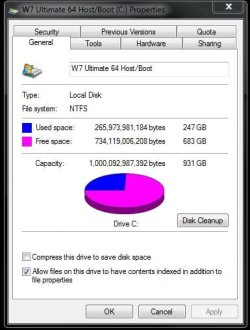
In case Wishmaster doesn't get back to you on the other question I can show how much is used here on the 1tb host drive if that helps. You probably won't have many programs there as seen here but you still will want to allow some free drive for any C primary to avoid the "out of memory" error typically seen when a drive or partition runs out of room for the paging file.

100gb is the reasonable bare minimum until you start adding things on later. A good 200-250gb C primary leaving the rest for a storage partition is generally a good size to work with on a larger capacity drive.

Every little bit you pick up on always helps! :D
 

Attachments

  • Drive Space used on Host.jpg
    Drive Space used on Host.jpg
    36.7 KB · Views: 5

My Computers My Computers

  • At a glance

    W7 Ultimate x64/W10 Pro x64/W11 Pro Triple Bo...AMD Phenom II X4 975 Deneb 3.6ghz - 965 2nd r...Kingston Hyper X DDR3 1600 1.5v 16gb - Hyper ...MSI HD Radeon 5750 1gb - MSI HD Radeon 6450 o...
    Computer type
    PC/Desktop
    Computer Manufacturer/Model Number
    Custom builds = 2
    OS
    W7 Ultimate x64/W10 Pro x64/W11 Pro Triple Boot - Main PC W7 Remote PC Micro ATX W7 Pro x64/W11 Pro
    CPU
    AMD Phenom II X4 975 Deneb 3.6ghz - 965 2nd remote pc
    Motherboard
    Gigabyte GA-790XTA-UD4-Gigabyte GA-880GM-D2H remote pc
    Memory
    Kingston Hyper X DDR3 1600 1.5v 16gb - Hyper X Fury 8gb 2nd
    Graphics Card(s)
    MSI HD Radeon 5750 1gb - MSI HD Radeon 6450 on mini tower
    Sound Card
    Creative Labs X-Fi Xtreme Audio P - Realtek onooard 2nd case
    Monitor(s) Displays
    ASUS VW199T-P 19" HP 2082a Main-HP 2082a 20" remote pc
    Screen Resolution
    Asus 1440x900 - HP 1600x900
    Hard Drives
    WD Black 1TB HD per OS W7, W10, and pending W11 presently on 500gb OS Drive - Pending Triple 1TB HDs for Spanned Storage/backup volume
    Single 2TB external USB enclosure, single 1TB System 7 Host/Boot drive, Pending 8TB external HD for system image b
    PSU
    Corsair 750TX - primary / Corsair CX600 - second
    Case
    Antec 900-2 - SSD compatible / NZXT Vulcan mini tower
    Cooling
    Zalman CNPS9900A
    Keyboard
    AZIO L70 Backlit Letters Gaming - ONN Cordless/USB
    Mouse
    MSI DS200 Programmable, Logitech Cordless
    Internet Speed
    30mbps upgrade - primary hard wired - mini tower usb WiFi
    Antivirus
    GFI VIPRE Internet Security 2014 on W7 2016 beta on W10,
    Browser
    Cyberfox, WaterFox 64bit FF variants, FireFox x64, Pale Moon
    Other Info
    Accomdata fan cooled usb 2.0 PIDE/Sata II, III external enclosure.
    Sambient usb/eSata PATA/Sata II, III external enclosure.
  • At a glance

    W7 Pro x64/W11 ProAMD Deneb 3.6ghz - 965Kingston Hyper X Fury 8gbMSI HD Radeon 6450 DVI Output
    Computer type
    PC/Desktop
    System Manufacturer/Model Number
    CUSTOM ASSEMBLY
    OS
    W7 Pro x64/W11 Pro
    CPU
    AMD Deneb 3.6ghz - 965
    Motherboard
    Gigabyte GA-880GM-D2H remote pc
    Memory
    Kingston Hyper X Fury 8gb
    Graphics Card(s)
    MSI HD Radeon 6450 DVI Output
    Sound Card
    Realtek onooard Creative or Other separate PENDING
    Monitor(s) Displays
    VIZIO 32" LCD TV Separate LCD Pending
    Screen Resolution
    1600x1080
    Hard Drives
    WD 500GB OS Host/Boot WD Green 1TB Storage/Backup
    PSU
    Corsair 600W - THERMALTAKE 600W spare case
    Case
    NZXT Vulcan mini tower
    Cooling
    Twin 120mm Top Fans - 240mm Side Cover
    Keyboard
    ONN Cordless/USB Logitech Cordless
    Mouse
    ONN USB/Cordless - Logitech Cordless
    Internet Speed
    DSL 5G
    Browser
    MS Edge, FireFox, WaterFox x64, FireFox Nightly
    Other Info
    OS Testing-Remote Access to Main TeamViewer
250GB it is. Thanks again
 

My Computer My Computer

At a glance

Windows Vista Ultimate 32 bit & Win 7 Profess...Intel Core 2 E6320 Duo (4MB L2 cache, 1.86Ghz...4GB Kingston Dual Channel DDR2, PC2-5300, 667Mhz256MB nVidia GeForce 8600GTS
Computer Manufacturer/Model Number
Dell Dimension 9200
OS
Windows Vista Ultimate 32 bit & Win 7 Professional 32 bit
CPU
Intel Core 2 E6320 Duo (4MB L2 cache, 1.86Ghz, 1066FSB
Motherboard
Dell
Memory
4GB Kingston Dual Channel DDR2, PC2-5300, 667Mhz
Graphics Card(s)
256MB nVidia GeForce 8600GTS
Sound Card
Integrated Sound Blaster Audigy
Monitor(s) Displays
22 inch Widescreen Digital(Dell) @ 19" Acer LCD
Screen Resolution
Dell 1680 x 1050, Axcer 1280 x1024
Hard Drives
500GB Serial ATA 3Gb/s, 7200rpm w/ DataBurst Cache
1TB Seagate Barracuda 7200.12, 2 x 1TB USB drives for BU
PSU
APC Back UPS ES 750
Case
Standard
Cooling
Standard
Keyboard
MX5500 Logitech
Mouse
Logitech Bluetooth MX5500
Other Info
Dell Studio Laptop, Win 7 Pro 64 bit.
What do you people do?

I can't use more than 58% of 35 GB on my C:
 

My Computer My Computer

At a glance

MS Windows 7 Ultimate SP1 64-bitAMD A10-4600M6.00 GB Dual-Channel DDR3 @ 798MHz (11-11-12-28)AMD Radeon HD 7660G
Computer Manufacturer/Model Number
Toshiba Satellite S875D-S7239 laptop
OS
MS Windows 7 Ultimate SP1 64-bit
CPU
AMD A10-4600M
Motherboard
AMD Pumori (Socket FT1)
Memory
6.00 GB Dual-Channel DDR3 @ 798MHz (11-11-12-28)
Graphics Card(s)
AMD Radeon HD 7660G
Sound Card
High Definition Audio Device
Monitor(s) Displays
Generic PnP Monitor (1600x900@60Hz)
Screen Resolution
1600x900@60Hz
Hard Drives
SSD 119GB Corsair CSSD-V128GB2 ATA Device
Keyboard
Standard PS/2 Keyboard
Mouse
HP Wireless Optical Mobile Mouse Model FHA-3410
Internet Speed
What the local pub, local coffee shop offers.
Other Info
Optical Drive:MATSHITA BD-CMB UJ160B ATA Device


Also have an Asus ha1002xp netbook with Win 7 Ultimate installed.
What do you people do?

I can't use more than 58% of 35 GB on my C:

If you saw what I have loaded on 7 presently your eyes would bulge out! :D

Now for simply running 7 without "anything" period MS advised 16gb. In the real world with many programs installed and various user files present plus any customizations that may take later drive space becomes a commodity.

If you work with video at all you'll see how fast even a 1tb single primary will seem a bit small too. Not knowing what BarrieNoodles will eventually have running one has to provide for later expansion of things.

New larger versions of things, more complex or several larger games, and other things can pile on fast. Once you have worked with the present install long enough you should be able to get the better idea on just how drive space you will want for C over time. For the time being however this will be a dafety margin to consider.
 

My Computers My Computers

  • At a glance

    W7 Ultimate x64/W10 Pro x64/W11 Pro Triple Bo...AMD Phenom II X4 975 Deneb 3.6ghz - 965 2nd r...Kingston Hyper X DDR3 1600 1.5v 16gb - Hyper ...MSI HD Radeon 5750 1gb - MSI HD Radeon 6450 o...
    Computer type
    PC/Desktop
    Computer Manufacturer/Model Number
    Custom builds = 2
    OS
    W7 Ultimate x64/W10 Pro x64/W11 Pro Triple Boot - Main PC W7 Remote PC Micro ATX W7 Pro x64/W11 Pro
    CPU
    AMD Phenom II X4 975 Deneb 3.6ghz - 965 2nd remote pc
    Motherboard
    Gigabyte GA-790XTA-UD4-Gigabyte GA-880GM-D2H remote pc
    Memory
    Kingston Hyper X DDR3 1600 1.5v 16gb - Hyper X Fury 8gb 2nd
    Graphics Card(s)
    MSI HD Radeon 5750 1gb - MSI HD Radeon 6450 on mini tower
    Sound Card
    Creative Labs X-Fi Xtreme Audio P - Realtek onooard 2nd case
    Monitor(s) Displays
    ASUS VW199T-P 19" HP 2082a Main-HP 2082a 20" remote pc
    Screen Resolution
    Asus 1440x900 - HP 1600x900
    Hard Drives
    WD Black 1TB HD per OS W7, W10, and pending W11 presently on 500gb OS Drive - Pending Triple 1TB HDs for Spanned Storage/backup volume
    Single 2TB external USB enclosure, single 1TB System 7 Host/Boot drive, Pending 8TB external HD for system image b
    PSU
    Corsair 750TX - primary / Corsair CX600 - second
    Case
    Antec 900-2 - SSD compatible / NZXT Vulcan mini tower
    Cooling
    Zalman CNPS9900A
    Keyboard
    AZIO L70 Backlit Letters Gaming - ONN Cordless/USB
    Mouse
    MSI DS200 Programmable, Logitech Cordless
    Internet Speed
    30mbps upgrade - primary hard wired - mini tower usb WiFi
    Antivirus
    GFI VIPRE Internet Security 2014 on W7 2016 beta on W10,
    Browser
    Cyberfox, WaterFox 64bit FF variants, FireFox x64, Pale Moon
    Other Info
    Accomdata fan cooled usb 2.0 PIDE/Sata II, III external enclosure.
    Sambient usb/eSata PATA/Sata II, III external enclosure.
  • At a glance

    W7 Pro x64/W11 ProAMD Deneb 3.6ghz - 965Kingston Hyper X Fury 8gbMSI HD Radeon 6450 DVI Output
    Computer type
    PC/Desktop
    System Manufacturer/Model Number
    CUSTOM ASSEMBLY
    OS
    W7 Pro x64/W11 Pro
    CPU
    AMD Deneb 3.6ghz - 965
    Motherboard
    Gigabyte GA-880GM-D2H remote pc
    Memory
    Kingston Hyper X Fury 8gb
    Graphics Card(s)
    MSI HD Radeon 6450 DVI Output
    Sound Card
    Realtek onooard Creative or Other separate PENDING
    Monitor(s) Displays
    VIZIO 32" LCD TV Separate LCD Pending
    Screen Resolution
    1600x1080
    Hard Drives
    WD 500GB OS Host/Boot WD Green 1TB Storage/Backup
    PSU
    Corsair 600W - THERMALTAKE 600W spare case
    Case
    NZXT Vulcan mini tower
    Cooling
    Twin 120mm Top Fans - 240mm Side Cover
    Keyboard
    ONN Cordless/USB Logitech Cordless
    Mouse
    ONN USB/Cordless - Logitech Cordless
    Internet Speed
    DSL 5G
    Browser
    MS Edge, FireFox, WaterFox x64, FireFox Nightly
    Other Info
    OS Testing-Remote Access to Main TeamViewer
Down load lot of free programs to try and then let them hang around, besides having 3TB of HD space to play around with 250GB is less then 10 per cent. It's hard to beleive how HD capacity has mushroomed in the last few years.
 

My Computer My Computer

At a glance

Windows Vista Ultimate 32 bit & Win 7 Profess...Intel Core 2 E6320 Duo (4MB L2 cache, 1.86Ghz...4GB Kingston Dual Channel DDR2, PC2-5300, 667Mhz256MB nVidia GeForce 8600GTS
Computer Manufacturer/Model Number
Dell Dimension 9200
OS
Windows Vista Ultimate 32 bit & Win 7 Professional 32 bit
CPU
Intel Core 2 E6320 Duo (4MB L2 cache, 1.86Ghz, 1066FSB
Motherboard
Dell
Memory
4GB Kingston Dual Channel DDR2, PC2-5300, 667Mhz
Graphics Card(s)
256MB nVidia GeForce 8600GTS
Sound Card
Integrated Sound Blaster Audigy
Monitor(s) Displays
22 inch Widescreen Digital(Dell) @ 19" Acer LCD
Screen Resolution
Dell 1680 x 1050, Axcer 1280 x1024
Hard Drives
500GB Serial ATA 3Gb/s, 7200rpm w/ DataBurst Cache
1TB Seagate Barracuda 7200.12, 2 x 1TB USB drives for BU
PSU
APC Back UPS ES 750
Case
Standard
Cooling
Standard
Keyboard
MX5500 Logitech
Mouse
Logitech Bluetooth MX5500
Other Info
Dell Studio Laptop, Win 7 Pro 64 bit.
gentlemen,
I'm not a beginner at this. As long as you keep your data separate, your C can be small. And yes, I install and try out many different software packages.

Have a nice day.
 

My Computer My Computer

At a glance

MS Windows 7 Ultimate SP1 64-bitAMD A10-4600M6.00 GB Dual-Channel DDR3 @ 798MHz (11-11-12-28)AMD Radeon HD 7660G
Computer Manufacturer/Model Number
Toshiba Satellite S875D-S7239 laptop
OS
MS Windows 7 Ultimate SP1 64-bit
CPU
AMD A10-4600M
Motherboard
AMD Pumori (Socket FT1)
Memory
6.00 GB Dual-Channel DDR3 @ 798MHz (11-11-12-28)
Graphics Card(s)
AMD Radeon HD 7660G
Sound Card
High Definition Audio Device
Monitor(s) Displays
Generic PnP Monitor (1600x900@60Hz)
Screen Resolution
1600x900@60Hz
Hard Drives
SSD 119GB Corsair CSSD-V128GB2 ATA Device
Keyboard
Standard PS/2 Keyboard
Mouse
HP Wireless Optical Mobile Mouse Model FHA-3410
Internet Speed
What the local pub, local coffee shop offers.
Other Info
Optical Drive:MATSHITA BD-CMB UJ160B ATA Device


Also have an Asus ha1002xp netbook with Win 7 Ultimate installed.
gentlemen,
I'm not a beginner at this. As long as you keep your data separate, your C can be small. And yes, I install and try out many different software packages.

Have a nice day.

No one said you were. :D

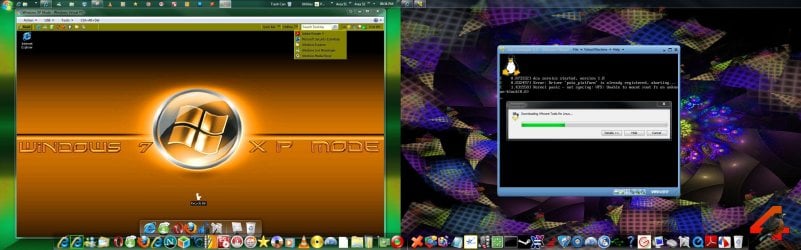
To give you some idea of what is typically seen here look back at the image in Post #10 as well as what you may tend to see running at any time on the desktop here to get a better idea.

Note the temp folder stacks things up there as well as for working on various things as well as storing various screens for further reference. Jpegs can also take up quite a bit of space at times along any updates and other downloads stored locally on C.

Circumstances are always going to be different for each user to begin with. Here I simply end up with the typical "busy' desktop more then others and have a single large C primary to work with. The rest goes onto one of the other four 1tb drives.
 

Attachments

  • Desktop Information Overload.jpg
    Desktop Information Overload.jpg
    287 KB · Views: 2

My Computers My Computers

  • At a glance

    W7 Ultimate x64/W10 Pro x64/W11 Pro Triple Bo...AMD Phenom II X4 975 Deneb 3.6ghz - 965 2nd r...Kingston Hyper X DDR3 1600 1.5v 16gb - Hyper ...MSI HD Radeon 5750 1gb - MSI HD Radeon 6450 o...
    Computer type
    PC/Desktop
    Computer Manufacturer/Model Number
    Custom builds = 2
    OS
    W7 Ultimate x64/W10 Pro x64/W11 Pro Triple Boot - Main PC W7 Remote PC Micro ATX W7 Pro x64/W11 Pro
    CPU
    AMD Phenom II X4 975 Deneb 3.6ghz - 965 2nd remote pc
    Motherboard
    Gigabyte GA-790XTA-UD4-Gigabyte GA-880GM-D2H remote pc
    Memory
    Kingston Hyper X DDR3 1600 1.5v 16gb - Hyper X Fury 8gb 2nd
    Graphics Card(s)
    MSI HD Radeon 5750 1gb - MSI HD Radeon 6450 on mini tower
    Sound Card
    Creative Labs X-Fi Xtreme Audio P - Realtek onooard 2nd case
    Monitor(s) Displays
    ASUS VW199T-P 19" HP 2082a Main-HP 2082a 20" remote pc
    Screen Resolution
    Asus 1440x900 - HP 1600x900
    Hard Drives
    WD Black 1TB HD per OS W7, W10, and pending W11 presently on 500gb OS Drive - Pending Triple 1TB HDs for Spanned Storage/backup volume
    Single 2TB external USB enclosure, single 1TB System 7 Host/Boot drive, Pending 8TB external HD for system image b
    PSU
    Corsair 750TX - primary / Corsair CX600 - second
    Case
    Antec 900-2 - SSD compatible / NZXT Vulcan mini tower
    Cooling
    Zalman CNPS9900A
    Keyboard
    AZIO L70 Backlit Letters Gaming - ONN Cordless/USB
    Mouse
    MSI DS200 Programmable, Logitech Cordless
    Internet Speed
    30mbps upgrade - primary hard wired - mini tower usb WiFi
    Antivirus
    GFI VIPRE Internet Security 2014 on W7 2016 beta on W10,
    Browser
    Cyberfox, WaterFox 64bit FF variants, FireFox x64, Pale Moon
    Other Info
    Accomdata fan cooled usb 2.0 PIDE/Sata II, III external enclosure.
    Sambient usb/eSata PATA/Sata II, III external enclosure.
  • At a glance

    W7 Pro x64/W11 ProAMD Deneb 3.6ghz - 965Kingston Hyper X Fury 8gbMSI HD Radeon 6450 DVI Output
    Computer type
    PC/Desktop
    System Manufacturer/Model Number
    CUSTOM ASSEMBLY
    OS
    W7 Pro x64/W11 Pro
    CPU
    AMD Deneb 3.6ghz - 965
    Motherboard
    Gigabyte GA-880GM-D2H remote pc
    Memory
    Kingston Hyper X Fury 8gb
    Graphics Card(s)
    MSI HD Radeon 6450 DVI Output
    Sound Card
    Realtek onooard Creative or Other separate PENDING
    Monitor(s) Displays
    VIZIO 32" LCD TV Separate LCD Pending
    Screen Resolution
    1600x1080
    Hard Drives
    WD 500GB OS Host/Boot WD Green 1TB Storage/Backup
    PSU
    Corsair 600W - THERMALTAKE 600W spare case
    Case
    NZXT Vulcan mini tower
    Cooling
    Twin 120mm Top Fans - 240mm Side Cover
    Keyboard
    ONN Cordless/USB Logitech Cordless
    Mouse
    ONN USB/Cordless - Logitech Cordless
    Internet Speed
    DSL 5G
    Browser
    MS Edge, FireFox, WaterFox x64, FireFox Nightly
    Other Info
    OS Testing-Remote Access to Main TeamViewer
Back
Top