
How to change Win 7 folder permissions on a linux PC?

sst61

New member
Local time
9:56 AM
Messages
28
Location
London, UK
Hi
Is there a way/utility to change Windows 7 x64' folders' permissions for user (C:\Users\SS) on a linux pc?

I have the boot up problem (Win 7 OS) of black screen of death with mouse pointer, after accessing the folder from Windows 10 and accidentally clicked Ok to to the prompt that 'You dont currently have permission to access this folder - click ok to permanently get access to this folder' as win 10 prompt me. So it no longer boots in to win 7 (my main win 7 which I dont want to reinstall).

As a second drive in a another win 7x64 OS, I cant even access its content or size, no bar next to the drive, just the label and the word NTFS, double clicking it you get the message 'F:\is not accessible. Access denied.' - it looks just like it is corrupted or bad partition or bad boot sector, but it isnt, I know that SSD couple of years old, never had a problem.

I run CHCDSK & SFC /scannow no problems found. Yet if I boot from this drive, it goes very fast to the Black Screen Of Death with mouse pointer - no commands, task man or any key entry, just a moveable mouse pointer, no log in, if I press press on/off button it sees that and says 'shutting down' and does but thats it.

Since I cant access it in windows environment, I am trying to access and repair it in linux if possible

Thanks for any pointers, bear in mind I am very beginner in linux.

Sean
 

My Computer My Computer

Computer type
PC/Desktop
Computer Manufacturer/Model Number
Asus
OS
x64
CPU
i7
Motherboard
Asus
Memory
16GB
Graphics Card(s)
GT560TI
Hard Drives
500GB SDD
128GB SSD
2TB
1TB
230GB
Antivirus
AVG
Browser
Firefox
I suspect it will be ridiculously difficult to do what you are asking.

If the permission changes cascaded through the W7 folder structure, it won't be feasible to manually repair the permissions.
You might have to copy all of your data from W7 (you can use a Linux Live CD/DVD/USB to do that) and then reinstall W7. :(

You should wait to see if other members have some suggestions though.

You should also create a backup HDD/SSD image of your system, using something like Macrium Reflect, before you attempt repairs (just in case anything goes wrong).

Tutorials
http://www.sevenforums.com/tutorials/73828-imaging-free-macrium.html
http://www.sevenforums.com/tutorials/218920-macrium-reflect-create-bootable-rescue-usb-drive.html
 

My Computer My Computer

Computer type
PC/Desktop
Computer Manufacturer/Model Number
n/a
OS
W7 Ultimate SP1, LM19.2 MATE, W10 Home 1703, W10 Pro 1703 VM, #All 64 bit
CPU
AMD Phenom II x6 1100T, 3.3 GHz
Motherboard
ASUS M4A88T-M/USB3 (AM3)
Memory
12GB DDR3 1333 G-Skill (4GB x 2), G-Skill (2GB x 2)
Graphics Card(s)
NVIDIA GeForce GTX 660
Sound Card
Realtek?
Monitor(s) Displays
Samsung S23B350
Screen Resolution
1920x1080
Hard Drives
WD Green 2TB (SATA), WD Green 3TB (SATA), WD Blue 4TB (SATA), WD Blue 6TB (SATA)
PSU
Cooler Master
Case
Antec GX300 Tower
Cooling
3x Antec TRICOOL 120mm Fans
Mouse
Wired Optical
Internet Speed
DSL
Antivirus
Avast
Browser
Pale Moon (64 bit)
Other Info
2018-12-27 Upgraded HDDs
2015-12-10 Upgraded case, graphics card, storage
2015-08-15 Upgraded motherboard & RAM
2015-07-15 Upgraded LM17.1 to LM17.2
You can try a System Restore from a "Windows 7 Repair Disk" or your installation DVD/USB if you have one.
 

My Computer My Computer

Computer type
PC/Desktop
Computer Manufacturer/Model Number
Custom Build
OS
Windows 7 Ultimate x64 SP1
CPU
AMD Phenom 2 1090T
Motherboard
Gigabyte GA-890FXA-UD5
Memory
2x8GB Kingston HyperX Fury Black 1600Mhz Unganged
Graphics Card(s)
MSI GTX 970 Gaming 4G
Sound Card
Realtek On-Board HD 7.1 Audio / Logitech G35
Monitor(s) Displays
3xAcer GD245HQ
Screen Resolution
1920x1080
Hard Drives
Samsung 850 Pro 512GB SSD - OS /
WD Caviar Black SATA 3 - 1 TBx2 - Dynamic RAID 0 /
WD Caviar Green SATA 2 - 640GBx2 - Dynamic RAID 0 /
WD Caviar Green SATA 2 - 640GB - Internal Backup /
Seagate Barracude SATA 3 - 3TB - External Backup/ Sync
PSU
HighPower 1000W
Case
Cooler Master HAF 932
Cooling
Noctua NH-D14
Keyboard
Logitech G19
Mouse
Logitech G500
Internet Speed
100/4 Mbit Cable (100GB quota)
Antivirus
ZoneAlarm Extreme Security / MBAM Pro / MBAE Free / SAS Free
Browser
IE 11 - Firefox - Chrome
Other Info
Logitech F710/ G27/ G940/ Z5500 // TrackIR 5 // Nvidia 3D Surround Vision
Hi, thank you both for your input. It was just a long shot.
I have tried the win repair, no joy, I am guessing because of permission changes, win cannot access restore point which there are plenty of. I havent really lost any data as my data was on another drive, I am trying to get win back as I dont want to re install as there are a lot of specialist/difficult to setup software which I dont want to go through installing and setting up.

I wait a little longer to see if anyone else can contribute.

Thanks again.
 

My Computer My Computer

Computer type
PC/Desktop
Computer Manufacturer/Model Number
Asus
OS
x64
CPU
i7
Motherboard
Asus
Memory
16GB
Graphics Card(s)
GT560TI
Hard Drives
500GB SDD
128GB SSD
2TB
1TB
230GB
Antivirus
AVG
Browser
Firefox
Hi, thank you both for your input. It was just a long shot.
I have tried the win repair, no joy, I am guessing because of permission changes, win cannot access restore point which there are plenty of. I havent really lost any data as my data was on another drive, I am trying to get win back as I dont want to re install as there are a lot of specialist/difficult to setup software which I dont want to go through installing and setting up.

I wait a little longer to see if anyone else can contribute.

Thanks again.
 

My Computer My Computer

Computer type
PC/Desktop
Computer Manufacturer/Model Number
Asus
OS
x64
CPU
i7
Motherboard
Asus
Memory
16GB
Graphics Card(s)
GT560TI
Hard Drives
500GB SDD
128GB SSD
2TB
1TB
230GB
Antivirus
AVG
Browser
Firefox
I have 2 experimental ideas :p

1. Try a System Restore in Win 10. Maybe it can change back the permissions/ownership to before what it has changed. Make sure restore point is from before the change.
2. In Windows 10, right click Windows 7 partition and go into properties, switch to Security tab, add Everyone as Full Control. Everyone should have the same SID on both Win7 and 10, so "maybe" it will work.

While trying (2), click the Advanced button on Security tab, then switch to Owner, click Edit and take a screenshot and post here - http://www.sevenforums.com/tutorials/9733-screenshots-files-upload-post-seven-forums.html
 

My Computer My Computer

Computer type
PC/Desktop
Computer Manufacturer/Model Number
Custom Build
OS
Windows 7 Ultimate x64 SP1
CPU
AMD Phenom 2 1090T
Motherboard
Gigabyte GA-890FXA-UD5
Memory
2x8GB Kingston HyperX Fury Black 1600Mhz Unganged
Graphics Card(s)
MSI GTX 970 Gaming 4G
Sound Card
Realtek On-Board HD 7.1 Audio / Logitech G35
Monitor(s) Displays
3xAcer GD245HQ
Screen Resolution
1920x1080
Hard Drives
Samsung 850 Pro 512GB SSD - OS /
WD Caviar Black SATA 3 - 1 TBx2 - Dynamic RAID 0 /
WD Caviar Green SATA 2 - 640GBx2 - Dynamic RAID 0 /
WD Caviar Green SATA 2 - 640GB - Internal Backup /
Seagate Barracude SATA 3 - 3TB - External Backup/ Sync
PSU
HighPower 1000W
Case
Cooler Master HAF 932
Cooling
Noctua NH-D14
Keyboard
Logitech G19
Mouse
Logitech G500
Internet Speed
100/4 Mbit Cable (100GB quota)
Antivirus
ZoneAlarm Extreme Security / MBAM Pro / MBAE Free / SAS Free
Browser
IE 11 - Firefox - Chrome
Other Info
Logitech F710/ G27/ G940/ Z5500 // TrackIR 5 // Nvidia 3D Surround Vision
Hi
Is there a way/utility to change Windows 7 x64' folders' permissions for user (C:\Users\SS) on a linux pc?

I have the boot up problem (Win 7 OS) of black screen of death with mouse pointer, after accessing the folder from Windows 10 and accidentally clicked Ok to to the prompt that 'You dont currently have permission to access this folder - click ok to permanently get access to this folder' as win 10 prompt me. So it no longer boots in to win 7 (my main win 7 which I dont want to reinstall).

As a second drive in a another win 7x64 OS, I cant even access its content or size, no bar next to the drive, just the label and the word NTFS, double clicking it you get the message 'F:\is not accessible. Access denied.' - it looks just like it is corrupted or bad partition or bad boot sector, but it isnt, I know that SSD couple of years old, never had a problem.

I run CHCDSK & SFC /scannow no problems found. Yet if I boot from this drive, it goes very fast to the Black Screen Of Death with mouse pointer - no commands, task man or any key entry, just a moveable mouse pointer, no log in, if I press press on/off button it sees that and says 'shutting down' and does but thats it.

Since I cant access it in windows environment, I am trying to access and repair it in linux if possible

Thanks for any pointers, bear in mind I am very beginner in linux.

Sean
You can try this, copy the file to a linux partition using linux mint or ubuntu. Boot linux, copy file from NTFS to EXT4 partition.

Then boot windows, run Access to Ext 2/3/4, HFS and ReiserFS from Windows, copy retrieve the files out of linux back into your working windows drive. See if they work again.
 

My Computer My Computer

OS
Windows 7 Ultimate x64
You can try this, copy the file to a linux partition using linux mint or ubuntu. Boot linux, copy file from NTFS to EXT4 partition.

Then boot windows, run Access to Ext 2/3/4, HFS and ReiserFS from Windows, copy retrieve the files out of linux back into your working windows drive. See if they work again.
I don't think that will work for System files (i.e. some files required a specific owner like "Trusted Installer").
 

My Computer My Computer

Computer type
PC/Desktop
Computer Manufacturer/Model Number
n/a
OS
W7 Ultimate SP1, LM19.2 MATE, W10 Home 1703, W10 Pro 1703 VM, #All 64 bit
CPU
AMD Phenom II x6 1100T, 3.3 GHz
Motherboard
ASUS M4A88T-M/USB3 (AM3)
Memory
12GB DDR3 1333 G-Skill (4GB x 2), G-Skill (2GB x 2)
Graphics Card(s)
NVIDIA GeForce GTX 660
Sound Card
Realtek?
Monitor(s) Displays
Samsung S23B350
Screen Resolution
1920x1080
Hard Drives
WD Green 2TB (SATA), WD Green 3TB (SATA), WD Blue 4TB (SATA), WD Blue 6TB (SATA)
PSU
Cooler Master
Case
Antec GX300 Tower
Cooling
3x Antec TRICOOL 120mm Fans
Mouse
Wired Optical
Internet Speed
DSL
Antivirus
Avast
Browser
Pale Moon (64 bit)
Other Info
2018-12-27 Upgraded HDDs
2015-12-10 Upgraded case, graphics card, storage
2015-08-15 Upgraded motherboard & RAM
2015-07-15 Upgraded LM17.1 to LM17.2
GokAy: your option 1, I am not too sure if that would do anything to a secondary drives' permissions. Your option 2 is something that I had planned to do at some point, first I like to take an image of the drive as it is before I change anything else, once done, i will try to change permissions in 10.

I ran CACLA & ICACLS commands in DOS to change folder permissions and it seems to have done that without any errors, I am checking its success level and whether it helps at all.

Currently with that, I am still in the same situation and cannot access the drive in any windows OS.

Thank you for all your inputs for now, will update when there is more.

Thanks,
Sean
 

My Computer My Computer

Computer type
PC/Desktop
Computer Manufacturer/Model Number
Asus
OS
x64
CPU
i7
Motherboard
Asus
Memory
16GB
Graphics Card(s)
GT560TI
Hard Drives
500GB SDD
128GB SSD
2TB
1TB
230GB
Antivirus
AVG
Browser
Firefox
If you have a flash drive, boot up a live usb of ubuntu.
Then access the locked files and copy them to the working drive. Or copy to an external drive.

But I see your trying to make the win7 boot again, which yeah, I dont think I can help, my idea will only recover data files.

you can use linux to modify NTFS file permissions, read here
permissions - How do I use 'chmod' on an NTFS (or FAT32) partition? - Ask Ubuntu
to do this I think you need an installed ubuntu, not a live usb.

chown in linux lets you change who owns the file or folder, and can be done recursively.
chmod lets you change the permissions on the file, what can be done with it.
 

My Computer My Computer

OS
Windows 7 Ultimate x64
You shouldn't be needing Linux to make a Win7 drive readable. If that is what you need, change ownership of Win7 partition to your Win10 account. And add it to NTFS permissions as well. Most similar cases I have seen here are old WinXP partitions unreadable under 7.

What I have proposed earlier was an attempt at making Win7 bootable.
 

My Computer My Computer

Computer type
PC/Desktop
Computer Manufacturer/Model Number
Custom Build
OS
Windows 7 Ultimate x64 SP1
CPU
AMD Phenom 2 1090T
Motherboard
Gigabyte GA-890FXA-UD5
Memory
2x8GB Kingston HyperX Fury Black 1600Mhz Unganged
Graphics Card(s)
MSI GTX 970 Gaming 4G
Sound Card
Realtek On-Board HD 7.1 Audio / Logitech G35
Monitor(s) Displays
3xAcer GD245HQ
Screen Resolution
1920x1080
Hard Drives
Samsung 850 Pro 512GB SSD - OS /
WD Caviar Black SATA 3 - 1 TBx2 - Dynamic RAID 0 /
WD Caviar Green SATA 2 - 640GBx2 - Dynamic RAID 0 /
WD Caviar Green SATA 2 - 640GB - Internal Backup /
Seagate Barracude SATA 3 - 3TB - External Backup/ Sync
PSU
HighPower 1000W
Case
Cooler Master HAF 932
Cooling
Noctua NH-D14
Keyboard
Logitech G19
Mouse
Logitech G500
Internet Speed
100/4 Mbit Cable (100GB quota)
Antivirus
ZoneAlarm Extreme Security / MBAM Pro / MBAE Free / SAS Free
Browser
IE 11 - Firefox - Chrome
Other Info
Logitech F710/ G27/ G940/ Z5500 // TrackIR 5 // Nvidia 3D Surround Vision
GokAy, Yes the goal is to get it back it is bootable state.
Your option 1 was system restore from 10 - I can try that I guess - that should not put too much ripples in Win 7 drive.

Your option 2 is what I have seriously resisted doing until I get an image of the drive before further work on it, just in case it introduces too many variable. I will do that, do you think that would work? I wont be able to try that today but I will try and report back.

I have not lost any data as my data is on another drive - so thank you for all suggesting accessing data from Linux.
 

My Computer My Computer

Computer type
PC/Desktop
Computer Manufacturer/Model Number
Asus
OS
x64
CPU
i7
Motherboard
Asus
Memory
16GB
Graphics Card(s)
GT560TI
Hard Drives
500GB SDD
128GB SSD
2TB
1TB
230GB
Antivirus
AVG
Browser
Firefox
I don't know if it will work, but hope it will :) in my own win 7 and 10 dual boot system I remove the drive letter for the other OS when booted with one just to avoid similar problems.
 

My Computer My Computer

Computer type
PC/Desktop
Computer Manufacturer/Model Number
Custom Build
OS
Windows 7 Ultimate x64 SP1
CPU
AMD Phenom 2 1090T
Motherboard
Gigabyte GA-890FXA-UD5
Memory
2x8GB Kingston HyperX Fury Black 1600Mhz Unganged
Graphics Card(s)
MSI GTX 970 Gaming 4G
Sound Card
Realtek On-Board HD 7.1 Audio / Logitech G35
Monitor(s) Displays
3xAcer GD245HQ
Screen Resolution
1920x1080
Hard Drives
Samsung 850 Pro 512GB SSD - OS /
WD Caviar Black SATA 3 - 1 TBx2 - Dynamic RAID 0 /
WD Caviar Green SATA 2 - 640GBx2 - Dynamic RAID 0 /
WD Caviar Green SATA 2 - 640GB - Internal Backup /
Seagate Barracude SATA 3 - 3TB - External Backup/ Sync
PSU
HighPower 1000W
Case
Cooler Master HAF 932
Cooling
Noctua NH-D14
Keyboard
Logitech G19
Mouse
Logitech G500
Internet Speed
100/4 Mbit Cable (100GB quota)
Antivirus
ZoneAlarm Extreme Security / MBAM Pro / MBAE Free / SAS Free
Browser
IE 11 - Firefox - Chrome
Other Info
Logitech F710/ G27/ G940/ Z5500 // TrackIR 5 // Nvidia 3D Surround Vision
OK update on the status:

Gokay, First I tried setting permissions from win 10 win explorer, right click drive, security tab, add user - this throw up errors on some file/folders and it wouldnt complete having gone through a number of files and folders.

So next elevated command prompt in 10, using CACLS command I gave admin rights to the entire C drive, User folder and system32 folder, next reboot it was accessible in win 10 and all the files were there intact however, booting the win 7 drive up I still get the same black screen of death with mouse - so one step closer, drive now accessible but still no boot.

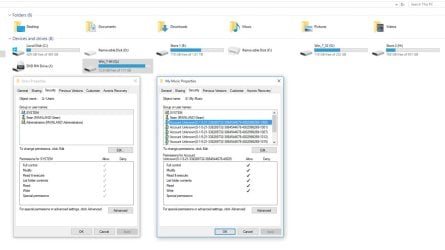
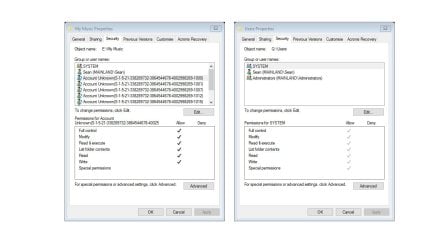
From attached photo you can see my E: data drive which used to host the My Doc, Music, Photos for my win 7. When for the first time accessed these folders in Win 10, I got the same prompt ' you havent got access, click OK to get permanent access' I OKed it and I have access to them (The whole problem started when I did the same on my Win 7' User' folder). Now in attached, the accessed E:\My Music security properties (on the right) now shows an unknown account which must be my Win 7 account (win 10 & 7 both have the same computer name and users). My Q: drive which is the old win 7 drive' security properties show only permissions for win 10 users and the actual Allow column is greyed out?
I am thinking if I manage to add the unknown security account ti Q drive then win 7 may boot? I am not sure and certainly dont know how to do that not knowing where that account is kept on win 7 files and guessing it is deep within a system file anyway so it may not be possible, maybe there is a way to export?


Sean
 

Attachments

  • Slide1.JPG
    Slide1.JPG
    66.9 KB · Views: 2
  • Slide2.JPG
    Slide2.JPG
    71.3 KB · Views: 1

My Computer My Computer

Computer type
PC/Desktop
Computer Manufacturer/Model Number
Asus
OS
x64
CPU
i7
Motherboard
Asus
Memory
16GB
Graphics Card(s)
GT560TI
Hard Drives
500GB SDD
128GB SSD
2TB
1TB
230GB
Antivirus
AVG
Browser
Firefox
I don't know of any method to change permissions to an unknown security principal/group.

Those S-1-5-21-### are Windows 7 SIDs (Security IDs, your accounts, administrator, guest etc) https://en.wikipedia.org/wiki/Security_Identifier

Having extra unknown SIDs in the security list shouldn't cause your issue but who knows. Did you try adding Everyone with Full Control to Win7 OS drive yet? (I don't know if this would make it bootable again).

Did you try a startup repair yet? http://www.sevenforums.com/tutorials/681-startup-repair.html
 

My Computer My Computer

Computer type
PC/Desktop
Computer Manufacturer/Model Number
Custom Build
OS
Windows 7 Ultimate x64 SP1
CPU
AMD Phenom 2 1090T
Motherboard
Gigabyte GA-890FXA-UD5
Memory
2x8GB Kingston HyperX Fury Black 1600Mhz Unganged
Graphics Card(s)
MSI GTX 970 Gaming 4G
Sound Card
Realtek On-Board HD 7.1 Audio / Logitech G35
Monitor(s) Displays
3xAcer GD245HQ
Screen Resolution
1920x1080
Hard Drives
Samsung 850 Pro 512GB SSD - OS /
WD Caviar Black SATA 3 - 1 TBx2 - Dynamic RAID 0 /
WD Caviar Green SATA 2 - 640GBx2 - Dynamic RAID 0 /
WD Caviar Green SATA 2 - 640GB - Internal Backup /
Seagate Barracude SATA 3 - 3TB - External Backup/ Sync
PSU
HighPower 1000W
Case
Cooler Master HAF 932
Cooling
Noctua NH-D14
Keyboard
Logitech G19
Mouse
Logitech G500
Internet Speed
100/4 Mbit Cable (100GB quota)
Antivirus
ZoneAlarm Extreme Security / MBAM Pro / MBAE Free / SAS Free
Browser
IE 11 - Firefox - Chrome
Other Info
Logitech F710/ G27/ G940/ Z5500 // TrackIR 5 // Nvidia 3D Surround Vision
GokAy,

Sorry for the delay in responding.

I have now managed to remove all the other number type users from the drive security tab. This was done again by running the CACLS commands to grant everyone full rights including C: C:\Users and C:windows System32 and then after a reboot, changing the permissions to the default. This was done in elevated Command Prompt in win 10.

I have now full access to the drive, the security tab only shows the right people i.e. system, Sean, Admins. it looks as per other drives that are OK. BUT, still I have the same BlackSD with mouse, still no boot!

Yes I have tried system repairs of all kinds to no avail.
 

My Computer My Computer

Computer type
PC/Desktop
Computer Manufacturer/Model Number
Asus
OS
x64
CPU
i7
Motherboard
Asus
Memory
16GB
Graphics Card(s)
GT560TI
Hard Drives
500GB SDD
128GB SSD
2TB
1TB
230GB
Antivirus
AVG
Browser
Firefox
Hi guys and sorry for the delay in responding.

I have a bit of an update. I have managed to get access to the drive content now but still cannot boot in to windows 7.

I got access to the drive by resetting the permissions for c:, user, system32, windows and then setting the default permissions. This has now given me the rights to access it in win 10 or other windows as a second drive but still no boot and still black screen of death with mouse.

Now I am trying to find out how to boot it. And yes have tried all the repair and safe modes but they all result in the same thing.

Thanks for all your suggestions.

Sean
 

My Computer My Computer

Computer type
PC/Desktop
Computer Manufacturer/Model Number
Asus
OS
x64
CPU
i7
Motherboard
Asus
Memory
16GB
Graphics Card(s)
GT560TI
Hard Drives
500GB SDD
128GB SSD
2TB
1TB
230GB
Antivirus
AVG
Browser
Firefox

My Computer My Computer

Computer type
PC/Desktop
Computer Manufacturer/Model Number
Custom Build
OS
Windows 7 Ultimate x64 SP1
CPU
AMD Phenom 2 1090T
Motherboard
Gigabyte GA-890FXA-UD5
Memory
2x8GB Kingston HyperX Fury Black 1600Mhz Unganged
Graphics Card(s)
MSI GTX 970 Gaming 4G
Sound Card
Realtek On-Board HD 7.1 Audio / Logitech G35
Monitor(s) Displays
3xAcer GD245HQ
Screen Resolution
1920x1080
Hard Drives
Samsung 850 Pro 512GB SSD - OS /
WD Caviar Black SATA 3 - 1 TBx2 - Dynamic RAID 0 /
WD Caviar Green SATA 2 - 640GBx2 - Dynamic RAID 0 /
WD Caviar Green SATA 2 - 640GB - Internal Backup /
Seagate Barracude SATA 3 - 3TB - External Backup/ Sync
PSU
HighPower 1000W
Case
Cooler Master HAF 932
Cooling
Noctua NH-D14
Keyboard
Logitech G19
Mouse
Logitech G500
Internet Speed
100/4 Mbit Cable (100GB quota)
Antivirus
ZoneAlarm Extreme Security / MBAM Pro / MBAE Free / SAS Free
Browser
IE 11 - Firefox - Chrome
Other Info
Logitech F710/ G27/ G940/ Z5500 // TrackIR 5 // Nvidia 3D Surround Vision
Almost - got sticky keys up but as in the thread, I dont get a link to Ease of access and the thread trail ends there, same with in key + U... interesting angle though.
BTW my Safe Mode goes as fare as the list of all the drivers etc it loads and it hangs somewhere in there and never gets to boot in to the black screen. It seems to be a hard crash as every time there is a horizontal line that appears at the very top of the screen - the type that has multi colour pixels. Like if you have a faulty video card but I havent got a faulty video card as it is working perfectly fine in 10, never had an issue. I dont think the video drivers would would suddenly play up either.

Previously the win 7 drive was not even accessible in win 10. With the sticky key experiment I am convinced of the following:

  • While in black screen, Windows has just started
  • it cannot find/correlate users so cannot even see/recognise the available profiles to show a login screen
  • I dont think Windows in its early boot part is able to run something in its Start up folder and I dont know any other way to get a utility to run when it goes in the black screen
 

My Computer My Computer

Computer type
PC/Desktop
Computer Manufacturer/Model Number
Asus
OS
x64
CPU
i7
Motherboard
Asus
Memory
16GB
Graphics Card(s)
GT560TI
Hard Drives
500GB SDD
128GB SSD
2TB
1TB
230GB
Antivirus
AVG
Browser
Firefox
Hmm, if you can get the Ease of Access window then the login screen may be there, just not showing. Lets try a blind log in? :D

Start the PC and wait, say, 5 minutes. (Don't click or type anything). Then type your password and press ENTER. Lets see if it will get you to desktop.

Can you get to recovery environment (Repair Disk or Installation Disk) or was it black screen as well?
 

My Computer My Computer

Computer type
PC/Desktop
Computer Manufacturer/Model Number
Custom Build
OS
Windows 7 Ultimate x64 SP1
CPU
AMD Phenom 2 1090T
Motherboard
Gigabyte GA-890FXA-UD5
Memory
2x8GB Kingston HyperX Fury Black 1600Mhz Unganged
Graphics Card(s)
MSI GTX 970 Gaming 4G
Sound Card
Realtek On-Board HD 7.1 Audio / Logitech G35
Monitor(s) Displays
3xAcer GD245HQ
Screen Resolution
1920x1080
Hard Drives
Samsung 850 Pro 512GB SSD - OS /
WD Caviar Black SATA 3 - 1 TBx2 - Dynamic RAID 0 /
WD Caviar Green SATA 2 - 640GBx2 - Dynamic RAID 0 /
WD Caviar Green SATA 2 - 640GB - Internal Backup /
Seagate Barracude SATA 3 - 3TB - External Backup/ Sync
PSU
HighPower 1000W
Case
Cooler Master HAF 932
Cooling
Noctua NH-D14
Keyboard
Logitech G19
Mouse
Logitech G500
Internet Speed
100/4 Mbit Cable (100GB quota)
Antivirus
ZoneAlarm Extreme Security / MBAM Pro / MBAE Free / SAS Free
Browser
IE 11 - Firefox - Chrome
Other Info
Logitech F710/ G27/ G940/ Z5500 // TrackIR 5 // Nvidia 3D Surround Vision
Back
Top