How to change menu background color?

djpaige9

New member
Local time
7:35 PM
Messages
14
New computer, first time user of Windows 7 (W7 Home Premium 64bit), and the ugly light purple background color of the dropdown menus in my applications is really bothering me. See attached screen capture.

How can I change this?
 

Attachments

  • menu.gif
    menu.gif
    49 KB · Views: 91

My Computer My Computer

Computer Manufacturer/Model Number
CyberPower
OS
Windows 7 Home Premium 64 bit
CPU
AMD Phenom II X6 1055T
Motherboard
Gigabyte GA-870A-UD3
Memory
8GB
Graphics Card(s)
ATI Radeon HD 5570 QGB
Sound Card
Asus Xonar DG
Monitor(s) Displays
Acer X233H
Hard Drives
640 GB SATA III, 1 TB GB SATA III
The most curious thing is I don't see any purple in that screen shot.
 

My Computer My Computer

Computer Manufacturer/Model Number
Insane hobo technologies. ;-)
OS
Windows 7 x64
CPU
Intel i7 2600k
Motherboard
Asrock z68 extreme 4 gen 3
Memory
G.skill Ripjaw 16gigs @ 1866
Graphics Card(s)
Nvidia gtx580 (evga)
Sound Card
Integrated HD audio + hdmi
Monitor(s) Displays
24" ASUS widescreen + 42" insignia
Screen Resolution
1080p (1920x1080)
Hard Drives
128 Samsung 830
256 Samsung 840
3 x 1tb storage drive (various)
1 western digital 1tb (eSATA)
1 Seagate 1tb (eSATA)
PSU
1 kilowatt SLI/Crossfire rated Silverstone modular
Case
NZXT Phantom + additional 220 fan
Cooling
Zalmann
Keyboard
Microsoft wireless 3000 (v2)
Mouse
MS - wireless 5000 (bluetrack)
Internet Speed
depends on if you ask me or my provider.
Other Info
The above information is provided as is, and the author assumes no responsibility for issues it may cause with your sanity or fanboyism.
When I saved it as a gif, the color got modified, trust me its a light purple.
 

My Computer My Computer

Computer Manufacturer/Model Number
CyberPower
OS
Windows 7 Home Premium 64 bit
CPU
AMD Phenom II X6 1055T
Motherboard
Gigabyte GA-870A-UD3
Memory
8GB
Graphics Card(s)
ATI Radeon HD 5570 QGB
Sound Card
Asus Xonar DG
Monitor(s) Displays
Acer X233H
Hard Drives
640 GB SATA III, 1 TB GB SATA III
Depends on the theme you're using. If you're using Windows Classic you can right-click on the Desktop, select Personalize, click on Windows Color and Appearance, Advanced, and open the drop-down menu under Item and select: Menu. There you can change the color of all the menus in Windows.
 

My Computer My Computer

Computer Manufacturer/Model Number
HP Pavillion dv5t (generation 1)
OS
Vista 64 bit and 32 bit (SP2)
CPU
Intel(R) Core(TM)2 Duo Processor T9400 (2.53 GHz
Memory
4GB DDR2 System Memory (2 Dimm)
Graphics Card(s)
512 MB NVIDIA GeForce 9600M GT
Monitor(s) Displays
15.4" diagonal WSXGA+ High-Definition HP BrightView Widescre
Screen Resolution
1680 x 1050
Hard Drives
320GB 5400RPM SATA Hard Drive with HP ProtectSmart Hard Drive Protection
Keyboard
Built-in HP
Mouse
Built in - Synaptics TouchPad V6.5 on PS/2 Port
Internet Speed
Max
Other Info
~ Intel Next-Gen Wireless-N Mini-card w/Bluetooth ~ Blu-Ray ROM DVD+/-R/RW ~ Integ. HDTV Hybrid Tuner ~ 12 Cell Battery ~ MS Office (Home Premium) 2007 ~
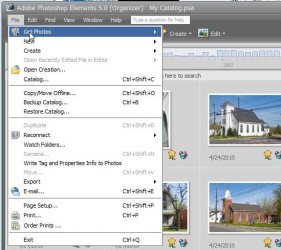
Okay, I did the personalization as you suggested to my Windows Classic theme. I wanted a white background on the dropdown menus. It was successful for "older" applications that I have, such as Photoshop Elements 5 and something called "Note Tab Light", the menu background is white. See attached screen capture.

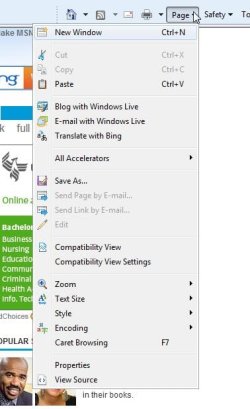
However, it was not successful, the menu background is still a light purple, for "newer" applications such as Firefox, Quicken Deluxe 2010, Lightroom, Internet Explorer, etc. See attached screen capture.

So, what is going on here? What next? How can I get all menus to have a white background?

 

Attachments

  • ie_menu.jpg
    ie_menu.jpg
    30 KB · Views: 36
  • pse_menu.jpg
    pse_menu.jpg
    42.8 KB · Views: 41

My Computer My Computer

Computer Manufacturer/Model Number
CyberPower
OS
Windows 7 Home Premium 64 bit
CPU
AMD Phenom II X6 1055T
Motherboard
Gigabyte GA-870A-UD3
Memory
8GB
Graphics Card(s)
ATI Radeon HD 5570 QGB
Sound Card
Asus Xonar DG
Monitor(s) Displays
Acer X233H
Hard Drives
640 GB SATA III, 1 TB GB SATA III
Try these steps first, and then go back and repeat the color change steps in Windows Color and Appearances to change the background color of your menus:

1. Open Internet Options, General, Appearance, click on "Color."
UNcheck "Use Windows." Then, follow the on-screen directions. You will have the options to choose standard colors or to create your own custom colors. (And while you're on the Color screen, be sure to read the suggestions in the "How to ignore preset colors" link.)

137755d1297376965-how-change-color-ie9-rc-internet_options.jpg


2. Then: go back to the General tab and click: Accessibility (across from the Color button). Check "Ignore colors specified on webpage."

137762d1297378598-how-change-color-ie9-rc-accessibility.jpg


For additional suggestions, check this tutorial:
Windows Color and Appearance settings
 
Last edited:

My Computer My Computer

Computer Manufacturer/Model Number
HP Pavillion dv5t (generation 1)
OS
Vista 64 bit and 32 bit (SP2)
CPU
Intel(R) Core(TM)2 Duo Processor T9400 (2.53 GHz
Memory
4GB DDR2 System Memory (2 Dimm)
Graphics Card(s)
512 MB NVIDIA GeForce 9600M GT
Monitor(s) Displays
15.4" diagonal WSXGA+ High-Definition HP BrightView Widescre
Screen Resolution
1680 x 1050
Hard Drives
320GB 5400RPM SATA Hard Drive with HP ProtectSmart Hard Drive Protection
Keyboard
Built-in HP
Mouse
Built in - Synaptics TouchPad V6.5 on PS/2 Port
Internet Speed
Max
Other Info
~ Intel Next-Gen Wireless-N Mini-card w/Bluetooth ~ Blu-Ray ROM DVD+/-R/RW ~ Integ. HDTV Hybrid Tuner ~ 12 Cell Battery ~ MS Office (Home Premium) 2007 ~
Back
Top