how to change my display adapter to nVidia GeForce 8600

poktool91

New member
Local time
5:35 PM
Messages
11
Hey gus~ can i ask how to change my display adapter to nVidia GeForce 8600?
Here's my display adapter...
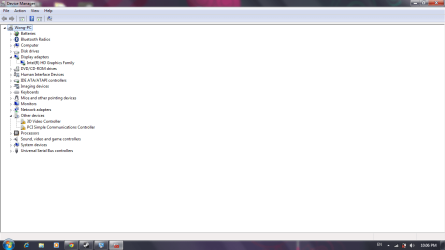
Untitled.png
does display adapter stand for graphic card?
i hope to ply dota2 but the system system requirements show this~ here the print screen~
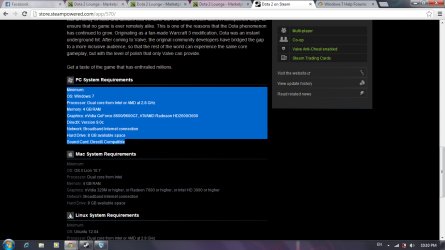
1.png
if i change my display adapter to nVidia GeForce 8600 is that work? and how do i delete the intel(r) and change it in to nVidia GeForce 8600
Pls help~ and sorry about the broken english
 

My Computer My Computer

At a glance

32 bit
Computer type
PC/Desktop
OS
32 bit
Can I just ask as it is a little unclear, do you actually have an Nvidia 8600 Graphics card fitted in your PC?

It looks in the screenshot that you have a laptop not a Desktop PC as it is showing a power cable unplugged icon?

You can't just change the display adapter to an Nvidia 8600, the Nvidia 8600 is a specific dedicated graphics card for desktop PC's.
 

My Computer My Computer

At a glance

Windows 7 Professional 64 bit
OS
Windows 7 Professional 64 bit
Hi there ... You have some errors showing in the Device Manager .. What is the make and Model number of your computer ?
 

My Computer My Computer

At a glance

windows 7 home 64bitINTEL-CORE I716GB
Computer Manufacturer/Model Number
W530-3630QM1
OS
windows 7 home 64bit
CPU
INTEL-CORE I7
Memory
16GB
Hard Drives
750GB
Browser
Chrome
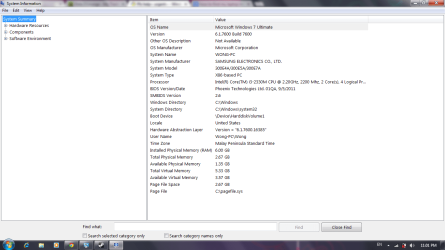
Ya~ mine is a laptop~ but there was a sticker beside my touch pad write Nvidia Optimus~ is that mean my laptop should had nvidia driver inside? i remember that last time i'm using nvidia driver and i can play dota2...but when my friend help me format...all the driver change~ and dota2 keep on crashing~ pls help me~
this is my system information
Untitled.png
 

My Computer My Computer

At a glance

32 bit
Computer type
PC/Desktop
OS
32 bit

My Computer My Computer

At a glance

windows 7 home 64bitINTEL-CORE I716GB
Computer Manufacturer/Model Number
W530-3630QM1
OS
windows 7 home 64bit
CPU
INTEL-CORE I7
Memory
16GB
Hard Drives
750GB
Browser
Chrome
I would head to the official Nvidia site and have a look for drivers for Optimus and your laptop.

Paul.
 

My Computer My Computer

At a glance

Windows 7 Professional 64 bit
OS
Windows 7 Professional 64 bit
You have drivers which need install, including one for video effects. These need to be done now.

Enable Automatically deliver drivers via Windows Update (Step 3) then run all rounds of Important and Optional Updates to completion. If a reboot is requested, afterwards go right back and check for more updates until they are done.

After all Updates are done, post back a screenshot of the Device Manager again. Any drivers still missing can be found on the Samsung Support Downloads webpage for your model.
 
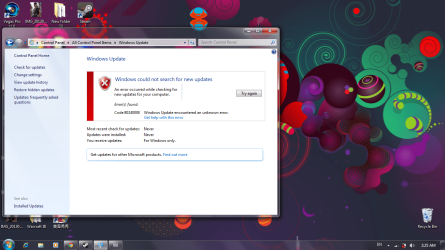
i press my window update~ i get this msg ><
Untitled.png
 

My Computer My Computer

At a glance

32 bit
Computer type
PC/Desktop
OS
32 bit
Ya~ mine is a laptop~ but there was a sticker beside my touch pad write Nvidia Optimus~ is that mean my laptop should had nvidia driver inside? i remember that last time i'm using nvidia driver and i can play dota2...but when my friend help me format...all the driver change~ and dota2 keep on crashing~ pls help me~
this is my system information
View attachment 280600

Can I just ask, why did you format?
 

My Computer My Computer

At a glance

Windows 7 Professional 64 bit
OS
Windows 7 Professional 64 bit
The error means you likely have significant corruption, so I would follow these steps closely to get a perfect Clean Reinstall - Factory OEM Windows 7 .

During the booted install using the Installer provided if necessary, choose Custom Install and delete all partitions, create and Format new as you wish or just click Next to have the installer do it for you. The step where you do that is pictured in Steps 7 and 8 of Clean Install Windows 7 .

Put your wireless driver in the backup so if it's not provided during install you can install it to get online, then enable Automatically deliver drivers via Windows Update (Step 3) and run all rounds of Important and Optional Windows Updates to completion. After requested reboots, keep going back to Check for Updates until there are no more.

Then install programs slowly over time to gauge performace changes between each.

Ask back if you have any questions as we specialize in getting perfect reinstalls here.
 
Back
Top