
Hi everyone,
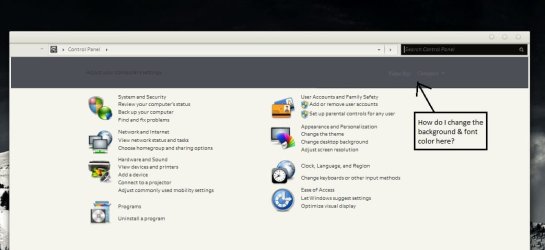
Today I realized that the text in the top panel of my control panel (as shown in the picture) is very difficult to read. I think one of the themes I installed changed the colors and I don't know how to get the colors changed back to what it used to be. So this got me wondering: how can I change the colors in that panel (via registry or what have you)?
Thanks.
Today I realized that the text in the top panel of my control panel (as shown in the picture) is very difficult to read. I think one of the themes I installed changed the colors and I don't know how to get the colors changed back to what it used to be. So this got me wondering: how can I change the colors in that panel (via registry or what have you)?
Thanks.
Attachments
My Computer
At a glance
Windows 7 Professional 64bitIntel Core2Duo T9300 @ 2.50Ghz (2CPUS)3072MBNVidia Quadro FX570M
- Computer Manufacturer/Model Number
- Lenovo Thinkpad T61P DVU6460
- OS
- Windows 7 Professional 64bit
- CPU
- Intel Core2Duo T9300 @ 2.50Ghz (2CPUS)
- Memory
- 3072MB
- Graphics Card(s)
- NVidia Quadro FX570M


