How to change the icons of movie files?

Arkwell

New member
Local time
5:38 AM
Messages
4
I have all my movie files on my computer, and I link them to my xbox through media center. I have one file which came with a image file somehow embedded into the video file, so the icon in windows explorer is the dvd cover, and likewise when I view it on my tv through windows media center on my xbox, it has a nice picture aswell instead of text. does anyone know how to do this?
 
Last edited:

My Computer My Computer

At a glance

windows 7!
OS
windows 7!
hmm

no one? :/
 

My Computer My Computer

At a glance

windows 7!
OS
windows 7!
Welcome to Seven Forums Arkwell. It's not that everyone is ignoring you. But when questions do not have well known or common answers, often people will not reply when they don't have your answer. I did some googling, and see lots of posts about embedding cover art in MP3's, but not so much about DVD art. I found this thread which may be a jumping off point for some ideas as to what to look for:

Here

Hoping someone will have some better ideas and add to this. A Guy
 

My Computer My Computer

At a glance

Windows 10 Home x64INTEL Core i5-750 Quad-Core 3.37GHzHyperX Fury Black Series 8GB (2 x 4GB) 1866MhzEVGA GeForce GTX 750 Superclocked 1GB 128-Bit...
Computer type
PC/Desktop
OS
Windows 10 Home x64
CPU
INTEL Core i5-750 Quad-Core 3.37GHz
Motherboard
ASUS P7P55D
Memory
HyperX Fury Black Series 8GB (2 x 4GB) 1866Mhz
Graphics Card(s)
EVGA GeForce GTX 750 Superclocked 1GB 128-Bit GDDR5
Monitor(s) Displays
LG 32MA68HY 32" IPS
Screen Resolution
1920 x 1080
Hard Drives
Samsung 840 Evo 120GB, SEAGATE 500GB Barracuda® 7200.12, SATA 3 Gb/s, 7200 RPM, 16MB cache
PSU
ANTEC TruePower New TP-550, 80 PLUS, 550W
Case
ANTEC Three Hundred Illusion
Cooling
COOLER MASTER Hyper 212 Plus, 4 x 120mm 1 x 140mm Noctua's
Internet Speed
85 + Mbps
Antivirus
Avast
Browser
Vivaldi
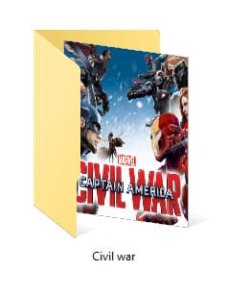
Do you want something like this ?

Capture.JPG

Actually I dont know how to add an album art in a video file ( I know how to do it for a music file), but there is a way to do the same thing, though a bit laborious . I am describing the steps below :
1. Download an album art for your video (I use google image search for it)
2. Make it square using any image editor. Dont crop, just resize, say 400x400 pixels
3. make a folder for your video, put the resized image in it, name it folder.jpg, and hide it.
4. You are done :D

Now look the explorer folder, add those to media player or media center, and see the change :D

If there is any trouble doing it, make me know ;)
 

My Computer My Computer

At a glance

Microsoft Windows 10 Pro Insider Preview 64-bitIntel(R) Core(TM) i3-4130 CPU @ 3.40GHzCorsair Vengence 4GB x2 (8.00GB Dual-Channel ...2047MB GeForce GTS 450 (ZOTAC International)
Computer type
PC/Desktop
Computer Manufacturer/Model Number
Self Assembled
OS
Microsoft Windows 10 Pro Insider Preview 64-bit
CPU
Intel(R) Core(TM) i3-4130 CPU @ 3.40GHz
Motherboard
Gigabyte Technology Co., Ltd. B85M-D3H
Memory
Corsair Vengence 4GB x2 (8.00GB Dual-Channel DDR3 @ 798MHz)
Graphics Card(s)
2047MB GeForce GTS 450 (ZOTAC International)
Sound Card
Onboard (Realtek High Definition Audio)
Monitor(s) Displays
LG Flatron E2040T
Screen Resolution
1600x900
Hard Drives
Western Digital 1 TB
Seagate 500 GB
PSU
Corsair VS550
Case
Cooler Master K380
Cooling
Cooler Master Seidon 120V Plus
Keyboard
Logitech MK260r
Mouse
Logitech MK260r
Internet Speed
PMPL Broadband
Antivirus
Windows Defender + MBAM
Browser
Firefox
Other Info
Dell Studio 15" Laptop
hmm

yah i knew about doing that..the image files dont have to be in the folders, you can just right-click on the folders and set a picture as the icon.
i just didnt want to have to do this bc most of my movies arent in folders, and id have to put them all in their own one, which would take a while:(

theres like literally nothing on google about it..nothing about setting an image file somehow embedding it into a video file..even though i clearly have an mpeg movie that has an image file somehow embedded into it..i thought the programs you can dl for embeddng image files into mp3s might be the same principle, but it seems not..
 

My Computer My Computer

At a glance

windows 7!
OS
windows 7!
the image files dont have to be in the folders, you can just right-click on the folders and set a picture as the icon.
May you please guide me through the process ? I really dont know whether I can set a picture as icon in windows. I knew that you can set an icon as icon , and if it is a live folder icon, you can force a picture to be displayed as preview.

Your help there would be highly appreciated :D
 

My Computer My Computer

At a glance

Microsoft Windows 10 Pro Insider Preview 64-bitIntel(R) Core(TM) i3-4130 CPU @ 3.40GHzCorsair Vengence 4GB x2 (8.00GB Dual-Channel ...2047MB GeForce GTS 450 (ZOTAC International)
Computer type
PC/Desktop
Computer Manufacturer/Model Number
Self Assembled
OS
Microsoft Windows 10 Pro Insider Preview 64-bit
CPU
Intel(R) Core(TM) i3-4130 CPU @ 3.40GHz
Motherboard
Gigabyte Technology Co., Ltd. B85M-D3H
Memory
Corsair Vengence 4GB x2 (8.00GB Dual-Channel DDR3 @ 798MHz)
Graphics Card(s)
2047MB GeForce GTS 450 (ZOTAC International)
Sound Card
Onboard (Realtek High Definition Audio)
Monitor(s) Displays
LG Flatron E2040T
Screen Resolution
1600x900
Hard Drives
Western Digital 1 TB
Seagate 500 GB
PSU
Corsair VS550
Case
Cooler Master K380
Cooling
Cooler Master Seidon 120V Plus
Keyboard
Logitech MK260r
Mouse
Logitech MK260r
Internet Speed
PMPL Broadband
Antivirus
Windows Defender + MBAM
Browser
Firefox
Other Info
Dell Studio 15" Laptop

My Computer My Computer

At a glance

Windows 7 Ultimate (x64) SP1Intel 3770k 4.6GHz8GB (2x 4GB) Crucial BallistixSapphire 7950 (1060/1600)
Computer Manufacturer/Model Number
tw33k
OS
Windows 7 Ultimate (x64) SP1
CPU
Intel 3770k 4.6GHz
Motherboard
ASUS Maximus V Formula
Memory
8GB (2x 4GB) Crucial Ballistix
Graphics Card(s)
Sapphire 7950 (1060/1600)
Sound Card
On Board Realtek HD Audio
Monitor(s) Displays
27" Acer B273HU (via HDMI)
Screen Resolution
2048 x 1152
Hard Drives
Crucial M4 128GB
2TB WD Black
1TB Samsung F3 SATA
1TB WD Elite External
2TB WD USB 3.0
PSU
Corsair AX750 Gold
Case
Corsair Obsidian 800DW
Cooling
Corsair H100 (2x AP-121/2x UK-3000 push/pull)
Keyboard
Microsoft Wireless 5000
Mouse
Microsoft Wireless 5000
Internet Speed
5mb/s
Other Info
Logitech z-2300 2.1 speakers
Lamptron FC-5 v2
hmm,..i downloaded that program but it doesnt seem very good

i guess ill just have to say screw it and forget trying..obviously not possible to achieve this easily

oh and you just right click on the folder and set a pic as the icon folder picture:)
 

My Computer My Computer

At a glance

windows 7!
OS
windows 7!
Apparently there is no easy way to do this and the methods are different for windows 7 32 bit and 64 bit systems.

Here is a video of somebody doing what I think you are trying to accomplish: YouTube - Windows 7 Tip: Change Video Thumbnail Icons To DVD Covers

Basically you just create a shortcut and hide the existing file because you can change the icon on a shortcut. Now, the method differs on the two operating systems if you wish to get rid of the shortcut arrow overlay. Here is the tutorial for 32 bit windows 7 or Vista

Disable Shortcut Icon Arrow Overlay in Windows 7 or Vista - How-To Geek

For Windows 7 64 bit download Ultimate Windows Tweaker : Ultimate Windows Tweaker, a TweakUI for Windows 7 & Vista | The Windows Club

and go to additional tweaks and check the "Remove arrows from shortcut Icons" box and you should be all set.
 

My Computer My Computer

At a glance

windows 7 home premium 64 bit
OS
windows 7 home premium 64 bit
If you look at media browser then you will be able to view all your movies via the browser and see the film posters/ covers and have all the meta data for the movie.
there are tons of features and if you want to use it then i have a file that you can run in your movie folder that will put all the movies in a individual folder and they would be named at the click of a button.
check the mediabrowser sticky thread in media center forum. trust me you will be made up with this if/when you start to use it properly
 

My Computer My Computer

At a glance

Microsoft Windows 7 Home Premium 64-bit 7600IIx4 amd athelon 635 processor2x2gbati radeon HD 5450
Computer Manufacturer/Model Number
Hewlett packard/p6512uk
OS
Microsoft Windows 7 Home Premium 64-bit 7600
CPU
IIx4 amd athelon 635 processor
Motherboard
FOXCONN 2AA9
Memory
2x2gb
Graphics Card(s)
ati radeon HD 5450
Sound Card
(1) Realtek High Definition Audio (2) AMD High Definition
Monitor(s) Displays
samsung lcd tv 32"
Screen Resolution
1360x 768
Hard Drives
(1) WDC WD10 01FAES-60Z2A0 SATA Disk Device (2) Maxtor OneTouch USB Device (3) ST310003 33AS USB Device (4) WD My Book 1111 USB Device
PSU
?
Cooling
air!
Keyboard
wireless hp
Mouse
wireless Hp,optical
Internet Speed
1.10mb/s
Antivirus
MSE
Browser
Firefox
My Method to achieve this

I use this method to display the DVD cover in Explorer + Ensure DVD cover is also displayed on X-Box/WMC when I browse my library.

Here's my method:
1- Download the DVD cover image, save it to your library location
1a- Ensure the image and movie have the exact same name (except suffix)
2- Open new project in Windows Live Movie Maker
3- Click Add Videos and photos
3a- Add the DVD cover image first
3b- Add the movie itself after the DVD cover
** This basically makes the DVD cover image the first ~5 seconds of the movie
4- Save Movie
4a- It will save in WMV format.
5 (optional) Convert the WMV file to any other format you like (I use WinFX to convert to .AVI)

Voila!
 

My Computer My Computer

At a glance

Windows 7 Ultimate x64
OS
Windows 7 Ultimate x64
If the movie file is an .mp4 then all you need to do is name the dvd cover picture "folder.jpg"and put it in the folder with the movie. Works here anyway. I have shark codec pack installed if that makes any difference. Only works for mp4 movies.
 

My Computer My Computer

At a glance

Windows 7 Ultimate (32-bit)Intel Mobile Core 2 Duo T5500 @ 1.66 GHz2.0GB Dual Channel DDR2 @ 266 MHz 4-4-4-12Mobile Intel 945 Express Chipset Family
Computer Manufacturer/Model Number
Toshiba Satellite A135S4487
OS
Windows 7 Ultimate (32-bit)
CPU
Intel Mobile Core 2 Duo T5500 @ 1.66 GHz
Motherboard
Intel i945GM Chipset
Memory
2.0GB Dual Channel DDR2 @ 266 MHz 4-4-4-12
Graphics Card(s)
Mobile Intel 945 Express Chipset Family
Sound Card
Realtek High Definition Audio
Monitor(s) Displays
Generic PnP Monitor, Samsung 46" LCD
Screen Resolution
1280 x 800, 1920 x 1080
Hard Drives
100GB Hitachi ATA Device (IDE)
120GB Western Digital USB
250GB External USB
Keyboard
Microsoft Wireless Comfort Keyboard 5000
Mouse
Microsoft Wireless Mouse 5000
Internet Speed
DSL
I know I'm not allowed to use foul language on this forum, but you can use iTunes to add cover art to mp4 video files.
 

My Computer My Computer

At a glance

Windows 7 Home Premium 32bit
OS
Windows 7 Home Premium 32bit
Update

Since my last post I have found two small programs that seem to do the job of adding jpeg images to video files, AudioShell and Tag&Rename. When I first tried these programs they seemed to lock up and not respond once I started the image transfer, but it turned out if you have a large video file and/or a slow connection to your network hard drive, this process can take several minutes. If you look in the folder where the transfer is taking place, you'll notice a newly created .tmp file and once it reaches the same size as your video file, the process is complete and the .tmp file is deleted.

If you would like more information on AudioShell click here.

I'm running Window 7, 32-bit.
 

My Computer My Computer

At a glance

Windows 7 Home Premium 32bit
OS
Windows 7 Home Premium 32bit
Easy Fix

I know this thread was made a while ago, but for anyone else looking to do this. iTunes is the easiest way.
It doesn't matter what OS you are using.

1. Download iTunes, install and set it all up.
2. Find the drop down menu (usually top right of window) and find the "Add file to library option
3. Find the movie you want to change (it may be in your "home videos" tab if its not in the "My Movies" tab
4. Right click the movie and click "Get Info", then under the "Artwork" tab you can add your own artwork.

This will change the thumbnail for the video where ever its saved. Unfortunately you still have to go and save all the images you want to you (you used to be able to drag and drop, but that's been removed)
 

My Computer My Computer

At a glance

Windows 8.1
Computer type
PC/Desktop
OS
Windows 8.1
Do you want something like this ?

View attachment 79276

Actually I dont know how to add an album art in a video file ( I know how to do it for a music file), but there is a way to do the same thing, though a bit laborious . I am describing the steps below :
1. Download an album art for your video (I use google image search for it)
2. Make it square using any image editor. Dont crop, just resize, say 400x400 pixels
3. make a folder for your video, put the resized image in it, name it folder.jpg, and hide it.
4. You are done :D

Now look the explorer folder, add those to media player or media center, and see the change :D

If there is any trouble doing it, make me know ;)


Forgive me for bumping this old thread but I couldn't find a way to PM the user. I looked if I am a blind please let me know.

Arc how do you get the pictures of movies to fit exactly on the folders without cutting off the title of the movie? Every time I follow your instructions no matter how small I make the image the title of the movie words get cut off.

Please help. Thanks.
 

My Computer My Computer

At a glance

Windows 10 64 bit
Computer type
PC/Desktop
OS
Windows 10 64 bit
Forgive me for bumping this old thread but I couldn't find a way to PM the user.

Welcome to the forum,

You can't PM as a new member, I notified Arc of your question though. :)
 

My Computer My Computer

At a glance

Win 10 Pro x64Intel I5-2500K @3.3GHz16GB G.Skill Ripjaws X (4x4GB)EVGA GeForce 750 Ti SC 2GB
Computer type
PC/Desktop
Computer Manufacturer/Model Number
Self Built
OS
Win 10 Pro x64
CPU
Intel I5-2500K @3.3GHz
Motherboard
Asrock P67 Extreme4
Memory
16GB G.Skill Ripjaws X (4x4GB)
Graphics Card(s)
EVGA GeForce 750 Ti SC 2GB
Sound Card
ASUS Xonar DG 5.1 Channels 24-bit 96KHz PCI Interface Sound
Monitor(s) Displays
auria eq2367
Screen Resolution
1920 x 1080
Hard Drives
250GB Samsung 850 EVO SSD
1TB WD Blue
1TB Hitachi
PSU
SeaSonic X 650W 80 Plus Gold
Case
Corsair Obsidian 750D
Cooling
Corsair H60, Three 140mm case fans
Keyboard
Logitech Wireless Keyboard K520
Mouse
Logitech Wireless Mouse M310
Internet Speed
Wave Broadband ~ 100 dn 5 up
Antivirus
Windows Defender, Malwarebytes Premium
Browser
Edge, IE11, Chrome
Other Info
Laptop specs: HP g7-1365dx /
CPU: AMD A6-3420M APU with Radeon(tm) HD Graphics /
RAM: Crucial 8Gb (2x4Gb) /
SSD: Crucial M4-CT128M4SSD2 ATA Device/ FW 000F /
GFX: AMD Radeon HD 6520G /
OS: Windows 10 Pro x64
Arc how do you get the pictures of movies to fit exactly on the folders without cutting off the title of the movie? Every time I follow your instructions no matter how small I make the image the title of the movie words get cut off.

Please help. Thanks.
I dont do anything else other than what I said, mate. :)

Doing it right now to check .... a hypothetical movie folder ....
2016-04-30_115335.jpg
And it worked again.

Are you cropping the image during resizing?
 

My Computer My Computer

At a glance

Microsoft Windows 10 Pro Insider Preview 64-bitIntel(R) Core(TM) i3-4130 CPU @ 3.40GHzCorsair Vengence 4GB x2 (8.00GB Dual-Channel ...2047MB GeForce GTS 450 (ZOTAC International)
Computer type
PC/Desktop
Computer Manufacturer/Model Number
Self Assembled
OS
Microsoft Windows 10 Pro Insider Preview 64-bit
CPU
Intel(R) Core(TM) i3-4130 CPU @ 3.40GHz
Motherboard
Gigabyte Technology Co., Ltd. B85M-D3H
Memory
Corsair Vengence 4GB x2 (8.00GB Dual-Channel DDR3 @ 798MHz)
Graphics Card(s)
2047MB GeForce GTS 450 (ZOTAC International)
Sound Card
Onboard (Realtek High Definition Audio)
Monitor(s) Displays
LG Flatron E2040T
Screen Resolution
1600x900
Hard Drives
Western Digital 1 TB
Seagate 500 GB
PSU
Corsair VS550
Case
Cooler Master K380
Cooling
Cooler Master Seidon 120V Plus
Keyboard
Logitech MK260r
Mouse
Logitech MK260r
Internet Speed
PMPL Broadband
Antivirus
Windows Defender + MBAM
Browser
Firefox
Other Info
Dell Studio 15" Laptop
Do you want something like this ?

View attachment 79276

Actually I dont know how to add an album art in a video file ( I know how to do it for a music file), but there is a way to do the same thing, though a bit laborious . I am describing the steps below :
1. Download an album art for your video (I use google image search for it)
2. Make it square using any image editor. Dont crop, just resize, say 400x400 pixels
3. make a folder for your video, put the resized image in it, name it folder.jpg, and hide it.
4. You are done :D

Now look the explorer folder, add those to media player or media center, and see the change :D

If there is any trouble doing it, make me know ;)

Arc how do you get the pictures of movies to fit exactly on the folders without cutting off the title of the movie? Every time I follow your instructions no matter how small I make the image the title of the movie words get cut off.

Please help. Thanks.
I dont do anything else other than what I said, mate. :)

Doing it right now to check .... a hypothetical movie folder .... And it worked again.

Are you cropping the image during resizing?


I don't think I am cropping the image during resizing why ?

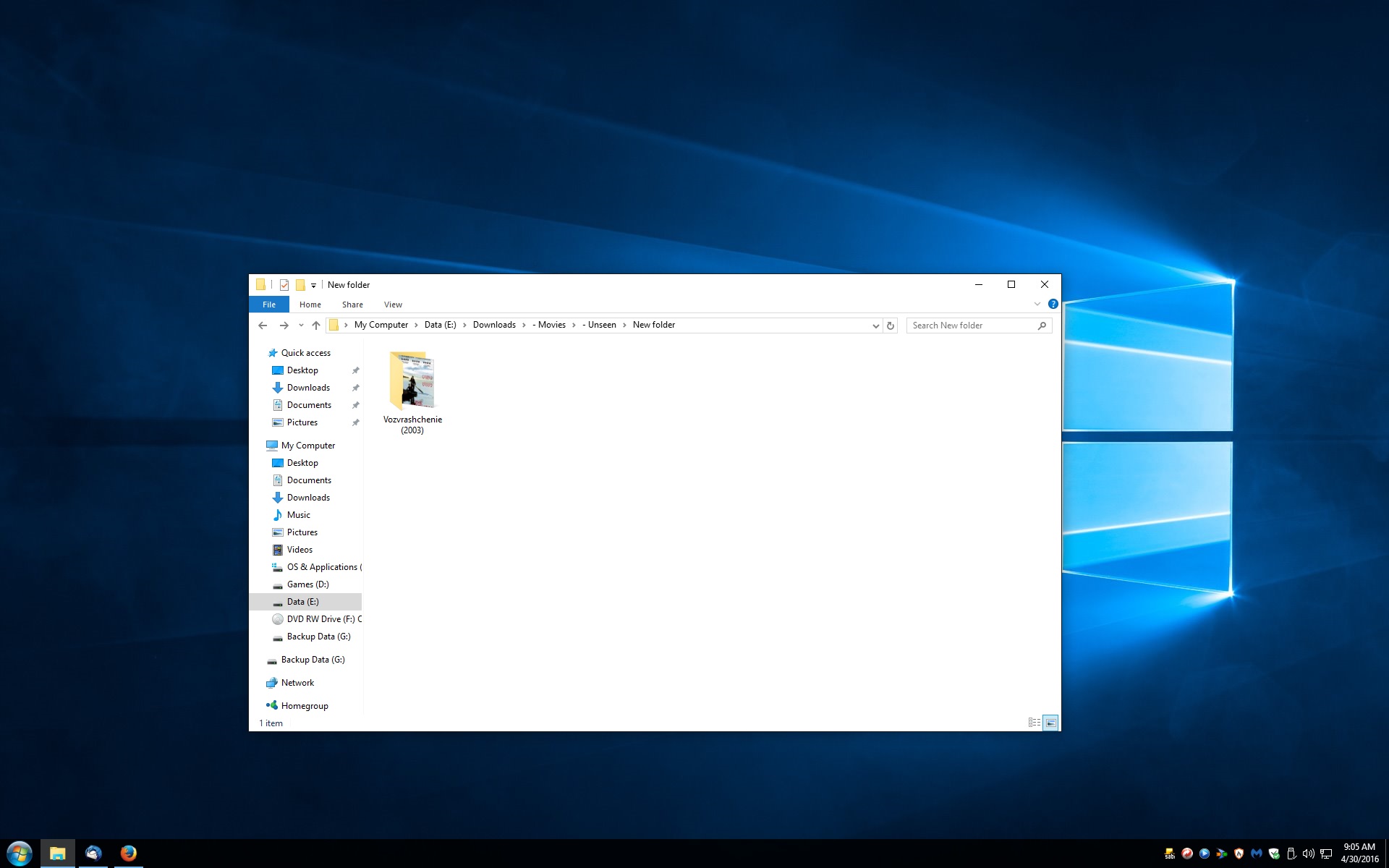
This is what mine looks like.


bSdaBMn.jpg


See the title of the movie is cut off. It is called The Return the other name is in Russian.

This is what is should look like.

izFsDdc.jpg
 

My Computer My Computer

At a glance

Windows 10 64 bit
Computer type
PC/Desktop
OS
Windows 10 64 bit
The point 4 of my post says ... you need to give the image a squarish shape. So I did ....
izFsDdc.jpg
And here is the result ....
2016-05-01_001305.jpg
The desktop thumbnail uses a square image. If the thumbnail preview assumes the square by itself, it may not be the thumbnail preview that you are wanting. So provide it yourself.
 

My Computer My Computer

At a glance

Microsoft Windows 10 Pro Insider Preview 64-bitIntel(R) Core(TM) i3-4130 CPU @ 3.40GHzCorsair Vengence 4GB x2 (8.00GB Dual-Channel ...2047MB GeForce GTS 450 (ZOTAC International)
Computer type
PC/Desktop
Computer Manufacturer/Model Number
Self Assembled
OS
Microsoft Windows 10 Pro Insider Preview 64-bit
CPU
Intel(R) Core(TM) i3-4130 CPU @ 3.40GHz
Motherboard
Gigabyte Technology Co., Ltd. B85M-D3H
Memory
Corsair Vengence 4GB x2 (8.00GB Dual-Channel DDR3 @ 798MHz)
Graphics Card(s)
2047MB GeForce GTS 450 (ZOTAC International)
Sound Card
Onboard (Realtek High Definition Audio)
Monitor(s) Displays
LG Flatron E2040T
Screen Resolution
1600x900
Hard Drives
Western Digital 1 TB
Seagate 500 GB
PSU
Corsair VS550
Case
Cooler Master K380
Cooling
Cooler Master Seidon 120V Plus
Keyboard
Logitech MK260r
Mouse
Logitech MK260r
Internet Speed
PMPL Broadband
Antivirus
Windows Defender + MBAM
Browser
Firefox
Other Info
Dell Studio 15" Laptop
Back
Top