Solved How to Change Toolbar Fonts in Windows Aero?

RetiredEngineer

New member
Local time
11:43 PM
Messages
11
Hi Everyone,

Because of failing eyesight, I work best in Windows Aero if I can change all the display fonts from Segoe UI to Segoe UI Semibold. I can do this everywhere except for the Toolbar text shown in the attached screen shot. In the lower left are my pop-up menus, created from Toolbars by "squashing" them down to single-letter titles (R,A,L,C,E,F,M); and right below the Windows Explorer menu bar is another Toolbar it would be nice to display with Segoe UI Semibold entries.

I would be pleased to pay a reasonable development fee to anyone who cares to provide these Toolbar modification.

Kind Regards,
RetiredEngineer
 

Attachments

  • 2016-04-22_11-13-30 Segoe UI Semibold.png
    2016-04-22_11-13-30 Segoe UI Semibold.png
    237.7 KB · Views: 7
Last edited:

My Computer My Computer

At a glance

Wndows 7 Home Premium 64-bit
Computer type
PC/Desktop
Computer Manufacturer/Model Number
HP Pavilion p6210y Desktop PC
OS
Wndows 7 Home Premium 64-bit
Hi there, the offer for money is a nice gesture but we just like to help. :)

I'll be honest, I don't know of a way to do that but I do have an alternate suggestion.

What if you added an icon to those toolbars, say a different color or something like that.

What made me think of that was this tutorial,

http://www.sevenforums.com/tutorials/61294-shut-down-computer-shortcut-create.html

I used to have that as a toolbar on my win 7 machine and it was a nice big icon like explained in step 6 of option two,

52247d1265363360-shut-down-computer-shortcut-create-shut_down.png


I'm sure we can fix you up with some icons if want to try that.
 

My Computer My Computer

At a glance

Win 10 Pro x64Intel I5-2500K @3.3GHz16GB G.Skill Ripjaws X (4x4GB)EVGA GeForce 750 Ti SC 2GB
Computer type
PC/Desktop
Computer Manufacturer/Model Number
Self Built
OS
Win 10 Pro x64
CPU
Intel I5-2500K @3.3GHz
Motherboard
Asrock P67 Extreme4
Memory
16GB G.Skill Ripjaws X (4x4GB)
Graphics Card(s)
EVGA GeForce 750 Ti SC 2GB
Sound Card
ASUS Xonar DG 5.1 Channels 24-bit 96KHz PCI Interface Sound
Monitor(s) Displays
auria eq2367
Screen Resolution
1920 x 1080
Hard Drives
250GB Samsung 850 EVO SSD
1TB WD Blue
1TB Hitachi
PSU
SeaSonic X 650W 80 Plus Gold
Case
Corsair Obsidian 750D
Cooling
Corsair H60, Three 140mm case fans
Keyboard
Logitech Wireless Keyboard K520
Mouse
Logitech Wireless Mouse M310
Internet Speed
Wave Broadband ~ 100 dn 5 up
Antivirus
Windows Defender, Malwarebytes Premium
Browser
Edge, IE11, Chrome
Other Info
Laptop specs: HP g7-1365dx /
CPU: AMD A6-3420M APU with Radeon(tm) HD Graphics /
RAM: Crucial 8Gb (2x4Gb) /
SSD: Crucial M4-CT128M4SSD2 ATA Device/ FW 000F /
GFX: AMD Radeon HD 6520G /
OS: Windows 10 Pro x64
Hi Derek,

I am most grateful for your attention to my reading problems. However, using icons alone looks to be too large a task at this point.

I should point out here that one of your colleagues, who understands how to create new Themes using Windows Style Builder, has offered to post a new Segoe UI Semibold Toolbar font add-in. Worth watching for, at least for me.

Kind Regards,
RetiredEngineer
 
Last edited:

My Computer My Computer

At a glance

Wndows 7 Home Premium 64-bit
Computer type
PC/Desktop
Computer Manufacturer/Model Number
HP Pavilion p6210y Desktop PC
OS
Wndows 7 Home Premium 64-bit
Hi there,

You're welcome, I understand.

I was thinking of having one of our graphics experts make icons with those letters for you.

I hope that works out for you, sounds like just what you wanted anyway.

Let us know how it goes. :)
 

My Computer My Computer

At a glance

Win 10 Pro x64Intel I5-2500K @3.3GHz16GB G.Skill Ripjaws X (4x4GB)EVGA GeForce 750 Ti SC 2GB
Computer type
PC/Desktop
Computer Manufacturer/Model Number
Self Built
OS
Win 10 Pro x64
CPU
Intel I5-2500K @3.3GHz
Motherboard
Asrock P67 Extreme4
Memory
16GB G.Skill Ripjaws X (4x4GB)
Graphics Card(s)
EVGA GeForce 750 Ti SC 2GB
Sound Card
ASUS Xonar DG 5.1 Channels 24-bit 96KHz PCI Interface Sound
Monitor(s) Displays
auria eq2367
Screen Resolution
1920 x 1080
Hard Drives
250GB Samsung 850 EVO SSD
1TB WD Blue
1TB Hitachi
PSU
SeaSonic X 650W 80 Plus Gold
Case
Corsair Obsidian 750D
Cooling
Corsair H60, Three 140mm case fans
Keyboard
Logitech Wireless Keyboard K520
Mouse
Logitech Wireless Mouse M310
Internet Speed
Wave Broadband ~ 100 dn 5 up
Antivirus
Windows Defender, Malwarebytes Premium
Browser
Edge, IE11, Chrome
Other Info
Laptop specs: HP g7-1365dx /
CPU: AMD A6-3420M APU with Radeon(tm) HD Graphics /
RAM: Crucial 8Gb (2x4Gb) /
SSD: Crucial M4-CT128M4SSD2 ATA Device/ FW 000F /
GFX: AMD Radeon HD 6520G /
OS: Windows 10 Pro x64
I will see what I can do and get back here in a day or 2.

Jerry
 

My Computer My Computer

At a glance

Win 7 Pro x64 / Win 10 ProIntel(R) Core(TM) i7-3630QM CPU @ 2.40GHz12 GB(1) Intel(R) HD Graphics 4000 (2) NVIDIA GeFo...
Computer type
Laptop
Computer Manufacturer/Model Number
Sager NP9170
OS
Win 7 Pro x64 / Win 10 Pro
CPU
Intel(R) Core(TM) i7-3630QM CPU @ 2.40GHz
Motherboard
CLEVO P170EM
Memory
12 GB
Graphics Card(s)
(1) Intel(R) HD Graphics 4000 (2) NVIDIA GeForce GTX 675M
Sound Card
(1) Realtek High Definition Audio (2) Intel(R) Display Aud
Monitor(s) Displays
17.3
Screen Resolution
1920x1080
Hard Drives
(1) Samsung 860 EVO 500GB(OS) (1) Samsung 860 EVO 500GB(Data)
Keyboard
Backlite
Antivirus
MSE, Malwarebytes Pro
Browser
Firefox
Other Info
DESKTOP: Custom-built.
OS: Win 10 Pro x64.
CASE: Rosewill R5.
CPU: Intel I5 4670K CPU @ 3.40GHz.
CPU COOLER: Cool Master Hyper 212 EVO.
MOTHERBOARD: Asus Z87-A.
MEMORY: Kingston HyperX 2x4 GB.
GPU: Nvidia Geforce 650 TI.
PSU: Corsair TX750.
DRIVES: (1) Samsung 840 120 GB SSD (2) Western Digital blue 500 GB 7200 RPM.
I think I got it for you.

You will need to do 1 of these 2 ways of Enabling custom themes for it to work.
http://www.sevenforums.com/tutorials/34579-enabling-custom-themes-windows-7-a.html
Or
http://www.sevenforums.com/tutorials/28377-theme-how-apply-custom-themes.html?filter

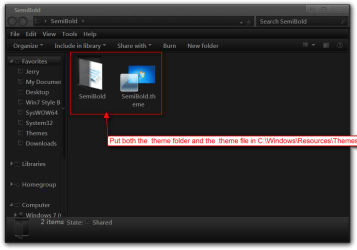
Download and extract the zip folder at the bottom of this post to your Desktop.

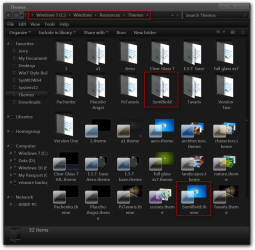
Put both the SemiBold theme folder and the SemiBold.theme file in C:\Windows\Resources\Themes
1.png1.2.png

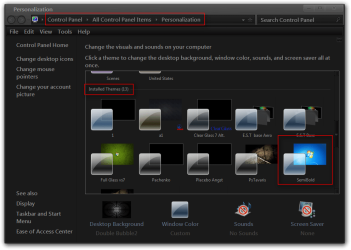
It will show up under Installed Themes as SemiBold in Personalization.
2.png

Let me know if it's OK.

Jerry
 

Attachments

My Computer My Computer

At a glance

Win 7 Pro x64 / Win 10 ProIntel(R) Core(TM) i7-3630QM CPU @ 2.40GHz12 GB(1) Intel(R) HD Graphics 4000 (2) NVIDIA GeFo...
Computer type
Laptop
Computer Manufacturer/Model Number
Sager NP9170
OS
Win 7 Pro x64 / Win 10 Pro
CPU
Intel(R) Core(TM) i7-3630QM CPU @ 2.40GHz
Motherboard
CLEVO P170EM
Memory
12 GB
Graphics Card(s)
(1) Intel(R) HD Graphics 4000 (2) NVIDIA GeForce GTX 675M
Sound Card
(1) Realtek High Definition Audio (2) Intel(R) Display Aud
Monitor(s) Displays
17.3
Screen Resolution
1920x1080
Hard Drives
(1) Samsung 860 EVO 500GB(OS) (1) Samsung 860 EVO 500GB(Data)
Keyboard
Backlite
Antivirus
MSE, Malwarebytes Pro
Browser
Firefox
Other Info
DESKTOP: Custom-built.
OS: Win 10 Pro x64.
CASE: Rosewill R5.
CPU: Intel I5 4670K CPU @ 3.40GHz.
CPU COOLER: Cool Master Hyper 212 EVO.
MOTHERBOARD: Asus Z87-A.
MEMORY: Kingston HyperX 2x4 GB.
GPU: Nvidia Geforce 650 TI.
PSU: Corsair TX750.
DRIVES: (1) Samsung 840 120 GB SSD (2) Western Digital blue 500 GB 7200 RPM.
W7 Toolbars Are Now Readable For Me

Thank-you, Jerry, for the Segoe UI Semibold fix to Toolbar fonts in W7. My Toolbars now work as I need them to, and I can now read their text for extended periods without eyestrain.

Well done!

Kind regards,
RetiredEngineer
 

My Computer My Computer

At a glance

Wndows 7 Home Premium 64-bit
Computer type
PC/Desktop
Computer Manufacturer/Model Number
HP Pavilion p6210y Desktop PC
OS
Wndows 7 Home Premium 64-bit
An Additional Note Of Gratitude And Appreciation

Thank-you, Jerry, for the Segoe UI Semibold fix to Toolbar fonts in W7.

Now that I've used your Semibold font fix for W7 Aero, I realize that you went well beyond the call of duty. Not only do all Toolbars display in Semibold, but every other user of this font in the System also displays in Semibold. As a result, everything in my System is now easier to read and select.

All I have left to say at this point is ...Thank-you, Thank-you, Thank-you! In one fell swoop, you've given me many more years of useful eyesight. For me, this is truly a substantial value added.

May God bless you and keep you. I will be eternally grateful.
 
Last edited:

My Computer My Computer

At a glance

Wndows 7 Home Premium 64-bit
Computer type
PC/Desktop
Computer Manufacturer/Model Number
HP Pavilion p6210y Desktop PC
OS
Wndows 7 Home Premium 64-bit
Jerry is an awesome guy as you have found out. Well done Jerry :thumbsup:

A Guy
 

My Computer My Computer

At a glance

Windows 10 Home x64INTEL Core i5-750 Quad-Core 3.37GHzHyperX Fury Black Series 8GB (2 x 4GB) 1866MhzEVGA GeForce GTX 750 Superclocked 1GB 128-Bit...
Computer type
PC/Desktop
OS
Windows 10 Home x64
CPU
INTEL Core i5-750 Quad-Core 3.37GHz
Motherboard
ASUS P7P55D
Memory
HyperX Fury Black Series 8GB (2 x 4GB) 1866Mhz
Graphics Card(s)
EVGA GeForce GTX 750 Superclocked 1GB 128-Bit GDDR5
Monitor(s) Displays
LG 32MA68HY 32" IPS
Screen Resolution
1920 x 1080
Hard Drives
Samsung 840 Evo 120GB, SEAGATE 500GB Barracuda® 7200.12, SATA 3 Gb/s, 7200 RPM, 16MB cache
PSU
ANTEC TruePower New TP-550, 80 PLUS, 550W
Case
ANTEC Three Hundred Illusion
Cooling
COOLER MASTER Hyper 212 Plus, 4 x 120mm 1 x 140mm Noctua's
Internet Speed
85 + Mbps
Antivirus
Avast
Browser
Vivaldi
You're Welcome, glad I could help.

Thank you Bill!
 

My Computer My Computer

At a glance

Win 7 Pro x64 / Win 10 ProIntel(R) Core(TM) i7-3630QM CPU @ 2.40GHz12 GB(1) Intel(R) HD Graphics 4000 (2) NVIDIA GeFo...
Computer type
Laptop
Computer Manufacturer/Model Number
Sager NP9170
OS
Win 7 Pro x64 / Win 10 Pro
CPU
Intel(R) Core(TM) i7-3630QM CPU @ 2.40GHz
Motherboard
CLEVO P170EM
Memory
12 GB
Graphics Card(s)
(1) Intel(R) HD Graphics 4000 (2) NVIDIA GeForce GTX 675M
Sound Card
(1) Realtek High Definition Audio (2) Intel(R) Display Aud
Monitor(s) Displays
17.3
Screen Resolution
1920x1080
Hard Drives
(1) Samsung 860 EVO 500GB(OS) (1) Samsung 860 EVO 500GB(Data)
Keyboard
Backlite
Antivirus
MSE, Malwarebytes Pro
Browser
Firefox
Other Info
DESKTOP: Custom-built.
OS: Win 10 Pro x64.
CASE: Rosewill R5.
CPU: Intel I5 4670K CPU @ 3.40GHz.
CPU COOLER: Cool Master Hyper 212 EVO.
MOTHERBOARD: Asus Z87-A.
MEMORY: Kingston HyperX 2x4 GB.
GPU: Nvidia Geforce 650 TI.
PSU: Corsair TX750.
DRIVES: (1) Samsung 840 120 GB SSD (2) Western Digital blue 500 GB 7200 RPM.
About this issue, I'd like to have the tutorial on how change all fonts in Win7 by 3rd applications (for 3rd visual style/theme not official Aero one) in the way Bongo did. Can anyone provide a guide/tutorial/link? Thanks. (I've method to get it work correctly in default Aero theme but not yet with 3rd ones)
I did attempt to search but only found this topic and www.sevenforums.com/tutorials/1175-fonts-change-16.html but not change all the fonts still leave some behind.

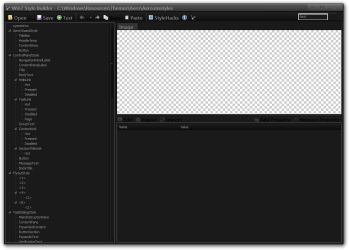
I tried a Msstyle editor and change all fonts in Fonts section to Tahoma 8pt but applying theme still leaving another fonts in other parts of windows UI. Especially in this windows Control Panel\System and Security\System
Screenshot below is what I tried with font changing feature.
aZgmAE9.png
 
Last edited:

My Computer My Computer

At a glance

Windows 7 Ultimate x64Intel(R) Core(TM) i5-6402P Skylake (14nm) 115...8.00 GB single DDR4 @ 1066MHzIntel(R) HD Graphics 510 (rev6)
OS
Windows 7 Ultimate x64
CPU
Intel(R) Core(TM) i5-6402P Skylake (14nm) 1151 LGA
Motherboard
MSI B150M MORTAR (MS-7972) 2.0
Memory
8.00 GB single DDR4 @ 1066MHz
Graphics Card(s)
Intel(R) HD Graphics 510 (rev6)
Sound Card
High Definition Audio Device
Monitor(s) Displays
HP S2032 1600x900 (60Hz)
Hard Drives
Model ST1000DM 003-1SB10C SCSI Disk Device
About this issue, I'd like to have the tutorial on how change all fonts in Win7 by 3rd applications (for 3rd visual style/theme not official Aero one) in the way Bongo did. Can anyone provide a guide/tutorial/link? Thanks. (I've method to get it work correctly in default Aero theme but not yet with 3rd ones)
I did attempt to search but only found this topic and www.sevenforums.com/tutorials/1175-fonts-change-16.html but not change all the fonts still leave some behind.

I tried a Msstyle editor and change all fonts in Fonts section to Tahoma 8pt but applying theme still leaving another fonts in other parts of windows UI. Especially in this windows Control Panel\System and Security\System
Screenshot below is what I tried with font changing feature.
aZgmAE9.png

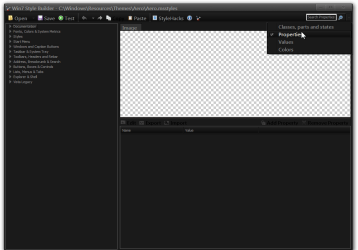
You will need to change more fonts than just the one you did, look at the screenshots below, in the first one in the search area make sure it is on Properties and then type in Font than on the left side you will need to click on each item and change the font there.

Jerry

1.png

2.png
 

My Computer My Computer

At a glance

Win 7 Pro x64 / Win 10 ProIntel(R) Core(TM) i7-3630QM CPU @ 2.40GHz12 GB(1) Intel(R) HD Graphics 4000 (2) NVIDIA GeFo...
Computer type
Laptop
Computer Manufacturer/Model Number
Sager NP9170
OS
Win 7 Pro x64 / Win 10 Pro
CPU
Intel(R) Core(TM) i7-3630QM CPU @ 2.40GHz
Motherboard
CLEVO P170EM
Memory
12 GB
Graphics Card(s)
(1) Intel(R) HD Graphics 4000 (2) NVIDIA GeForce GTX 675M
Sound Card
(1) Realtek High Definition Audio (2) Intel(R) Display Aud
Monitor(s) Displays
17.3
Screen Resolution
1920x1080
Hard Drives
(1) Samsung 860 EVO 500GB(OS) (1) Samsung 860 EVO 500GB(Data)
Keyboard
Backlite
Antivirus
MSE, Malwarebytes Pro
Browser
Firefox
Other Info
DESKTOP: Custom-built.
OS: Win 10 Pro x64.
CASE: Rosewill R5.
CPU: Intel I5 4670K CPU @ 3.40GHz.
CPU COOLER: Cool Master Hyper 212 EVO.
MOTHERBOARD: Asus Z87-A.
MEMORY: Kingston HyperX 2x4 GB.
GPU: Nvidia Geforce 650 TI.
PSU: Corsair TX750.
DRIVES: (1) Samsung 840 120 GB SSD (2) Western Digital blue 500 GB 7200 RPM.
@Bongo: I had some spare time to did just what you suggested and changed all fonts in search result. But only problem is there's too many manual repeat (I didn't really count) but at least 50-60 repeat for font changing task. Is there any faster way than this? Or this's the fastest way to do this font setting task.
 

My Computer My Computer

At a glance

Windows 7 Ultimate x64Intel(R) Core(TM) i5-6402P Skylake (14nm) 115...8.00 GB single DDR4 @ 1066MHzIntel(R) HD Graphics 510 (rev6)
OS
Windows 7 Ultimate x64
CPU
Intel(R) Core(TM) i5-6402P Skylake (14nm) 1151 LGA
Motherboard
MSI B150M MORTAR (MS-7972) 2.0
Memory
8.00 GB single DDR4 @ 1066MHz
Graphics Card(s)
Intel(R) HD Graphics 510 (rev6)
Sound Card
High Definition Audio Device
Monitor(s) Displays
HP S2032 1600x900 (60Hz)
Hard Drives
Model ST1000DM 003-1SB10C SCSI Disk Device
Resource Hacker for font changing.

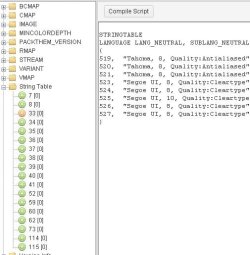
OK, so this's the solution for someone like me (I post this in order to help any other one in future who might search for this fonts problem and solution, I'm aware of Ave style editor is so powerful and great for creating/modifying visual style). Resource hacker or similar tool can do this font editing/changing task much faster and easier (if what you want is just change all fonts to your favorite one). I also see myself spending much less time in modifying/editing numerous tedious properties field to accomplish little thing in visual style (beside font/size I also want to use antialiased mode rather than Cleartype mode, just my preference, but with regular msstyle editor the task takes so much time). Thanks to those free tools.

Open msstyle with RH, Ctrl+F to find by fontname or anti-aliasing mode, but they usually place in string table. Editing can be done by copy+paste (could use external text edit for search replace to some extend) much faster than manually clicking and editing UI in Ave style editor. Only one thing I haven't figured it out yet, that's I can export string table to *.rc file and open with external editor for further editing but can't find a way to import *.rc file back into RH (I replace graphic images and icons with RH hacker before without problems, but replace *.rc file seems need a bit more trick that I'm not aware of. If anyone know, pls tell me, thanks). Even without this import function, it's still much faster than the old way 'coz you can treat it as raw text data not values of input field.
 

Attachments

  • resh4cker.jpg
    resh4cker.jpg
    39 KB · Views: 24
Last edited:

My Computer My Computer

At a glance

Windows 7 Ultimate x64Intel(R) Core(TM) i5-6402P Skylake (14nm) 115...8.00 GB single DDR4 @ 1066MHzIntel(R) HD Graphics 510 (rev6)
OS
Windows 7 Ultimate x64
CPU
Intel(R) Core(TM) i5-6402P Skylake (14nm) 1151 LGA
Motherboard
MSI B150M MORTAR (MS-7972) 2.0
Memory
8.00 GB single DDR4 @ 1066MHz
Graphics Card(s)
Intel(R) HD Graphics 510 (rev6)
Sound Card
High Definition Audio Device
Monitor(s) Displays
HP S2032 1600x900 (60Hz)
Hard Drives
Model ST1000DM 003-1SB10C SCSI Disk Device
Back
Top