Solved How to Change usb icon to default ?

prukeyhi

New member
Power User
VIP
Local time
5:53 AM
Messages
224
Location
Haifa-IL
Hi all
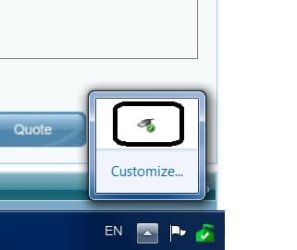
my usb icon on taskbar notification, as you can see in photo 1 .
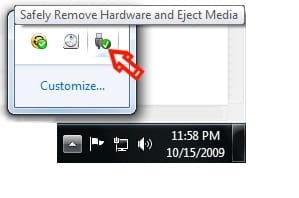
How to Change usb icon to default (photo 2 with red arrow pointed to ) ?
(Icon Cache - Rebuild tutorial, sfc /scannow did not help)
Thanks!
 

Attachments

  • 1.jpg
    1.jpg
    7.5 KB · Views: 29
  • 2.jpg
    2.jpg
    8 KB · Views: 27

My Computer My Computer

Computer type
PC/Desktop
OS
98SE/XP/windows7 32bit/ win10
Have you tried clicking on Customised as shown in your screen shots. When that windows opens look down to the lower LH corner of the screen & you will see "Restore Default Icon Behaviours" click on that & see if that fixes your problem.
 

My Computer My Computer

Computer type
PC/Desktop
Computer Manufacturer/Model Number
Self built using existing case
OS
Windows 7 Home Premium 64 bit sp1
CPU
Intel i5 3570 3.4Ghz Ivy Bridge SKT 1155 quad core
Motherboard
Gigabyte Z77-HD3 SKT 1155 2xSata 3, 4x USB 3.0
Memory
G-Skill Rip Jaws 16Gb (8x2) DDR3 -1600 PC3 12800 CL 10 red
Graphics Card(s)
Gigabyte NVIDIA GT610 1Gb DDR3 810/1200 PCI-E 2.0 Silent
Sound Card
NVIDIA High Definition & Realtech High Definition Audio
Monitor(s) Displays
2 x Philips 226V4L 16:9 aspect ratio
Screen Resolution
1920 x 1080 HD
Hard Drives
Samsung 840 Pro 256gb SSD, SATA 3.
Hitachi Touro Portable 1tb, USB 3.0 HDD used for image b/ups.
PSU
Corsair VS450
Case
Codeng
Cooling
PSU fan & CPU fan
Keyboard
Logitech
Mouse
Logitech Wireless trackball M570
Internet Speed
Wireless 3G. 3mg down & 550kb up.
Antivirus
Bitdefender Internet Security 2020
Browser
Opera (Current Version) & Firefox
Other Info
MS Office 2013 Pro. Davis weather station software. MGE Nova 600 avr UPS.
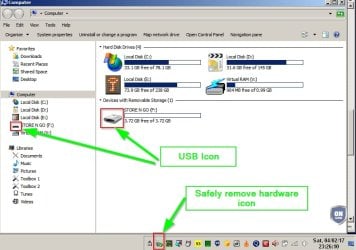
That's the "safely remove hardware" icon and it looks like the default icon to me.

It's not a USB icon. The USB icon should show up in an Explorer window or the Navigation Pane.

USB Icon.jpg


You might want to reset and clear notification area icons and cache.


Then you'll need to reconfigure notification area:

 
Last edited:

My Computer My Computer

Computer type
Laptop
Computer Manufacturer/Model Number
ASUS
OS
Microsoft Windows 7 Home Premium 64-bit 7601 Multiprocessor Free Service Pack 1
CPU
AMD C-60 APU with Radeon(tm) HD Graphics
Motherboard
ASUSTeK COMPUTER INC. X501U
Memory
4.00 GB
Graphics Card(s)
AMD Radeon HD 6290 Graphics
Sound Card
(1) AMD High Definition Audio Device (2) Realtek High Defi
Screen Resolution
1366 x 768 x 32 bits (4294967296 colors) @ 60 Hz
Hard Drives
Hitachi HTS545050A7E380 SATA Disk Device
Antivirus
Comodo CIS & FW, SecureAplus App Whitelisting, Threatfire
Browser
Cyberfox 64bit, Opera 64bit, Airfox
Other Info
Spy-The-Spy, HitmanPro.Alert, Norton Connect Safe, MJRegWatcher, BitDefender TrafficLight, Voodoo Shield, Zemana AntiMalware
A little more research shows both versions of the icon in various are stored in hotplug.dll

hotplug.dll Properties.jpg

Also both icons in various sizes are contained in:

"C:\Windows\System32\DeviceEject.exe"

I am guessing that the version of the icon you will see displayed is related to screen resolution and color bit depth and choice of taskbar icon size.
 

My Computer My Computer

Computer type
Laptop
Computer Manufacturer/Model Number
ASUS
OS
Microsoft Windows 7 Home Premium 64-bit 7601 Multiprocessor Free Service Pack 1
CPU
AMD C-60 APU with Radeon(tm) HD Graphics
Motherboard
ASUSTeK COMPUTER INC. X501U
Memory
4.00 GB
Graphics Card(s)
AMD Radeon HD 6290 Graphics
Sound Card
(1) AMD High Definition Audio Device (2) Realtek High Defi
Screen Resolution
1366 x 768 x 32 bits (4294967296 colors) @ 60 Hz
Hard Drives
Hitachi HTS545050A7E380 SATA Disk Device
Antivirus
Comodo CIS & FW, SecureAplus App Whitelisting, Threatfire
Browser
Cyberfox 64bit, Opera 64bit, Airfox
Other Info
Spy-The-Spy, HitmanPro.Alert, Norton Connect Safe, MJRegWatcher, BitDefender TrafficLight, Voodoo Shield, Zemana AntiMalware
I am guessing that the version of the icon you will see displayed is related to screen resolution and color bit depth and choice of taskbar icon size
Absolutely right !
Thanks Callender, you did it again
in my case DPI change caused it .
-what program do you use to see versions of the icon in stored in hotplug.dll?
- the DeviceEject.exe is not on "C:\Windows\System32\DeviceEject.exe"
but in C:\Windows\winsxs\x86_microsoft-windows-pnphotplugui_31bf3856ad364e35_6.1.7600.16385_none_e8b787acac120444\DeviceEject.exe

 

My Computer My Computer

Computer type
PC/Desktop
OS
98SE/XP/windows7 32bit/ win10

My Computer My Computer

Computer type
Laptop
Computer Manufacturer/Model Number
ASUS
OS
Microsoft Windows 7 Home Premium 64-bit 7601 Multiprocessor Free Service Pack 1
CPU
AMD C-60 APU with Radeon(tm) HD Graphics
Motherboard
ASUSTeK COMPUTER INC. X501U
Memory
4.00 GB
Graphics Card(s)
AMD Radeon HD 6290 Graphics
Sound Card
(1) AMD High Definition Audio Device (2) Realtek High Defi
Screen Resolution
1366 x 768 x 32 bits (4294967296 colors) @ 60 Hz
Hard Drives
Hitachi HTS545050A7E380 SATA Disk Device
Antivirus
Comodo CIS & FW, SecureAplus App Whitelisting, Threatfire
Browser
Cyberfox 64bit, Opera 64bit, Airfox
Other Info
Spy-The-Spy, HitmanPro.Alert, Norton Connect Safe, MJRegWatcher, BitDefender TrafficLight, Voodoo Shield, Zemana AntiMalware
Thanks Ranger4- unfortunately your advice did not help...
Thanks again Callender-nice app.
 

My Computer My Computer

Computer type
PC/Desktop
OS
98SE/XP/windows7 32bit/ win10
Back
Top