Hiya!!
I just wondered that is it possible to clear or empty your computer's cached memory on the fly without restarting the computer?
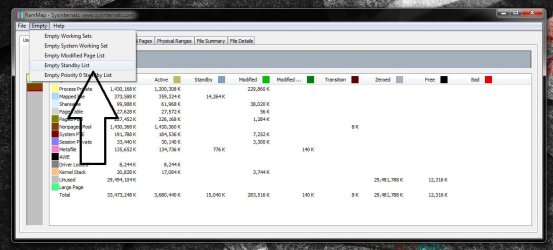
Here's the screenshot what i took where you can see better what i meant:

In this screenshot my cached memory is 4667mb, is it possible to clear it without restarting the computer??
Thanx you!! Btw..i'm using Windows 7 x64
I just wondered that is it possible to clear or empty your computer's cached memory on the fly without restarting the computer?
Here's the screenshot what i took where you can see better what i meant:
In this screenshot my cached memory is 4667mb, is it possible to clear it without restarting the computer??
Thanx you!! Btw..i'm using Windows 7 x64
My Computer
- Computer Manufacturer/Model Number
- HP Pavilion DV7-3197.eo
- OS
- Windows 7 NVIDIA Edition x64
- CPU
- Intel Core i7 Q720 1,60GHZ @ 1,60GHZ
- Memory
- 6GB DDR3
- Graphics Card(s)
- NVIDIA GeForce GT 230M
- Screen Resolution
- 1600 x 900
- Hard Drives
- 500GB + 1000GB
- Internet Speed
- 10 megabyte ADSL
- Other Info
- Current Windows 7 visual style:
Dark Soft