How to clear/empty computer's cached memory???

TheAslan

Banned
Local time
12:21 PM
Messages
25
Hiya!!

I just wondered that is it possible to clear or empty your computer's cached memory on the fly without restarting the computer?

Here's the screenshot what i took where you can see better what i meant:
j8k3yb.jpg


In this screenshot my cached memory is 4667mb, is it possible to clear it without restarting the computer??

Thanx you!! Btw..i'm using Windows 7 x64
 

My Computer

Computer Manufacturer/Model Number
HP Pavilion DV7-3197.eo
OS
Windows 7 NVIDIA Edition x64
CPU
Intel Core i7 Q720 1,60GHZ @ 1,60GHZ
Memory
6GB DDR3
Graphics Card(s)
NVIDIA GeForce GT 230M
Screen Resolution
1600 x 900
Hard Drives
500GB + 1000GB
Internet Speed
10 megabyte ADSL
Other Info
Current Windows 7 visual style:

Dark Soft
I'd have to ask why you would want to?? The CPU uses cache memory to store instructions that are repeatedly required to run programs, improving overall system speed. The advantage of cache memory is that the CPU does not have to use the motherboard’s system bus for data transfer. You don't want to clear that.

A Guy
 

My Computer

Computer type
PC/Desktop
OS
Windows 10 Home x64
CPU
INTEL Core i5-750 Quad-Core 3.37GHz
Motherboard
ASUS P7P55D
Memory
HyperX Fury Black Series 8GB (2 x 4GB) 1866Mhz
Graphics Card(s)
EVGA GeForce GTX 750 Superclocked 1GB 128-Bit GDDR5
Monitor(s) Displays
LG 32MA68HY 32" IPS
Screen Resolution
1920 x 1080
Hard Drives
Samsung 840 Evo 120GB, SEAGATE 500GB Barracuda® 7200.12, SATA 3 Gb/s, 7200 RPM, 16MB cache
PSU
ANTEC TruePower New TP-550, 80 PLUS, 550W
Case
ANTEC Three Hundred Illusion
Cooling
COOLER MASTER Hyper 212 Plus, 4 x 120mm 1 x 140mm Noctua's
Internet Speed
85 + Mbps
Antivirus
Avast
Browser
Vivaldi
There are many reasons to. For after effects users and many other vfx/editing softwares render and temporarily store the data in the ram. Once you close out of after effects all that stored ram data is still there. I have 16 gs of ram and 11 gigs is taken up by leftover cached ram from after effects. I know this is an old thread but idgaf
 

My Computer

Computer type
PC/Desktop
OS
MO
There are many reasons to. For after effects users and many other vfx/editing softwares render and temporarily store the data in the ram. Once you close out of after effects all that stored ram data is still there. I have 16 gs of ram and 11 gigs is taken up by leftover cached ram from after effects.

If another app can safely clear this RAM, then Windows native memory management can clear it.

Please post a screenshot Resource Monitor's Memory tab while this RAM is still in use after you have exited the software of interest.

http://www.sevenforums.com/tutorials/9733-screenshots-files-upload-post-seven-forums.html
 

My Computer

Computer type
Laptop
Computer Manufacturer/Model Number
Employer provided Dell Latitude
OS
W7 Pro SP1 64bit
CPU
i7
Memory
8GB
Graphics Card(s)
Intel HD Graphics
Hard Drives
crappy SSD
Antivirus
Employer mandated Symantec Endpoint Protection
Browser
Pale Moon 64bit, IE11 64bit & Chrome 64bit
It doesn't matters at all if no other program is needing memory. And the OS itself is designed to do such management on its own. When a program needs memory, the older and least used cache is flushed out of memory. A closed program is certainly a good candidate for freeing up memory.

It doesn't make any sense to ever try to manage it. The OS does it on it own, completely transparent to everything else running.
 

My Computer

Computer type
Laptop
Computer Manufacturer/Model Number
Toshiba Sattelite A665-S6092
OS
Windows 7 Ultimate x64
CPU
Intel Core i7-740QM
Memory
8 GB DDR3
Graphics Card(s)
NVIDIA GeForce 330GT
Screen Resolution
1366x768
Hard Drives
Samsung 840 SSD 500GB
1TB USB3 external HD
Cooling
Coolermaster Notepal U3 notebook cooling pad
Internet Speed
3mbps ASDL
Antivirus
ClamWin 0.98.7
Browser
Opera 12.17 x86 (main), Firefox 38 (sec), IE11 (last resort)
Windows 7 has excellent memory management and has no need for and will not benefit from programs such as Soft Cleaner. The only dubious benefit it has is to make the numbers in Task Manager more attractive to those who do not understand them.

Mark Russinovich and David Solomon, both highly respected Windows experts, had some very uncomplimentary things to say about these programs in the Microsoft publication "Windows Internals", sixth edition.
 

My Computer

Computer type
PC/Desktop
Computer Manufacturer/Model Number
HP
OS
Windows 7 Pro 64 bit
CPU
Xeon W3520
Memory
8 GB
Graphics Card(s)
Nvidia Geforce 210
There are many reasons to. For after effects users and many other vfx/editing softwares render and temporarily store the data in the ram. Once you close out of after effects all that stored ram data is still there. I have 16 gs of ram and 11 gigs is taken up by leftover cached ram from after effects. I know this is an old thread but idgaf

I have a Win 7 Pro desktop (this works for laptops too, but you have to remove the battery). Anyway, I read somewhere in a trouble-shooting process that if you:
1) Turn your machine off
2) Unplug the power cord (remove battery for laptop)
3) Hit the power button 3-4 times with cord unattached (or no battery)
4) Then power-up as normal

Your machine will be cleared as this (#3) discharges some capacitors that hold a charge for volatile memory and will dissipate the charge and clear your memory. I remember now, it's one of the steps that a nice program called Windows Repair from Tweaking.com has you do. I really like it because it is easy to follow and even works. It found a broken reparse point that I can't repair (yet), but other than that ... lol - RVAH-12
 

My Computer

Computer type
PC/Desktop
OS
Windows 7 Professional (SP1) 64 bit
Well I'm another one that knows no good reason to clear cached memory.
Just let Windows 7 take care of the memory.
Just remember to take off the XP hat and put on your Windows 7 hat and things will work just fine.
 

My Computer

Computer type
PC/Desktop
Computer Manufacturer/Model Number
Home made Desktop
OS
Windows 10 Pro. 64/ version 1709 Windows 7 Pro/64
CPU
Intel i7-6800K @ 4.3
Motherboard
ASUS X-99 Deluxe II
Memory
Corsair Platinum 16 gig @2400
Graphics Card(s)
EVGA GTX 1070 OC
Monitor(s) Displays
Asus 27" LED LCD/VE278Q
Screen Resolution
1920-1080 or 1280-720 HDMI
Hard Drives
INTEL SSD 730-240 Gb Sata 3.0/
PSU
EVGA Platium 1200W
Case
Phanteks Luxe Tempered Glass 8 fans/ one radiator
Cooling
XSPC/ Water Cooled CPU
Keyboard
Das 4 Professional
Mouse
Logitech M705/MX Anywhere 2-S
Internet Speed
100 mbits
Antivirus
Microsoft Security Essentials/ Malwarebytes Premium 3.0/ SAS
Browser
I.E. 11 default/Firefox/ ISP Time Warner Cable/Spectrum
Other Info
LG BluRay Burner/
Sound system-KLipsch-THX/
Icy Dock ssd Hot Swap bays.
Memory doesn't clear

I truly wish that Windows 7 did manage memory the way everyone here says that it does. It would certainly save a lot of headaches. Unfortunately it does not manage memory very well. I have to constantly reboot to clear the cached memory, otherwise no programs can be opened and nothing will run.
 

My Computer

Computer type
PC/Desktop
Computer Manufacturer/Model Number
HP
OS
win 7 64 bit

Attachments

  • Capture.JPG
    Capture.JPG
    109.4 KB · Views: 2

My Computer

Computer type
PC/Desktop
Computer Manufacturer/Model Number
Skylake Special #666
OS
Windows 10 Pro x64
CPU
Intel Core i7 6700K
Motherboard
Asus Sabertooth Z170 Mark 1
Memory
GSkill TridentZ RGB 16GB 3600 16-16-16-36
Graphics Card(s)
EVGA GTX 980 Ti SC x2
Sound Card
Realtek High Definition
Monitor(s) Displays
AOC G2460PG
Screen Resolution
1920 x 1080 144Hz
Hard Drives
Samsung 860 Pro 256GB, Seagate Barracuda 4TB x2
PSU
EVGA 1000 P2, EVGA White Custom Braided Cables
Case
Corsair Vengeance C70 Gunmetal Black
Cooling
Corsair H100i v2, Corsair ML120 x2, Thermal Grizzly Kryonaut
Keyboard
Logitech G910 Orion Spectrum
Mouse
Logitech G700s
Internet Speed
Verizon Fios Quantum Gateway 75/75
Antivirus
Windows Defender, Malwarebytes Free 3.8.3
Browser
Chrome
Other Info
Corsair SP120 x4, LG Blu-ray Drive, Durabrand HT-395 100 Watt Dolby Digital Amp, Corsair H2100 Wireless 7.1 Headset
Thanks

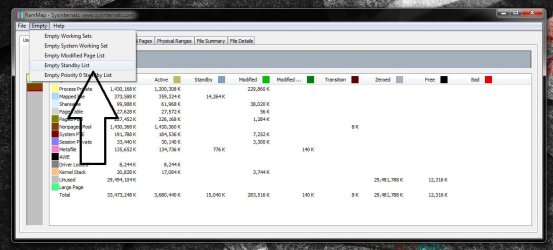
That did the trick
 

My Computer

Computer type
PC/Desktop
Computer Manufacturer/Model Number
HP
OS
win 7 64 bit
Sweet :D
 

My Computer

Computer type
PC/Desktop
Computer Manufacturer/Model Number
Skylake Special #666
OS
Windows 10 Pro x64
CPU
Intel Core i7 6700K
Motherboard
Asus Sabertooth Z170 Mark 1
Memory
GSkill TridentZ RGB 16GB 3600 16-16-16-36
Graphics Card(s)
EVGA GTX 980 Ti SC x2
Sound Card
Realtek High Definition
Monitor(s) Displays
AOC G2460PG
Screen Resolution
1920 x 1080 144Hz
Hard Drives
Samsung 860 Pro 256GB, Seagate Barracuda 4TB x2
PSU
EVGA 1000 P2, EVGA White Custom Braided Cables
Case
Corsair Vengeance C70 Gunmetal Black
Cooling
Corsair H100i v2, Corsair ML120 x2, Thermal Grizzly Kryonaut
Keyboard
Logitech G910 Orion Spectrum
Mouse
Logitech G700s
Internet Speed
Verizon Fios Quantum Gateway 75/75
Antivirus
Windows Defender, Malwarebytes Free 3.8.3
Browser
Chrome
Other Info
Corsair SP120 x4, LG Blu-ray Drive, Durabrand HT-395 100 Watt Dolby Digital Amp, Corsair H2100 Wireless 7.1 Headset
I truly wish that Windows 7 did manage memory the way everyone here says that it does. It would certainly save a lot of headaches. Unfortunately it does not manage memory very well. I have to constantly reboot to clear the cached memory, otherwise no programs can be opened and nothing will run.

Here's another option you might like to try (it's free) Works nicely for me. Manages memory using Windows own process the way it should, not by shoving stuff to the page file;
CleanMem Download

More reviews:
Review: CleanMem memory optimization done right - TechRepublic
CleanMem 2.5.0 Download - TechSpot
CleanMem: RAM/memory cleaner that actually works | Reviews, news, tips, and tricks | dotTechdotTech
Best Free Memory Optimizer | Gizmo's Freeware


And sevenforums very own thread about it years ago:
http://www.sevenforums.com/performa...anmem-only-memory-optimizer-really-works.html
 

My Computer

Computer type
Laptop
Computer Manufacturer/Model Number
Acer Aspire 6930G
OS
W7 Home Premium x86 SP1 Build 7601
CPU
Intel Mobile Core 2 Duo P7450 @ 2.13GHz
Motherboard
Acer Makalu U2E1
Memory
4.00GB Dual-Channel DDR2 @ 332MH
Graphics Card(s)
1024MB NVIDIA GeForce 9600M GT
Monitor(s) Displays
Generic PnP
Screen Resolution
1024x768@60Hz
Hard Drives
298GB Western Digital WDC WD3200BEVT-22ZCT0 (SATA)
Antivirus
Kaspersky Security Cloud Free / VoodooShield
Browser
Brave / Firefox
Other Info
uBlockOrigin / Bidefender Trafficlight / HitmanPro
Back
Top