

Hey all,
Anyone know how I can clear this Informational Warning? When I installed this OS I did full updates before installing my AV and it triggered Action Center to report no AV. After the installation of the AV, Action Center cleared it's 'missing status', but it still shows up in System Health reports
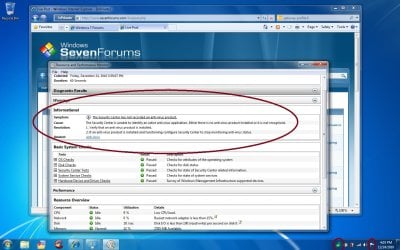
Thanks in advance for your input! Happy holidays!
-Adam
Anyone know how I can clear this Informational Warning? When I installed this OS I did full updates before installing my AV and it triggered Action Center to report no AV. After the installation of the AV, Action Center cleared it's 'missing status', but it still shows up in System Health reports
Thanks in advance for your input! Happy holidays!
-Adam
My Computer
At a glance
Windows 7 Ultimate x64Intel i5-2500k16GB2x Radeon HD7970 Crossfire
- Computer Manufacturer/Model Number
- Custom
- OS
- Windows 7 Ultimate x64
- CPU
- Intel i5-2500k
- Motherboard
- ASUS P8Z68-V Pro/GEN3
- Memory
- 16GB
- Graphics Card(s)
- 2x Radeon HD7970 Crossfire
- Sound Card
- On-Board / Logitech G930
- Monitor(s) Displays
- 3x Dell u2412m
- Screen Resolution
- 5760x1200
- Hard Drives
- Toshiba thns064gg2bbaa SSD
Seagate Barracuda 7200.12 ST31000528AS 1TB
Intel RST SSD caching enabled
- PSU
- Corsair AX850
- Case
- Corsair Obsidian 650D
- Cooling
- Corsair H100
- Keyboard
- Logitech Illuminated
- Mouse
- Logitech M510 Wireless
- Internet Speed
- 1Mb/s


