How to configure RAM to 1333MHz w/ P55 board (errors)

321

New member
Local time
4:39 PM
Messages
9
Location
Scarborough, ON
Hello,

I've recently built a computer with i7-860, MSI P55-GD65 and the OCZ DDR3 PC3-10666 (OCZ3P1333LV4GK) RAM.

When I start up my computer, my BIOS says 1066MHz.

I don't know how I can obtain 1333MHz speeds. Do I need to configure it somehow?

Also, when I run MemTest, I start getting errors. Is it because my RAM isn't configured correctly?

Thanks!
 

My Computer My Computer

At a glance

Windows 7Intel Core i7 860OCZ Platinum DDR3 PC3-10666 1333MHzXFX ATI Radeon HD 5770 XXX
Computer Manufacturer/Model Number
Home Built, N/A
OS
Windows 7
CPU
Intel Core i7 860
Motherboard
MSI P55-GD65
Memory
OCZ Platinum DDR3 PC3-10666 1333MHz
Graphics Card(s)
XFX ATI Radeon HD 5770 XXX
Sound Card
Onboard
Monitor(s) Displays
LG Flatron W2353V
Screen Resolution
1920 x 1080
Hard Drives
WD Caviar Black 1 TB
PSU
Seasonic M12D 850W
Case
Coolermaster 932 HAF
Cooling
Noctua NH-D14
Keyboard
IBM Standard PS/2
Mouse
Logitech G9
Internet Speed
10 Mb/s
In the DRAM config you need to find and manually enter the info with care. However, did you buy RAM that can be overclocked to 1333MHz but is really 1066MHz?
 

My Computer My Computer

At a glance

Windows 7 Ultimate x86-64[email protected] 1066MHz FSB6GB DDR3 1066MHz9300M GS 256MB Dedicated (Speed) + Intel4500M...
Computer Manufacturer/Model Number
Sony Vaio Z46GDU
OS
Windows 7 Ultimate x86-64
CPU
[email protected] 1066MHz FSB
Motherboard
Sony branded
Memory
6GB DDR3 1066MHz
Graphics Card(s)
9300M GS 256MB Dedicated (Speed) + Intel4500MHD (Stamina)
Sound Card
Realtek HD Audio
Monitor(s) Displays
13.1' WXGA
Screen Resolution
1600x900
Hard Drives
320GB 7200RPM w/ 16MB cache
Internet Speed
1MB/s
Download and run this program.

CPUID

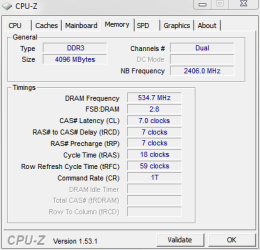
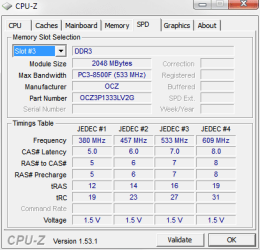
Under Memory it will show what your ram is set for and under SPD it will show what the auto settings should be.

Here are the designed specks from OCZ


  • 1333MHz DDR3
  • CL 7-7-7-20 (CAS-TRCD-TRP-TRAS)
  • 1.65 Volts
You system should run at these specks without error. Compare this to what CPUZ shows you. Post the Memory and SPD results. You will need to look in the Bios to see what Voltage the Memory is set for.

Jim :geek:
 

My Computer My Computer

At a glance

Windows 8.1 Pro w/Media Center 64bit, Windows...Phenom II X6 1100TCrucial Balistic 8gb DDR3-1866 CL9MSI R6850 Cyclone IGD5 PE
Computer type
PC/Desktop
Computer Manufacturer/Model Number
Home Built
OS
Windows 8.1 Pro w/Media Center 64bit, Windows 7 HP 64bit
CPU
Phenom II X6 1100T
Motherboard
ASUS M5A99X EVO
Memory
Crucial Balistic 8gb DDR3-1866 CL9
Graphics Card(s)
MSI R6850 Cyclone IGD5 PE
Sound Card
On Board
Monitor(s) Displays
ASUS VE258Q 25" LED with DVI-HDMI-DisplayPort
Screen Resolution
1920 x 1080
Hard Drives
Two WD Cavier Black 2TB Sata III, WD My Book Essential 2TB USB 3.0
PSU
Seasonic X650 80 Plus GOLD Modular
Case
Corsair 400R
Cooling
Antec Kuhler H2O 620, Two 120mm and four 140mm
Keyboard
Logitech K120
Mouse
Logitech Marble Mouse USB, Logitech Precision Game Pad
Internet Speed
15MB
Antivirus
Norton IS 2013, Malwarebytes Pro Beta 2
Browser
IE-11, FF-27
Other Info
APC UPS ES 750, Netgear WNR3500L Gigabit & Wireless N Router with SamKnows Test Program, Motorola SB6120 Gigabit Cable Modem. Brother HL-2170W Laser Printer, Epson V300 Scanner
Download and run this program.

CPUID

Under Memory it will show what your ram is set for and under SPD it will show what the auto settings should be.

Here are the designed specks from OCZ


  • 1333MHz DDR3
  • CL 7-7-7-20 (CAS-TRCD-TRP-TRAS)
  • 1.65 Volts
You system should run at these specks without error. Compare this to what CPUZ shows you. Post the Memory and SPD results. You will need to look in the Bios to see what Voltage the Memory is set for.

Jim :geek:

I've attached a screen shot of CPUID. Not sure what's going on and I think I bought memory that can be over clocked to 1333 at 1.65v, but I don't know how to do so.
 

Attachments

  • memory.PNG
    memory.PNG
    9 KB · Views: 9

My Computer My Computer

At a glance

Windows 7Intel Core i7 860OCZ Platinum DDR3 PC3-10666 1333MHzXFX ATI Radeon HD 5770 XXX
Computer Manufacturer/Model Number
Home Built, N/A
OS
Windows 7
CPU
Intel Core i7 860
Motherboard
MSI P55-GD65
Memory
OCZ Platinum DDR3 PC3-10666 1333MHz
Graphics Card(s)
XFX ATI Radeon HD 5770 XXX
Sound Card
Onboard
Monitor(s) Displays
LG Flatron W2353V
Screen Resolution
1920 x 1080
Hard Drives
WD Caviar Black 1 TB
PSU
Seasonic M12D 850W
Case
Coolermaster 932 HAF
Cooling
Noctua NH-D14
Keyboard
IBM Standard PS/2
Mouse
Logitech G9
Internet Speed
10 Mb/s
Something in the BIOS may be affecting the memory multiplier. Check there.
 

My Computer My Computer

At a glance

Windows 7 Ultimate x86-64[email protected] 1066MHz FSB6GB DDR3 1066MHz9300M GS 256MB Dedicated (Speed) + Intel4500M...
Computer Manufacturer/Model Number
Sony Vaio Z46GDU
OS
Windows 7 Ultimate x86-64
CPU
[email protected] 1066MHz FSB
Motherboard
Sony branded
Memory
6GB DDR3 1066MHz
Graphics Card(s)
9300M GS 256MB Dedicated (Speed) + Intel4500MHD (Stamina)
Sound Card
Realtek HD Audio
Monitor(s) Displays
13.1' WXGA
Screen Resolution
1600x900
Hard Drives
320GB 7200RPM w/ 16MB cache
Internet Speed
1MB/s
Something in the BIOS may be affecting the memory multiplier. Check there.

Can you help me find a tutorial that would explain how to adjust the BIOS for the memory multiplet?

I've attached the SPD from CPUID.
 

Attachments

  • memory.PNG
    memory.PNG
    10.6 KB · Views: 23

My Computer My Computer

At a glance

Windows 7Intel Core i7 860OCZ Platinum DDR3 PC3-10666 1333MHzXFX ATI Radeon HD 5770 XXX
Computer Manufacturer/Model Number
Home Built, N/A
OS
Windows 7
CPU
Intel Core i7 860
Motherboard
MSI P55-GD65
Memory
OCZ Platinum DDR3 PC3-10666 1333MHz
Graphics Card(s)
XFX ATI Radeon HD 5770 XXX
Sound Card
Onboard
Monitor(s) Displays
LG Flatron W2353V
Screen Resolution
1920 x 1080
Hard Drives
WD Caviar Black 1 TB
PSU
Seasonic M12D 850W
Case
Coolermaster 932 HAF
Cooling
Noctua NH-D14
Keyboard
IBM Standard PS/2
Mouse
Logitech G9
Internet Speed
10 Mb/s
Check the BIOS and ensure that the memory multiplier matches the FSB for 1333MHz speed.
 

My Computer My Computer

At a glance

Windows 7 Ultimate x86-64[email protected] 1066MHz FSB6GB DDR3 1066MHz9300M GS 256MB Dedicated (Speed) + Intel4500M...
Computer Manufacturer/Model Number
Sony Vaio Z46GDU
OS
Windows 7 Ultimate x86-64
CPU
[email protected] 1066MHz FSB
Motherboard
Sony branded
Memory
6GB DDR3 1066MHz
Graphics Card(s)
9300M GS 256MB Dedicated (Speed) + Intel4500MHD (Stamina)
Sound Card
Realtek HD Audio
Monitor(s) Displays
13.1' WXGA
Screen Resolution
1600x900
Hard Drives
320GB 7200RPM w/ 16MB cache
Internet Speed
1MB/s
Back
Top