How to configure ram?

maranatha4u

New member
Member
VIP
Local time
3:46 PM
Messages
157
Location
Lakeland, Florida USA
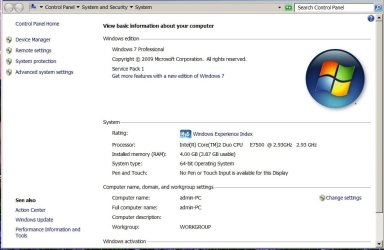
How do I configure my Dell Optiplex 760 tower (with Windows 7 Pro OS) to utilize all of its available RAM (4 g). Currently, it's using only about 2/3 of that.
 

My Computer

Computer Manufacturer/Model Number
Dell Optiplex 760
OS
Windows 7 Pro, 64-bit
How do I configure my Dell Optiplex 760 tower (with Windows 7 Pro OS) to utilize all of its available RAM (4 g). Currently, it's using only about 2/3 of that.

If you are running 32 bit you dont. Plus you dont want all you available ram to be used or you will start using the page file which is much slower.

Can we get more info on what you want to do??
 

My Computer

Computer Manufacturer/Model Number
HP Pavillion dv-7 1005 Tx
OS
Win 8 Release candidate 8400
CPU
[email protected]
Memory
4 gigs
Graphics Card(s)
Nvidia 9600M
Sound Card
HD built-in
Monitor(s) Displays
17" Wxga
Screen Resolution
1440x900
Cooling
none
Internet Speed
45Mb down 5Mb up
Reply To You, ZigZag

How do I configure my Dell Optiplex 760 tower (with Windows 7 Pro OS) to utilize all of its available RAM (4 g). Currently, it's using only about 2/3 of that.

If you are running 32 bit you dont. Plus you dont want all you available ram to be used or you will start using the page file which is much slower.

Can we get more info on what you want to do??
_______________________________________________________________

I'm sorry - apparently this forum encrypts a copy and paste to my screenshot I just sent you on my system. I'm attaching the screenshot here. Here's my reply ZigZag to my former message, in case you didn't get it (and screenshot attached).

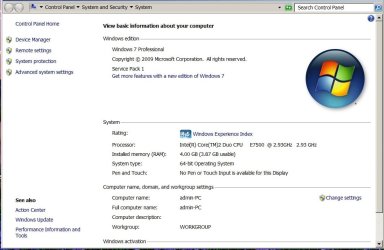
No, this is 64-bit. I've been told that I'm utilizing all the capacity of the RAM (as it could be much faster if it were utilized, from what I've been told). Here's a screenshot of my system if that will help you. The Dell technician told me this issue on the phone, but they wanted $100 in order for THEM to (install some software) to implement the maximum amount of RAM available on the system.
 

Attachments

  • SYSTEM.jpg
    SYSTEM.jpg
    68.6 KB · Views: 99

My Computer

Computer Manufacturer/Model Number
Dell Optiplex 760
OS
Windows 7 Pro, 64-bit
Do you have onboard video?
 

My Computer

Computer Manufacturer/Model Number
Self
OS
Main - Windows 7 Pro SP1 64-Bit; 2nd - Windows Server 2008 R2
CPU
Main - Core i7 2600K; 2nd - Core i7 920
Motherboard
Main - Asus P8Z68-V Pro/Gen3; 2nd - Gigabyte GA-EX58-UDR3
Memory
Main - 16GB Corsair Vengeance; 2nd - 12GB Corsair Vengeance
Graphics Card(s)
Main - XFX Radeon 6870 1GB; 2nd - XFX Radeon 4870 1GB
Sound Card
Both: Onboard Realtek Azalia
Monitor(s) Displays
Main - Hann 25" + I-INC 25" + Acer 23"; 2nd - Upgrading Soon
Screen Resolution
Main - 1920x1080 (All Three Monitors); 2nd - Upgrading Soon
Hard Drives
Main - (1) Crucial M4 128GB (Boot)
Main - (1) Seagate 2TB 64MB Cache (Data)
Main - (1) Seagate 2TB 64MB Cache (Data Backup)
2nd - (1) Intel X25-M SSD 80GB (Boot)
2nd - (3) Seagate 1TB 32MB Cache (Data Backup)
2nd - (1) Seagate 320GB (Because)
PSU
Main - OCZ 600W Modular; 2nd - OCZ 600W
Case
Main - Thermaltake Element G; 2nd - NZXT something or other
Cooling
Main - Corsair H80; 2nd - Prolimatech Megahalems
Keyboard
Main - Razer Reclusa; 2nd - Old MS Keyboard
Mouse
Main - Logitech MX Revolution; 2nd - Old MS Mouse
Internet Speed
20Mbps Time-Warner Cable
I'm sorry, but I'm not sure (forgive me for my ignorance). I just got the PC a few days ago. Is there a quick way for me to find out?
 

My Computer

Computer Manufacturer/Model Number
Dell Optiplex 760
OS
Windows 7 Pro, 64-bit

My Computer

Computer type
PC/Desktop
Computer Manufacturer/Model Number
Built them myself, Science Experiments !
OS
Win7 Enterprise, Win7 x86 (Ult 7600), Win7 x64 Ult 7600, TechNet RTM on AMD x64 (2.8Ghz)
CPU
AMD fx8350 4ghz, AMD-32 2400mhz, AMD-64 3200mhz, AMDx64 2.8G
Motherboard
SIS 755, ECS-K8M890M-M (Ult 7600), GigaByte & others
Memory
2gb, 4gb on the Ult 7600, 4gb on Technet RTM, 32gb on FX8350
Graphics Card(s)
Draw my own Graphics, several nVidia cards
Sound Card
on motherboard
Monitor(s) Displays
19" flat scr, 28" I-Inc widescr,22" Emprex Widescr, 23" Acer
Screen Resolution
1280 x 1024, 1440 x 900, 1920 x 1080
Hard Drives
6 pata Ide HD's & 2 Sata HD's
added 80gb external on Ult 7600 computer,
numerous extra 1tb, 2TB, 3Tb SATA HD's
A collection of ext HD Docks w/ HDs
PSU
430w, 550w, 600w, 700, 800, etc
Case
All Generic Full Towers
Cooling
Open Air & a few fans, some w/ colored LEDs
Keyboard
Compaq & Dell recycled from GoodWill
Mouse
Made in China Optical Wired Mouse
Internet Speed
Fast Cable InterNet
Antivirus
AVG Free on 24 different Desktops, NO Problems!
Browser
IE 8 is preferred, but use FireFox sometimes
Other Info
Linksys Routers, switches, & Hubs
Too Many USB Flash Drives to count, Biggest is 64GB !
Eight computers in my home network.
Sixteen computers at my business network.
Linked via TeamViewer !
Lots of old used spare computer parts everywhere!
I'm sorry, but I'm not sure (forgive me for my ignorance). I just got the PC a few days ago. Is there a quick way for me to find out?
Trace the video cable from the monitor to the computer and see where it's attached. If the connection is built into the motherboard then it's onboard. If it's connected to a card which is plugged into a slot on the motherboard then you have a separate video card.

The reason I ask is that onboard video shares RAM with the system, which would account for the difference. :)
 

My Computer

Computer Manufacturer/Model Number
Self
OS
Main - Windows 7 Pro SP1 64-Bit; 2nd - Windows Server 2008 R2
CPU
Main - Core i7 2600K; 2nd - Core i7 920
Motherboard
Main - Asus P8Z68-V Pro/Gen3; 2nd - Gigabyte GA-EX58-UDR3
Memory
Main - 16GB Corsair Vengeance; 2nd - 12GB Corsair Vengeance
Graphics Card(s)
Main - XFX Radeon 6870 1GB; 2nd - XFX Radeon 4870 1GB
Sound Card
Both: Onboard Realtek Azalia
Monitor(s) Displays
Main - Hann 25" + I-INC 25" + Acer 23"; 2nd - Upgrading Soon
Screen Resolution
Main - 1920x1080 (All Three Monitors); 2nd - Upgrading Soon
Hard Drives
Main - (1) Crucial M4 128GB (Boot)
Main - (1) Seagate 2TB 64MB Cache (Data)
Main - (1) Seagate 2TB 64MB Cache (Data Backup)
2nd - (1) Intel X25-M SSD 80GB (Boot)
2nd - (3) Seagate 1TB 32MB Cache (Data Backup)
2nd - (1) Seagate 320GB (Because)
PSU
Main - OCZ 600W Modular; 2nd - OCZ 600W
Case
Main - Thermaltake Element G; 2nd - NZXT something or other
Cooling
Main - Corsair H80; 2nd - Prolimatech Megahalems
Keyboard
Main - Razer Reclusa; 2nd - Old MS Keyboard
Mouse
Main - Logitech MX Revolution; 2nd - Old MS Mouse
Internet Speed
20Mbps Time-Warner Cable
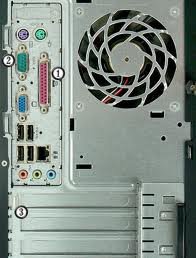
Thanks so much Prof for your help. I look, and the monitor cable is plugged into the top (1 of 3) horizontal (metal) rows at the bottom of the tower, similar to the image I'm attaching here. So, could you tell me which it is? (Sorry once again for my lack of knowledge)
 

Attachments

  • images.jpg
    images.jpg
    10.9 KB · Views: 414

My Computer

Computer Manufacturer/Model Number
Dell Optiplex 760
OS
Windows 7 Pro, 64-bit
I'm assuming you nabbed a generic picture and there is actually something occupying the top blank slot (where the circled "3" is) on your computer. Is that right?

Dell's website isn't much help, but they do list a VGA connector (the circled "2") as being standard. Whether they mean on a separate card or onboard is not clear. I'd venture a guess that it comes with onboard video which you may not be using. If so, you can (possibly) disable the onboard video in the BIOS and get what looks to be about 256MB of RAM freed up. (4.00GB actually equals 4096 MB, subtract the 3.87 Windows is showing, account for a rounding error, and you're at 256MB.)

If you are not comfortable dealing with the BIOS it is better to ask questions before doing anything. Dell doesn't usually give you much to change around to begin with, but if you disable your onboard video and don't have a separate card you will be facing an even more complicated job - and possibly temporarily be without any video at all until you fix it.

I'm definitely not trying to scare you into paying Dell's $100 "protection money" extortion, just advising you to ask questions about anything you are not 100% sure of. :)
 

My Computer

Computer Manufacturer/Model Number
Self
OS
Main - Windows 7 Pro SP1 64-Bit; 2nd - Windows Server 2008 R2
CPU
Main - Core i7 2600K; 2nd - Core i7 920
Motherboard
Main - Asus P8Z68-V Pro/Gen3; 2nd - Gigabyte GA-EX58-UDR3
Memory
Main - 16GB Corsair Vengeance; 2nd - 12GB Corsair Vengeance
Graphics Card(s)
Main - XFX Radeon 6870 1GB; 2nd - XFX Radeon 4870 1GB
Sound Card
Both: Onboard Realtek Azalia
Monitor(s) Displays
Main - Hann 25" + I-INC 25" + Acer 23"; 2nd - Upgrading Soon
Screen Resolution
Main - 1920x1080 (All Three Monitors); 2nd - Upgrading Soon
Hard Drives
Main - (1) Crucial M4 128GB (Boot)
Main - (1) Seagate 2TB 64MB Cache (Data)
Main - (1) Seagate 2TB 64MB Cache (Data Backup)
2nd - (1) Intel X25-M SSD 80GB (Boot)
2nd - (3) Seagate 1TB 32MB Cache (Data Backup)
2nd - (1) Seagate 320GB (Because)
PSU
Main - OCZ 600W Modular; 2nd - OCZ 600W
Case
Main - Thermaltake Element G; 2nd - NZXT something or other
Cooling
Main - Corsair H80; 2nd - Prolimatech Megahalems
Keyboard
Main - Razer Reclusa; 2nd - Old MS Keyboard
Mouse
Main - Logitech MX Revolution; 2nd - Old MS Mouse
Internet Speed
20Mbps Time-Warner Cable
Yes, that's right - I just got a quick photo; but the slots on the bottom ("3) is correct. My monitor plug is in the top of the three (only on my Dell tower, of course). You're a genius at this, I see (wow!). And, what you told me is just about what the Dell tech told me on the phone - that I could be utilizing about 1/3 more RAM.

I GREATLY appreciate your help here, and I'll probably end up paying Dell this money . . . only, not right now. I'm really financially strapped, as I just had my dad's Memorial Service just two days ago (http://www.polk-fl.net/staff/weeklycommunications/documents/Obituary_FrankCHild.pdf).

Thanks so much again, Prof for your help. God bless . . . Larry Hild
 

My Computer

Computer Manufacturer/Model Number
Dell Optiplex 760
OS
Windows 7 Pro, 64-bit
Ha! Found it!

Documentation

It looks like you are unable to completely disable the onboard video. My guess is that they want to charge you a C-Note for an updated BIOS which provides that option. There may be a free BIOS floating around somewhere, but flashing it always carries some risk. Personally, I think 256MB is not really worth going to extraordinary measures. For half of what they want to charge you to "fix" it you could replace your RAM with a pair of 4GB sticks and have 8GB (minus the measly 256MB for the onboard video, of course.)
 

Attachments

  • Dell Video-BIOS.JPG
    Dell Video-BIOS.JPG
    18.1 KB · Views: 17

My Computer

Computer Manufacturer/Model Number
Self
OS
Main - Windows 7 Pro SP1 64-Bit; 2nd - Windows Server 2008 R2
CPU
Main - Core i7 2600K; 2nd - Core i7 920
Motherboard
Main - Asus P8Z68-V Pro/Gen3; 2nd - Gigabyte GA-EX58-UDR3
Memory
Main - 16GB Corsair Vengeance; 2nd - 12GB Corsair Vengeance
Graphics Card(s)
Main - XFX Radeon 6870 1GB; 2nd - XFX Radeon 4870 1GB
Sound Card
Both: Onboard Realtek Azalia
Monitor(s) Displays
Main - Hann 25" + I-INC 25" + Acer 23"; 2nd - Upgrading Soon
Screen Resolution
Main - 1920x1080 (All Three Monitors); 2nd - Upgrading Soon
Hard Drives
Main - (1) Crucial M4 128GB (Boot)
Main - (1) Seagate 2TB 64MB Cache (Data)
Main - (1) Seagate 2TB 64MB Cache (Data Backup)
2nd - (1) Intel X25-M SSD 80GB (Boot)
2nd - (3) Seagate 1TB 32MB Cache (Data Backup)
2nd - (1) Seagate 320GB (Because)
PSU
Main - OCZ 600W Modular; 2nd - OCZ 600W
Case
Main - Thermaltake Element G; 2nd - NZXT something or other
Cooling
Main - Corsair H80; 2nd - Prolimatech Megahalems
Keyboard
Main - Razer Reclusa; 2nd - Old MS Keyboard
Mouse
Main - Logitech MX Revolution; 2nd - Old MS Mouse
Internet Speed
20Mbps Time-Warner Cable
WOW! But, would this tower accept the 8g of RAM?
 

My Computer

Computer Manufacturer/Model Number
Dell Optiplex 760
OS
Windows 7 Pro, 64-bit
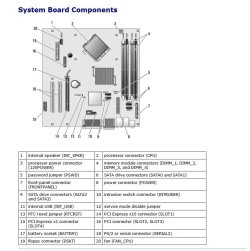
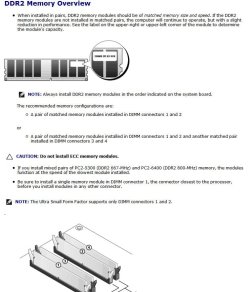
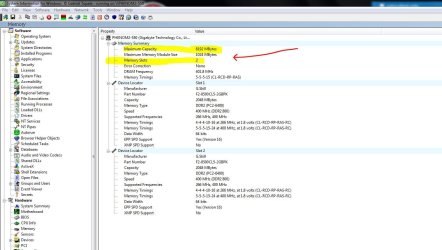
With the cautionary note that Dell is famous for having dozens (or more) of possible configurations of computers bearing the same model number, I'm sure you can. The picture I found for your rig shows a total of four RAM slots. I'm guessing that only two of them are currently filled. Adding two more 2GB sticks would total 4GB more RAM for a grand total of 8GB. The only hitch here is that mixing brands and types of RAM can occasionally cause problems. The safe route is to remove the RAM that's in there and replace them with a matched set guaranteed to work with your computer.

Crucial is an outstanding brand and promises to replace anything which doesn't get along with your computer:

SDRAM, DDR2 and DDR RAM memory upgrades from Crucial.com

(For some reason, some of their recommendations are way overpriced. You can do better price-wise.)

Fortunately, RAM is dirt cheap these days, which makes the "safe route" I described above even more appealing.
EDIT: Looks like DDR2 RAM has actually gone UP. I'd consider adding a 4GB kit with a compatibility guarantee. :(

Here are some examples:

Newegg.com - Computer Hardware, Memory, Desktop Memory, 8GB (2 x 4GB), 240-Pin DDR2 SDRAM

Finally, I am sorry to hear about your dad. Looks like he was quite a guy who certainly lived a full and worthy life. God bless you and your family.
 

Attachments

  • Dell MB.JPG
    Dell MB.JPG
    76.6 KB · Views: 10
  • Dell - RAM.JPG
    Dell - RAM.JPG
    76.6 KB · Views: 6

My Computer

Computer Manufacturer/Model Number
Self
OS
Main - Windows 7 Pro SP1 64-Bit; 2nd - Windows Server 2008 R2
CPU
Main - Core i7 2600K; 2nd - Core i7 920
Motherboard
Main - Asus P8Z68-V Pro/Gen3; 2nd - Gigabyte GA-EX58-UDR3
Memory
Main - 16GB Corsair Vengeance; 2nd - 12GB Corsair Vengeance
Graphics Card(s)
Main - XFX Radeon 6870 1GB; 2nd - XFX Radeon 4870 1GB
Sound Card
Both: Onboard Realtek Azalia
Monitor(s) Displays
Main - Hann 25" + I-INC 25" + Acer 23"; 2nd - Upgrading Soon
Screen Resolution
Main - 1920x1080 (All Three Monitors); 2nd - Upgrading Soon
Hard Drives
Main - (1) Crucial M4 128GB (Boot)
Main - (1) Seagate 2TB 64MB Cache (Data)
Main - (1) Seagate 2TB 64MB Cache (Data Backup)
2nd - (1) Intel X25-M SSD 80GB (Boot)
2nd - (3) Seagate 1TB 32MB Cache (Data Backup)
2nd - (1) Seagate 320GB (Because)
PSU
Main - OCZ 600W Modular; 2nd - OCZ 600W
Case
Main - Thermaltake Element G; 2nd - NZXT something or other
Cooling
Main - Corsair H80; 2nd - Prolimatech Megahalems
Keyboard
Main - Razer Reclusa; 2nd - Old MS Keyboard
Mouse
Main - Logitech MX Revolution; 2nd - Old MS Mouse
Internet Speed
20Mbps Time-Warner Cable
Wow - tremendous! Thanks so very much Steve for your help here. Sorry I had to leave you this morning . . . had to get some "shut eye." In your estimation, if I were to get the RAM from Crucial, would there be anything further I could do to make this system faster (and, it's not slow currently; I just want to optimize it to its full potential)? Here attached is the system screenshot, just in case you didn't get the one I erroneously copied and pasted last evening. Thank you also for condolences for dad . . . I "teary-eyed" my way through the Memorial Service at his church, as I loved him so very much.
 

Attachments

  • SYSTEM.jpg
    SYSTEM.jpg
    68.6 KB · Views: 26

My Computer

Computer Manufacturer/Model Number
Dell Optiplex 760
OS
Windows 7 Pro, 64-bit
A couple things worth mentioning, since the impetus behind your wanting to max out your RAM is due to perceived slowness of the computer.

1) 4GB (minus a tad for the onboard video) is a respectable amount. Unless you are doing video editing or rendering, or are in the habit of having dozens of things running at once, it ought to serve for most other purposes. Without knowing what you use the computer for it's hard to say if adding loads more RAM would be a dramatic improvement.

2) Which brings us to another issue. Dell is fond of putting a lot of their utility programs on their computers and having them all load at startup. I'd recommend running Startup Inspector for Windows - Free and then use the Snipping Tool to post a screenshot of what it finds. Chances are that you have stuff running behind your back that you don't need.

3) Fill out your complete System Specs - someone with eyes sharper than mine may have some suggestions.

4) Your CPU is showing it's age a bit, it's listed as a Intel® Core™2 Duo Processor E6550 2.33 GHz. Don't expect miracles.

On the whole, if you're mainly using the computer for email and the Internet you can get by for a while. The fact that you're locked into (what I discovered yesterday) is still pricey DDR2 RAM means that I wouldn't sink a lot of money into upgrades. When the time comes, you'll get far more bang for your buck by saving the dough now and putting it into a brand new system later. I am one to use my computer until I run into something I really want to do and can't, due to the limitations of my current hardware. Unless someone is made of money it makes no sense to upgrade "just because". :)
 

My Computer

Computer Manufacturer/Model Number
Self
OS
Main - Windows 7 Pro SP1 64-Bit; 2nd - Windows Server 2008 R2
CPU
Main - Core i7 2600K; 2nd - Core i7 920
Motherboard
Main - Asus P8Z68-V Pro/Gen3; 2nd - Gigabyte GA-EX58-UDR3
Memory
Main - 16GB Corsair Vengeance; 2nd - 12GB Corsair Vengeance
Graphics Card(s)
Main - XFX Radeon 6870 1GB; 2nd - XFX Radeon 4870 1GB
Sound Card
Both: Onboard Realtek Azalia
Monitor(s) Displays
Main - Hann 25" + I-INC 25" + Acer 23"; 2nd - Upgrading Soon
Screen Resolution
Main - 1920x1080 (All Three Monitors); 2nd - Upgrading Soon
Hard Drives
Main - (1) Crucial M4 128GB (Boot)
Main - (1) Seagate 2TB 64MB Cache (Data)
Main - (1) Seagate 2TB 64MB Cache (Data Backup)
2nd - (1) Intel X25-M SSD 80GB (Boot)
2nd - (3) Seagate 1TB 32MB Cache (Data Backup)
2nd - (1) Seagate 320GB (Because)
PSU
Main - OCZ 600W Modular; 2nd - OCZ 600W
Case
Main - Thermaltake Element G; 2nd - NZXT something or other
Cooling
Main - Corsair H80; 2nd - Prolimatech Megahalems
Keyboard
Main - Razer Reclusa; 2nd - Old MS Keyboard
Mouse
Main - Logitech MX Revolution; 2nd - Old MS Mouse
Internet Speed
20Mbps Time-Warner Cable
Thanks again Steve for you fantastic advice, as I've gotten a REAL education from you in a very short period of time. I'll do as you say about the Startup Inspector and the Snipping Tool.

Once again, thank you again for your help on all this Steve. Stay in touch . . .
 

My Computer

Computer Manufacturer/Model Number
Dell Optiplex 760
OS
Windows 7 Pro, 64-bit

Attachments

  • SIW_Max_Memory_on_MB.JPG
    SIW_Max_Memory_on_MB.JPG
    117.4 KB · Views: 14

My Computer

Computer type
PC/Desktop
Computer Manufacturer/Model Number
Built them myself, Science Experiments !
OS
Win7 Enterprise, Win7 x86 (Ult 7600), Win7 x64 Ult 7600, TechNet RTM on AMD x64 (2.8Ghz)
CPU
AMD fx8350 4ghz, AMD-32 2400mhz, AMD-64 3200mhz, AMDx64 2.8G
Motherboard
SIS 755, ECS-K8M890M-M (Ult 7600), GigaByte & others
Memory
2gb, 4gb on the Ult 7600, 4gb on Technet RTM, 32gb on FX8350
Graphics Card(s)
Draw my own Graphics, several nVidia cards
Sound Card
on motherboard
Monitor(s) Displays
19" flat scr, 28" I-Inc widescr,22" Emprex Widescr, 23" Acer
Screen Resolution
1280 x 1024, 1440 x 900, 1920 x 1080
Hard Drives
6 pata Ide HD's & 2 Sata HD's
added 80gb external on Ult 7600 computer,
numerous extra 1tb, 2TB, 3Tb SATA HD's
A collection of ext HD Docks w/ HDs
PSU
430w, 550w, 600w, 700, 800, etc
Case
All Generic Full Towers
Cooling
Open Air & a few fans, some w/ colored LEDs
Keyboard
Compaq & Dell recycled from GoodWill
Mouse
Made in China Optical Wired Mouse
Internet Speed
Fast Cable InterNet
Antivirus
AVG Free on 24 different Desktops, NO Problems!
Browser
IE 8 is preferred, but use FireFox sometimes
Other Info
Linksys Routers, switches, & Hubs
Too Many USB Flash Drives to count, Biggest is 64GB !
Eight computers in my home network.
Sixteen computers at my business network.
Linked via TeamViewer !
Lots of old used spare computer parts everywhere!
Thanks so much for your help; I really appreciate it.
 

My Computer

Computer Manufacturer/Model Number
Dell Optiplex 760
OS
Windows 7 Pro, 64-bit
Back
Top