How to connect computer and TV?

11tarot33

New member
Local time
10:04 AM
Messages
22
Location
Banja Luka
Sorry for witing this here, but I dk where else to put it.

I use ati radeon 3650 graphic card...

And I want somehow to connect my computer and TV....

What I need to do, and how to do it????? Please help :sarc:
 

My Computer My Computer

OS
Windows 7
CPU
Intel pentium IV 2.6 Ghz
Memory
160 GB hard disk - 2GB RAM
Graphics Card(s)
Radeon 3650
Monitor(s) Displays
Monitor Flatron l1918s
Mouse
Logitech L1 laser mouse
All depends on what kind of connections are available on the TV.
 

My Computer My Computer

Computer type
PC/Desktop
Computer Manufacturer/Model Number
Me
OS
Win 7 Ultimate x64
CPU
FX-8350 @ 4.6 GHz so far
Motherboard
Asus M5A97 EVO
Memory
ADATA XPG V1 Series Black 8GB DDR3 1600
Graphics Card(s)
Sapphire R9 270x Dual-X
Sound Card
Xonar DGX w/ Corsair Vengence 1300
Monitor(s) Displays
Acer S232HL Abid
Screen Resolution
1920x1080
Hard Drives
120 GB OCZ Vertex 3
500 GB Seagate 7200.12
PSU
Antec Earthwatts 650W Green
Case
Antec Three Hundred
Cooling
Cooler Master 212 EVO
Keyboard
Logitech G510
Mouse
Logitech G500s
Internet Speed
35000/3000
Sorry for witing this here, but I dk where else to put it.

I use ati radeon 3650 graphic card...

And I want somehow to connect my computer and TV....

What I need to do, and how to do it????? Please help :sarc:
Welcome to the Windows 7 support forum!
Tarot, connecting your TV and Computer will depend on 2 factors.
Your TV connection and the type of Video Card you hace.
If you have not filled out your system specs including your grfx card please do so now. As soon as we have this info we can assisit you.
 

My Computer My Computer

Computer Manufacturer/Model Number
Custom Build
OS
Windows 7 7600 1 X64
CPU
AMD PHENOM II X 550 PROCESSOR 3.1 ghz
Motherboard
ASUS M4A78-TE
Memory
Corsair 4 gig ddr 3
Graphics Card(s)
ati radeon 3300
Sound Card
ati hd
Monitor(s) Displays
syncmaster 2033sw
Screen Resolution
1600X900 60 hz refresh
Hard Drives
twin_seagates SATA's 1 TB & 500 Gig, hitachi_slimline 160 gig
PSU
antec_550 watt
Case
cooler master GLite
Cooling
stock_heat sink
Internet Speed
20mbs up/ 1.5mbs down
Other Info
favorite child "stewie"
favorite dog "brian"
Hm, I think that I write that I have Graphic card ATI radeon 3650 (512MB)..... If you need anything else... just say..... but, please help me...
 

My Computer My Computer

OS
Windows 7
CPU
Intel pentium IV 2.6 Ghz
Memory
160 GB hard disk - 2GB RAM
Graphics Card(s)
Radeon 3650
Monitor(s) Displays
Monitor Flatron l1918s
Mouse
Logitech L1 laser mouse
Hm, I think that I write that I have Graphic card ATI radeon 3650 (512MB)..... If you need anything else... just say..... but, please help me...

Yes you did. That means that you have a combination of DVI, VGA, S-Video (to component adapter that comes with the cards with the S-Video port) or possibly a HDMI port to choose from. With that in mind,

All depends on what kind of connections are available on the TV.

pretty much says it all. We aren't mind readers, so we can't tell you how to hook it up as we don't know what the TV is or what connections are on it.
 

My Computer My Computer

Computer type
PC/Desktop
Computer Manufacturer/Model Number
Me
OS
Win 7 Ultimate x64
CPU
FX-8350 @ 4.6 GHz so far
Motherboard
Asus M5A97 EVO
Memory
ADATA XPG V1 Series Black 8GB DDR3 1600
Graphics Card(s)
Sapphire R9 270x Dual-X
Sound Card
Xonar DGX w/ Corsair Vengence 1300
Monitor(s) Displays
Acer S232HL Abid
Screen Resolution
1920x1080
Hard Drives
120 GB OCZ Vertex 3
500 GB Seagate 7200.12
PSU
Antec Earthwatts 650W Green
Case
Antec Three Hundred
Cooling
Cooler Master 212 EVO
Keyboard
Logitech G510
Mouse
Logitech G500s
Internet Speed
35000/3000
ah, sorry I forgot that too.... well I have basic Samsung TV, it have some basic outputs, for programs (antene).... and some other things which I use when I play PS2, and one more thing, one big thing...like some kind of addapter...but it can be also used for PS2...... and I want to make some basic kind of conection...just to watch DVD-s, to play good games with my friends...and stuffs like that...
 

My Computer My Computer

OS
Windows 7
CPU
Intel pentium IV 2.6 Ghz
Memory
160 GB hard disk - 2GB RAM
Graphics Card(s)
Radeon 3650
Monitor(s) Displays
Monitor Flatron l1918s
Mouse
Logitech L1 laser mouse
well I have basic Samsung TV, it have some basic outputs

Sorry to say but that helps not a bit. The exact model number of the TV would help. You could also try reading the owners manual that came with the TV, if the TV is new enough pretty sure it will have that info in it.
 

My Computer My Computer

Computer type
PC/Desktop
Computer Manufacturer/Model Number
Me
OS
Win 7 Ultimate x64
CPU
FX-8350 @ 4.6 GHz so far
Motherboard
Asus M5A97 EVO
Memory
ADATA XPG V1 Series Black 8GB DDR3 1600
Graphics Card(s)
Sapphire R9 270x Dual-X
Sound Card
Xonar DGX w/ Corsair Vengence 1300
Monitor(s) Displays
Acer S232HL Abid
Screen Resolution
1920x1080
Hard Drives
120 GB OCZ Vertex 3
500 GB Seagate 7200.12
PSU
Antec Earthwatts 650W Green
Case
Antec Three Hundred
Cooling
Cooler Master 212 EVO
Keyboard
Logitech G510
Mouse
Logitech G500s
Internet Speed
35000/3000
Well, I searched for user manual and name of it but I could't find it..... I know that it is really big, and heavy.....I looked up on samsungs website, but they only have a plasma and LCD televisors...and my is not plasma or LCD.....
 

My Computer My Computer

OS
Windows 7
CPU
Intel pentium IV 2.6 Ghz
Memory
160 GB hard disk - 2GB RAM
Graphics Card(s)
Radeon 3650
Monitor(s) Displays
Monitor Flatron l1918s
Mouse
Logitech L1 laser mouse
Well, I searched for user manual and name of it but I could't find it..... I know that it is really big, and heavy.....I looked up on samsungs website, but they only have a plasma and LCD televisors...and my is not plasma or LCD.....
When you say its heavy Tarot, I guessing that its not LCD or Flat screen of any sort!
Are you able to take a photo of the front or back? Better yet do you have a model number? Anything that we can track?
 

My Computer My Computer

Computer Manufacturer/Model Number
Custom Build
OS
Windows 7 7600 1 X64
CPU
AMD PHENOM II X 550 PROCESSOR 3.1 ghz
Motherboard
ASUS M4A78-TE
Memory
Corsair 4 gig ddr 3
Graphics Card(s)
ati radeon 3300
Sound Card
ati hd
Monitor(s) Displays
syncmaster 2033sw
Screen Resolution
1600X900 60 hz refresh
Hard Drives
twin_seagates SATA's 1 TB & 500 Gig, hitachi_slimline 160 gig
PSU
antec_550 watt
Case
cooler master GLite
Cooling
stock_heat sink
Internet Speed
20mbs up/ 1.5mbs down
Other Info
favorite child "stewie"
favorite dog "brian"
It's begging to sound like it is a crt TV in that case if it is new enough it MAY have a s-video connection but I'm leaning more towards it's not going to be possible.
 

My Computer My Computer

Computer Manufacturer/Model Number
Self Built
OS
Windows 7 ultimate 64 bit / XP Home sp3
CPU
intel Core 2 Duo E8400 3.0ghz
Motherboard
Asus P5ND bios 1401
Memory
8 gigs 1066 OCZ Fata1ty
Graphics Card(s)
EVGA GTX 580 Call of Duty Black Ops Edition
Sound Card
Creative Soundblaster Audigy 2zs
Monitor(s) Displays
Asus 24in LCD's 2MS X2
Screen Resolution
1920x1080p @60Hz
Hard Drives
WD Caviar 500 Black/ WD Caviar 200 Blue
PSU
OCZ 700W GameXtreme
Case
NZXT Apollo
Cooling
Corsair H50 CPU/120mm x3 /60mm x2 /Corsair Dominator Ram
Keyboard
Logitech Bluetooth Wireless MX5000
Mouse
Logitech Bluetooth Wireless MX1000
Internet Speed
Download 19.83 Upload 0.97
Other Info
Logitech Z2300 Speakers/ Bose Noise Cancelling Headphones/Avermedia PCI-e Hybrid TV Bravo/Epson NX415 all in one/ 4 Port Powered USB Hub/ LG 10x Bluray Burner /TSST Corp DVDRW External
I have Scart ...... I want to go via that...my graphic have output for that....and please, call me Igor.... tnx for helping...
 

My Computer My Computer

OS
Windows 7
CPU
Intel pentium IV 2.6 Ghz
Memory
160 GB hard disk - 2GB RAM
Graphics Card(s)
Radeon 3650
Monitor(s) Displays
Monitor Flatron l1918s
Mouse
Logitech L1 laser mouse
Hi there
You need to check 2 pieces of hardware Both the TV and the computer graphics device.

With the Computer. Do you have any "holes" on the back which are marked Audeo / Video OUTPUT -- these will be "Composite" and most TV's will be able to use these as an INPUT source.

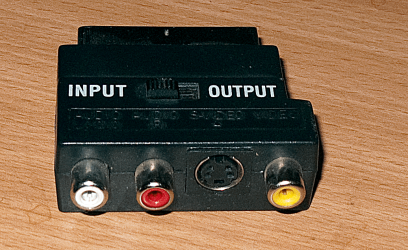
If your TV has a "Euro Scart" connector - the large awkward oblong shaped thingy then you can get a "Composite" to SCART adapter - just plug the 3 composite leads into the 3 slots on the SCART adapter and use the AUX in switch (or AV) on your TV to watch.

If it a VHS-S connector ( a small 4 / 5 pin device) then your TV *might not / probably won't* have the same device -- if it does then just directly connect the cable between computer and TV.

Other connections are HDMI and DVI (usually for games etc).

A problem with HDMI output is that a lot of things like Blu Ray DVD's are DRM encoded and probably will have some sort of Macrovision to stop you playing these in HD (1080p) on a TV. "Composite" usually always works although you will then only get Standard definition video output.

Use your mobile phone to take a picture of the output connections on the computer and the input connections on the TV. Post the pics so we can see what we are dealing with.

Pic enc of SCART ==> Composite adapter

Cheers
jimbo
 

Attachments

  • scart.png
    scart.png
    483.8 KB · Views: 75

My Computer My Computer

Computer type
PC/Desktop
Computer Manufacturer/Model Number
Custom built, several laptops HP/ASUS
OS
Linux CENTOS 7 / various Windows OS'es and servers
CPU
Intel i7 Intel i5
Memory
8GB, 16GB
Graphics Card(s)
On Motherboard
Sound Card
Realtek HD audio
Monitor(s) Displays
Apple Cinema display, Samsung LCD
Screen Resolution
1920 X 1080
Hard Drives
4 X 1TB SATA
Mouse
Toshiba wireless laser
Internet Speed
> 20MB up
Back
Top