fsinclaire
New member
- Local time
- 8:09 AM
- Messages
- 4
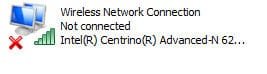
I have a factory-refurbished, new-to-me Dell Latitude E6410 with Windows 7 Professional. I can't figure out how to connect to a WiFi signal. At Control Panel>>Device Manager>>Network Adaptor is "Intel Centrino Advanced-N 6200 AGN"; at Properties is "This device is working properly"; at Advanced tab, Property is "802.11n Channel 22" is selected, at Value is "20 Mhz only". At Network Connections, the WiFi signal seems to be displayed as strong, but there is a red X and "Not Connected" (see attached graphic). When I right click it, "disable" shows, suggesting it is "enabled", but just in case, I did disable it, then re-enabled, but the "not connected" and red X still display. I will appreciate any help! Thank you. Francis
Attachments
My Computer
At a glance
Windows 7 Professional 32bitIntel Core i5 M520 @ 2.40 Ghz4 GBNVidia NVS 3100M
- Computer type
- Laptop
- Computer Manufacturer/Model Number
- Dell Latitude E5410
- OS
- Windows 7 Professional 32bit
- CPU
- Intel Core i5 M520 @ 2.40 Ghz
- Motherboard
- ACPI x86-based PC
- Memory
- 4 GB
- Graphics Card(s)
- NVidia NVS 3100M
- Hard Drives
- Fujitsu MHV 2080BHL
- Antivirus
- Norton Internet Security
- Browser
- Firefox 28